
Security
Microsoft Introduces Enhanced Security Measures for Teams Screen Capture Protection


Microsoft Teams Introduces Feature to Prevent Screen Capture
Microsoft recently unveiled a new feature for its Teams platform that is set to enhance security during virtual meetings. This feature, available to Premium customers, automatically blocks screenshots and recordings to protect sensitive meeting content.
The announcement of this new feature was made by Microsoft back in May 2025, with plans to roll it out starting in July of the same year. However, a recent update revealed that the rollout was delayed until early November.
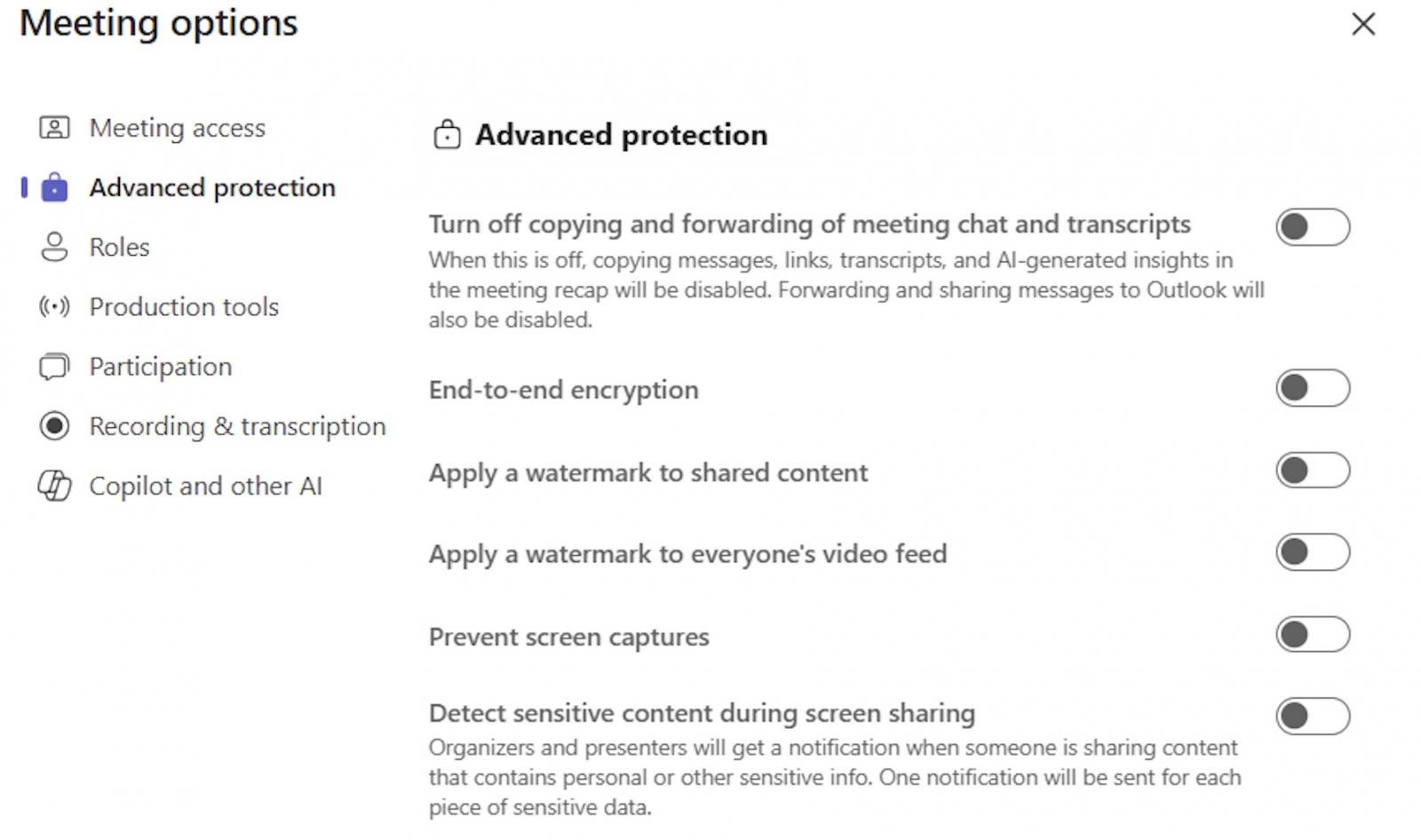
Named “Prevent screen capture,” this feature restricts access to visual meeting content by blocking screen capture on Windows and Android devices using native device tools and most third-party apps.

When attempting to take screenshots on Windows desktop devices, users will see a black rectangle surrounding the meeting window. On Android devices, a message indicating that screen capture is restricted will be displayed. For platforms that do not support this feature, meeting attendees will only be able to join in audio mode.
The screen capture prevention feature is disabled by default and needs to be manually enabled by organizers and co-organizers for each meeting through Meeting Options. Microsoft 365 admins can manage device enrollment and Teams Premium licensing through Entra ID.
According to Microsoft, the “Prevent screen capture” feature will be introduced to Microsoft Teams Premium by late November 2025. It aims to secure sensitive meeting content by blocking screenshots and recordings on Windows desktop and Android devices. This feature is off by default, requires manual enablement per meeting, and unsupported platforms will join in audio-only mode.
It’s important to note that while screenshots and recordings are blocked, information shared during Teams meetings can still be captured through alternative methods, such as taking photos of the screen during the conversation.
Earlier this year, WhatsApp introduced a similar feature called “Advanced Chat Privacy,” which protects sensitive information shared in chats by preventing the export of chat content and saving of shared media.
Microsoft has also been focusing on enhancing security within Teams by working on protecting against malicious file types and URLs in chats and channels. Additionally, Teams will now alert users when sending or receiving private messages containing flagged malicious links.
During last year’s Enterprise Connect conference, Microsoft revealed that over 320 million users are actively using Teams each month across various markets and languages, highlighting the platform’s widespread adoption.

As MCP (Model Context Protocol) becomes the standard for connecting LLMs to tools and data, security teams are moving fast to keep these new services safe.
This free cheat sheet outlines 7 best practices you can start using today.













iPhone 18 Pro Face ID Freezing Bug: Update on Fix Release Date

Affordable Electric Vehicle Now Available in Australia: Leapmotor B03 Approved for Sale

Reborn in Ashes: The Shattered Faith Saga – Coming to Consoles Soon

Save Big on Xiaomi 17T: £200 Discount on Amazon – Tech Advisor

NUSX and UnternehmerTUM Join Forces to Expand Presence in Munich

Streaming Wars: Disney+ and Hulu Increase Subscription Fees in 2026

The Surprising TRUTH about Samsung – 15 things you did not know.

McLaren’s Legacy: The Remuera and Muriwai Trademarks

Cloudscape Chronicles: A Fumito Ueda-inspired Parkour Adventure

EU Takes Action Against Instagram and Facebook for Violating Illegal Content Rules

Warning: Facebook Creators Face Monetization Loss for Stealing and Reposting Videos

Facebook’s New Look: A Blend of Instagram’s Style

Facebook Compliance: ICE-tracking Page Removed After US Government Intervention

Facebook and Instagram to Reduce Personalized Ads for European Users

InstaDub: Meta’s AI Translation Tool for Instagram Videos

Reclaim Your Account: Facebook and Instagram Launch New Hub for Account Recovery

Meta discontinues Messenger apps for Windows and macOS

Breaking Updates: Meta Connect 2025 Unveils Latest Developments
The Surprising TRUTH about Samsung – 15 things you did not know.

10 Incredible Android DIY Hacks!

Does a Cheap 2018 Smartphone beat a 2013 Flagship?

Samsung Galaxy S9 & S9+ UNBOXING!

Samsung Galaxy S9 Plus vs iPhone X

The BEST $300 Phone (2018) ft. MKBHD, Technical Guruji, iJustine + More

Samsung Galaxy S9 Plus Gaming Review! (vs OnePlus 5T)

THE BEST PHONE HTC EVER MADE?

The Truth about Google?
-
 Facebook11 months ago
EU Takes Action Against Instagram and Facebook for Violating Illegal Content Rules
-
 Facebook12 months ago
Warning: Facebook Creators Face Monetization Loss for Stealing and Reposting Videos
-
 Facebook10 months ago
Facebook’s New Look: A Blend of Instagram’s Style
-
 Facebook12 months ago
Facebook Compliance: ICE-tracking Page Removed After US Government Intervention
-
 Facebook10 months ago
Facebook and Instagram to Reduce Personalized Ads for European Users
-
 Facebook12 months ago
InstaDub: Meta’s AI Translation Tool for Instagram Videos
-
 Facebook10 months ago
Reclaim Your Account: Facebook and Instagram Launch New Hub for Account Recovery
-
 Apple11 months ago
Meta discontinues Messenger apps for Windows and macOS
