
Security
GreyNoise’s Botnet Detection Tool: Keeping Your Devices Safe


GreyNoise Launches Free Scanner to Check for Botnet Involvement
In a bid to help users detect if their IP addresses have been compromised by malicious scanning operations, GreyNoise Labs has unveiled a new tool called GreyNoise IP Check. This tool allows individuals to determine if their IP addresses have been associated with activities such as botnets and residential proxy networks.
According to the threat monitoring firm, the prevalence of this issue has surged in the past year, with many unwitting users inadvertently aiding malicious online activities.
GreyNoise highlighted the proliferation of residential proxy networks, which have been using home internet connections as exit points for illicit traffic. The firm explained, “Over the past year, residential proxy networks have exploded and have been turning home internet connections into exit points for other people’s traffic.”
Whether through intentional installation of software for financial gain or through the stealthy infiltration of malware via dubious apps or browser extensions, individuals may unknowingly become conduits for malicious activities.
While various methods exist to identify involvement in botnet operations, GreyNoise’s IP address check tool offers a non-intrusive means of detection.
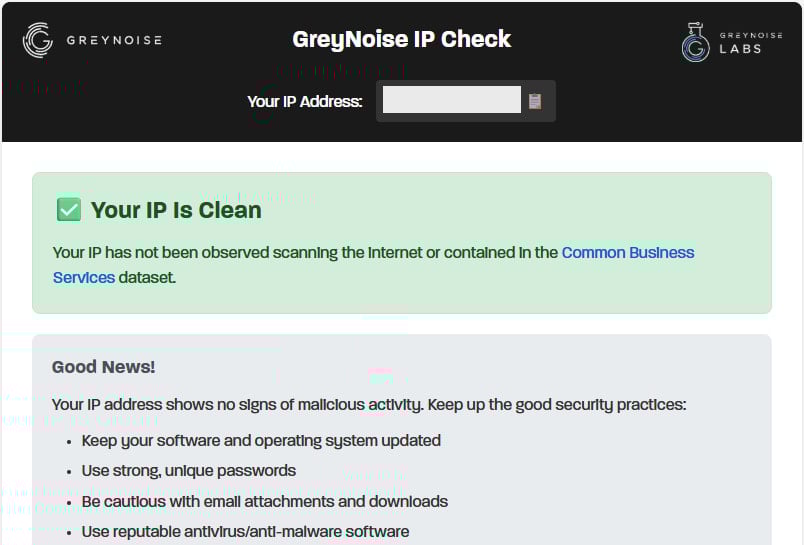
Users who visit the scanner’s webpage will receive one of three possible results:
- Clean: No indication of malicious scanning activity
- Malicious/Suspicious: The IP has exhibited scanning behavior, prompting users to investigate their network devices
- Common Business Service: The IP is associated with a VPN, corporate network, or cloud provider, where scanning activity is deemed normal
Source: BleepingComputer
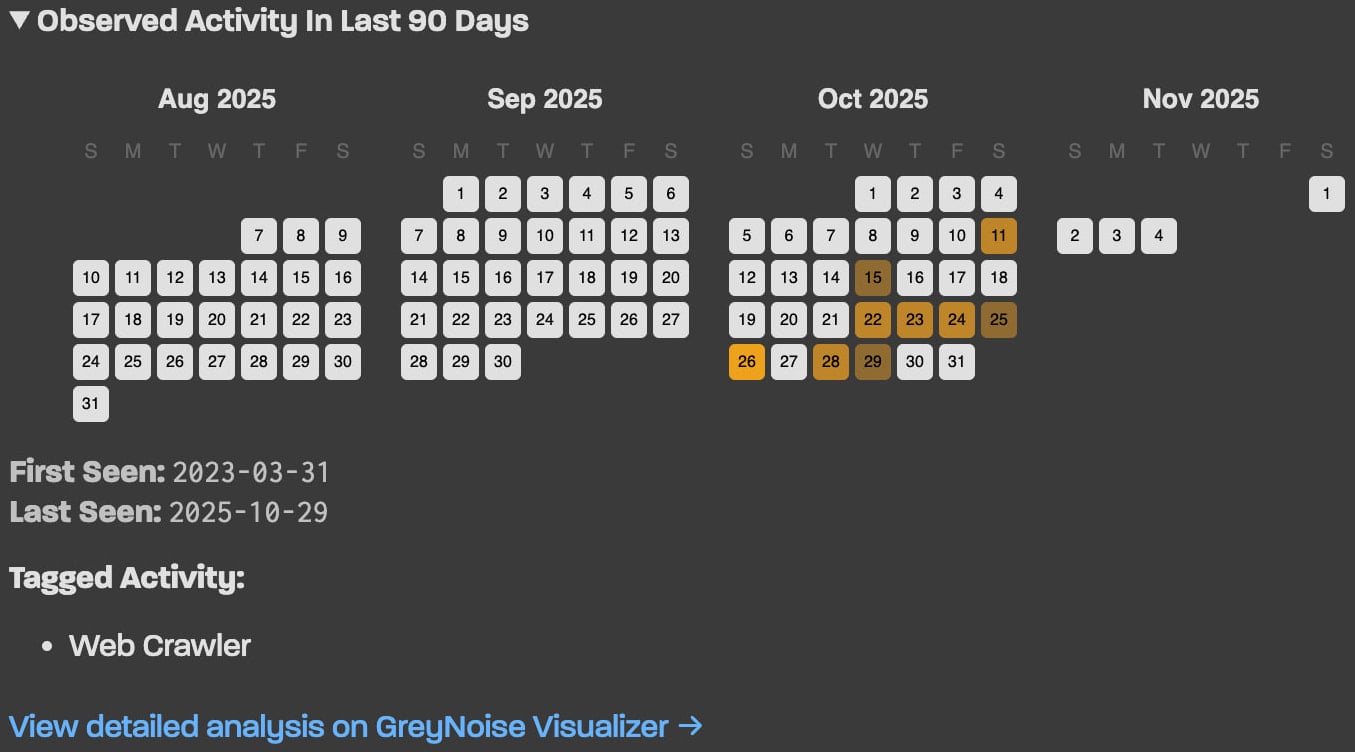
In cases where suspicious activity is linked to an IP address, the platform will present a 90-day historical timeline to help pinpoint potential infection points.
For instance, the installation of bandwidth-sharing clients or questionable applications preceding scanning activities may offer clues for remediation.
Source: GreyNoise
For more technical users, GreyNoise also provides an unauthenticated, rate-limit-free JSON API accessible via curl, enabling integration into scripts or monitoring systems.
If a scan reveals a “Malicious/Suspicious” result, initiating malware scans on all network devices, particularly routers and smart TVs, is recommended.
Users are urged to update device firmware, change admin credentials, and disable unnecessary remote access features to enhance security.

As MCP (Model Context Protocol) becomes the standard for connecting LLMs to tools and data, security teams are moving fast to keep these new services safe.
This free cheat sheet outlines 7 best practices you can start using today.











Nissan X-Trail Hybrid: Affordable Alternative to RAV4 with No Lower-Priced Option in Sight

Departure of Microsoft’s Office and Teams Chief: What’s Next for the Tech Giant?

Reigns and Card Shark creators Nerial pivot back to their origins as they close doors and lay off staff

Building Trust Through Visual Storytelling: A Key Strategy for Startup Success

Rediscover the Classics: Stream Free Movies on Apple TV Today

Using the Cheapest Smartphone in the World.

Freelander 8 Roars into Australia: Unleashing 800 Horsepower and Hardcore Off-Road Features in 2027

Amazon’s Game-Changing $35 Remote and E-Reader Updates

007: Dawn of Shadows – Enhanced Missions Expansion now available

EU Takes Action Against Instagram and Facebook for Violating Illegal Content Rules

Warning: Facebook Creators Face Monetization Loss for Stealing and Reposting Videos

Facebook’s New Look: A Blend of Instagram’s Style

Facebook Compliance: ICE-tracking Page Removed After US Government Intervention

Facebook and Instagram to Reduce Personalized Ads for European Users

InstaDub: Meta’s AI Translation Tool for Instagram Videos

Reclaim Your Account: Facebook and Instagram Launch New Hub for Account Recovery

Meta discontinues Messenger apps for Windows and macOS

Breaking Updates: Meta Connect 2025 Unveils Latest Developments
Using the Cheapest Smartphone in the World.

Samsung Galaxy S9+ Unboxing! (Clone)

Unboxing the First Ever Samsung Galaxy S!!

Huawei P Smart – Huawei’s new Killer Budget Smartphone!

MYSTERY Package from Xiaomi – HUGE UNBOXING!

5 ways you’re using your Smartphone wrong.

THE INSANE DUAL BATTERY SMARTPHONE!

ELEPHONE U PRO UNBOXING AND REVIEW!

Mrwhosetheboss – 1 Million Subscribers
-
 Facebook11 months ago
EU Takes Action Against Instagram and Facebook for Violating Illegal Content Rules
-
 Facebook12 months ago
Warning: Facebook Creators Face Monetization Loss for Stealing and Reposting Videos
-
 Facebook10 months ago
Facebook’s New Look: A Blend of Instagram’s Style
-
 Facebook12 months ago
Facebook Compliance: ICE-tracking Page Removed After US Government Intervention
-
 Facebook10 months ago
Facebook and Instagram to Reduce Personalized Ads for European Users
-
 Facebook12 months ago
InstaDub: Meta’s AI Translation Tool for Instagram Videos
-
 Facebook10 months ago
Reclaim Your Account: Facebook and Instagram Launch New Hub for Account Recovery
-
 Apple12 months ago
Meta discontinues Messenger apps for Windows and macOS
