
Security
APT37 Hackers Exploit Google Find Hub in Android Data-Wiping Attacks


North Korean threat actors are exploiting Google’s Find Hub feature to monitor the GPS coordinates of their targets and remotely restore Android devices to their factory settings.
The primary focus of these attacks is on South Korean individuals, with initial contact being made through the popular KakaoTalk messaging app.
Genians, a South Korean cybersecurity firm, has linked this malicious activity to a KONNI campaign, noting its connections to Kimsuky and APT37 (ScarCruft) groups.

KONNI, typically identified as a remote access tool, has been utilized by North Korean threat actors associated with APT37 and Kimsuky to target various sectors like education, government, and cryptocurrency.
Genians’ analysis indicates that the KONNI campaign installs remote access trojans on computers to enable the exfiltration of sensitive data.
The wiping of Android devices serves to isolate victims, remove evidence of the attack, delay recovery efforts, and suppress security alerts. It also severs victims from KakaoTalk PC sessions, which attackers hijack post-wiping to propagate to the victims’ contacts.
Infection Chain
The KONNI campaign, as investigated by Genians, initiates by targeting victims through spear-phishing emails posing as South Korea’s National Tax Service, police, or other official entities.
Upon executing the digitally signed MSI attachment or a corresponding ZIP file, the script triggers an AutoIT script to establish persistence on the device through a scheduled task. This script fetches additional modules from a command and control (C2) server, providing remote access, keylogging, and the ability to introduce further payloads.
Genians reports that secondary payloads obtained by the script include RemcosRAT, QuasarRAT, and RftRAT.
These tools are utilized to gather Google and Naver account credentials, enabling the threat actors to access the victims’ Gmail and Naver mail accounts, modify security settings, and erase compromising logs.
Utilizing Find Hub for Device Resets
Using the compromised Google account, the attacker leverages Google Find Hub to identify registered Android devices and ascertain their GPS locations.
Find Hub, Android’s default “Find My Device” tool, allows users to locate, lock, or wipe their devices remotely in case of loss or theft.
Genians’ forensic analysis reveals that the attacker wiped a target’s device using Find Hub’s remote reset command.
Researchers at Genians state, “The investigation uncovered that on September 5, a threat actor compromised a South Korea-based counselor’s KakaoTalk account and sent a malicious file disguised as a ‘stress relief program’ to an actual defector student.”
The hackers exploited the GPS tracking feature to strike when the victim was away from their device and less likely to respond promptly.
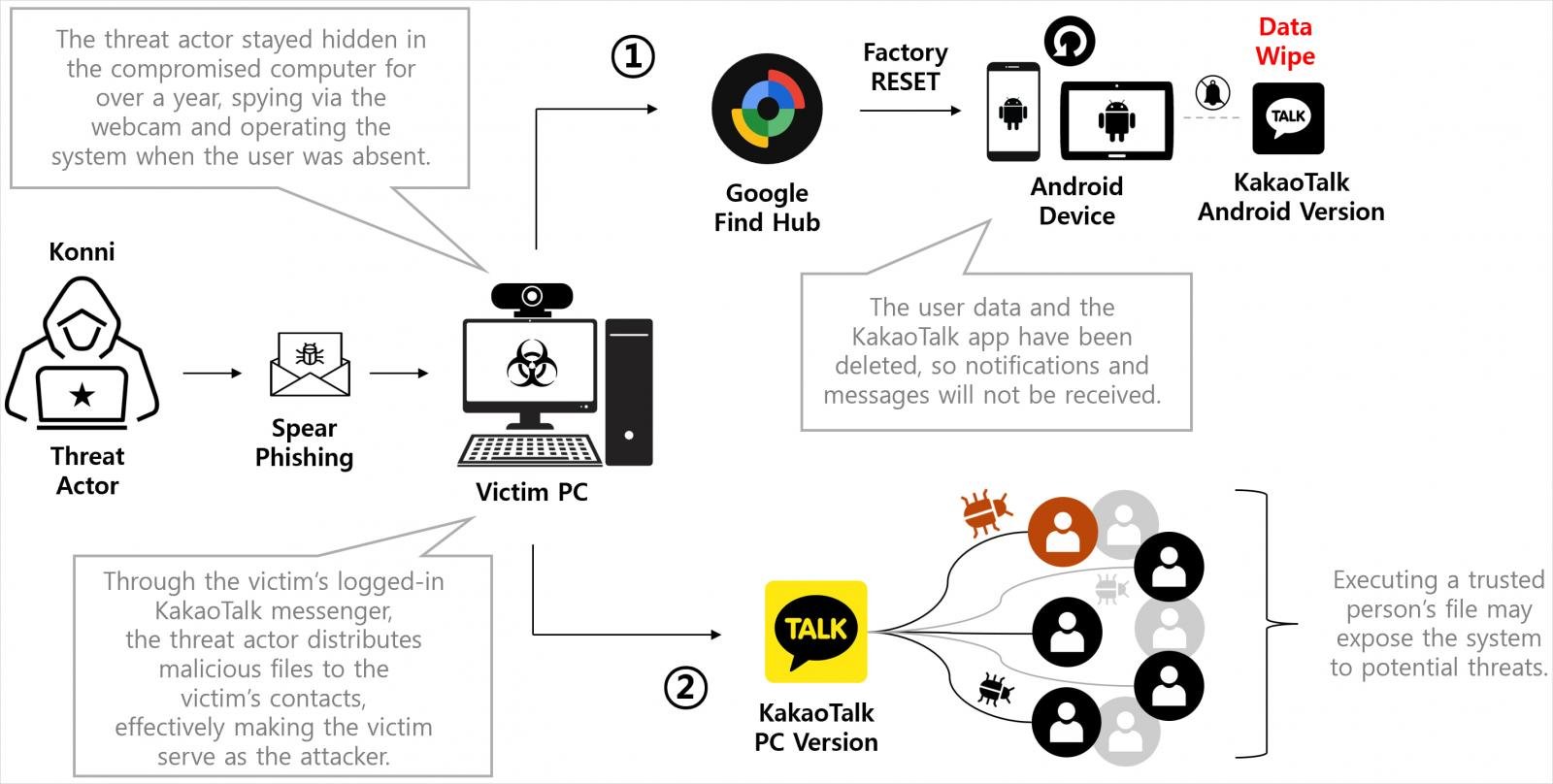
Source: Genians Security
During the attack, the threat actor executed remote reset commands on all registered Android devices, resulting in the complete deletion of crucial data. The attacker repeated the wipe commands thrice to impede recovery efforts and device usage for an extended period.
With mobile alerts neutralized, the attacker utilized the victim’s logged-in KakaoTalk PC session on the compromised computer to disseminate malicious files to the victim’s contacts.
On September 15, Genians observed another attack on a different victim employing a similar modus operandi.
To defend against these attacks, it is advised to secure Google accounts by activating multi-factor authentication and ensuring prompt access to a recovery account.
When receiving files via messaging applications, always verify the sender’s identity by directly contacting them before opening the attachments.
Genians’ detailed report includes a technical assessment of the malware used and a list of indicators of compromise (IoCs) relevant to the investigated activity.
Update 11/11 – A Google representative has provided BleepingComputer with the following statement regarding the incident.
“This attack did not exploit any security vulnerability in Android or Find Hub. The report indicates that this targeted attack necessitated the presence of PC malware to steal Google account credentials and misuse legitimate functionalities in Find Hub (previously Find My Device). We strongly recommend all users enable 2-Step Verification or passkeys for comprehensive protection against credential theft. For users facing heightened visibility or targeted threats, enrolling in our Advanced Protection Program is advised for Google’s highest level of account security.” – A Google representative.

As the Model Context Protocol (MCP) becomes the standard for linking LLMs to tools and data, security teams are swiftly adapting to safeguard these new services.
This complimentary cheat sheet outlines 7 best practices that can be implemented immediately.












Balancing Act: The Decision to Shut Down Sora

Exclusive Arrival: Cupra Born VZ Lands in Australia – But There’s a Twist!

iPhone 12 Pro Max vs Samsung Note 20 Ultra / Huawei Mate 40 Pro Camera Test Comparison.

ClickFix: The New Threat to macOS Security

Kingdom Come: Deliverance 2 – The Rise of Artificial Intelligence

Elon Musk’s Latest Venture Faces Uncertainty as Last Co-Founder Departs xAI

Apple Bids Farewell to the Mac Pro Tower: Is it Truly Dead?

Porsche 911 GT3 RS Facelift: Unveiling the 992.2 Model in August 2026

Bearlyfy Strikes Russian Companies with Unique GenieLocker Ransomware Attack

EU Takes Action Against Instagram and Facebook for Violating Illegal Content Rules

Warning: Facebook Creators Face Monetization Loss for Stealing and Reposting Videos

Facebook Compliance: ICE-tracking Page Removed After US Government Intervention

Facebook’s New Look: A Blend of Instagram’s Style

Facebook and Instagram to Reduce Personalized Ads for European Users

InstaDub: Meta’s AI Translation Tool for Instagram Videos

Reclaim Your Account: Facebook and Instagram Launch New Hub for Account Recovery

Meta discontinues Messenger apps for Windows and macOS

Breaking Updates: Meta Connect 2025 Unveils Latest Developments
iPhone 12 Pro Max vs Samsung Note 20 Ultra / Huawei Mate 40 Pro Camera Test Comparison.

iPhone 12 Pro Max vs Samsung Note 20 Ultra / Huawei / Xiaomi / OnePlus Battery Life DRAIN Test.

The BEST Smartphone of 2020 🏆

The Self-Healing Smartphones!

Apple is not what it used to be.

Smartphones are Boring now.

The Fastest Android Phone Ever.

Unboxing the $122,000 Smartphone. 🤯

Are Linux Smartphones about to KILL Android?
-
 Facebook5 months ago
EU Takes Action Against Instagram and Facebook for Violating Illegal Content Rules
-
 Facebook5 months ago
Warning: Facebook Creators Face Monetization Loss for Stealing and Reposting Videos
-
 Facebook5 months ago
Facebook Compliance: ICE-tracking Page Removed After US Government Intervention
-
 Facebook4 months ago
Facebook’s New Look: A Blend of Instagram’s Style
-
 Facebook4 months ago
Facebook and Instagram to Reduce Personalized Ads for European Users
-
 Facebook6 months ago
InstaDub: Meta’s AI Translation Tool for Instagram Videos
-
 Facebook4 months ago
Reclaim Your Account: Facebook and Instagram Launch New Hub for Account Recovery
-
 Apple5 months ago
Meta discontinues Messenger apps for Windows and macOS
