
Gadgets
Aqara Smart Hub Comparison: M200 vs M3 & M2 Review

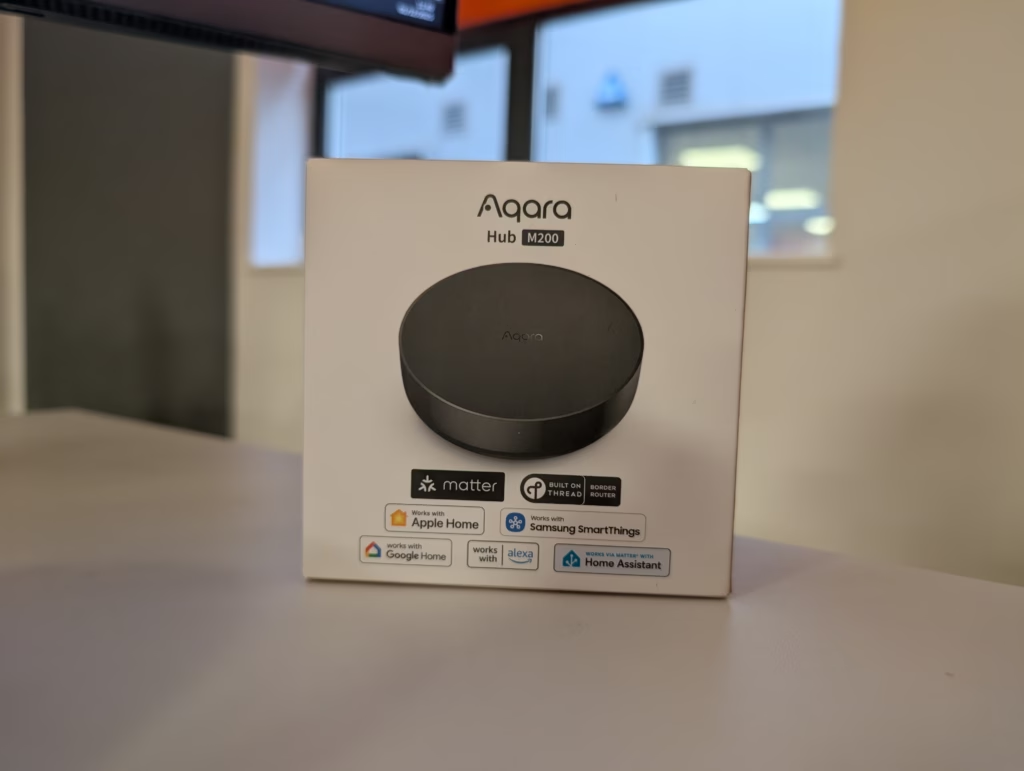
Aqara Smart Hub M200 Review
Summary
The Aqara Smart Hub M200 is a well-balanced and thoughtfully updated successor to the M2, offering modern features such as Thread, Matter, dual-band Wi-Fi, USB-C power and PoE support at a very reasonable price. While it lacks the advanced processing and higher device limits of the M3, it delivers excellent day-to-day performance, especially when wired via PoE, and is arguably the best option for most users building or expanding an Aqara-based smart home. As a secondary hub, it is superb—quietly improving range, stability and automation responsiveness without any fuss.
Pros
- Affordable upgrade with Thread, Matter and PoE
- Strong stability and instant local automations
- Excellent as a secondary hub within a cluste
Cons
- Lower Zigbee capacity than the M2
- Not as feature-rich as the M3
I have previously reviewed the Aqara Hub M3 and also had the M2 prior to that, which I turned into a secondary hub when I moved to the M3.
Aqara has now released the Smart Hub M200, presumably the successor to the M2.
With an RRP of £60, it provides a more affordable alternative to the M3 while retaining many of its features. In particular, both the M3 and M200 are Matter controllers and Thread Border Routers, providing you with greater compatibility with different ecosystems.
Related Reviews
Specification
| Specification | Details |
| Dimensions | ⌀100.5 × 30.75 mm (⌀3.96 × 1.21 in) |
| Power Input | 5V⎓2A |
| PoE Input | 48V⎓0.25A |
| Wireless Protocols | Wi-Fi IEEE 802.11 a/b/g/n/ac/ax (2.4 GHz / 5 GHz), Zigbee / Thread IEEE 802.15.4, Bluetooth |
| Speaker | 90 dB (10 cm) |
| Ports | RJ45 PoE × 1, USB-A × 1, USB-C × 1 |
| Operating Temperature | -10°C to 50°C (14°F to 122°F) |
| Operating Humidity | 0–95% RH, no condensation |
| What’s in the Box | Hub M200 × 1, User Manual × 2, USB-A to USB-C Cable × 1 |
Design
At first glance, you might mistake the M200 for the M2. They share the same “puck” form factor—a circular, black device that is unobtrusive enough to sit on a media unit but functional enough to be wall-mounted. However, placing them side-by-side reveals subtle but distinct differences.
The older M2 features a glossy, shiny black border around the top edge. While this looked premium out of the box, it was a magnet for dust and fingerprints. The M200 rectifies this with a matte black finish that matches the top surface. It is a small change, but one that makes the device look cleaner over time. The text on the underside and rear has also been improved; on the M2, regulatory text was printed around the circular edge, requiring you to rotate the device to read it. On the M200, the text is linear and includes multiple languages (English, Korean, Russian), making it far more legible.
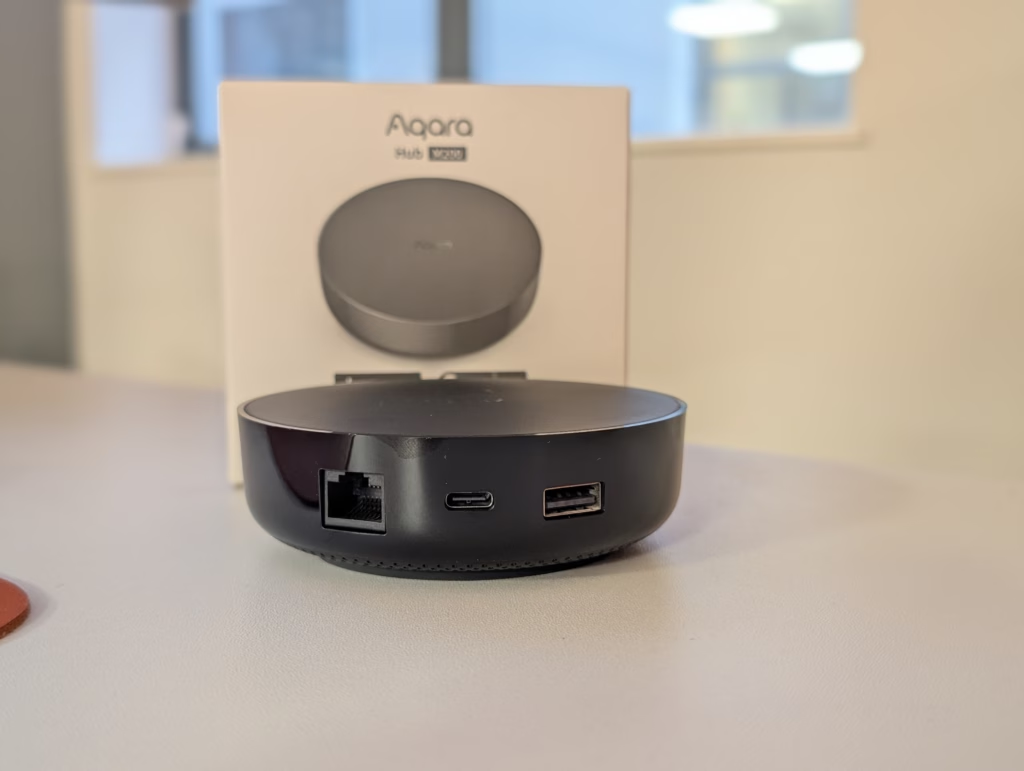
The rear port layout has also been adjusted. The PoE port on the M200 is rotated 180 degrees compared to the M2, likely to accommodate internal board changes. The most significant physical upgrade is the USB-C port.
The Aqara Smart Hub M200 offers longevity with its standard USB-C power input in a world where micro-USB cables are becoming scarce.
To set up the M200, you can use the USB-C port for power or connect it to an Ethernet cable and power it through a PoE switch for a clean and efficient setup. My preferred method ensures network stability, optimizes Wi-Fi bandwidth, and prevents the hub from dropping offline due to wireless interference. Additionally, the built-in speaker announces, “Ready to connect. Please open the app,” providing reassurance that the device is booting correctly.
In the Aqara Home app, you can easily add the M200 by scanning the QR code on the unit. The M200 supports both 2.4 GHz and 5 GHz bands, offering flexibility based on your home network environment. The introduction of hub clusters with the M3 allows for more stable and fast automations between multiple hubs and connected devices.
The Aqara app interface remains clean and user-friendly, allowing you to manage Zigbee device network strength, Matter bridging settings, and the built-in alarm system. It’s important to note that the M200 has a limit of 40 Zigbee devices and 40 Thread devices, which may affect users with extensive Zigbee installations.
For advanced users, integrating Zigbee and Thread devices directly into Home Assistant using the Aqara hub as a bridge provides a safety net in case of Home Assistant server issues. This setup also allows access to specific features within the Aqara ecosystem that may not fully expose over generic Zigbee coordinators. By connecting your devices to the Aqara Smart Hub M200 and bridging them via Matter to Home Assistant, you can enjoy the advantages of both worlds: the detailed hardware control of the native app and the extensive automation capabilities of Home Assistant.
However, it is important to note that connecting Aqara to Home Assistant via Matter may result in some missing features. Matter is a standard that aims to unify devices, but it may not support every unique feature of each device. This trade-off between stability and feature depth is something to consider when setting up your smart home system.
The inclusion of a Thread Border Router is a significant advantage of the M200 over the M2. Thread is a mesh networking protocol that offers self-healing and low latency capabilities. For Thread devices to communicate with the internet or your phone, they require a Border Router. The M200 can now serve this function at a more affordable price point compared to the M3 or Aqara Camera Hub G5 Pro.
Additionally, the M200 can act as a Thread Mesh Extender if you already have the M3, improving the signal strength for Thread devices in your home. The built-in 360-degree Infrared (IR) blaster allows you to control non-smart devices, and the improved IR state synchronisation feature enhances the user experience.
The built-in speaker on the M200 is a useful addition for setup processes and automations. While it may not replace a dedicated chime, it can be utilized for alerts and notifications. The hub’s local automation support ensures fast rule execution without relying on cloud processing.
In terms of pricing, the Aqara Smart Hub M200 is competitively priced compared to other Aqara hubs. While it may not offer groundbreaking features, it provides a reliable and efficient hub for most users. The M200 is a solid choice for those looking to enhance their smart home setup with Thread and Matter compatibility. The Aqara Smart Hub M200 is a well-rounded and carefully updated successor to the M2, offering modern features such as Thread, Matter, dual-band Wi-Fi, USB-C power, and PoE support at an affordable price. While it may not have the advanced processing power and higher device limits of the M3, it excels in day-to-day performance, especially when connected via PoE. This makes it a top choice for most users looking to build or expand their Aqara-based smart home. As a secondary hub, the M200 shines by enhancing range, stability, and automation responsiveness without any hassle.
Pros:
– Affordable upgrade with Thread, Matter, and PoE support
– Strong stability and immediate local automations
– Excellent as a secondary hub within a cluster
Cons:
– Lower Zigbee capacity compared to the M2
– Not as feature-rich as the M3
Overall, the M200 is an appealing option for individuals like myself who have a growing number of smart devices. It offers a reliable network extension and improved range, stability, and responsiveness, particularly when using POE or USB and Ethernet connections rather than relying solely on Wi-Fi. While the M3 may be superior in certain aspects, the high price tag may deter those entering the world of smart homes or those with more modest setups. The M200, on the other hand, strikes a balance between affordability and functionality, making it a valuable addition to any smart home setup. Please convert the following text. Transform the following:
Original: The cat is sleeping on the couch.
Transformed: On the couch is where the cat is sleeping.












Exclusive Look: The 2027 Chevrolet Corvette Grand Sport Unleashed at Sebring

DON’T buy a Screen Protector before watching this.

Exploiting Vulnerable Drivers: How EDR Killers Use BYOVD to Disable Security

Alphabet’s X Unveils Innovative Spinout Targeting Costly Bureaucratic Challenges

Lawsuit: Halide co-founder accuses Sebastiaan de With of code theft for Apple

Previewing the Next Level: Apple Unveils iOS 26.4 RC for iPhone with Exciting New Features

Revamped Design: BMW’s Modern Makeover for the i3 Sedan

GitHub Actions Exploited in Trivy Vulnerability Scanner Breach, Infostealer Unleashed

Minecraft Dungeons II: The Battle Continues

EU Takes Action Against Instagram and Facebook for Violating Illegal Content Rules

Warning: Facebook Creators Face Monetization Loss for Stealing and Reposting Videos

Facebook Compliance: ICE-tracking Page Removed After US Government Intervention

Facebook’s New Look: A Blend of Instagram’s Style

Facebook and Instagram to Reduce Personalized Ads for European Users

InstaDub: Meta’s AI Translation Tool for Instagram Videos

Reclaim Your Account: Facebook and Instagram Launch New Hub for Account Recovery

Meta discontinues Messenger apps for Windows and macOS

Breaking Updates: Meta Connect 2025 Unveils Latest Developments
DON’T buy a Screen Protector before watching this.

Beware of Fake Reviewers! ⚠️

Xiaomi Mi 11 Unboxing & Review.

The Galaxy S21 Ultra is Better than you think.

Samsung Galaxy S21 Ultra vs iPhone 12 Pro Max Camera Test Comparison.

Samsung S21 Ultra vs iPhone Battery Life Test!

The Truth about Xiaomi “Air Charging”

DON’T buy this Smartphone.

Galaxy S21 Ultra – Exynos vs Snapdragon.
-
 Facebook5 months ago
EU Takes Action Against Instagram and Facebook for Violating Illegal Content Rules
-
 Facebook5 months ago
Warning: Facebook Creators Face Monetization Loss for Stealing and Reposting Videos
-
 Facebook5 months ago
Facebook Compliance: ICE-tracking Page Removed After US Government Intervention
-
 Facebook3 months ago
Facebook’s New Look: A Blend of Instagram’s Style
-
 Facebook3 months ago
Facebook and Instagram to Reduce Personalized Ads for European Users
-
 Facebook5 months ago
InstaDub: Meta’s AI Translation Tool for Instagram Videos
-
 Facebook4 months ago
Reclaim Your Account: Facebook and Instagram Launch New Hub for Account Recovery
-
 Apple5 months ago
Meta discontinues Messenger apps for Windows and macOS
