
Security
Blender Model Files: The Gateway to StealC Infostealing Malware


Malicious Blender Files Delivering StealC Infostealing Malware
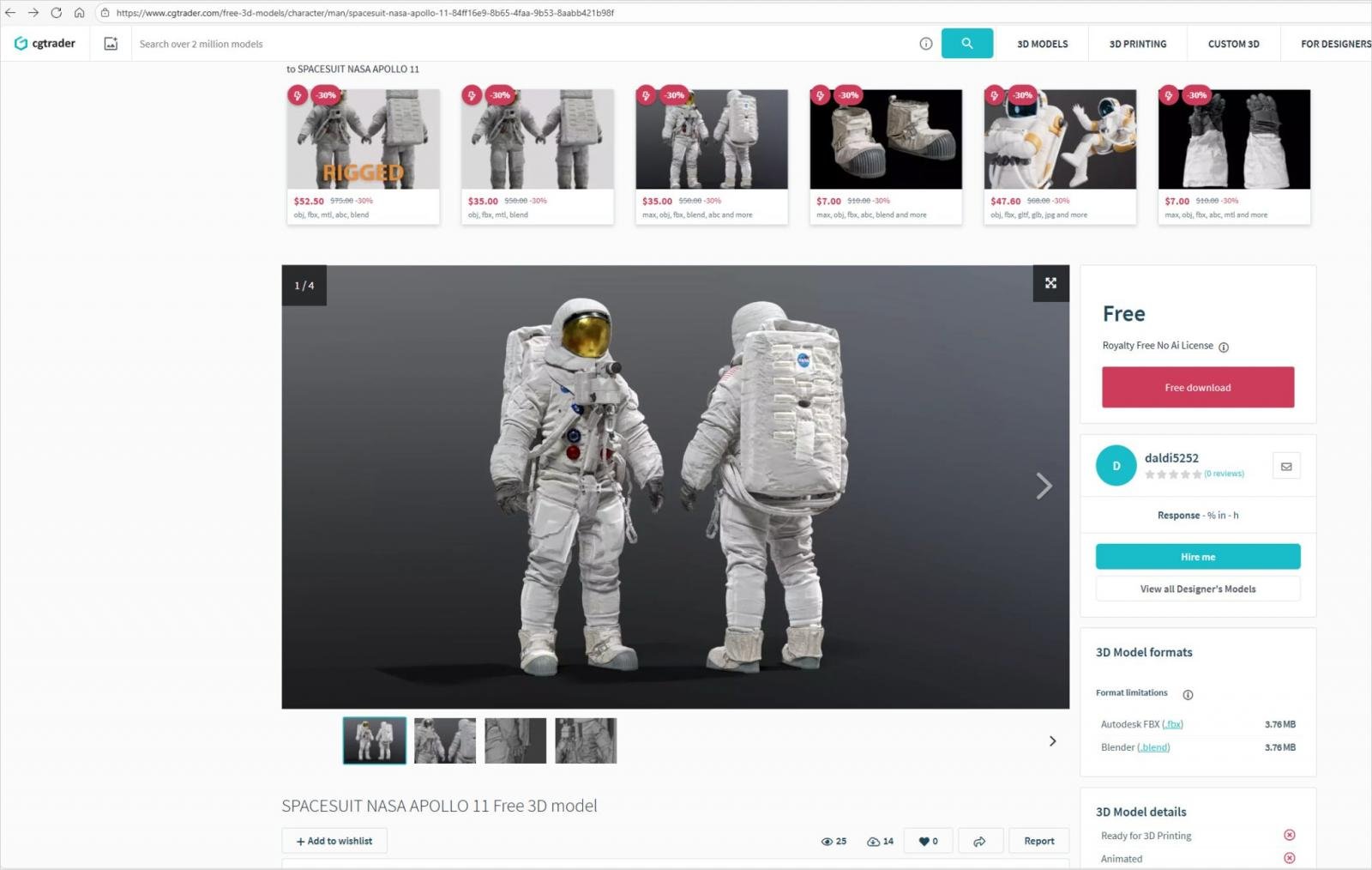
A recent cybersecurity discovery has revealed that a Russian-linked campaign is distributing the StealC V2 information stealer malware through deceptive Blender files that are being uploaded to popular 3D model marketplaces like CGTrader.
Blender, an open-source 3D creation suite, is a versatile tool capable of executing Python scripts for various functionalities such as automation, custom user interfaces, rendering processes, rigging tools, and pipeline integration.
One concerning aspect is the Auto Run feature within Blender, which, when enabled, can automatically execute Python scripts upon opening specific files. This convenience feature, however, has been exploited by malicious actors in this campaign.
Despite the risks involved, users often opt to enable the Auto Run feature for its convenience, unknowingly exposing themselves to potential threats.
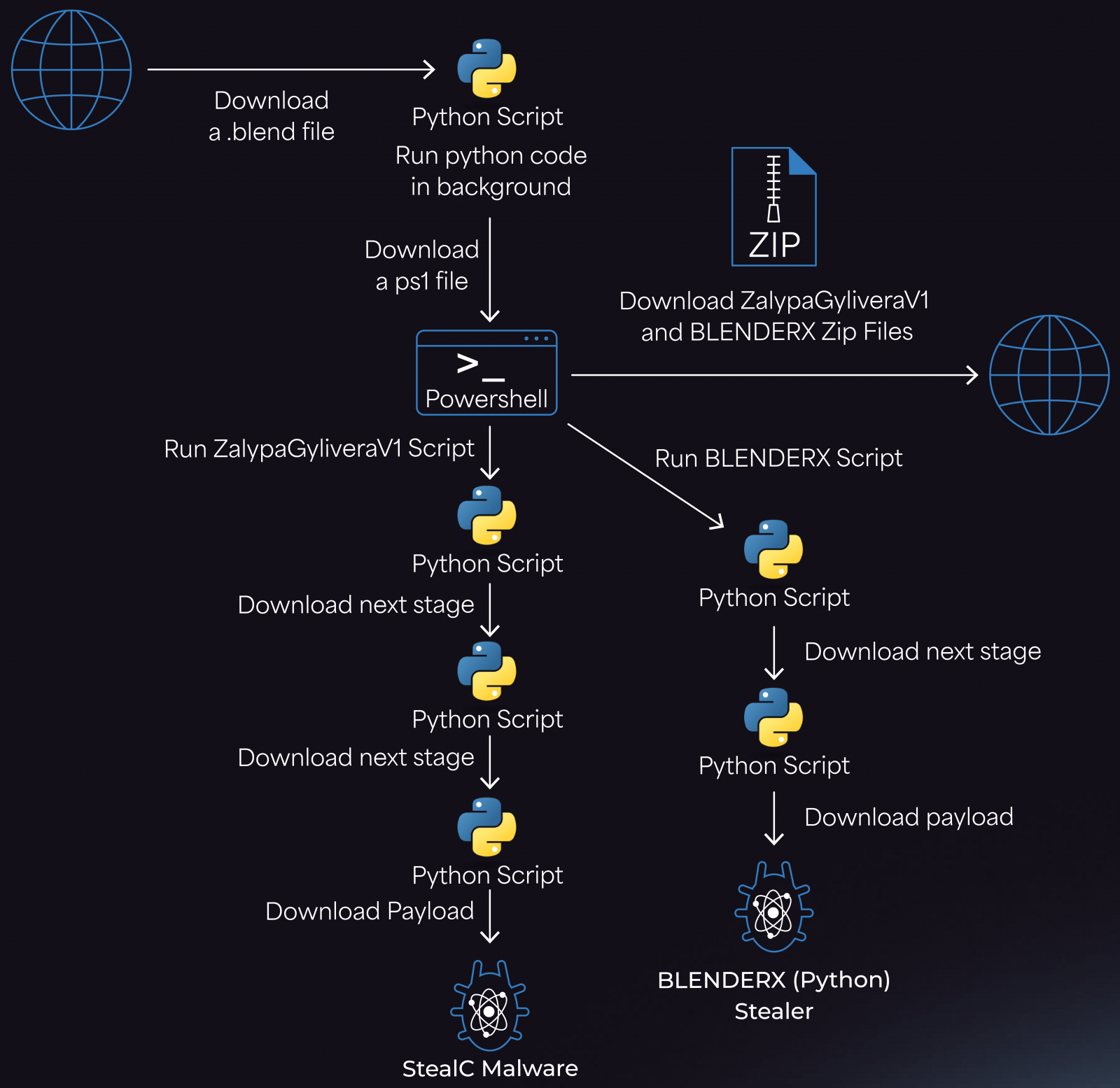
Researchers at Morphisec, a cybersecurity company, have identified attacks utilizing malicious .blend files embedded with Python code that fetches a malware loader from a Cloudflare Workers domain.
Source: Morphisec
The loader, in turn, retrieves a PowerShell script that downloads two ZIP archives, ZalypaGyliveraV1 and BLENDERX, from controlled IPs by the attackers. These archives unpack in the %TEMP% folder and drop LNK files in the Startup directory for persistence, deploying the StealC infostealer alongside an auxiliary Python stealer for added redundancy.
Source: Morphisec
The latest variant of the StealC malware employed in this campaign has enhanced data-stealing capabilities, including support for extracting information from various sources such as browsers, cryptocurrency wallets, messaging platforms, VPN clients, and mail clients.
Despite being documented since 2023, the StealC variant analyzed by Morphisec evades detection by most antivirus software, highlighting the need for heightened vigilance among users.
Given the limited ability of 3D model marketplaces to scrutinize user-submitted files for malicious content, Blender users are urged to exercise caution when downloading files from such platforms and consider disabling the auto-execution of code within Blender’s settings.
To disable auto-execution, users can navigate to Blender > Edit > Preferences and uncheck the ‘Auto Run Python Scripts’ option.
It is crucial for users to treat 3D assets as executable files and only trust content from reputable sources with a proven track record. Additionally, utilizing sandboxed environments for testing purposes is recommended to mitigate potential risks.

As the Model Context Protocol (MCP) gains traction as the standard for connecting LLMs to tools and data, security teams are prioritizing the safeguarding of these new services.
Discover 7 best practices in this free cheat sheet to enhance your security measures today.











Celebrating the First iX3 Delivery at BMW’s Debrecen Factory

iPhone 12 Pro Max vs Samsung Note 20 Ultra / Huawei / Xiaomi / OnePlus Battery Life DRAIN Test.

Stealthy Malware: The Hidden Threat Within Telnyx PyPI Package

Harvest of Suspicion: Grave Seasons Murder Mystery Farming Sim Arrives in August

Tech Giants Clash: OpenAI Halts Sora as Meta Faces Legal Setback

Apple’s AI Playlist Playground: Where Music Goes to Die

Beyond the Stars: For All Mankind Season 5 Unveiled in Liminal Film Expose

Top 10 Fuel-Efficient Cars for Less Than $50,000

The Illusionists: Mastering Deception in Hacking and ArtForgery

EU Takes Action Against Instagram and Facebook for Violating Illegal Content Rules

Warning: Facebook Creators Face Monetization Loss for Stealing and Reposting Videos

Facebook Compliance: ICE-tracking Page Removed After US Government Intervention

Facebook’s New Look: A Blend of Instagram’s Style

Facebook and Instagram to Reduce Personalized Ads for European Users

InstaDub: Meta’s AI Translation Tool for Instagram Videos

Reclaim Your Account: Facebook and Instagram Launch New Hub for Account Recovery

Meta discontinues Messenger apps for Windows and macOS

Breaking Updates: Meta Connect 2025 Unveils Latest Developments
iPhone 12 Pro Max vs Samsung Note 20 Ultra / Huawei / Xiaomi / OnePlus Battery Life DRAIN Test.

The BEST Smartphone of 2020 🏆

The Self-Healing Smartphones!

Apple is not what it used to be.

Smartphones are Boring now.

The Fastest Android Phone Ever.

Unboxing the $122,000 Smartphone. 🤯

Are Linux Smartphones about to KILL Android?

15 Smartphone FAILS to ruin your day 😂
-
 Facebook5 months ago
EU Takes Action Against Instagram and Facebook for Violating Illegal Content Rules
-
 Facebook5 months ago
Warning: Facebook Creators Face Monetization Loss for Stealing and Reposting Videos
-
 Facebook5 months ago
Facebook Compliance: ICE-tracking Page Removed After US Government Intervention
-
 Facebook4 months ago
Facebook’s New Look: A Blend of Instagram’s Style
-
 Facebook4 months ago
Facebook and Instagram to Reduce Personalized Ads for European Users
-
 Facebook5 months ago
InstaDub: Meta’s AI Translation Tool for Instagram Videos
-
 Facebook4 months ago
Reclaim Your Account: Facebook and Instagram Launch New Hub for Account Recovery
-
 Apple5 months ago
Meta discontinues Messenger apps for Windows and macOS
