
Mobile Tech
Enhanced Battery Management in macOS 26.4: Get the Most out of Your Device with Charge Limit and Shortcuts Integration

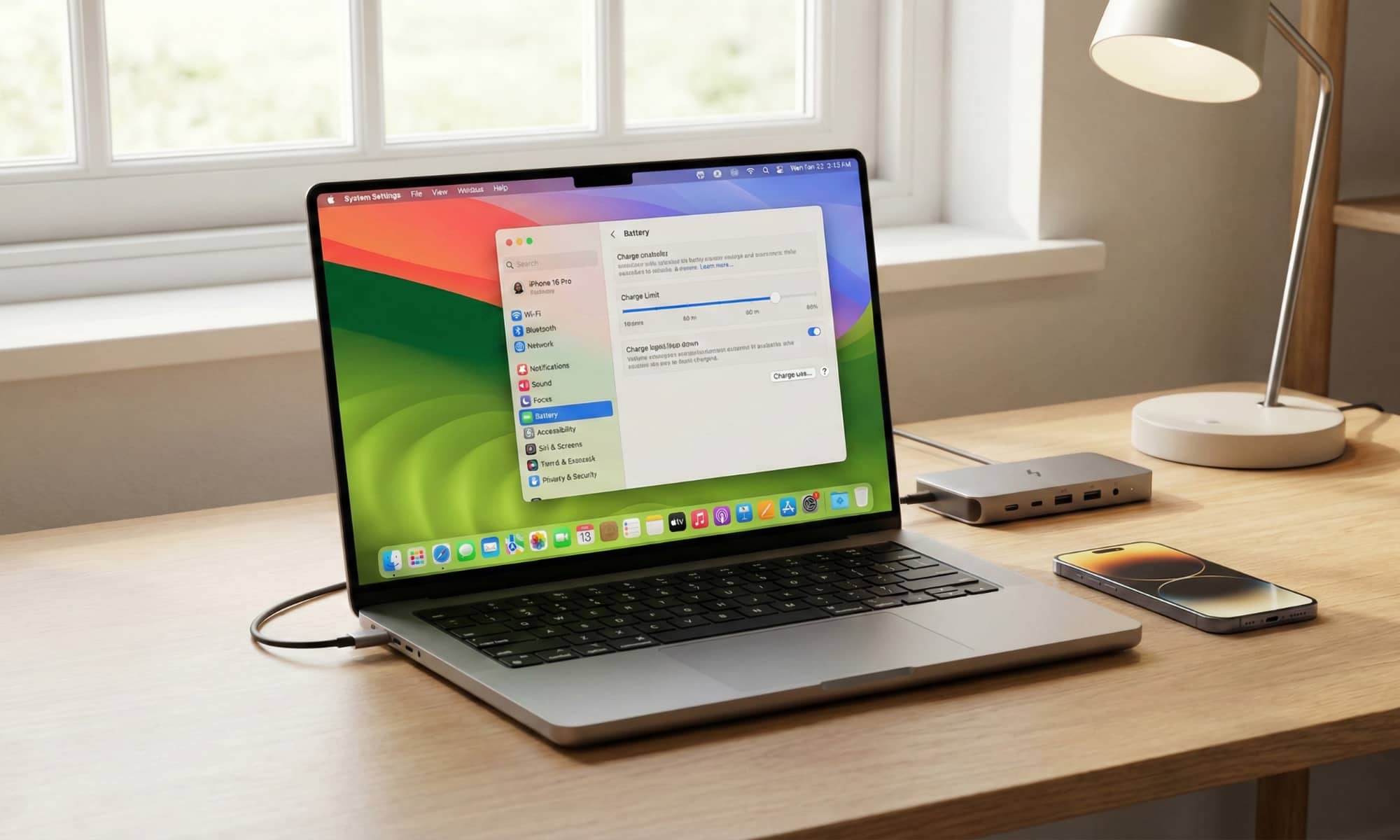
Apple recently unveiled the first betas of its OS 26.4 operating systems, with a notable addition for macOS Tahoe 26.4 users. While not many new features are expected for macOS, the update will bring a significant perk related to iPhone battery management to Mac devices.
Optimized Battery Charging has been a feature on Mac devices since macOS Big Sur in 2020, albeit trailing behind its implementation on iPhones, which was introduced in iOS 13 a year earlier. The latest addition to macOS Tahoe is the Charge Limit feature, which has been available on iPhones since iOS 17.
Initially introduced as an iPhone 15 feature in 2023, the Charge Limit setting has now made its way to macOS after a delay. This feature is tied to the Power Management Controller exclusively found in Apple silicon Macs, indicating that older Intel Macs running macOS Tahoe may not be compatible.
The Charge Limit setting can be accessed in the macOS 26.4 beta through the System Settings app under Battery settings. By adjusting the slider, users can set a specific charging cap between 80% and 95%, ensuring that the MacBook stops charging once the designated limit is reached.
Maintaining a lower charge level helps prolong the battery’s lifespan by reducing stress and chemical aging. This feature is particularly beneficial for MacBooks that are frequently plugged in for extended periods, unlike iPhones that are typically charged intermittently.
While Optimized Battery Charging stops at 80% to preserve battery health during longer charging periods, the Charge Limit feature prevents the MacBook from exceeding the set limit. Users can temporarily adjust the setting to 100% for specific scenarios, with the option to revert to the previous limit automatically.
Additionally, power users can manage the Charge Limit using Apple’s Shortcuts app, allowing for customized automation based on different scenarios. This feature enhances user control over battery management, offering flexibility in adjusting the charging limit based on varying needs and usage patterns.












Maximize Your Productivity with Vertical Browser Tabs

Enhancing iPhone Accessibility: Top 7 Features to Enable in 2026

Hyundai’s Future Ioniq EVs: A Farewell to Pixel Lights?

Amazon’s Announcement: Upgrading Your Kindle and Kindle Fire Devices

Rapid Deployment: China-Linked Storm-1175 Exploits Zero-Days with Medusa Ransomware

Maximizing Startup Success: The Ultimate Guide to Essential Business Tools

Exclusive Deal: Save $200 on Samsung Galaxy S26 Ultra Today!

Apocalypse on Mac: The RAMageddon Chronicles

Unlocking Cost Savings: How MG 4 EV Urban is Making Electric Vehicles More Affordable for Fleets

EU Takes Action Against Instagram and Facebook for Violating Illegal Content Rules

Warning: Facebook Creators Face Monetization Loss for Stealing and Reposting Videos

Facebook Compliance: ICE-tracking Page Removed After US Government Intervention

Facebook’s New Look: A Blend of Instagram’s Style

Facebook and Instagram to Reduce Personalized Ads for European Users

InstaDub: Meta’s AI Translation Tool for Instagram Videos

Reclaim Your Account: Facebook and Instagram Launch New Hub for Account Recovery

Meta discontinues Messenger apps for Windows and macOS

Breaking Updates: Meta Connect 2025 Unveils Latest Developments

Galaxy Note 20 Ultra Review.

I bought every Galaxy Note ever.

Samsung and Google are at War.

OnePlus 7 Pro in 2020 – Wow.

Poco X3 – The Shady Truth.

Huawei is replacing Android.

14 MEGA Smartphone Fails we’ll never forget.

Why Samsung’s Transparent Phone will fail.

6G – Explained!
-
 Facebook6 months ago
EU Takes Action Against Instagram and Facebook for Violating Illegal Content Rules
-
 Facebook6 months ago
Warning: Facebook Creators Face Monetization Loss for Stealing and Reposting Videos
-
 Facebook6 months ago
Facebook Compliance: ICE-tracking Page Removed After US Government Intervention
-
 Facebook4 months ago
Facebook’s New Look: A Blend of Instagram’s Style
-
 Facebook4 months ago
Facebook and Instagram to Reduce Personalized Ads for European Users
-
 Facebook6 months ago
InstaDub: Meta’s AI Translation Tool for Instagram Videos
-
 Facebook4 months ago
Reclaim Your Account: Facebook and Instagram Launch New Hub for Account Recovery
-
 Apple6 months ago
Meta discontinues Messenger apps for Windows and macOS
