
Security
Enhanced Microsoft 365 Backup: Introducing File-Level Restore for Quick Recovery


Microsoft Introduces Granular Restore Capability to Microsoft 365 Backup
Microsoft is set to enhance its Microsoft 365 Backup service by rolling out a new feature that will expedite recovery processes. This upgrade will empower administrators to restore individual files and folders, streamlining the restoration process.
Microsoft 365 Backup is a comprehensive backup and restore service for SharePoint, OneDrive, and Exchange, designed to safeguard against data loss due to ransomware, accidental deletion, or data corruption.
Previously, Microsoft 365 Backup operated at the site or drive level, necessitating a full restore for a single corrupted or deleted file. With the introduction of granular restore capabilities, administrators will now have the ability to browse and search existing restore points for protected SharePoint sites and OneDrive accounts. They can then select specific files or folders for recovery, enhancing efficiency and reducing downtime.
This new feature is accessible to tenants with Microsoft 365 Backup enabled, and only administrators assigned the SharePoint Backup Administrator role can utilize it. End users will not be directly impacted by this change, as restore operations will be initiated by admins and will not affect the user experience.
In a recent message center update, Microsoft announced, “Microsoft 365 Backup will enable admins to browse, search, and restore individual files or folders from SharePoint and OneDrive restore points starting early 2026.”
This granular restore functionality aims to minimize recovery time, requires the SharePoint Backup Administrator role, and adheres to existing backup policies without disrupting users.
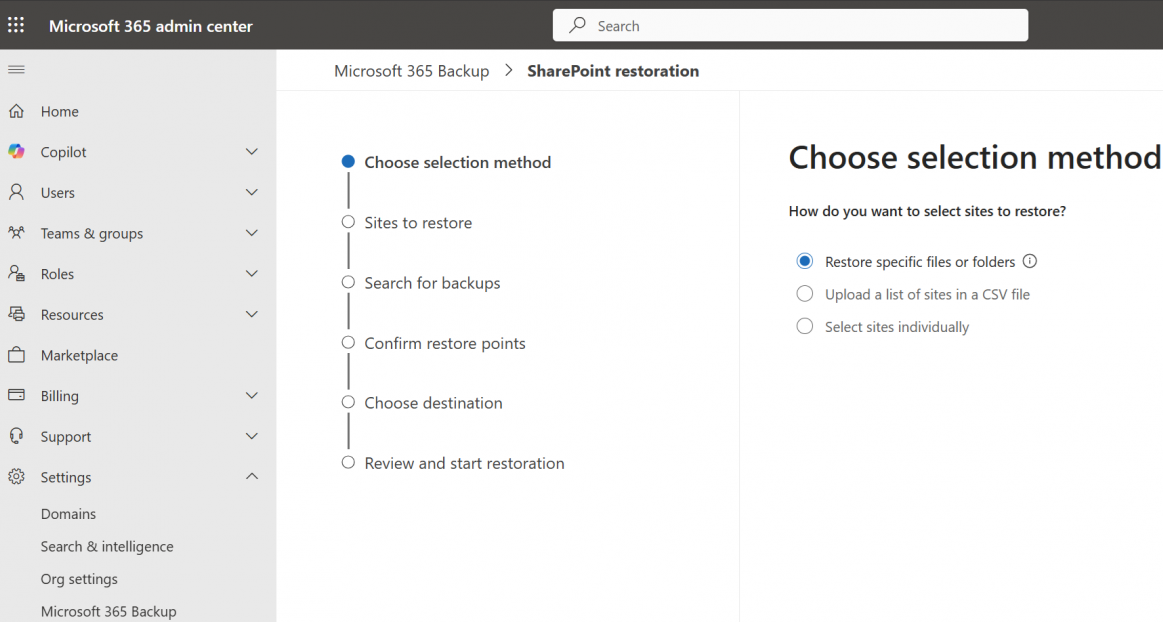
The granular restore feature entered public preview in early March 2026 and is anticipated to be globally available between late April and early May 2026.
Prior to the rollout to their tenants, Microsoft recommends that customers review their Microsoft 365 Backup coverage for SharePoint and OneDrive, ensure backup administrators are familiar with the granular restore workflow, and update internal recovery runbooks to accommodate file- and folder-level restore scenarios.
Microsoft emphasized, “This feature introduces a new method for admins to access existing Microsoft 365 Backup restore points at a more granular level (file or folder), without changing where or how backup data is stored. Admins gain finer control to restore specific files or folders containing personal data when responding to recovery, correction, or remediation scenarios.”
Furthermore, Microsoft recently expanded Windows Backup for Organizations, an enterprise-grade backup tool, to enable enterprise users to restore personal settings and Microsoft Store apps from a previous Windows 11 device.

Malware is becoming increasingly sophisticated. The Red Report 2026 delves into how new threats leverage math to detect sandboxes and evade detection.
Download our analysis of 1.1 million malicious samples to uncover the top 10 techniques and assess the efficacy of your security stack.













Rare Porsche Carrera GT in Custom Gulf Blue Fetches Record $6.7 Million at Auction

Zenfone 8 – The most boring INCREDIBLE phone ever.

Enhanced Microsoft 365 Backup: Introducing File-Level Restore for Quick Recovery

Ninja Mexican: Console Edition

Nominal Achieves Unicorn Status: Hardware Testing Startup Valued at $1 Billion After $155 Million Funding Round

Pros and Cons: A Buyer’s Guide

Exclusive Look at the Final BMW ALPINA XB7: Up Close and Personal

The Rise of AI-Infused Hacker Tactics: Exploiting Artificial Intelligence in Cyberattacks

Legends of Aincrad: A Sword Art Online RPG Adventure

EU Takes Action Against Instagram and Facebook for Violating Illegal Content Rules

Warning: Facebook Creators Face Monetization Loss for Stealing and Reposting Videos

Facebook Compliance: ICE-tracking Page Removed After US Government Intervention

Facebook’s New Look: A Blend of Instagram’s Style

InstaDub: Meta’s AI Translation Tool for Instagram Videos

Facebook and Instagram to Reduce Personalized Ads for European Users

Reclaim Your Account: Facebook and Instagram Launch New Hub for Account Recovery

Meta discontinues Messenger apps for Windows and macOS

Breaking Updates: Meta Connect 2025 Unveils Latest Developments
Zenfone 8 – The most boring INCREDIBLE phone ever.

The BEST Smartphones of 2021! (Mid Year)

I bought the SMALLEST Tech in the world.

How Cryptocurrency ACTUALLY works.

OnePlus Nord CE Unboxing!

STOP Buying this Tech Scam.

Who has the WORST Customer Service?

How many Spy Cameras are Recording you right now?

Dear Apple.
-
 Facebook4 months ago
EU Takes Action Against Instagram and Facebook for Violating Illegal Content Rules
-
 Facebook5 months ago
Warning: Facebook Creators Face Monetization Loss for Stealing and Reposting Videos
-
 Facebook5 months ago
Facebook Compliance: ICE-tracking Page Removed After US Government Intervention
-
 Facebook3 months ago
Facebook’s New Look: A Blend of Instagram’s Style
-
 Facebook5 months ago
InstaDub: Meta’s AI Translation Tool for Instagram Videos
-
 Facebook3 months ago
Facebook and Instagram to Reduce Personalized Ads for European Users
-
 Facebook3 months ago
Reclaim Your Account: Facebook and Instagram Launch New Hub for Account Recovery
-
 Apple5 months ago
Meta discontinues Messenger apps for Windows and macOS
