
Security
Enhanced Security: 1Password’s Latest Phishing Prevention Tool

Enhanced Phishing Protection for 1Password Users
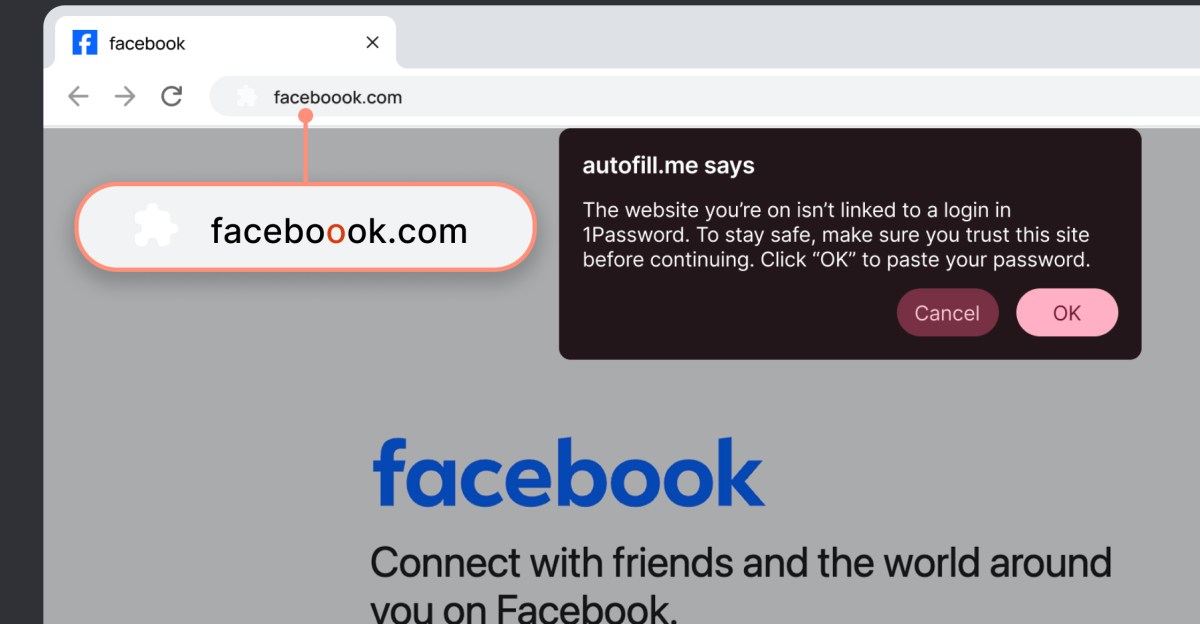
When a user of 1Password clicks on a link that leads to a website with a different URL from the one saved in their login details, the 1Password browser extension takes action to protect them. It will not automatically fill in their login information, and a warning message will pop up alerting them that the website they are on is not associated with any saved login credentials in 1Password.
Limitations of the Feature
While this new feature is a valuable tool in preventing phishing attacks, it is not foolproof. Users still have the option to manually enter their login information on suspicious websites. However, the warning message serves as a reminder that they may be at risk of falling victim to a phishing scam, prompting them to exercise caution and think twice before proceeding.
Rollout of the Phishing Prevention Feature
Starting today, 1Password is introducing the new phishing prevention feature to users, with a gradual rollout expected to take several weeks. For individual and family plan users, the feature will be automatically enabled once it becomes available. However, businesses will need to manually activate the feature through 1Password Admins.











Russian Hacker Sentenced to Prison for Cyberattacks Conducted by TA551 Botnet

Pixel 9a: Enhanced Fingerprint Sensor and Unbeatable Price Drop

Unlocking Success: The Essential Elements of a Thriving Business

The Final Frontier: For All Mankind Season 6

Lyria 3 Pro: Crafting Catchy Three-Minute AI Jams

Samsung Galaxy A57 Review: The Ultimate Choice for Everyday Use

The Unexpected Updates: A Closer Look at watchOS 5 and 8 in 2026
Chevrolet Unveils Exciting 2027 Corvette Grand Sport: A Sneak Peek Before the Big Reveal on March 26

Ring’s Latest Innovation: 4K Video Comes to Battery-Powered Doorbell Camera

EU Takes Action Against Instagram and Facebook for Violating Illegal Content Rules

Warning: Facebook Creators Face Monetization Loss for Stealing and Reposting Videos

Facebook Compliance: ICE-tracking Page Removed After US Government Intervention

Facebook’s New Look: A Blend of Instagram’s Style

Facebook and Instagram to Reduce Personalized Ads for European Users

InstaDub: Meta’s AI Translation Tool for Instagram Videos

Reclaim Your Account: Facebook and Instagram Launch New Hub for Account Recovery

Meta discontinues Messenger apps for Windows and macOS

Breaking Updates: Meta Connect 2025 Unveils Latest Developments

The Fastest Android Phone Ever.

Unboxing the $122,000 Smartphone. 🤯

Are Linux Smartphones about to KILL Android?

15 Smartphone FAILS to ruin your day 😂

World’s Biggest Smartphone Collection?

I switched to iPhone – This is what I found out.

What happened to Beats by Dre?

DON’T buy a Screen Protector before watching this.

Beware of Fake Reviewers! ⚠️
-
 Facebook5 months ago
EU Takes Action Against Instagram and Facebook for Violating Illegal Content Rules
-
 Facebook5 months ago
Warning: Facebook Creators Face Monetization Loss for Stealing and Reposting Videos
-
 Facebook5 months ago
Facebook Compliance: ICE-tracking Page Removed After US Government Intervention
-
 Facebook4 months ago
Facebook’s New Look: A Blend of Instagram’s Style
-
 Facebook4 months ago
Facebook and Instagram to Reduce Personalized Ads for European Users
-
 Facebook5 months ago
InstaDub: Meta’s AI Translation Tool for Instagram Videos
-
 Facebook4 months ago
Reclaim Your Account: Facebook and Instagram Launch New Hub for Account Recovery
-
 Apple5 months ago
Meta discontinues Messenger apps for Windows and macOS
