
Security
Enhanced Security Measures: 1Password’s New Pop-Up Phishing Alerts


1Password, a popular digital vault and password manager, has recently upgraded its features to include an added layer of defense against phishing URLs. This new addition aims to empower users in identifying potentially malicious websites and safeguarding their account credentials from cyber threats.
Renowned for its subscription-based password management service, 1Password is extensively utilized by various organizations in the corporate sector. Notably, Windows has recently integrated support for native passkey management through the 1Password platform.
Similar to other password management tools, 1Password implements a security measure where it refrains from auto-filling login information when users visit a website with a URL that does not match the stored credentials in their vault.

While this feature provides inherent protection against phishing attempts, there is still a possibility that users may overlook warning signs and inadvertently enter their login details on fraudulent websites.
Recognizing this potential security loophole, 1Password acknowledges that relying solely on this protective mechanism may not be comprehensive enough. Users could still fall prey to typosquatted domains, where threat actors register domains with misspelled variations to deceive unsuspecting individuals.
Despite users believing they are on the correct website, they may attribute any discrepancies to a glitch in their password manager or a temporary lockout, leading them to manually input their credentials.
To bridge this security gap, 1Password has introduced an additional protective measure in the form of a pop-up alert system that notifies users of potential phishing risks.
The vendor emphasizes, “It’s easy for a user to miss subtle discrepancies in the URL, especially when the rest of the webpage appears legitimate.” This feature aims to prompt users to exercise caution and scrutinize websites more closely before proceeding.
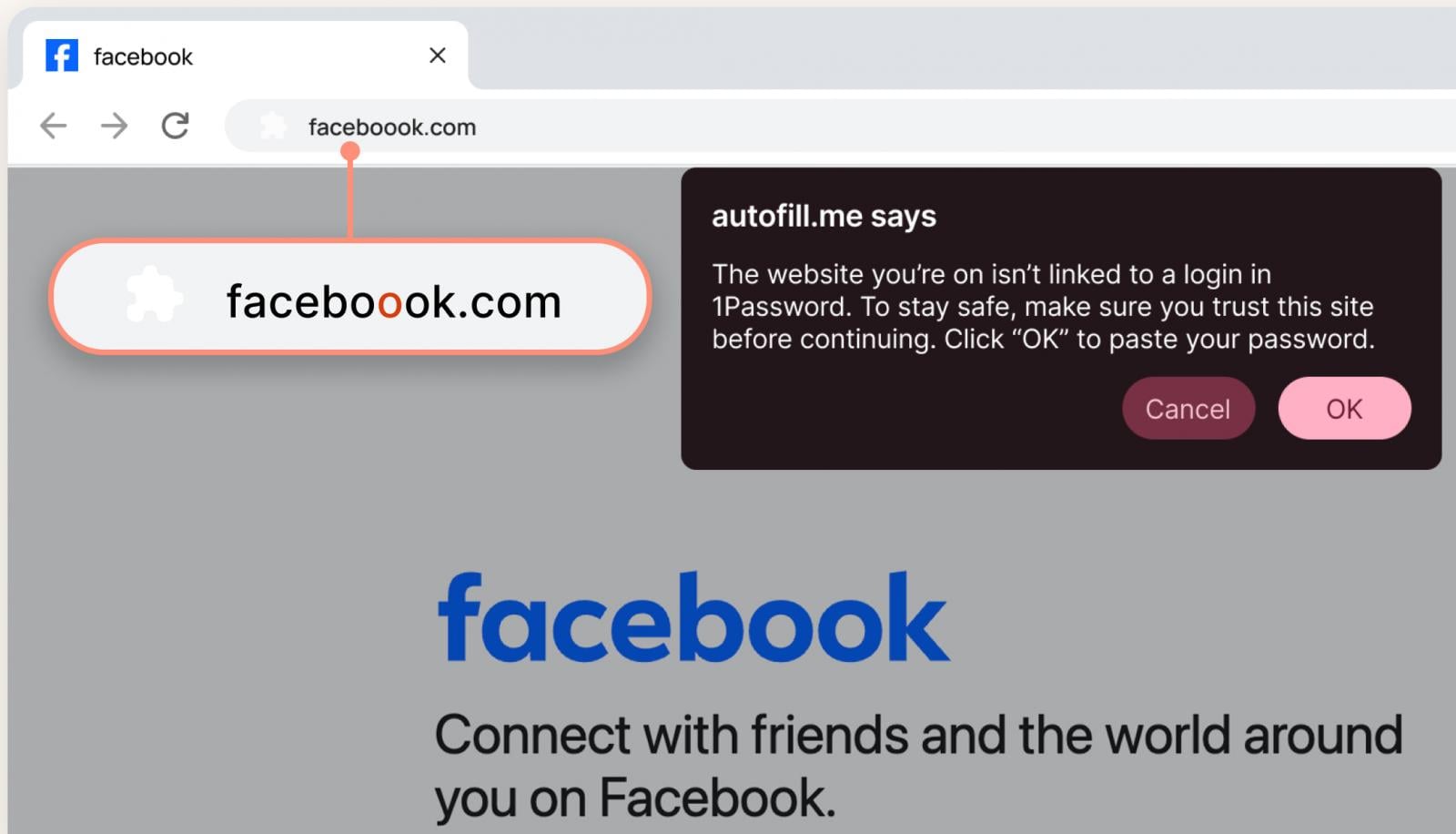
Source: 1Password
According to the vendor, the pop-up notification serves as a reminder for users to pause, evaluate the situation, and proceed with caution.
This new feature will be automatically activated for ‘individual’ and ‘family plan’ users, while administrators can manually enable it for employees through the Authentication Policies within the 1Password admin console.
In its recent announcement, the password management company underscores the escalating threat of phishing attacks, particularly with the rise of AI tools that facilitate more sophisticated and widespread scams.
Based on a survey conducted by 1Password involving 2000 participants in the U.S., findings revealed that 61% had fallen victim to successful phishing attempts, with 75% admitting to not verifying URLs before clicking on links.
Within corporate settings, where a single compromised account could grant malicious actors access to sensitive networks and systems, 1Password discovered that a significant portion of employees reused passwords across work accounts, resulting in nearly half falling victim to phishing incidents.
Interestingly, almost half of the survey respondents believed that the responsibility of combating phishing attacks rested solely with the IT department, with 72% confessing to clicking on suspicious links.
Moreover, over 50% of the participants expressed a preference for deleting suspicious messages rather than reporting them, indicating a prevalent lack of proactive cybersecurity practices.

As the Model Context Protocol (MCP) gains prominence as the standard for connecting LLMs to tools and data, security teams are swiftly adapting to ensure the safety of these new services.
This comprehensive cheat sheet outlines 7 effective practices that can be implemented immediately.












Data Breach at Mazda: Employee and Partner Information Exposed

City of Legends: Wartales Expansion – Choose Your Fate

Xiaomi 17 vs 17 Ultra Comparison: Why You Should Consider the Standard Model

Insight Partners Investigates ‘Fake Compliance’ Allegations, Delays Demos and Scrubs Investment Plans

Wuthering Heights: A Tale of Love and Loss Streaming Now

The Evolution of Apple’s AirPods Max: Unveiling the AirPods Max 2

German Court Rules Against DUH in Climate Lawsuit Against BMW and Mercedes

Microsoft boosts AI team with former Ai2 CEO and top researchers

Score the Best Deal on the Most Affordable E-Book Readers in Months

EU Takes Action Against Instagram and Facebook for Violating Illegal Content Rules

Warning: Facebook Creators Face Monetization Loss for Stealing and Reposting Videos

Facebook Compliance: ICE-tracking Page Removed After US Government Intervention

Facebook’s New Look: A Blend of Instagram’s Style

Facebook and Instagram to Reduce Personalized Ads for European Users

InstaDub: Meta’s AI Translation Tool for Instagram Videos

Reclaim Your Account: Facebook and Instagram Launch New Hub for Account Recovery

Meta discontinues Messenger apps for Windows and macOS

Breaking Updates: Meta Connect 2025 Unveils Latest Developments

World’s Biggest Smartphone Collection?

I switched to iPhone – This is what I found out.

What happened to Beats by Dre?

DON’T buy a Screen Protector before watching this.

Beware of Fake Reviewers! ⚠️

Xiaomi Mi 11 Unboxing & Review.

The Galaxy S21 Ultra is Better than you think.

Samsung Galaxy S21 Ultra vs iPhone 12 Pro Max Camera Test Comparison.

Samsung S21 Ultra vs iPhone Battery Life Test!
-
 Facebook5 months ago
EU Takes Action Against Instagram and Facebook for Violating Illegal Content Rules
-
 Facebook5 months ago
Warning: Facebook Creators Face Monetization Loss for Stealing and Reposting Videos
-
 Facebook5 months ago
Facebook Compliance: ICE-tracking Page Removed After US Government Intervention
-
 Facebook3 months ago
Facebook’s New Look: A Blend of Instagram’s Style
-
 Facebook4 months ago
Facebook and Instagram to Reduce Personalized Ads for European Users
-
 Facebook5 months ago
InstaDub: Meta’s AI Translation Tool for Instagram Videos
-
 Facebook4 months ago
Reclaim Your Account: Facebook and Instagram Launch New Hub for Account Recovery
-
 Apple5 months ago
Meta discontinues Messenger apps for Windows and macOS
