
Mobile Tech
Enhancing Clarity: Mastering Your iPhone’s Always On Display

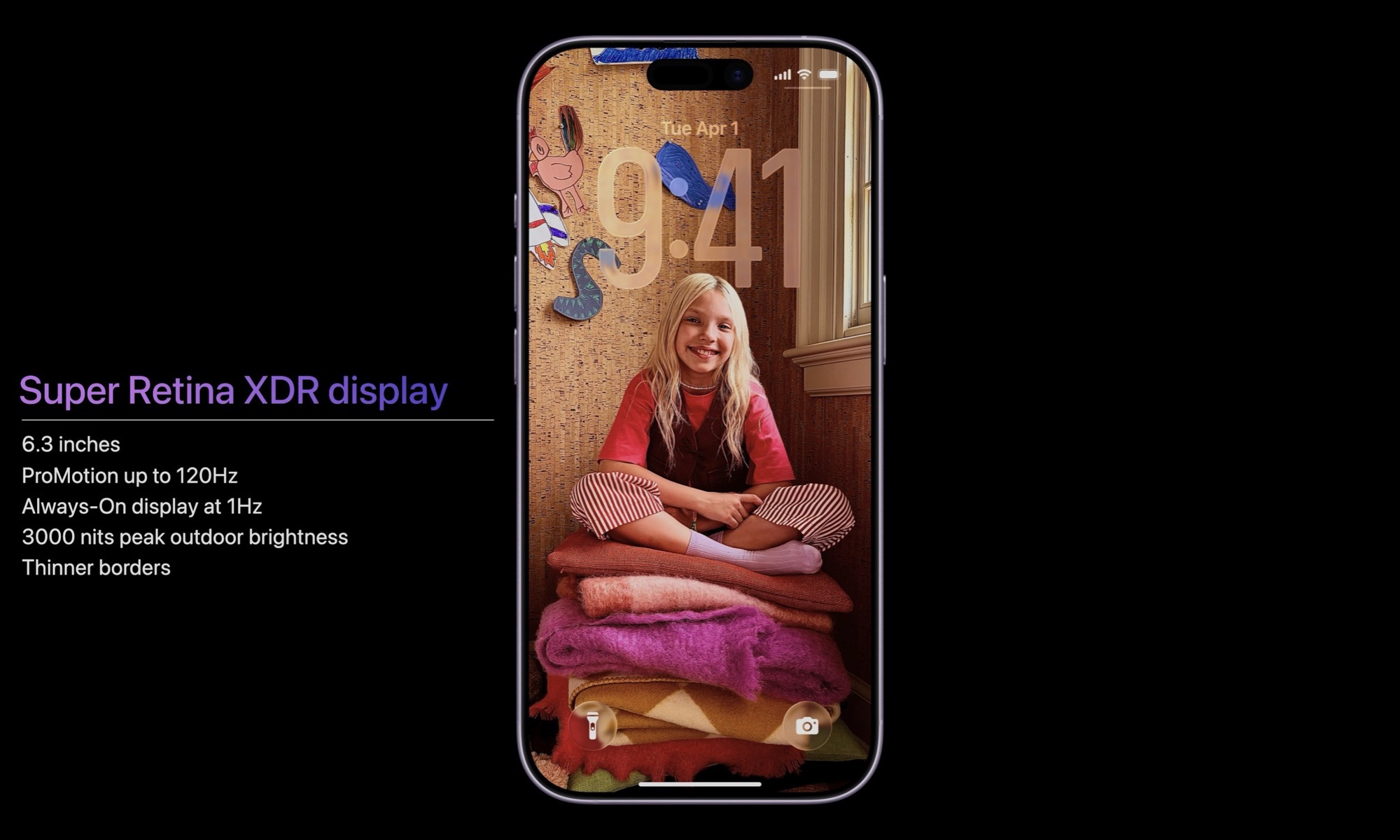
Apple has finally introduced Always On Display technology to the iPhone with the iPhone 14 Pro lineup in 2022. This feature, although not favored by everyone, is power-efficient and offers a more vibrant display compared to many Android smartphones.
It took Apple a considerable amount of time to bring this technology to the iPhone, but the wait seems to have been worth it. The Always On Display on the iPhone shows a dimmed version of the lock screen in full color, complete with wallpaper, dynamic widgets, and color filters to ensure the wallpaper looks great even at lower brightness levels.
Apple has also implemented clever power-saving and privacy features. The display turns off when the iPhone is face down or in a pocket, and it even goes dark when the user walks away if they have an Apple Watch paired.
The Expansion of Always On Display
Initially exclusive to the iPhone Pro lineup, Apple extended the Always On Display feature to the base iPhone 17, along with the 120 Hz ProMotion display technology. This move brings the feature to a wider user base who may not have experienced it before. However, with the release of iOS 26, there have been changes to how wallpaper is displayed on the Always On Display.
Over time, Apple has added new settings to customize the Always On Display. Users can now choose to turn it off completely, disable wallpaper and notifications, or opt for a classic monochrome look.
With the introduction of iOS 26, Apple added a new feature that blurs the wallpaper on the Always On Display, making it easier to read the clock and other foreground information. However, this feature may render lock screen photos unrecognizable.
Removing Wallpaper Blur in Always-On Mode
While the wallpaper blur feature may be enabled by default on new iPhones, it can be easily turned off in the settings:
- Open the Settings app on your iPhone.
- Select Display & Brightness.
- Scroll down and choose Always On Display.
- Toggle off Blur Wallpaper Photo.
Users can also adjust other settings related to the Always On Display in this menu, such as turning off the wallpaper or the feature entirely, and choosing whether to display notifications. The blurring feature can also be turned on here for those who prefer the aesthetic, especially with abstract wallpapers.
It remains unclear why some iPhones have this feature enabled by default while others do not. Nevertheless, Apple continues to refine the iPhone experience through subtle updates like this, offering users the choice between a sharp or softly blurred lock screen.
global $wp;
. ‘/’;
??>











Unveiling the Powerhouse: Mercedes-AMG GT Black Series with Dynamic Aero System Spotted at Nurburgring

iPhone 12 Pro Max Unboxing & Review!

European Commission Launches Investigation into Amazon Cloud Account Breach

Drama and Dollars: The Evolution of Soap Opera-TikTok Hybrids

Maximizing MacBook Battery Life: Tips for Charging Slowly and Setting Charge Limits

Lost Legacy: The Disappearance of AC Schnitzer and the Changing Automotive Landscape

Cyber Warfare: The Battlefront of the Digital Age

Monster Hunter Stories 3: The Challenge of Twisted Reflection

Revolutionizing Cash-Pay Clinic Prescribing: VITL Secures $7.5M Amid GLP-1 Boom

EU Takes Action Against Instagram and Facebook for Violating Illegal Content Rules

Warning: Facebook Creators Face Monetization Loss for Stealing and Reposting Videos

Facebook Compliance: ICE-tracking Page Removed After US Government Intervention

Facebook’s New Look: A Blend of Instagram’s Style

Facebook and Instagram to Reduce Personalized Ads for European Users

InstaDub: Meta’s AI Translation Tool for Instagram Videos

Reclaim Your Account: Facebook and Instagram Launch New Hub for Account Recovery

Meta discontinues Messenger apps for Windows and macOS

Breaking Updates: Meta Connect 2025 Unveils Latest Developments
iPhone 12 Pro Max Unboxing & Review!

iPhone 12 Pro Max vs Samsung Note 20 Ultra / Huawei Mate 40 Pro Camera Test Comparison.

iPhone 12 Pro Max vs Samsung Note 20 Ultra / Huawei / Xiaomi / OnePlus Battery Life DRAIN Test.

The BEST Smartphone of 2020 🏆

The Self-Healing Smartphones!

Apple is not what it used to be.

Smartphones are Boring now.

The Fastest Android Phone Ever.

Unboxing the $122,000 Smartphone. 🤯
-
 Facebook5 months ago
EU Takes Action Against Instagram and Facebook for Violating Illegal Content Rules
-
 Facebook5 months ago
Warning: Facebook Creators Face Monetization Loss for Stealing and Reposting Videos
-
 Facebook6 months ago
Facebook Compliance: ICE-tracking Page Removed After US Government Intervention
-
 Facebook4 months ago
Facebook’s New Look: A Blend of Instagram’s Style
-
 Facebook4 months ago
Facebook and Instagram to Reduce Personalized Ads for European Users
-
 Facebook6 months ago
InstaDub: Meta’s AI Translation Tool for Instagram Videos
-
 Facebook4 months ago
Reclaim Your Account: Facebook and Instagram Launch New Hub for Account Recovery
-
 Apple5 months ago
Meta discontinues Messenger apps for Windows and macOS
