
Gadgets
Exploring the Power and Performance of the Ugreen NASync DXP4800 Plus: A Comprehensive Review

Any links to online stores should be assumed to be affiliates. The company or PR agency provides all or most review samples. They have no control over my content, and I provide my honest opinion.
I recently reviewed the excellent Ugreen NASync DH4300 Plus. As a long-time Unraid user, I didn’t expect to like it as much as I did, due to the limited app availability, but I leaned into the functionality it does have, and have continued to use it since. This has now become my NAS, which I use for photo backups, backing up my cloud drives, and using the Rsync functionality to back up my servers.
The NASync DH2300 wasn’t quite as impressive due to the lack of Docker, which limits its functionality, but thanks to its incredibly low price, it remains a great option for someone looking for a basic NAS, either as a starter device or for basic backup functions (and perhaps as an alternative to Google Photos).
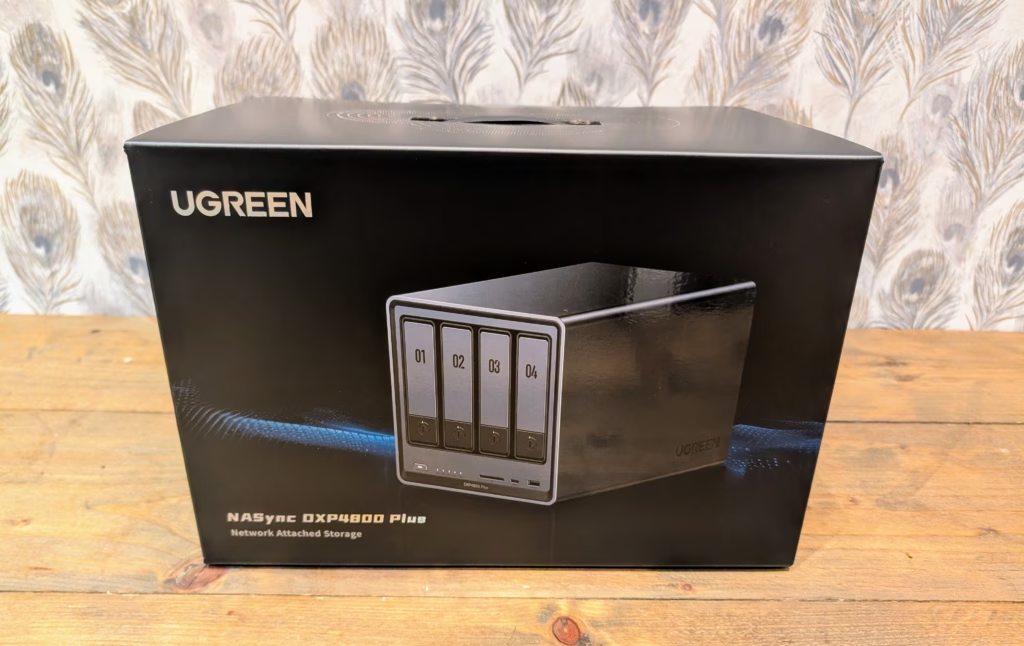
Ugreen has now sent me the NASync DXP4800 Plus to review. This is another 4-bay NAS, and it runs the same UGOS, with Docker, as the DXP4800 Plus, but it uses an Intel Pentium Gold 8505 instead of a Rockchip ARM chipset, making it much more powerful. It then has 2x M2 slots for caching, 8GB DDR5 (expandable to 64GB) and dual Ethernet ports, with one being 10GbE and the other 2.5GbE.
These specs, especially the 10GbE port, make this a perfect replacement for my ageing TerraMaster F4-422. It has served me well, especially when I turned it into an Unraid NAS, but the Intel Celeron J3455 and DDR3 mean it was quite underpowered, especially if I wanted to make the most of the 10GbE port.
Related Reviews
Ugreen NASync DXP4800 Plus vs NASync DXP4800 vs NASync DH4300 Plus Specification
Ugreen has three 4-bay models sitting at different price points.
| Model | DXP4800 Plus | DXP2800 | DH4300 Plus | DH2300 |
| Price | £539.99 | £263.99 | £305.99 | £169.99 |
| Drive Bays | 6 (4+2) | 4 (2+2) | 4 (4+0) | 2 (2+0) |
| SATA Hard Drive Slots | SATA 4-Bays | SATA 2-Bays | SATA 4-Bays | SATA 2-Bays |
Unboxing / Design
The NAS is well made, with a predominantly aluminium chassis which gives a superior built quality to the more affordable ARM based models I have reviewed from Ugreen.
The functionality is excellent, but it seems like a missed opportunity to maintain brand consistency.
What stands out to me is the magnetic, removable dust filter that covers the 140mm rear fan. While this is common in decent PC cases, it is surprisingly rare in NAS units, even though they operate 24/7 and are prone to accumulating more dust than typical PCs. Additionally, the fan is connected via a standard 4-pin connector, making it easily replaceable if necessary – a feature not commonly seen in consumer NAS devices.
To access the M.2 slots and RAM, you need to remove a panel on the base secured by only two screws. While this process is straightforward, it requires attention to detail in terms of cable management and ensuring that the included thick thermal pads make proper contact with the metal base for effective heat dissipation. Ugreen’s inclusion of these thermal pads specifically for this purpose demonstrates their commitment to attention to detail.
The setup process is consistent with other models I have reviewed. You can either access the IP address or use the Ugreen app.
The setup wizard guides you through the basics of creating an administrator account, setting up network preferences, and configuring your first storage pool. Importantly, Ugreen does not require you to create a cloud account to use the device, although you have the option to enable their UGREENlink remote access service. This sets them apart from manufacturers who are increasingly promoting cloud services.
When configuring your storage pool, you have the standard RAID options available: JBOD, Basic, RAID 0, RAID 1, RAID 5, RAID 6, and RAID 10. For a 4-bay system, RAID 5 strikes a good balance between capacity (75% of total storage) and protection (can withstand one drive failure), while RAID 6 sacrifices more capacity (50% of total storage) but can survive two drive failures. Considering the size of modern drives and the significant time required to rebuild a failed drive in a RAID 5 array, RAID 6 is a worthwhile option despite the capacity reduction.
You also have the choice between the Btrfs and Ext4 file systems. Btrfs is recommended for most users as it natively supports snapshots, offering protection against accidental file deletion and even ransomware attacks by allowing you to revert to a previous state. It is not a substitute for proper backups, but it serves as an excellent safety net. One thing to keep in mind is that the initial RAID synchronization process can be time-consuming, depending on the size of your drives.
To set up SSD cache on the Ugreen NAS, you need to navigate to the Storage section after creating your storage pool. From there, you can enable SSD cache by clicking on the three dots next to the storage pool.
The Ugreen NAS supports SSD caching with two NVMe drives working independently for read and write cache. If you only have one drive, you will only get read cache. It is recommended to under-provision the cache drive by setting the capacity to 80% of the SSD storage capacity to prevent data loss.
The M.2 slots on the Ugreen NAS are Gen 4 x4 connections, which is impressive considering the price point. This allows the slots to handle high speeds, although other factors like the SATA controller and network speeds may limit the actual performance.
While UGOS is a solid operating system, it may not offer the same range of applications and flexibility as Unraid, TrueNAS, or Proxmox. It is possible to install these alternative operating systems on Intel-based Ugreen NAS devices, but the process may be more complicated than a simple USB thumb drive swap.
Ugreen’s warranty policy regarding third-party operating systems has been clarified to cover hardware only, regardless of the OS installed. They caution users about potential risks like data loss and compatibility issues when using alternative operating systems.
Overall, UGOS is suitable for basic NAS tasks, but for more advanced features like complex Docker setups or extensive virtualization, installing alternative operating systems like Unraid may be a better option. The Intel platform enhances the viability of the NASync DXP4800 Plus compared to ARM-based units. The UGOS UI and Settings offer a familiar interface similar to Synology’s DSM, providing a PC desktop appearance. Multiple applications can run simultaneously, enhancing multitasking capabilities. The dashboard displays system status and access major functions easily. The available apps are decent, with the inclusion of Docker providing flexibility for additional applications. The Photo app stands out with its AI-powered features for organizing photos. While the interface is user-friendly and the features are beneficial for managing personal photo collections, the AI technology used in this platform is not as advanced as those found in Google, Apple, or Synology’s Photos. During testing with a large image library, the object recognition was inconsistent, correctly identifying only around 60-70% of objects and missing many obvious ones.
Nevertheless, the standout feature of this platform is its on-device processing, which ensures that user photos are not uploaded to external servers for analysis. This privacy-focused approach will appeal to users who prioritize keeping their data secure. The search feature is effective for basic queries such as locating pictures by date, location, or people in them. However, the virtual machine feature on this NAS has significant potential, although it may be limited due to the device’s specifications. It is advisable to be mindful of the resources allocated to a VM and manage expectations regarding performance. The VM manager is straightforward, allowing users to create VMs from ISO files, assign CPU cores and RAM, and set up network configurations. I tested a lightweight Debian installation with 2 CPU cores and 4GB of RAM, and it performed adequately for basic tasks. However, it is not suitable for running Windows VMs with demanding applications or multiple VMs simultaneously without significant performance compromises.
The Pentium Gold 8505 processor’s hybrid architecture (one performance core and four efficiency cores) allows it to handle light virtualization tasks, but it is not capable of running a full development environment or similarly demanding applications. For most users, VM functionality is best used for specific use cases, such as running a particular always-on application or testing something in an isolated environment.
Setting up a VM is a straightforward process; you can create a new VM with an ISO or import an existing disk file. Once the VM is set up, you can access the GUI through your browser.
In terms of Docker functionality, it remains the same as the DH4300. Personally, I have struggled with Docker management within NAS operating systems, often making mistakes with volume and port mapping. However, I was able to successfully set up and run Docker on the DH4300 via SSH, ensuring that volumes were set to easily accessible file directories.
The challenge with UGOS is that the native Docker interface is quite basic. While you can pull images and create containers, volume mapping and network configuration require careful attention. Incorrect volume mapping can lead to containers not accessing necessary data or storing data in locations that are not backed up or easily accessible.
My recommendation is to use Docker Compose files to define containers if you are comfortable with basic Linux commands. This provides full control and makes it easier to document your setup. If you are less familiar with command-line tools, the built-in interface can be used, but take the time to understand volume mapping before deploying critical containers.
In terms of file transfer speeds, the 10GbE connection theoretically allows speeds up to 1,250MB/s. In practice, with a RAID 5 array of spinning hard drives, speeds of 500-600MB/s were observed, which is respectable for mechanical drives. The bottleneck in this scenario is the drives themselves, not the network connection.
It is important to note that achieving 500-600MB/s over 10GbE is still faster than what most competing NAS units can achieve at this price point. For example, the TerraMaster F4-424 does not include 10GbE at all, and the QNAP TS-464 requires an expansion card for 10GbE. The inclusion of Sync & Backup as a standard feature by Ugreen is significant. I have extensively used this utility on the NASync DH4300 Plus for backing up photos and syncing data. The process was seamless, with the ability to transfer large amounts of data quickly and efficiently. Additionally, the performance of the Intel Pentium 8505 chipset in handling media playback and transcoding was impressive, especially with support for Intel QuickSync. This feature allows for hardware transcoding of multiple streams simultaneously, making it ideal for Plex or Jellyfin servers. Overall, the NASync DH4300 Plus offers excellent performance for typical home media server scenarios. The Docker configuration on UGOS may not be easily accessible through the interface, so you might need to make changes using the command line or a tool like Portainer. The built-in media player on UGOS is surprisingly good, offering functionality similar to Plex/Jellyfin. With the HDMI output on the NAS, you could potentially use it as both a media server and a home theatre PC, as it operates quietly enough to be placed next to your TV without generating noticeable fan noise. Similarly, I was curious to test the performance of the Photo app with the enhanced processing power. The AI features, such as facial recognition, had significant processing times on the DH4300 Plus NAS. However, on the DXP4800 Plus, the performance improvement is noticeable. Processing 220,000 photos for face recognition took about 36 hours on the DH4300 Plus, while on the DXP4800 Plus, similar processing completed in roughly 12 hours, a significant improvement.
The photos app on the DXP4800 Plus NAS offers more features than the DH4300 Plus. There are options for people recognition, text recognition, similar/duplicate recognition, scene & object recognition, pet recognition (not available on DH4300 Plus), sensitive content identification, image recognition, and model training package (not available on DH4300 Plus).
The face recognition works well on the DXP4800 Plus once processing is complete. It correctly identified faces in about 80% of test photos and grouped them accurately. The semantic search feature is hit-and-miss, working well for obvious subjects but struggling with more abstract queries. The model training package allows users to create their object recognition by providing sample photos.
Home Assistant is available as a Docker container on the DXP4800 Plus and performs acceptably for basic use. The qBittorrent app in the UGOS app store works well for managing torrent downloads, with good download speeds and network port options.
In terms of power draw, energy efficiency, and noise, the DXP4800 Plus consumes between 39W and 45W during light loads, making it power-efficient. Power usage can be further optimized with scheduled start-up and shutdown features and tweaking hard drive sleep times. The annual electricity cost for running the NAS at 40W average consumption 24/7 is approximately £84. Comparatively, the Synology DS920+ and TerraMaster F4-424 consume slightly less power under similar loads. The differences, although not significant in absolute terms, can accumulate over years of continuous operation.
The noise levels of the Ugreen NASync DXP4800 Plus are good, with the 140mm fan running quietly at idle and becoming more noticeable under load. The drive noise is more significant than the fan, especially during intensive operations like RAID rebuilds or large file transfers.
In terms of price and alternative options, the Ugreen NASync DXP4800 Plus is available for £540, while the ARM-based NASync DH4300 Plus is priced at £306. Moving up a level, the NASync DXP6800 Pro is available for £850, offering more features at a higher price point.
Other alternatives include the Minisforum N5 AI NAS for £550 and the TerraMaster F4-425 Plus or F4-424 Max for different price points and specifications. Additionally, the Synology DiskStation DS925+ offers a different set of features for around £550.
Overall, Ugreen has excelled in the hardware aspects of their NASync range, offering great value for money. While the UGOS operating system could use more development, the NAS devices still offer impressive performance and features. The NASync DXP4800 Plus stands out as a sweet spot in terms of price and performance, offering flexibility with the option to install a different operating system.
In conclusion, the Ugreen NASync DXP4800 Plus is a powerful NAS option with a multi-gig network at a reasonable price, competing well with other brands in terms of hardware capabilities. Despite some limitations in the operating system, the overall value for money is fantastic. Are you in search of powerful hardware with multi-gig networking capabilities and the flexibility to expand or switch operating systems in the future? Look no further than this exceptional choice that truly shines within its price range.
Pros:
– Exceptional hardware and 10GbE connectivity at a competitive price point
– Superior build quality and quiet operation for a seamless user experience
– Support for Docker and alternative operating systems for enhanced flexibility
– Impressive media performance thanks to Intel QuickSync technology
Cons:
– Limited UGOS app store and interface may pose some restrictions
– Relies on an external PSU rather than an internal power source
– Missing built-in Plex functionality and some common NAS utilities
About the Author:
James, a tech enthusiast based in the UK, is the Editor and Owner of Mighty Gadget since 2007. His passion for technology spans across various categories, from computers and networking to mobile devices, wearables, and smart home gadgets. With a background in Information Systems Design and a Master’s Degree in Computing, along with Cisco CCNA accreditation, James brings a unique perspective to tech blogging. Vuelio consistently ranks Mighty Gadget as one of the top technology blogs in the UK, showcasing James’ dedication to providing engaging and informative content to his readers.
Please note: This article contains affiliate links and images from Amazon Product Advertising API, last updated on 2025-11-14. Transform the following sentence:
“The cat is sleeping on the windowsill.”
to:
“On the windowsill, the cat is peacefully sleeping.” “Today is a beautiful day”
into
“The current day is quite lovely” Transform the following:
Original: The cat is sleeping peacefully on the windowsill.
Transformed: Peacefully sleeping on the windowsill is the cat. Transform the following:
Original: The weather was so nice that we decided to go for a walk in the park.
Transformation: Because the weather was so nice, we chose to take a stroll in the park.













Maximizing MacBook Battery Life: Tips for Charging Slowly and Setting Charge Limits

Lost Legacy: The Disappearance of AC Schnitzer and the Changing Automotive Landscape

Cyber Warfare: The Battlefront of the Digital Age

Monster Hunter Stories 3: The Challenge of Twisted Reflection

Revolutionizing Cash-Pay Clinic Prescribing: VITL Secures $7.5M Amid GLP-1 Boom

Balancing Act: The Decision to Shut Down Sora

Exclusive Arrival: Cupra Born VZ Lands in Australia – But There’s a Twist!

iPhone 12 Pro Max vs Samsung Note 20 Ultra / Huawei Mate 40 Pro Camera Test Comparison.

ClickFix: The New Threat to macOS Security

EU Takes Action Against Instagram and Facebook for Violating Illegal Content Rules

Warning: Facebook Creators Face Monetization Loss for Stealing and Reposting Videos

Facebook Compliance: ICE-tracking Page Removed After US Government Intervention

Facebook’s New Look: A Blend of Instagram’s Style

Facebook and Instagram to Reduce Personalized Ads for European Users

InstaDub: Meta’s AI Translation Tool for Instagram Videos

Reclaim Your Account: Facebook and Instagram Launch New Hub for Account Recovery

Meta discontinues Messenger apps for Windows and macOS

Breaking Updates: Meta Connect 2025 Unveils Latest Developments
iPhone 12 Pro Max vs Samsung Note 20 Ultra / Huawei Mate 40 Pro Camera Test Comparison.

iPhone 12 Pro Max vs Samsung Note 20 Ultra / Huawei / Xiaomi / OnePlus Battery Life DRAIN Test.

The BEST Smartphone of 2020 🏆

The Self-Healing Smartphones!

Apple is not what it used to be.

Smartphones are Boring now.

The Fastest Android Phone Ever.

Unboxing the $122,000 Smartphone. 🤯

Are Linux Smartphones about to KILL Android?
-
 Facebook5 months ago
EU Takes Action Against Instagram and Facebook for Violating Illegal Content Rules
-
 Facebook5 months ago
Warning: Facebook Creators Face Monetization Loss for Stealing and Reposting Videos
-
 Facebook6 months ago
Facebook Compliance: ICE-tracking Page Removed After US Government Intervention
-
 Facebook4 months ago
Facebook’s New Look: A Blend of Instagram’s Style
-
 Facebook4 months ago
Facebook and Instagram to Reduce Personalized Ads for European Users
-
 Facebook6 months ago
InstaDub: Meta’s AI Translation Tool for Instagram Videos
-
 Facebook4 months ago
Reclaim Your Account: Facebook and Instagram Launch New Hub for Account Recovery
-
 Apple5 months ago
Meta discontinues Messenger apps for Windows and macOS
