
Gadgets
Flic Duo Smart Button & Flic Hub Mini: The Ultimate Review

Any links to online stores should be assumed to be affiliates. The company or PR agency provides all or most review samples. They have no control over my content, and I provide my honest opinion.
Flic Duo Smart Button & Flic Hub Mini Review
Summary
The Flic Duo is a thoughtfully designed smart button with impressive flexibility, combining physical controls, gesture input, and broad native integrations into a single compact device. It works reliably once set up, and the accompanying hubs significantly expand its capabilities, particularly for Sonos, Philips Hue, and other supported platforms. However, its high price and limited interoperability with systems like Home Assistant make it harder to recommend for experienced smart home users who already have established Zigbee or Matter ecosystems. For those seeking a simple, app-driven control solution without running a full automation platform, or for users who value the optional safety features, the Flic Duo remains an appealing if premium choice.
Pros
- Highly flexible controls with gestures and placement awareness
- Excellent native integrations, especially for media and lighting
- Reliable performance with strong range when paired with a hub
Cons
- Significantly more expensive than competing Zigbee buttons
- Limited direct integration with Home Assistant
- Gesture setup and ecosystem constraints may deter advanced users
The Flic Duo is a dual-button smart controller that combines traditional button presses with gesture input to drive automations across lights, media, and other connected devices. It is designed to work both as a wall-mounted switch and as a handheld remote, with deeper integration available when paired with a Flic Hub.
Related Reviews
Specification
| Specification | Details |
| Battery Life | Up to 3 years (CR2032 replaceable battery) |
| Dimensions | 51 × 29 × 8mm |
| Indoor Range | Up to 50m |
| LED Indicator | 3-colour LED |
| Compatibility | Flic Hub, Hub LR & Hub Mini, iOS, Android & more |
| Triggers | Push, Double Push, Hold, Hold & Swipe, Hold & Twist |
| Matter Support | Compatible through Flic Hub |
| Apple HomeKit | Push, Double-Push & Hold accessible through Flic Hub LR |
| Customisation | White or black; extra icon stickers included |
| Open SDK | Through Flic Hub LR |
| HID & MIDI | Coming in future update |
Features
Wall Switch and Handheld Modes
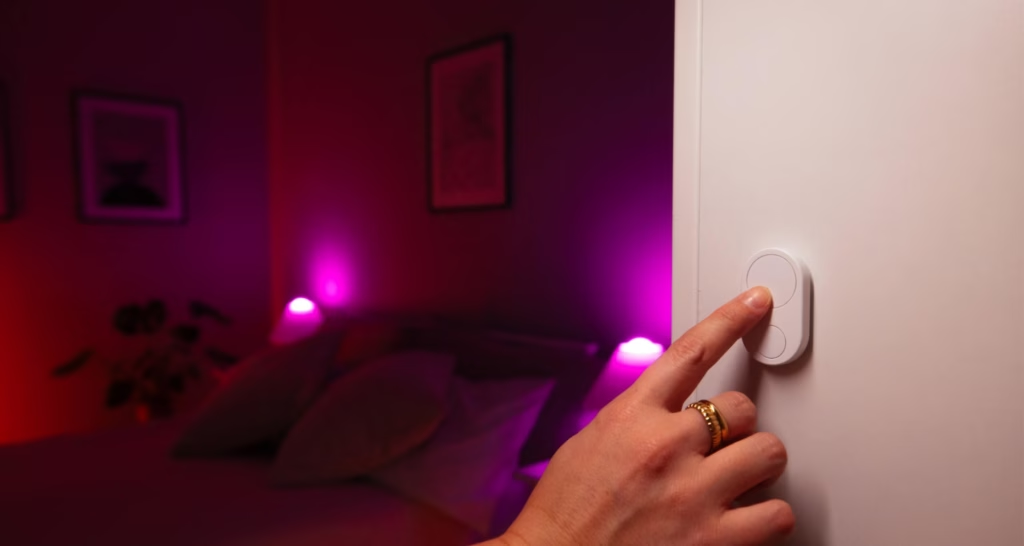
Mounted on a wall, the large button on the Flic Duo is well suited to simple on/off or toggle actions such as controlling room lighting or a main scene. In this mode it effectively behaves like a modernised light switch, offering a familiar interaction for people who do not want to open apps or speak to a voice assistant.
When you pick the Duo up, the motion sensor enables swipe and twist gestures that make more sense in the hand, turning it into something closer to a media or scene remote. You can, for example, use swipe‑up or swipe‑down to adjust brightness or volume, and twist gestures to change scenes or dim levels without needing an additional dial product.
Smart Home and Media Control
Out of the box, common use cases include lighting control, heating adjustments, and media playback. A single press can toggle lights, while a long press plus swipe can be used for dimming, although granular dimming and multi‑room scenarios typically require pairing with a Flic Hub. For temperature, one button can be configured to increase set‑point and the other to decrease it, with LED colours used to indicate direction or mode.
For media and TV setups, gesture mappings allow volume up/down, track skip, and replay without needing to reach for a phone. When used with the Flic Hub LR and its IR accessory, the Duo can act as a simple remote for television power and basic AV controls by sending infrared commands to existing equipment.
Safety and Location Features
Beyond smart home control, the onboard accelerometer supports motion‑based safety features such as fall detection. In supported setups, a detected fall can trigger alerts to predefined contacts, which may be useful for elderly users or lone workers when combined with appropriate monitoring workflows.
There is also a configurable SOS or personal alarm function, where a press can send an emergency notification and location data via a paired app or service. A “find my Flic” feature allows the Duo to emit a sound when triggered from the app, which is practical if the unit is frequently used as a portable remote.
Integrations and Hubs
Flic Duo integrates with a range of platforms and services including Amazon Alexa, Apple Home (via HomeKit), Matter ecosystems, Philips Hue, Sonos and other common smart home brands. Some of these can be addressed directly via a phone, but broader and more reliable integrations generally depend on using a Flic hub as the always‑on bridge.
The Flic Hub LR adds Ethernet, 5 GHz Wi‑Fi and an IR port, and acts as a Matter controller, while the more compact Flic Hub Mini focuses on Bluetooth long‑range and Matter controller functionality for simpler environments. For Apple users, only button presses (not gestures) are currently exposed into HomeKit, so advanced gesture logic needs to be handled inside the Flic ecosystem or via other supported services.
Accessories and Mounting Options
Flic offers a set of optional accessories to adapt the Duo to different use cases. A sticker sheet with iconography for lighting, music, security and other functions is available to label buttons and make multi‑button or multi‑room deployments easier to remember, which is relevant in shared households or office environments.
A metal clip with lanyard attachment lets you carry the Duo on a belt, bag or around the neck, which aligns with use in care settings or mobile work scenarios.
Additionally, there are silicone and metal mounting options available, including a more durable weather-resistant case for outdoor or semi-exposed installations and a metal plate for stable mounting on walls, desks, or car dashboards while still maintaining magnetic detachability.
The Flic Duo utilizes two physical buttons and an integrated motion sensor to support five generic triggers: single press, double press, long press, long press with swipe, and long press with twist. With these triggers and buttons, the device can be configured with over 20 distinct actions per Duo and more than 30 commands when placement-aware behavior is utilized. It comes with a built-in buzzer and three LEDs that offer audio and visual feedback, allowing users to confirm actions without needing to check a phone or display.
The design of the Flic Duo is compact and minimalistic, featuring a magnetic mounting plate that allows it to be placed on a wall and easily removed for handheld use. It is powered by a CR2032 coin cell battery that lasts for approximately three years of typical use before needing replacement.
The physical design of the Flic Duo is a standout feature, with satisfying tactile buttons and a sturdy build despite its small size. It is available in both black and white color options to suit various interiors. Its slim profile ensures it blends in seamlessly when mounted next to a traditional light switch. I came across this Reddit comment discussing how to integrate Flic buttons with Home Assistant using webhooks, noting that it works best with a Flic hub. The process involves creating an automation with three webhook triggers named Single, Double, and Hold to correspond to the actions Flic buttons can perform.
After setting up the automation, the Flic hub needs to be configured to send the hooks to Home Assistant. This can be done easily on a phone by copying the webhook URL from the automation and pasting it into the Flic app for the desired button actions. The type should be changed to “POST” for each action.
Once the setup is complete, the automation will trigger based on the type of press on the Flic button, and different actions can be added for Single, Double, and Hold triggers. It is important not to delete this automation once set up.
Additionally, there is an alternative option available through Home Assistant addons by Philipp Schmitt, which uses Bluetooth on the device and may not require a hub. However, some users have reported issues with Bluetooth initialization in Home Assistant.
The comment also mentions the extensive range of actions available with Flic buttons, which are more comprehensive than other providers. In daily use, the Flic Duo is generally reliable, but its performance can be affected by the connection quality of the devices it controls. When using Matter devices paired directly to the Flic Hub, the response time is almost immediate. The twist and swipe actions work well, although there may be a slight delay in certain situations, such as wireless interference or distance from the hub.
For controlling Sonos, the experience is excellent with responsive volume adjustments. Setting a maximum volume limit in the app helps prevent accidental deafness from enthusiastic twisting. However, gesture recognition can become unreliable when the button is moved to areas with poor signal, like a garage.
The battery life meets expectations thanks to Bluetooth Low Energy, providing impressive range for a coin-cell device that covers most average-sized homes without issues, as long as the Hub is centrally located.
The Bluetooth range with the Hub Mini is sufficient for a typical semi-detached house. For larger properties or thick walls, the Hub LR with extended range may be a better investment.
In terms of pricing and alternatives, the Flic Duo is priced at £50, while the Flic Hub Mini costs £21. Other options from Flic include the Flic Hub LR (£62), Flic Button (£30), and Flic Twist (£67). Competing alternatives like the Philips Hue Smart button, Aqara Wireless Mini Switch, and Ikea options are available at lower prices.
Overall, the Flic Duo offers a range of features including gesture control, broad integrations, and safety functions. While it may not be the most cost-effective option compared to Zigbee alternatives, it provides an appealing choice for users without advanced automation platforms. The safety features, in particular, make it a compelling device for certain use cases. However, for experienced smart home enthusiasts with existing ecosystems, the Flic Duo’s premium pricing may be harder to justify.
Bringing a Unique Perspective to Tech Blogging
With a wide range of interests, I am able to offer a distinctive viewpoint on tech blogging, blending lifestyle, fitness, and the latest tech trends.
It is a source of pride for me that Vuelio consistently recognizes Mighty Gadget as one of the premier technology blogs in the UK. Through my unwavering commitment to technology and my passion for sharing knowledge, my goal is to continue delivering engaging and informative content to my audience.
Transform the following sentence into a question:
She is going to the store.
Is she going to the store? Transform the following sentence into a question:
The cat is sleeping peacefully on the windowsill.
Is the cat sleeping peacefully on the windowsill?













Exclusive Look: The 2027 Chevrolet Corvette Grand Sport Unleashed at Sebring

DON’T buy a Screen Protector before watching this.

Exploiting Vulnerable Drivers: How EDR Killers Use BYOVD to Disable Security

Alphabet’s X Unveils Innovative Spinout Targeting Costly Bureaucratic Challenges

Lawsuit: Halide co-founder accuses Sebastiaan de With of code theft for Apple

Previewing the Next Level: Apple Unveils iOS 26.4 RC for iPhone with Exciting New Features

Revamped Design: BMW’s Modern Makeover for the i3 Sedan

GitHub Actions Exploited in Trivy Vulnerability Scanner Breach, Infostealer Unleashed

Minecraft Dungeons II: The Battle Continues

EU Takes Action Against Instagram and Facebook for Violating Illegal Content Rules

Warning: Facebook Creators Face Monetization Loss for Stealing and Reposting Videos

Facebook Compliance: ICE-tracking Page Removed After US Government Intervention

Facebook’s New Look: A Blend of Instagram’s Style

Facebook and Instagram to Reduce Personalized Ads for European Users

InstaDub: Meta’s AI Translation Tool for Instagram Videos

Reclaim Your Account: Facebook and Instagram Launch New Hub for Account Recovery

Meta discontinues Messenger apps for Windows and macOS

Breaking Updates: Meta Connect 2025 Unveils Latest Developments
DON’T buy a Screen Protector before watching this.

Beware of Fake Reviewers! ⚠️

Xiaomi Mi 11 Unboxing & Review.

The Galaxy S21 Ultra is Better than you think.

Samsung Galaxy S21 Ultra vs iPhone 12 Pro Max Camera Test Comparison.

Samsung S21 Ultra vs iPhone Battery Life Test!

The Truth about Xiaomi “Air Charging”

DON’T buy this Smartphone.

Galaxy S21 Ultra – Exynos vs Snapdragon.
-
 Facebook5 months ago
EU Takes Action Against Instagram and Facebook for Violating Illegal Content Rules
-
 Facebook5 months ago
Warning: Facebook Creators Face Monetization Loss for Stealing and Reposting Videos
-
 Facebook5 months ago
Facebook Compliance: ICE-tracking Page Removed After US Government Intervention
-
 Facebook3 months ago
Facebook’s New Look: A Blend of Instagram’s Style
-
 Facebook3 months ago
Facebook and Instagram to Reduce Personalized Ads for European Users
-
 Facebook5 months ago
InstaDub: Meta’s AI Translation Tool for Instagram Videos
-
 Facebook4 months ago
Reclaim Your Account: Facebook and Instagram Launch New Hub for Account Recovery
-
 Apple5 months ago
Meta discontinues Messenger apps for Windows and macOS
