
Security
LinkedIn’s Covert Operation: Uncovering 6,000+ Chrome Extension Secrets


A recent study named “BrowserGate” has raised concerns about Microsoft’s LinkedIn using concealed JavaScript scripts on its platform to scan visitors’ browsers for installed extensions and gather device information.
As per a report by Fairlinked e.V., an association of commercial LinkedIn users, Microsoft’s platform inserts JavaScript into user sessions to check for numerous browser extensions and link the findings to identifiable user profiles.
The author alleges that this action is aimed at collecting sensitive personal and business data since LinkedIn accounts are associated with real identities, employers, and job titles.
“LinkedIn scans for more than 200 products that directly compete with its own sales tools, such as Apollo, Lusha, and ZoomInfo. By knowing each user’s employer, LinkedIn can track which companies utilize competing products. It is extracting customer lists from numerous software companies through their users’ browsers without their knowledge,” the report states.
“Subsequently, LinkedIn utilizes this information. The platform has already issued warnings to users of third-party tools based on data obtained through this covert scanning to pinpoint its targets.”
BleepingComputer has independently verified some of these claims through its own testing, where a JavaScript file with a randomized filename was observed being loaded by LinkedIn’s website.
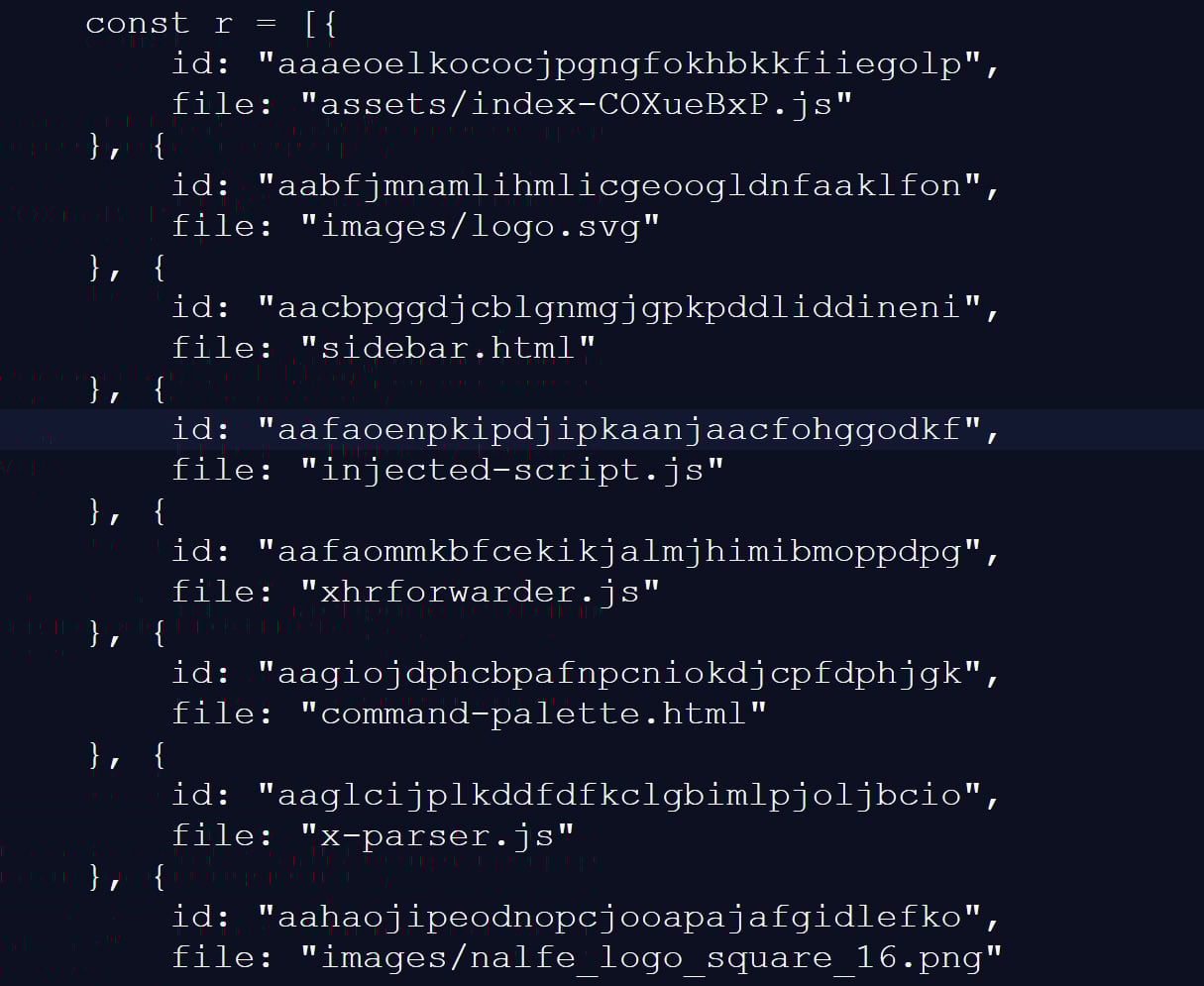
This script checked for 6,236 browser extensions by trying to access file resources linked to a specific extension ID, a common method for detecting the presence of installed extensions.
This fingerprinting script was previously identified in 2025, detecting around 2,000 extensions at that time. Another GitHub repository from two months ago indicates 3,000 extensions being detected, showing a continuous increase in the number of extensions detected.
Source: BleepingComputer
While many of the scanned extensions are related to LinkedIn, the script also detected language and grammar extensions, tools for tax professionals, and other seemingly unrelated features.
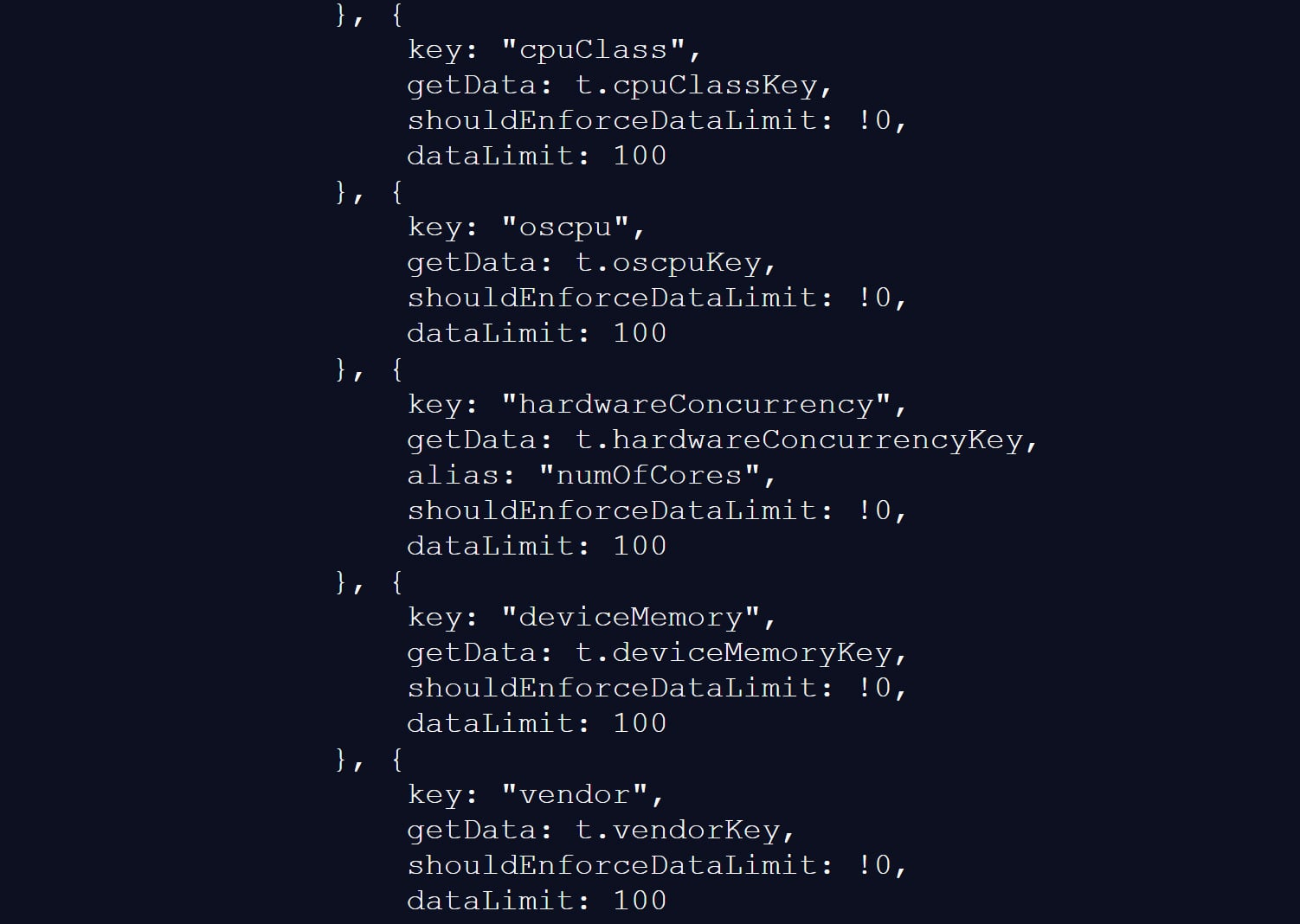
The script also gathers various browser and device data, including CPU core count, available memory, screen resolution, timezone, language settings, battery status, audio information, and storage features.
Source: BleepingComputer
BleepingComputer could not validate the claims in the BrowserGate report regarding the use of the collected data or if it is shared with third-party entities.
Nevertheless, similar fingerprinting techniques have been utilized in the past to create unique browser profiles, enabling user tracking across different websites.
LinkedIn’s Response to Data Use Allegations
LinkedIn does not deny detecting specific browser extensions, stating that the information is utilized to safeguard the platform and its users.
However, the company refutes the report, attributing it to an individual whose account was restricted for scraping LinkedIn content and violating the site’s terms of use.
“The claims made on the website linked here are completely false. The individual behind them is facing an account restriction due to scraping and other violations of LinkedIn’s Terms of Service.
To protect our members’ privacy and data, as well as ensure site stability, we identify extensions that scrape data without members’ consent or breach LinkedIn’s Terms of Service.
Some extensions have static resources (images, javascript) that can be injected into our webpages. We can detect these extensions by checking for the existence of the static resource URL. This detection is visible in the Chrome developer console. We use this data to identify extensions that violate our terms, enhance our technical defenses, and understand why a member account might be extracting excessive data from other members, impacting site stability at scale. We do not use this data to deduce sensitive information about members.
For additional context, in response to this website owner’s account restriction, they tried to seek legal action in Germany, alleging that LinkedIn had violated various laws. The court ruled against them, finding their claims baseless and highlighting that the individual’s own data practices were unlawful.
Regrettably, this is a situation where an individual lost in court but is attempting to challenge the verdict in the court of public opinion without regard for accuracy.”
LinkedIn asserts that the BrowserGate report originates from a conflict involving the developer of a LinkedIn-related browser extension called “Teamfluence,” which LinkedIn states was restricted for violating the platform’s terms.
Documents provided to BleepingComputer reveal that a German court dismissed the developer’s request for a preliminary injunction, determining that LinkedIn’s actions did not constitute unlawful obstruction or discrimination.
The court also noted that automated data collection alone could breach LinkedIn’s terms of use, justifying the platform’s decision to block the accounts for protection.
LinkedIn argues that the BrowserGate report is an effort to publicly rehash that dispute.
Regardless of the report’s origins, one fact remains undisputed.
LinkedIn’s website utilizes a fingerprinting script to detect over 6,000 extensions running on a Chromium browser, along with other details about a visitor’s system.
This is not the first instance of companies employing aggressive fingerprinting scripts to identify software running on visitors’ devices.
In 2021, eBay was found using JavaScript to conduct automated port scans on visitors’ devices to determine if they had various remote support software installed.
Although eBay never disclosed the purpose of these scripts, it was widely believed that they were used to combat fraud on compromised devices.
Subsequently, it was revealed that several other companies, including Citibank, TD Bank, Ameriprise, Chick-fil-A, Lendup, BeachBody, Equifax IQ connect, TIAA-CREF, Sky, GumTree, and WePay, were also utilizing the same fingerprinting script.

Automated penetration testing validates the existence of vulnerabilities, while BAS assesses whether your controls can prevent them. Many teams perform one without the other.
This whitepaper outlines six validation surfaces, identifies coverage limits, and equips practitioners with three key questions for any tool assessment.













Boosting Electric Vehicle Adoption: Australian Government Funding for Audi, Skoda, Cupra, and Volkswagen Buyers

6G – Explained!

LinkedIn’s Covert Operation: Uncovering 6,000+ Chrome Extension Secrets

Skyblivion Remake Mod Still Thriving: Call for Help to Maintain Momentum

Unveiling the Xiaomi Pad 8 Pro: A Timeless Example of Xiaomi’s Great Value

Anthropic Acquires Coefficient Bio: A $400M Biotech Merger

The Future of Interactive Companions: A Review of Casio’s AI Pet Moflin

The Top 7 iPhone Apps for Mindfulness and Stress Relief in 2026

Unleashing Project Leo: The Ultimate Track-Ready Porsche 911

EU Takes Action Against Instagram and Facebook for Violating Illegal Content Rules

Warning: Facebook Creators Face Monetization Loss for Stealing and Reposting Videos

Facebook Compliance: ICE-tracking Page Removed After US Government Intervention

Facebook’s New Look: A Blend of Instagram’s Style

Facebook and Instagram to Reduce Personalized Ads for European Users

InstaDub: Meta’s AI Translation Tool for Instagram Videos

Reclaim Your Account: Facebook and Instagram Launch New Hub for Account Recovery

Meta discontinues Messenger apps for Windows and macOS

Breaking Updates: Meta Connect 2025 Unveils Latest Developments
6G – Explained!

Is Samsung about to take over?

The Problem with Fast Chargers.

if smartphone commercials were honest.

iPhone 12 – What were Apple thinking?

OnePlus 8T vs Google Pixel 5 – The Brutal Truth.

iPhone 12 / 12 Pro Unboxing – ft MKBHD!

iPhone 12 Pro vs iPhone 12 vs iPhone 11 Pro Camera Test Comparison.

Huawei Mate 40 Pro Unboxing – WHAT.
-
 Facebook5 months ago
EU Takes Action Against Instagram and Facebook for Violating Illegal Content Rules
-
 Facebook6 months ago
Warning: Facebook Creators Face Monetization Loss for Stealing and Reposting Videos
-
 Facebook6 months ago
Facebook Compliance: ICE-tracking Page Removed After US Government Intervention
-
 Facebook4 months ago
Facebook’s New Look: A Blend of Instagram’s Style
-
 Facebook4 months ago
Facebook and Instagram to Reduce Personalized Ads for European Users
-
 Facebook6 months ago
InstaDub: Meta’s AI Translation Tool for Instagram Videos
-
 Facebook4 months ago
Reclaim Your Account: Facebook and Instagram Launch New Hub for Account Recovery
-
 Apple5 months ago
Meta discontinues Messenger apps for Windows and macOS
