
Gadgets
Maximizing Battery Life: A Comprehensive Guide for the Oral-B iO Electric Toothbrush

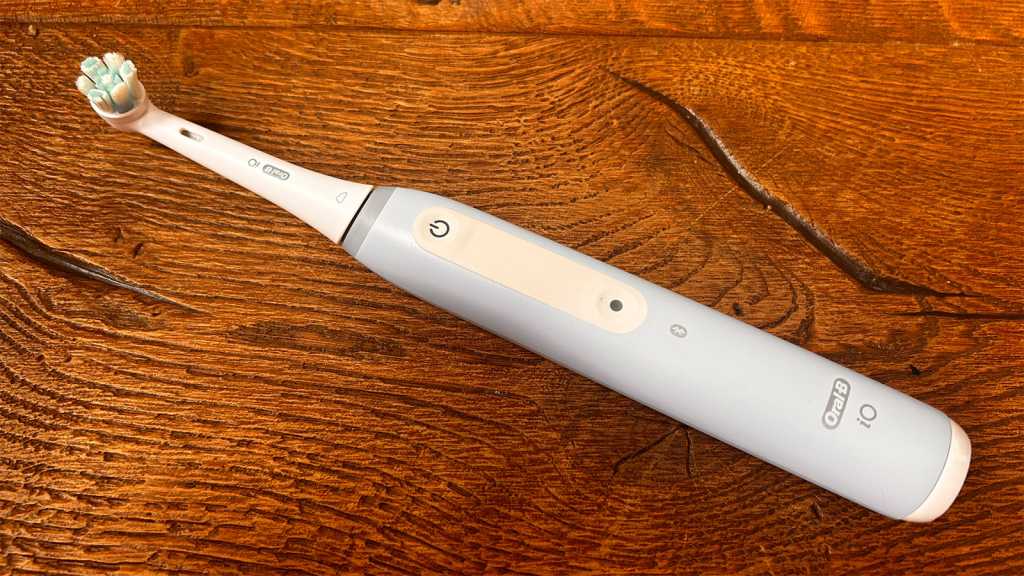
As a modern individual, I always kickstart my day by brushing my teeth, unlike the Medieval peasants of the past. Even though my bathroom is filled with various electric toothbrushes from previous reviews, my go-to choice is the Oral-B iO4. This specific model has proven to provide the best brushing performance, which is crucial for maintaining my dental health and avoiding unpleasant visits to the dentist.
However, one day, my trusty toothbrush failed to turn on, leaving me in a dilemma. Having tested numerous electric toothbrushes, I am well aware of the importance of maintaining good dental hygiene, especially at home.
My initial suspicion was directed towards the battery of the toothbrush, as I had heard of similar issues from other users. While the official Oral-B website was not much help in resolving the problem, a helpful community on the /oralbtoothbrush subreddit provided some valuable insights.
How to Resolve Battery Problems with Your Oral-B iO Toothbrush
If your toothbrush is still under warranty, it is advisable to return it for a replacement rather than attempting to fix it yourself, as this could void the warranty and potentially damage the water resistance of the device. However, if the warranty has expired, there are a few Reddit-approved methods you can try to fix the issue.
1. Clean the Metal Ring at the Top of the Brush Handle
Start with this simple solution, which may work for all iO models.
2. Perform a Factory Reset on the Brush
If your iO6 or above model is experiencing battery issues, try performing a factory reset through the settings menu on the brush.
3. Discharge the Battery and Recharge It
For brushes that are not holding a charge, particularly iO6 or above models, remove the brush head, switch on the brush, and let it run for about 20 minutes before recharging it.
4. Remove and Replace the Battery
This step should be considered a last resort. In cases like mine with the iO4 model, where there is no battery percentage indicator, accessing the battery physically is necessary. Here’s how I fixed my brush:
To access the battery, unscrew the base of the brush using the provided notches or a flathead screwdriver if needed. Carefully remove the spring that pops out, and then proceed to remove and clean the battery terminals. Reassemble the brush, and it should start charging normally.
If a battery replacement is necessary, compatible rechargeable batteries can be purchased online at affordable prices.
Despite these battery issues, Oral-B iO brushes are still highly recommended for their overall performance. For more information on the different models available and their features, check out our comprehensive Oral-B iO guide. Additionally, explore our recommendations for the best electric toothbrushes across all brands, including budget-friendly options.












Secure APK Sideloading: Harnessing the Power of Advanced Flow for Safe Android Installation

Gunvolt Chronicles: Luminous Avenger iX – The Complete Dual Collection

K2 Launches Groundbreaking High-Powered Satellite for Advanced Space Computing

The End of Security: iOS 13 and 14 Vulnerabilities in 2026

Exclusive Look: The 2027 Chevrolet Corvette Grand Sport Unleashed at Sebring

DON’T buy a Screen Protector before watching this.

Exploiting Vulnerable Drivers: How EDR Killers Use BYOVD to Disable Security

Alphabet’s X Unveils Innovative Spinout Targeting Costly Bureaucratic Challenges

Lawsuit: Halide co-founder accuses Sebastiaan de With of code theft for Apple

EU Takes Action Against Instagram and Facebook for Violating Illegal Content Rules

Warning: Facebook Creators Face Monetization Loss for Stealing and Reposting Videos

Facebook Compliance: ICE-tracking Page Removed After US Government Intervention

Facebook’s New Look: A Blend of Instagram’s Style

Facebook and Instagram to Reduce Personalized Ads for European Users

InstaDub: Meta’s AI Translation Tool for Instagram Videos

Reclaim Your Account: Facebook and Instagram Launch New Hub for Account Recovery

Meta discontinues Messenger apps for Windows and macOS

Breaking Updates: Meta Connect 2025 Unveils Latest Developments
DON’T buy a Screen Protector before watching this.

Beware of Fake Reviewers! ⚠️

Xiaomi Mi 11 Unboxing & Review.

The Galaxy S21 Ultra is Better than you think.

Samsung Galaxy S21 Ultra vs iPhone 12 Pro Max Camera Test Comparison.

Samsung S21 Ultra vs iPhone Battery Life Test!

The Truth about Xiaomi “Air Charging”

DON’T buy this Smartphone.

Galaxy S21 Ultra – Exynos vs Snapdragon.
-
 Facebook5 months ago
EU Takes Action Against Instagram and Facebook for Violating Illegal Content Rules
-
 Facebook5 months ago
Warning: Facebook Creators Face Monetization Loss for Stealing and Reposting Videos
-
 Facebook5 months ago
Facebook Compliance: ICE-tracking Page Removed After US Government Intervention
-
 Facebook3 months ago
Facebook’s New Look: A Blend of Instagram’s Style
-
 Facebook3 months ago
Facebook and Instagram to Reduce Personalized Ads for European Users
-
 Facebook5 months ago
InstaDub: Meta’s AI Translation Tool for Instagram Videos
-
 Facebook4 months ago
Reclaim Your Account: Facebook and Instagram Launch New Hub for Account Recovery
-
 Apple5 months ago
Meta discontinues Messenger apps for Windows and macOS
