
Tech News
Navigating the Software Design Process: A Complete Walkthrough

Understanding the Software Design Process
Software design is a critical foundation for the success of any software product. It involves following a structured process from start to finish to ensure that every step is carefully planned and executed. This approach makes the development and deployment of software much smoother, as it eliminates the risk of straying off course during the process.
Before diving into the development and testing of the source code, it is essential to conceptualize all the necessary features, anticipate potential challenges, and devise an overall design strategy. By following a well-defined software design process, you ensure that the software is easy to build, scale, maintain, and, most importantly, that it meets the needs of users and aligns with business objectives.
This article provides a comprehensive guide to the software design process, covering the stages and principles involved. It delves into key elements such as architecture, modules, interfaces, and data, essential design tools, and how a robust design leads to superior software outcomes.
Key Takeaways:
- Software design bridges the gap between requirements and development, translating user and business needs into a detailed technical blueprint.
- Design encompasses architectural, interface, and detailed levels, ensuring clarity and structure throughout the software.
- Good design enhances quality, scalability, maintainability, and overall performance while reducing bugs and adapting to change.
- The design process comprises 9 strategic stages, from requirements to maintenance, forming a complete lifecycle.
- Tools like Figma, Balsamiq, and Sketch expedite the software design process, making it more collaborative and user-centered.
Exploring the Software Design Process
The software design process entails a systematic approach to creating a detailed blueprint of a software system before coding commences. It involves translating user requirements into a technical plan that outlines the system’s architecture, components, interfaces, and data structures. This process is a pivotal step in the software development lifecycle (SDLC) as it focuses on how to build a system that meets requirements.
Three Levels of Software Design
Software design encompasses three levels or phases – architectural design, preliminary/interface design, and detailed design. These phases progress from a high-level conceptual overview to specific algorithmic and data structure details, creating a blueprint for the software.
1. Architectural Design
Architectural design defines the high-level external design that outlines the system’s structure and components to fulfill specific requirements. It establishes the foundation for the entire system, determining technologies, interfaces, and data flows to ensure functionality, scalability, security, and maintainability.
Focus:
- System architecture and technologies
- Modules, subsystems, layers
- High-level data flow and control flow
Output:
- Architecture diagrams
- Technology stack decisions
- System components and relationships
2. Preliminary/Interface Design
The interface design focuses on outlining how users interact with the system, including navigation, typography, buttons, and user interactions. Preliminary design sets the project’s overall direction, while interface design specifies user interaction methods to ensure a seamless experience.
Focus:
- Input/output behavior
- Component communication protocols
- User interface structure and flow
Output:
- API specifications
- UI wireframes/mockups
- Interface contracts between modules
3. Detailed Design
Detailed design is the lowest level of the software design phase that translates high-level architectural plans into specific technical blueprints for implementation. This involves defining the internal elements of each module, including logic, data structures, interfaces, and algorithms, providing developers with a guide for writing code.
Focus:
- Algorithms and control structures
- Class diagrams and object interactions
- Database schemas
- Function definitions and pseudocode
Output:
- Class/module specifications
- Logic flowcharts
- Entity-relationship diagrams
The Importance of Design in Software Development
Design plays a crucial role in creating software that is understandable, reliable, and adaptable. A solid design translates user needs into a concrete plan, ensuring the final product is efficient, maintainable, and meets functional and non-functional requirements. This leads to lower costs, faster development, and an enhanced user experience. Here are the benefits of software design:
- Improves quality and reduces defects
- Increases maintainability and adaptability
- Enhances performance
- Reduces costs and development time
- Ensures user satisfaction
- Promotes reusability
- Provides a foundation for development
Every line of code starts with a clear vision; design turns that vision into reality.
— Mehul Rajput, CEO of MindInventory
Elements of the Software Design Process
The software design process comprises key elements that define how a system functions internally and externally. These elements guide both high-level structure and low-level implementation decisions.
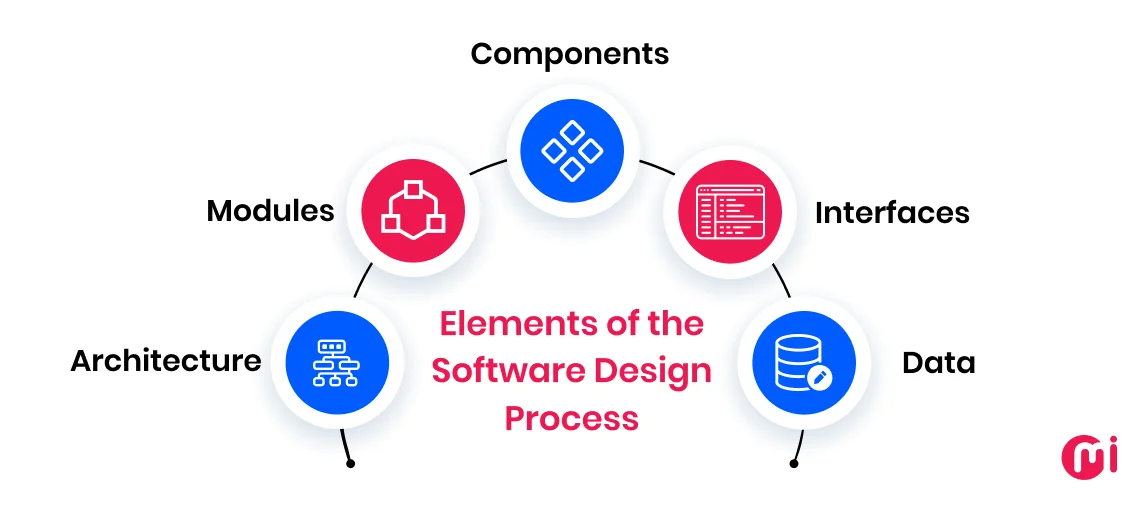
1. Architecture
Architecture defines the overall structure of the system, depicting how various parts interact. It establishes the foundation for performance, scalability, and reliability, influencing technology choices and system behavior.
2. Modules
Modules are self-contained software units that perform specific functions, breaking down the system into manageable parts with defined responsibilities. Modular design enhances readability, usability, and maintainability, allowing teams to work on different modules independently.
3. Components
Components are smaller building blocks within modules, promoting code reuse, separation of concerns, and complexity management at a granular level.
4. Interfaces
Interfaces define how system parts communicate internally and externally, ensuring loose coupling and easy integration without revealing internal details.
5. Data
Data includes information structuring, storage, and transfer throughout the system, affecting performance, data integrity, and system growth.
Key Principles of Good Software Design
Key software design principles include modularity, abstraction, encapsulation, correctness, scalability, refactoring, reusability, and maintainability. These principles play crucial roles in the software design process:
- Modularity: Breaks down software into smaller, self-contained modules for easier testing, maintenance, and updates.
- Abstraction: Hides complex details, presenting essential features to users for better understanding.
- Correctness: Ensures software behaves as intended, meeting requirements accurately.
- Scalability: Enables software to handle increased load without performance issues, ensuring future readiness.
- Refactoring: Restructures code for improved readability, structure, and performance without altering behavior.
- Reusability: Designs components for multiple use cases, saving time and reducing bugs.
- Maintainability: Allows easy updates and enhancements over time, reducing costs and supporting growth.
9 Stages of the Software Design Process
The software design process involves nine stages, from requirements to maintenance, ensuring a smooth transition from concept to implementation:
1. Requirement Analysis
Collecting, documenting, and analyzing stakeholder needs to define the project’s scope and functionality.
2. Planning
Defining project goals, feasibility, scope, resources, budget, and risk management.
3. Technical Design
Planning system architecture, technical structure, and technology stack.
4. User Interface Design
Creating intuitive, user-friendly interfaces for seamless user experiences.
5. Design Validation
Reviewing and validating designs to ensure practicality and effectiveness.
6. Development
Turning design and requirements into working software.
7. Testing
Ensuring software functions as expected and is free of bugs or vulnerabilities.
8. Deployment
Releasing software to users in a controlled manner.
9. Maintenance
Supporting ongoing updates, bug fixes, and enhancements post-deployment.
Tools for Software Design
Various tools aid in the software design process, such as Figma, Balsamiq, Axure RP, Sketch, and InVision Studio, offering features for different design needs:
1. Figma
A cloud-based design and prototyping tool supporting design systems and collaborative workflows.
2. Balsamiq
A low-fidelity wireframing tool for quick UI layout sketches.
3. Axure RP
An advanced prototyping tool for interactive, dynamic prototypes without coding.
4. Sketch
A vector-based design tool for UI and digital product designs.
5. InVision Studio
A screen design and prototyping tool focusing on motion and interaction design.
Conclusion
Following a well-defined software design process is crucial for building software that meets requirements and aligns with business goals. From requirement analysis to maintenance, a structured approach leads to successful software design and development.
At MindInventory, we excel in designing and delivering exceptional software development services tailored to your needs. With extensive experience and a proven track record, we ensure quality solutions that drive business success. Whether you need new software development or modernization services, we are here to help. Contact our experts to discuss your software design and development needs.
FAQs: Software Design Process
The difference between software design and architecture is that architecture defines the high-level structure and system components, while software design focuses on the detailed implementation of those components, including UI, logic, and interactions.
The design phase is crucial, and skipping design often leads to rework and poor scalability. Even small teams benefit from a lightweight design to clarify goals and avoid misalignment.
Design should be revisited whenever requirements change, technical issues arise, or you’re scaling the product. In agile teams, this often happens every sprint or major release.
Figma is ideal for beginners, as it’s free, intuitive, browser-based, and supports real-time collaboration with built-in templates and community resources.










The End of Security: iOS 13 and 14 Vulnerabilities in 2026

Exclusive Look: The 2027 Chevrolet Corvette Grand Sport Unleashed at Sebring

DON’T buy a Screen Protector before watching this.

Exploiting Vulnerable Drivers: How EDR Killers Use BYOVD to Disable Security

Alphabet’s X Unveils Innovative Spinout Targeting Costly Bureaucratic Challenges

Lawsuit: Halide co-founder accuses Sebastiaan de With of code theft for Apple

Previewing the Next Level: Apple Unveils iOS 26.4 RC for iPhone with Exciting New Features

Revamped Design: BMW’s Modern Makeover for the i3 Sedan

GitHub Actions Exploited in Trivy Vulnerability Scanner Breach, Infostealer Unleashed

EU Takes Action Against Instagram and Facebook for Violating Illegal Content Rules

Warning: Facebook Creators Face Monetization Loss for Stealing and Reposting Videos

Facebook Compliance: ICE-tracking Page Removed After US Government Intervention

Facebook’s New Look: A Blend of Instagram’s Style

Facebook and Instagram to Reduce Personalized Ads for European Users

InstaDub: Meta’s AI Translation Tool for Instagram Videos

Reclaim Your Account: Facebook and Instagram Launch New Hub for Account Recovery

Meta discontinues Messenger apps for Windows and macOS

Breaking Updates: Meta Connect 2025 Unveils Latest Developments
DON’T buy a Screen Protector before watching this.

Beware of Fake Reviewers! ⚠️

Xiaomi Mi 11 Unboxing & Review.

The Galaxy S21 Ultra is Better than you think.

Samsung Galaxy S21 Ultra vs iPhone 12 Pro Max Camera Test Comparison.

Samsung S21 Ultra vs iPhone Battery Life Test!

The Truth about Xiaomi “Air Charging”

DON’T buy this Smartphone.

Galaxy S21 Ultra – Exynos vs Snapdragon.
-
 Facebook5 months ago
EU Takes Action Against Instagram and Facebook for Violating Illegal Content Rules
-
 Facebook5 months ago
Warning: Facebook Creators Face Monetization Loss for Stealing and Reposting Videos
-
 Facebook5 months ago
Facebook Compliance: ICE-tracking Page Removed After US Government Intervention
-
 Facebook3 months ago
Facebook’s New Look: A Blend of Instagram’s Style
-
 Facebook3 months ago
Facebook and Instagram to Reduce Personalized Ads for European Users
-
 Facebook5 months ago
InstaDub: Meta’s AI Translation Tool for Instagram Videos
-
 Facebook4 months ago
Reclaim Your Account: Facebook and Instagram Launch New Hub for Account Recovery
-
 Apple5 months ago
Meta discontinues Messenger apps for Windows and macOS
