
Mobile Tech
The Ultimate Guide to iPhone 17 Charging Accessories

There’s nothing worse than seeing a 10% low power alert when you’re halfway through a holiday flight or in the middle of taking family photos around the tree. That’s why it’s important to ensure you’ve packed the proper power for your iPhone, especially in the midst of a busy holiday travel season, where it’s easy to forget those essentials while you’re packing the gifts, kids, and pets into the car.
In Part 3 of our series, I’ve rounded up the power accessories that have actually earned a permanent spot in my family’s travel bags. While there are plenty of basic cables and power bricks that will get the job done, I’m focusing instead on the best on-the-go experiences, MagSafe innovations, and high-speed chargers that make the iPhone 17 experience truly seamless and will be a welcome gift for frequent travelers or anyone who’s nervous about getting through the day on a full charge.
The Last-Minute iPhone Gift Series
Mophie Juice Pack: Power on the Go
The Juice Pack likely needs no introduction to long-time iPhone users — Mophie’s first charging case debuted in 2006, although it wasn’t until the iPhone came along that it became a hit. Since then, it’s become the best-known battery case on the market, and the company continues to release updated versions for each year’s new iPhones.
This year, there’s a Juice Pack for the iPhone 17 Pro and iPhone Air, although Mophie has sadly left the iPhone 17 out for now. That’s unfortunate, as even though the iPhone 17 shares a very similar design to the iPhone 16, the dimensions are just different enough to be incompatible with last year’s Juice Pack model.
The Juice Pack for iPhone Air is easily the most useful, delivering 60% more power to ensure you get through an entire day while adding minimal bulk. I didn’t get to try this one, but based on Mophie’s very solid track record, I’m confident in saying it will be a solid choice for any iPhone Air user out there who needs extended runtimes without the awkwardness of slapping on MagSafe battery packs, although it naturally takes away from the svelte design of Apple’s new model.
The Juice Pack for iPhone 17 Pro Max, which is the one I’ve been testing and using, is arguably less necessary as an everyday carry considering how large the internal battery already is. However, it’s still a great way to ensure you have power to spare when you know you’ll be away from a charger for an extended period of time — or just don’t feel like dealing with the hassle of topping up your iPhone.
The 3,600 mAh battery pack inside promises 50% additional run time, but as I wrote years ago, it’s worth mentioning that battery cases lean into a different power strategy than external battery packs that can actually help to preserve your battery health.
The Case for Improved Battery Health
Most folks who use MagSafe battery packs tend to only pop them on when their internal battery is getting low, and there’s been a tendency to use battery cases in the same way. However, that doesn’t make a lot of sense when your iPhone is wearing the case all day anyway.
Ten years ago, Apple released its own Smart Battery Case for the iPhone, a short-lived product that distinguished itself from the competition by the lack of an off switch. In that product, Apple showed us the “right” way to use a battery case: slap it on your iPhone at the start of the day and then run from the external battery until it’s dead, using the iPhone’s internal battery as the backup.
While Mophie’s Juice Packs still include a power button, I strongly recommend leaving it on from the start. Like all lithium-ion batteries, the iPhone battery is rated for a set number of charge cycles, after which it begins losing capacity. By running from the case, you avoid using up your internal battery. Plus, it takes more energy to charge a battery than to simply run the phone from an external source, so you’ll get more efficiency out of the Juice Pack this way.
This is where the newer Adaptive Power features in iOS 26 and the classic charging limit toggles become incredibly useful. You can set your charging limit to 80% or 90% in Settings, ensuring the case keeps you at a healthier level all day without stressing the internal cells.
Just keep in mind that you’re still strapping a heat-generating battery to the back of your iPhone, so you should not only turn the case off when you’re engaging in CPU-intensive activities like playing AAA games — you may want to remove it entirely. Apple’s new vapor chamber cooling is great, but it’s not magic; the heat has to go somewhere, and it doesn’t help when it’s fighting to get through a thick case with a 3,600 mAh battery inside.
Design and Features
You’ll be bulking up your iPhone quite a bit with the Juice Pack, but it doubles as a reasonably protective case against the bumps and scrapes of everyday life. It’s rated for six-foot drop protection and includes raised edges to protect the screen and a decent amount of grippiness to help you keep a hold on your iPhone, plus a spot to attach a lanyard.
This year’s models also bring USB-C audio passthrough for the first time, which will be a boon for those who want to plug in wired USB-C headphones for listening to Apple Music in lossless quality.
There’s naturally also USB-C passthrough charging, which prioritizes topping up your iPhone battery before the one in the case.
While MagSafe wireless charging is still not available, the Juice Pack does feature strong magnets on the back that can attach to MagSafe stands, mounts, accessories, and any metallic surface. This makes it convenient for mounting your iPhone on your fridge and keeping it at eye level while you’re working in the kitchen.
The Juice Pack provides standard coverage for the volume and side sleep buttons, with an open Camera Control instead of a capacitive pass-through button. It also includes a button on the back for powering the case on or off and checking the approximate battery level using the four LEDs beside it.
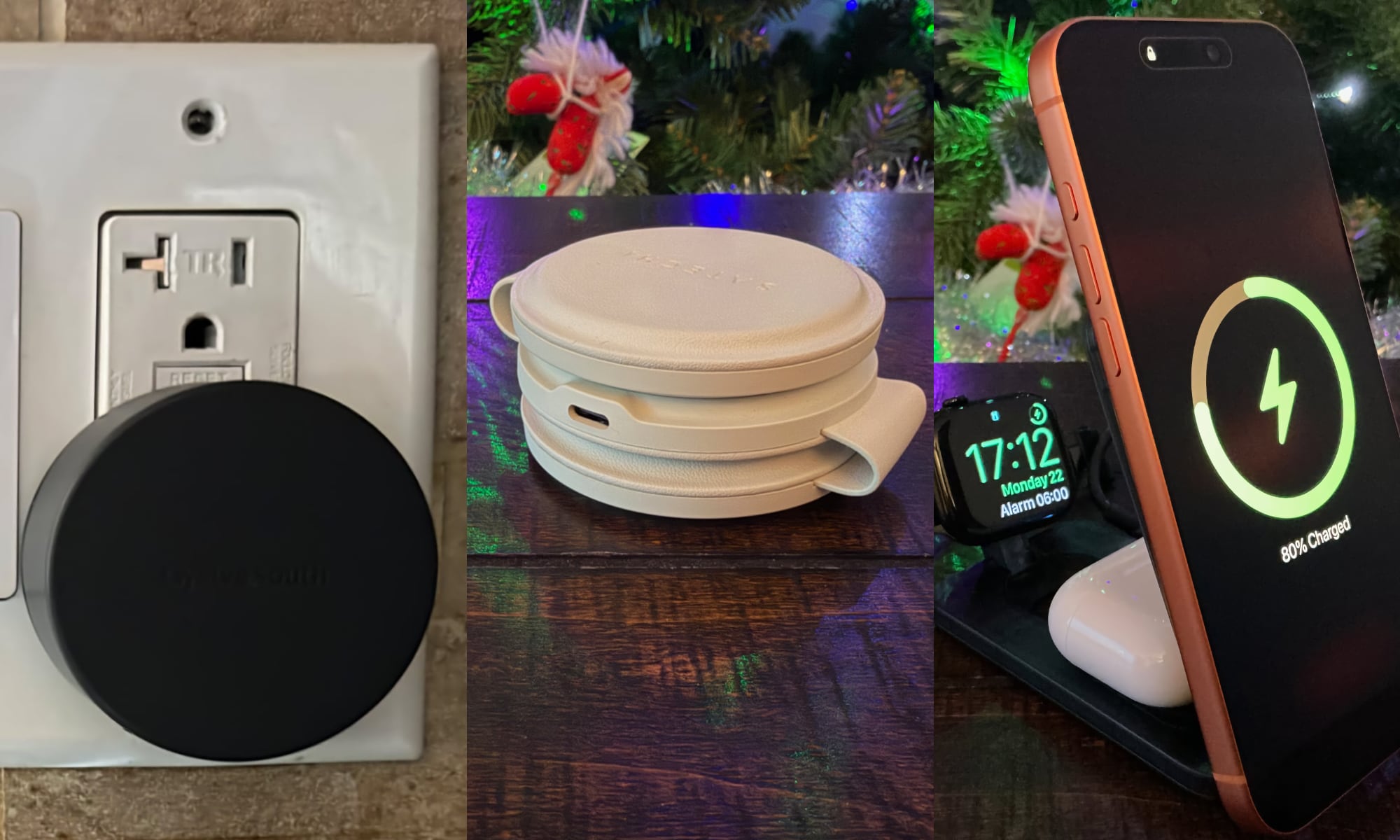
TwelveSouth’s PowerBug is a clever solution that incorporates a MagSafe charging ring into an unassuming USB-C power brick. This allows you to plug in your iPhone and dock it anywhere with an outlet, eliminating the need for cables. The PowerBug is Qi2 and MagSafe-certified, delivering 15W of wireless charging power and featuring a USB-C port for additional charging capabilities.
The Satechi OntheGo 3-in-1 charger is a compact and stylish option for travelers, offering fast charging for an iPhone, Apple Watch, and AirPods. It folds up into a compact form for easy portability and includes a color-matched USB-C cable and travel pouch.
ESR’s CryoBoost Foldable 3-in-1 magnetic charging station combines a tech-forward aesthetic with practical features. It includes a stand for propping up your iPhone, a pad for docking your Apple Watch, and the ability to charge AirPods. The charger also helps keep your iPhone cool while charging, preserving battery health and speeding up charging.
ESR’s charger supports the Qi 2.2 standard, offering wireless charging rates up to 25W for compatible devices. It includes a USB-C cable and power brick in the box for added convenience.
In the next part of the series, we will explore accessories that solve common iPhone-related challenges, including mounts for the car and home, screen protectors, custom skins, and straps.












Upcoming Electric BMW X5 M Set to Hit Production in Two Years: Latest Updates

Lost and Found: Navigating the World of Stamps with One Very Dumb Question

14 MEGA Smartphone Fails we’ll never forget.

Axios npm Hijacking: How Fake Teams Error Fix Led to Maintainer Account Takeover

Flashpoint: The Newest Addition to ARC Raiders in Update 1.22

OpenClaw: The Premium Experience for Anthropic subscribers

Closing the Communication Gap: How OCSF Provides the Missing Link for Data Security Teams

Apple’s 2026 Product Launches Hindered by Stupidity: A Delayed Release

Volvo EX30 EV: Urgent Fix Needed for Fire Risk Recall

EU Takes Action Against Instagram and Facebook for Violating Illegal Content Rules

Warning: Facebook Creators Face Monetization Loss for Stealing and Reposting Videos

Facebook Compliance: ICE-tracking Page Removed After US Government Intervention

Facebook’s New Look: A Blend of Instagram’s Style

Facebook and Instagram to Reduce Personalized Ads for European Users

InstaDub: Meta’s AI Translation Tool for Instagram Videos

Reclaim Your Account: Facebook and Instagram Launch New Hub for Account Recovery

Meta discontinues Messenger apps for Windows and macOS

Breaking Updates: Meta Connect 2025 Unveils Latest Developments
14 MEGA Smartphone Fails we’ll never forget.

Why Samsung’s Transparent Phone will fail.

6G – Explained!

Is Samsung about to take over?

The Problem with Fast Chargers.

if smartphone commercials were honest.

iPhone 12 – What were Apple thinking?

OnePlus 8T vs Google Pixel 5 – The Brutal Truth.

iPhone 12 / 12 Pro Unboxing – ft MKBHD!
-
 Facebook5 months ago
EU Takes Action Against Instagram and Facebook for Violating Illegal Content Rules
-
 Facebook6 months ago
Warning: Facebook Creators Face Monetization Loss for Stealing and Reposting Videos
-
 Facebook6 months ago
Facebook Compliance: ICE-tracking Page Removed After US Government Intervention
-
 Facebook4 months ago
Facebook’s New Look: A Blend of Instagram’s Style
-
 Facebook4 months ago
Facebook and Instagram to Reduce Personalized Ads for European Users
-
 Facebook6 months ago
InstaDub: Meta’s AI Translation Tool for Instagram Videos
-
 Facebook4 months ago
Reclaim Your Account: Facebook and Instagram Launch New Hub for Account Recovery
-
 Apple6 months ago
Meta discontinues Messenger apps for Windows and macOS
