
Security
Thunderbird Enhances Compatibility with Microsoft Exchange: Seamless Integration Now Available


Thunderbird Enhances Native Support for Microsoft Exchange Accounts
Thunderbird, the popular free and open-source email application developed by Mozilla, has rolled out version 145 with significant updates. One of the key highlights of this release is the full native support for Microsoft Exchange email via the Exchange Web Services (EWS) protocol.
This latest development eliminates the need for third-party add-ons for Thunderbird users operating in Microsoft Exchange environments such as Microsoft 365 and Office 365. With seamless message synchronization and folder management capabilities both locally and on the server, users can now experience enhanced efficiency and convenience.
Migrating from Outlook to Thunderbird has also been streamlined, as the email client can automatically detect settings and utilize Microsoft’s OAuth2 authorization protocol.
The official announcement from Thunderbird emphasizes the significance of this update, stating, “Until now, Thunderbird users in Exchange-hosted environments often relied on IMAP/POP protocols or third-party extensions. With full native Exchange support for email, Thunderbird now works more seamlessly in Exchange environments, including full folder listings, message synchronization, folder management both locally and on the server, attachment handling, and more.”
Microsoft Exchange serves as an email and collaboration server widely utilized by businesses for managing communications, calendars, and contacts. Organizations typically connect to an Exchange server using Outlook or Microsoft 365, but any application with EWS support, such as Thunderbird, can now establish a connection.
Transitioning from Outlook to Thunderbird is a straightforward process in version 145 or later. Users can add their Exchange account through the Account Hub, navigate to Exchange/Exchange Web Services, and follow the guided setup provided by the application.
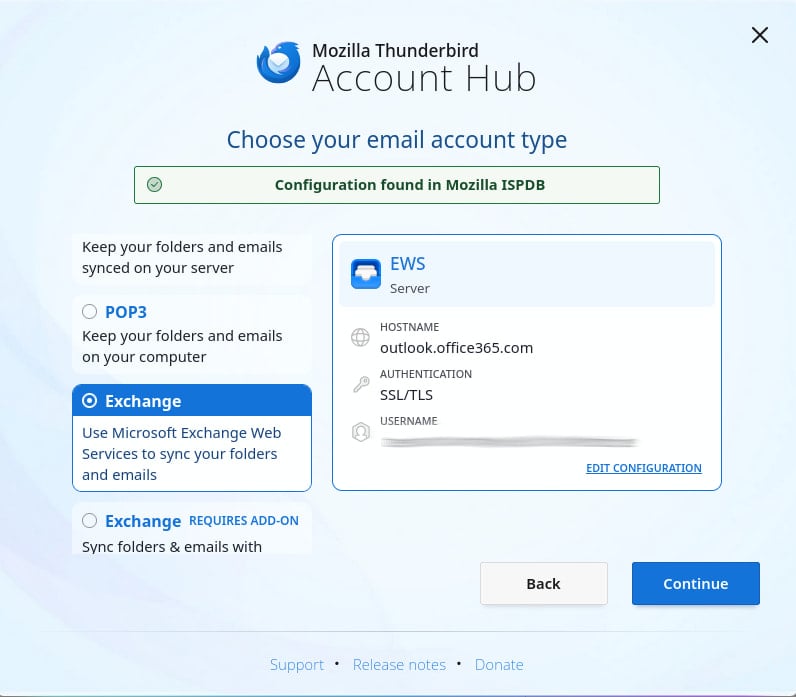
Source: Mozilla
The current features supported by Thunderbird’s Exchange integration include email setup, folder access, message management, attachment handling, search functionality, and compatibility with Microsoft 365 domains and on-premise Exchange servers.
Looking ahead, the Thunderbird development team aims to introduce additional features such as Calendar syncing, Address book/contacts integration, advanced filter actions, and support for specific authentication methods and Microsoft Graph integration.
While no specific timelines have been provided for these enhancements, Thunderbird remains committed to supporting EWS due to its widespread usage. Microsoft has assured continued support for EWS in the foreseeable future, even as it transitions towards the Microsoft Graph interface.
For more details on Thunderbird’s Exchange support and instructions for account setup, users can refer to the dedicated wiki page and support portal.

As MCP (Model Context Protocol) becomes the standard for connecting LLMs to tools and data, security teams are moving fast to keep these new services safe.
This free cheat sheet outlines 7 best practices you can start using today.













Apple WWDC 2026: The Ultimate Guide to What’s Coming Next

Unleashing the Beast: The 2027 Mercedes-AMG GT Black Series

15 Smartphone FAILS to ruin your day 😂

Data Breach at Mazda: Employee and Partner Information Exposed

City of Legends: Wartales Expansion – Choose Your Fate

Xiaomi 17 vs 17 Ultra Comparison: Why You Should Consider the Standard Model

Insight Partners Investigates ‘Fake Compliance’ Allegations, Delays Demos and Scrubs Investment Plans

Wuthering Heights: A Tale of Love and Loss Streaming Now

The Evolution of Apple’s AirPods Max: Unveiling the AirPods Max 2

EU Takes Action Against Instagram and Facebook for Violating Illegal Content Rules

Warning: Facebook Creators Face Monetization Loss for Stealing and Reposting Videos

Facebook Compliance: ICE-tracking Page Removed After US Government Intervention

Facebook’s New Look: A Blend of Instagram’s Style

Facebook and Instagram to Reduce Personalized Ads for European Users

InstaDub: Meta’s AI Translation Tool for Instagram Videos

Reclaim Your Account: Facebook and Instagram Launch New Hub for Account Recovery

Meta discontinues Messenger apps for Windows and macOS

Breaking Updates: Meta Connect 2025 Unveils Latest Developments
15 Smartphone FAILS to ruin your day 😂

World’s Biggest Smartphone Collection?

I switched to iPhone – This is what I found out.

What happened to Beats by Dre?

DON’T buy a Screen Protector before watching this.

Beware of Fake Reviewers! ⚠️

Xiaomi Mi 11 Unboxing & Review.

The Galaxy S21 Ultra is Better than you think.

Samsung Galaxy S21 Ultra vs iPhone 12 Pro Max Camera Test Comparison.
-
 Facebook5 months ago
EU Takes Action Against Instagram and Facebook for Violating Illegal Content Rules
-
 Facebook5 months ago
Warning: Facebook Creators Face Monetization Loss for Stealing and Reposting Videos
-
 Facebook5 months ago
Facebook Compliance: ICE-tracking Page Removed After US Government Intervention
-
 Facebook3 months ago
Facebook’s New Look: A Blend of Instagram’s Style
-
 Facebook4 months ago
Facebook and Instagram to Reduce Personalized Ads for European Users
-
 Facebook5 months ago
InstaDub: Meta’s AI Translation Tool for Instagram Videos
-
 Facebook4 months ago
Reclaim Your Account: Facebook and Instagram Launch New Hub for Account Recovery
-
 Apple5 months ago
Meta discontinues Messenger apps for Windows and macOS
