
Security
Troubleshooting Windows Task Manager: Resolving Issues Post-KB5067036 Update

Windows 11 Task Manager Bug Causing Performance Issues
Recently, Microsoft acknowledged a known issue affecting users who are unable to quit the Windows 11 Task Manager after installing the optional October 2025 update. The problem arises when the Task Manager continues to run in the background even after users attempt to close the app using the “Close” button. This issue has led to performance problems such as stuttering and CPU hang-ups.
According to Microsoft, the issue occurs after installing Windows Updates released on or after October 28, 2025 (KB5067036). When users try to close Task Manager using the “Close (X)” button, the process does not terminate properly. As a result, the previous instance of Task Manager remains active in the background without any visible window.
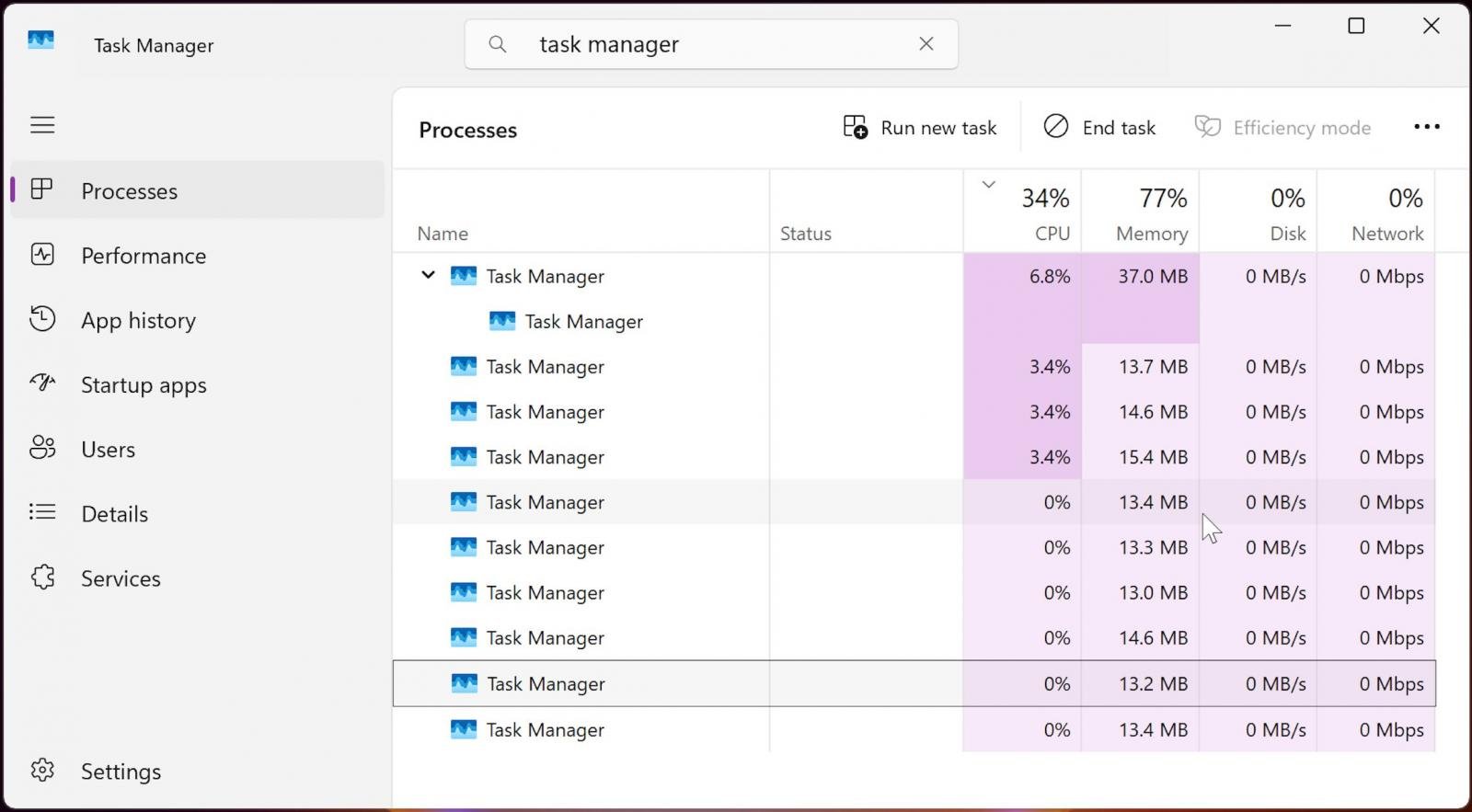
This issue leads to multiple lingering instances of taskmgr.exe, consuming system resources and potentially degrading device performance. These additional instances appear as “Task Manager” in the Processes tab and as “Taskmgr.exe” in the Details tab.
While having a few Task Manager processes running in the background may not impact most systems significantly, the accumulation of multiple instances can lead to noticeable slowdowns in other applications, as noted by Microsoft.
Microsoft is currently investigating the issue and has not yet released a fix. However, the company has provided a temporary workaround for users impacted by the KB5067036 preview update from last month.
Users can manually quit each process by selecting them in a new Task Manager window and clicking the “End Task” button, or they can terminate all processes simultaneously by following these steps:
- Select Start or press the Windows key.
- Type cmd or Command Prompt in the search box.
- Select Command Prompt from the results.
- To run as an administrator: Right-click Command Prompt and select Run as administrator.
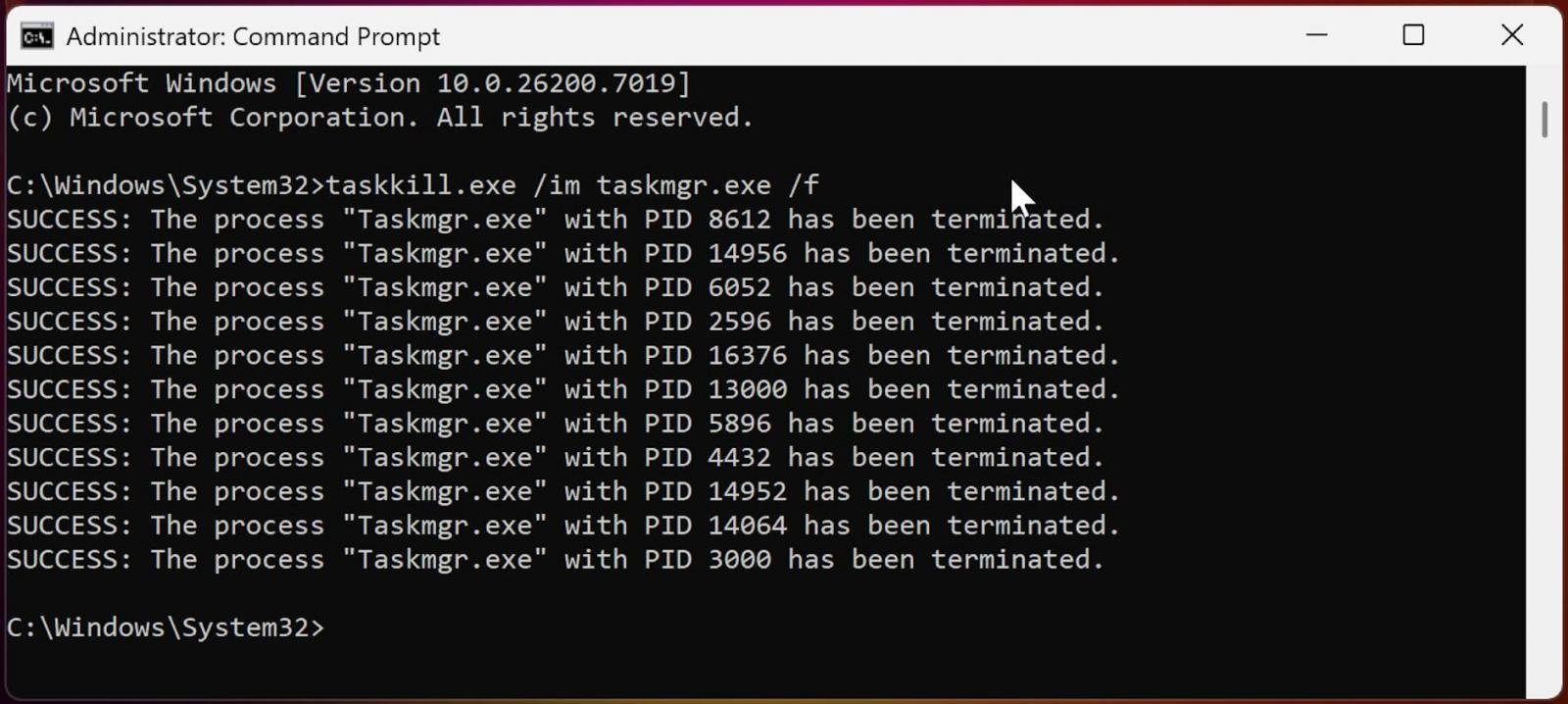
- In the Command Prompt window, type the following command and press Enter:
taskkill.exe /im taskmgr.exe /f
The non-security preview update KB5067036, released on October 28, includes an updated Start Menu and the rollout of the Administrator Protection Windows security feature. This optional update requires manual installation unless the “Get the latest updates as soon as they’re available” option is enabled.
With the release of KB5067036, Microsoft has addressed issues affecting the Windows 11 Media Creation Tool (MCT), which is now operational again following problems on up-to-date Windows 10 PCs and Windows 11 Arm64 PCs after installing the Windows 11 2025 Update.
The update also resolves 0x800F081F update errors impacting Windows 11 24H2 systems after installing the KB5050094 January 2025 preview cumulative update and subsequent updates.
MCP Best Practices for Enhanced Security

As MCP (Model Context Protocol) becomes the standard for connecting LLMs to tools and data, security teams are prioritizing the security of these new services.
Download our free cheat sheet outlining 7 best practices to enhance security today.













Exclusive Arrival: Cupra Born VZ Lands in Australia – But There’s a Twist!

iPhone 12 Pro Max vs Samsung Note 20 Ultra / Huawei Mate 40 Pro Camera Test Comparison.

ClickFix: The New Threat to macOS Security

Kingdom Come: Deliverance 2 – The Rise of Artificial Intelligence

Elon Musk’s Latest Venture Faces Uncertainty as Last Co-Founder Departs xAI

Apple Bids Farewell to the Mac Pro Tower: Is it Truly Dead?

Porsche 911 GT3 RS Facelift: Unveiling the 992.2 Model in August 2026

Bearlyfy Strikes Russian Companies with Unique GenieLocker Ransomware Attack

Innovative Ventures: The 8 Startups Investors Can’t Resist from YC Demo Day

EU Takes Action Against Instagram and Facebook for Violating Illegal Content Rules

Warning: Facebook Creators Face Monetization Loss for Stealing and Reposting Videos

Facebook Compliance: ICE-tracking Page Removed After US Government Intervention

Facebook’s New Look: A Blend of Instagram’s Style

Facebook and Instagram to Reduce Personalized Ads for European Users

InstaDub: Meta’s AI Translation Tool for Instagram Videos

Reclaim Your Account: Facebook and Instagram Launch New Hub for Account Recovery

Meta discontinues Messenger apps for Windows and macOS

Breaking Updates: Meta Connect 2025 Unveils Latest Developments
iPhone 12 Pro Max vs Samsung Note 20 Ultra / Huawei Mate 40 Pro Camera Test Comparison.

iPhone 12 Pro Max vs Samsung Note 20 Ultra / Huawei / Xiaomi / OnePlus Battery Life DRAIN Test.

The BEST Smartphone of 2020 🏆

The Self-Healing Smartphones!

Apple is not what it used to be.

Smartphones are Boring now.

The Fastest Android Phone Ever.

Unboxing the $122,000 Smartphone. 🤯

Are Linux Smartphones about to KILL Android?
-
 Facebook5 months ago
EU Takes Action Against Instagram and Facebook for Violating Illegal Content Rules
-
 Facebook5 months ago
Warning: Facebook Creators Face Monetization Loss for Stealing and Reposting Videos
-
 Facebook5 months ago
Facebook Compliance: ICE-tracking Page Removed After US Government Intervention
-
 Facebook4 months ago
Facebook’s New Look: A Blend of Instagram’s Style
-
 Facebook4 months ago
Facebook and Instagram to Reduce Personalized Ads for European Users
-
 Facebook6 months ago
InstaDub: Meta’s AI Translation Tool for Instagram Videos
-
 Facebook4 months ago
Reclaim Your Account: Facebook and Instagram Launch New Hub for Account Recovery
-
 Apple5 months ago
Meta discontinues Messenger apps for Windows and macOS
