Gadgets
Ultimate Efficiency: Startech 140W Universal Triple Monitor Docking Station Unveiled


Any links to online stores should be assumed to be affiliates. The company or PR agency provides all or most review samples. They have no control over my content, and I provide my honest opinion.
I have reviewed a lot of docking stations over the past few years, and I have always been a big fan of them, but late last year, I started working in IT support, and most clients use laptops combined with multi-monitor setups. This, therefore, makes a dock essential.
We tend to match docks for the laptop, which are predominantly either Dell or Lenovo.
After a year of supporting clients with docks, I have realized how unreliable they can be, and the cost of branded docks seems disproportionate for what you are getting.
I have reviewed products from Startech in the past, and while I have found them to be good, I have often criticized the prices when compared to options on Amazon from popular brands like Anker and Ugreen.
However, Startech has one advantage over those brands: our MSP and I believe many others wouldn’t typically supply products from the likes of Anker or Ugreen, but they would with Startech.
So, I was quite eager to test the new Startech 140W Universal Triple Monitor Docking Station. At £242 RRP, it is unlikely to win over many home users, especially when you can pick up similarly specced options from Ugreen, Anker, and OWC at lower price points.
One big selling point for this dock, in comparison to many consumer options, is the support for three 4K displays. It has two inputs that you can use either DP or HDMI on, then a USB-C output which supports DP Alt-Mode Video. It achieves this using DisplayLink, which allows it to support multi-monitor setups over older and slower USB-C ports, and it even includes a USB-A adaptor allowing you to use this on legacy systems.
Related Reviews
Specification
| Ports | |
| External Ports | |
| Port Type | Details |
| USB 3.2 Type-A | Gen 1, 5Gbps |
| USB 3.2 Type-A with BC 1.2 | Gen 1, 5Gbps, 7.5W |
| USB 3.2 Type-C with BC 1.2 | Gen 1, 5Gbps, 18W |
| 3.5mm Audio | Stereo Female, 4-position |
| RJ-45 | 2.5G/1G/100Mbps/10Mbps |
| DisplayPort | 2 ports |
| HDMI | 2 ports |
| USB 2.0 Type-A | 2 ports, 480Mbps |
| USB 3.2 Type-C | Gen 2, 10Gbps |
| USB 3.2 Type-C (DP Alt Mode) | Gen 2, 10Gbps, 7.5W, DP Alt-Mode Video |
| Host Connectivity | |
| Connector | Specification |
| USB Type-C | Host connection port |
| Hardware | |
| Feature | Specification |
| 4K Support | Yes |
| Fast-Charge Ports | Yes |
| Displays Supported | 3 |
| Audio | Yes |
| Interface | USB 3.2 Gen 2 10Gbps |
| Bus Type | USB-A, USB-C |
| Lock Slot Compatibility | Kensington Standard, Kensington Nano, Noble Wedge |
| Chipsets | DisplayLink DL6950; GL5911; GL5910; GL3590; RTL8156B |
| MTBF | 42,209 Hours |
| Performance | |
| Feature | Specification |
| Wake on LAN | Yes |
| Max Data Transfer Rate | 10Gbps |
| Max Digital Resolution | 4K 60Hz |
| Type and Rate | USB 3.2 Gen 2, 10 Gbit/s |
| UASP Support | Yes |
| Supported Charging | BC 1.2 (1.5A), USB-C (18W) |
| Compatible Networks | 2.5G / 1G / 100Mbps / 10Mbps |
| PXE | Yes |
| Full Duplex | Yes |
| Power | |
| Item | Specification |
| Power Source | AC Adapter Included |
| Input Voltage | 100 to 240 AC |
| Input Current | 2.5A |
| Output Voltage | 20V DC |
| Output Current | 10.5A |
| Centre Tip Polarity | Positive |
| Plug Type | M |
| Power Consumption | 210W |
Design / Build Quality
Docking stations are not exactly attractive in the first place, and Startech does not make the most visually appealing products. This is very much function over form. The chassis is constructed with a utilitarian grey and black aesthetic that blends easily into a corporate office environment but will not win any design awards. The casing feels dense and substantial, which is usually a positive indicator for thermal management. Docks pushing 140W of power and driving three monitors generate significant heat, so the materials used here likely serve as a passive heatsink.
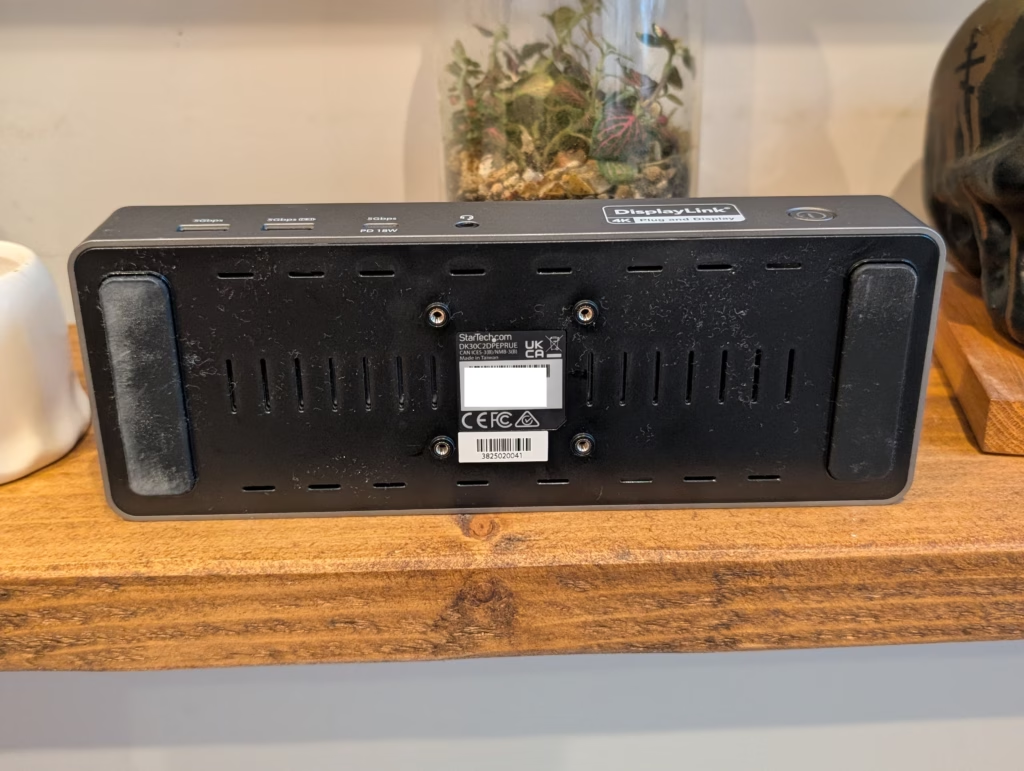
The layout of the ports is logical for a permanent desk setup. The rear houses the connections that you typically plug in once and forget, such as the monitor cables (HDMI/DP), the Ethernet connection for wired internet, and the USB 2.0 ports which are ideal for a keyboard and mouse. Keeping these at the back aids in cable management, preventing the “spider web” effect across your desk.
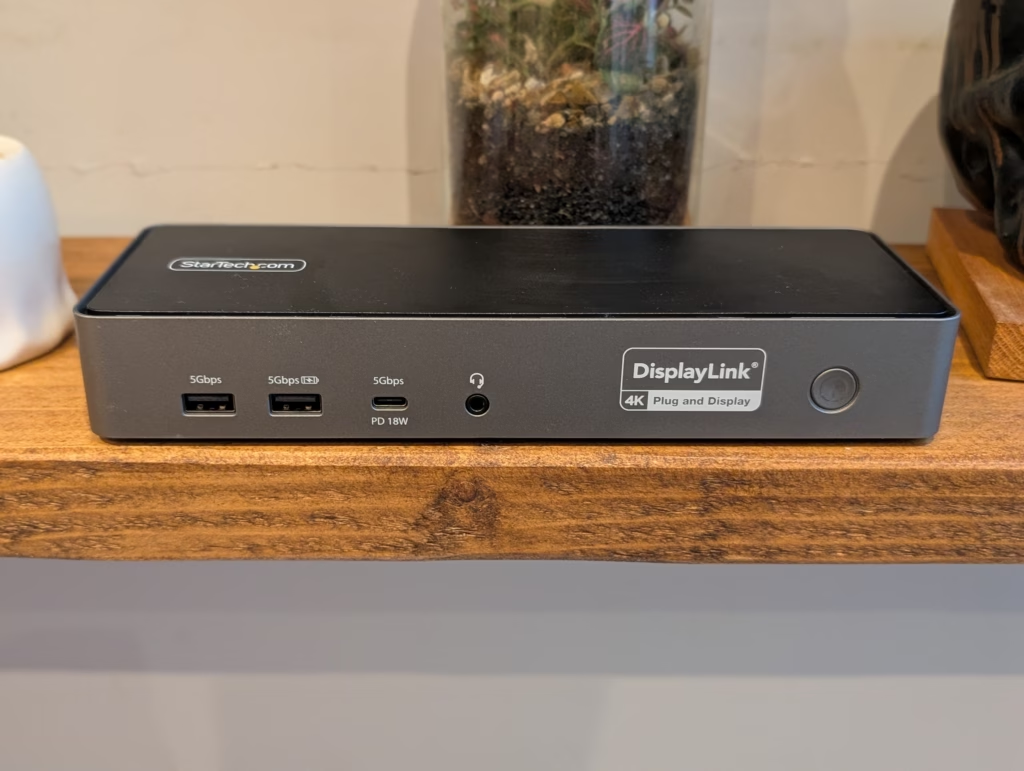
Conversely, the front panel features the ports you need frequent access to. There is a USB-C port capable of 18W charging, which is excellent for quickly topping up a phone or connecting a temporary drive. The inclusion of two USB-A ports on the front is also practical, as many wireless headset receivers and flash drives still utilize this connector. The power button is tactile and located on the front right, next to the audio jack.
One specific feature that leans heavily into the enterprise focus is the inclusion of three different lock slots. On the side of the unit, you will find a Kensington Standard slot, a Nano slot, and a Noble Wedge slot. In an office environment where hardware theft is a genuine concern, this flexibility ensures the dock can be secured regardless of which locking system the company has already invested in.












iPhone 12 vs iPhone 12 Pro / 11 Pro Max / 11 Pro / 11 / XR / SE Battery Life DRAIN Test.

TeamPCP Releases Telnyx Versions on PyPI, Conceals Malicious Stealer in WAV Files

The Sunday Gazette: Gaming News and Reviews

Y Combinator Graduate Glimpse Secures $35M Funding Round with a16z Leading Investment

Upgrade to iOS 26.4: The Latest and Greatest Features

Koenigsegg Gemera Hits the Production Line: A 6-Year Journey from Unveiling to Reality

Director Patel’s Email Inbox Hacked by FBI, Investigation Underway

Revolutionizing Emergency Response: The Future of Hybrid Vehicles

The Battle for Fairness: Apple’s Ongoing Struggle with App Store Antitrust

EU Takes Action Against Instagram and Facebook for Violating Illegal Content Rules

Warning: Facebook Creators Face Monetization Loss for Stealing and Reposting Videos

Facebook Compliance: ICE-tracking Page Removed After US Government Intervention

Facebook’s New Look: A Blend of Instagram’s Style

Facebook and Instagram to Reduce Personalized Ads for European Users

InstaDub: Meta’s AI Translation Tool for Instagram Videos

Reclaim Your Account: Facebook and Instagram Launch New Hub for Account Recovery

Meta discontinues Messenger apps for Windows and macOS

Breaking Updates: Meta Connect 2025 Unveils Latest Developments
iPhone 12 vs iPhone 12 Pro / 11 Pro Max / 11 Pro / 11 / XR / SE Battery Life DRAIN Test.

19 Smartphone Gadgets that Blew me Away.

iPhone 12 Pro Max Unboxing & Review!

iPhone 12 Pro Max vs Samsung Note 20 Ultra / Huawei Mate 40 Pro Camera Test Comparison.

iPhone 12 Pro Max vs Samsung Note 20 Ultra / Huawei / Xiaomi / OnePlus Battery Life DRAIN Test.

The BEST Smartphone of 2020 🏆

The Self-Healing Smartphones!

Apple is not what it used to be.

Smartphones are Boring now.
-
 Facebook5 months ago
EU Takes Action Against Instagram and Facebook for Violating Illegal Content Rules
-
 Facebook6 months ago
Warning: Facebook Creators Face Monetization Loss for Stealing and Reposting Videos
-
 Facebook6 months ago
Facebook Compliance: ICE-tracking Page Removed After US Government Intervention
-
 Facebook4 months ago
Facebook’s New Look: A Blend of Instagram’s Style
-
 Facebook4 months ago
Facebook and Instagram to Reduce Personalized Ads for European Users
-
 Facebook6 months ago
InstaDub: Meta’s AI Translation Tool for Instagram Videos
-
 Facebook4 months ago
Reclaim Your Account: Facebook and Instagram Launch New Hub for Account Recovery
-
 Apple5 months ago
Meta discontinues Messenger apps for Windows and macOS
