
Security
Windows 11 Update Resolves File Explorer Freezes and Search Problems

Microsoft has recently rolled out the KB5070311 preview cumulative update for Windows 11 systems, containing 49 changes aimed at addressing various issues, including fixes for File Explorer freezes and search problems.
KB5070311 serves as an optional preview update released towards the end of each month, allowing IT administrators to test out Windows bug fixes, enhancements, and new features before the official Patch Tuesday release the following month.
Unlike the Patch Tuesday cumulative updates, the monthly non-security preview updates focus solely on quality improvements and do not include any security fixes.
Among the fixes introduced in the November optional update KB5070311 is the resolution of a known issue that caused the explorer.exe process and taskbar to become unresponsive post certain notifications.
The update also addresses a bug that led to File Explorer search issues with certain SMB (Server Message Block) shares, along with an issue impacting the stability of the Local Security Authority Subsystem Service (LSASS) due to an access violation.
To install KB5070311, users can navigate to Settings, click on Windows Update, and select ‘Check for Updates’. Since this is an optional update, users will be prompted to install it by clicking the ‘Download and install’ link. Alternatively, the preview update can be manually installed after downloading it from the Microsoft Update Catalog.
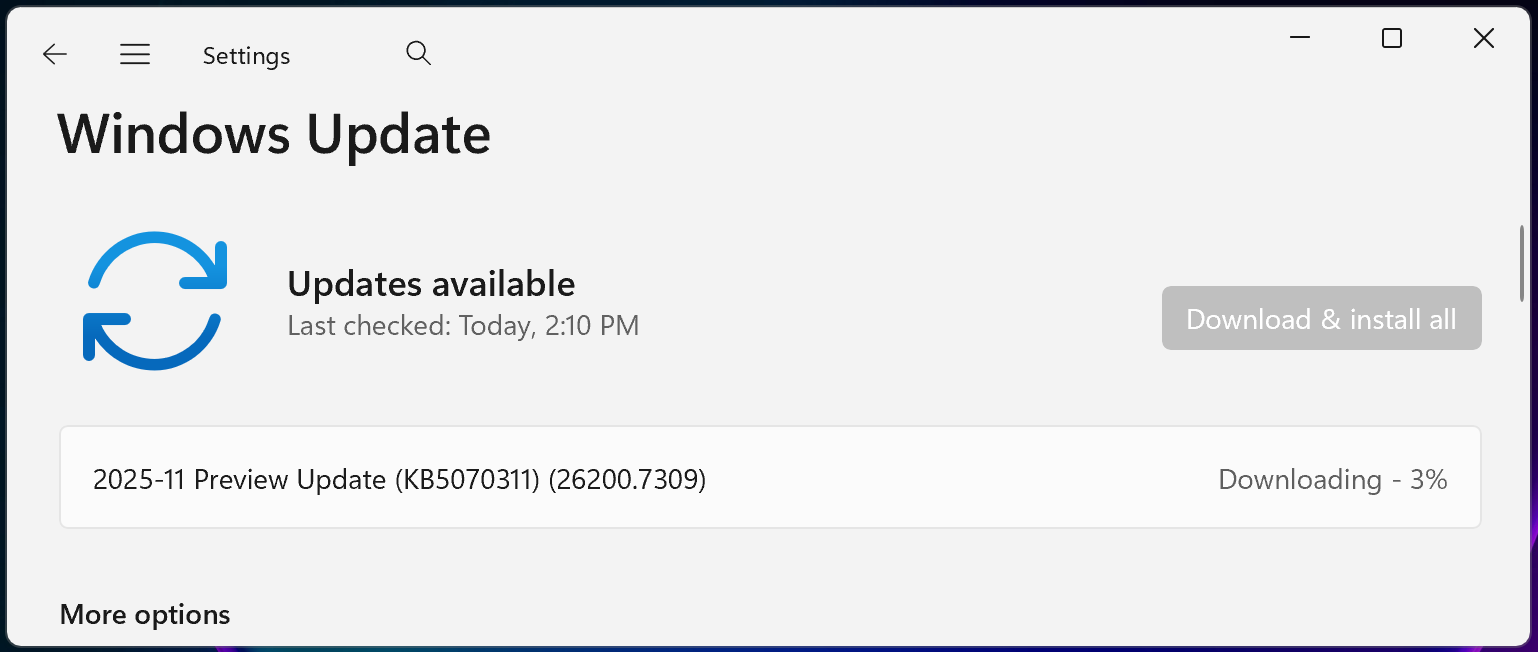
Key Highlights of Windows 11 KB5070311
Upon installation, this optional non-security preview update will update Windows 11 25H2 and 24H2 devices to builds 26200.7309 and 26100.7309, respectively.
The November 2025 preview update brings forth additional fixes and enhancements, with some of the noteworthy ones outlined below:
- The search results menu now displays more available results, facilitating quicker access to and modification of settings. A scroll bar has been added to view all search results. (Copilot+ PCs)
- Windows Studio Effects, offering AI-powered camera enhancements, can now be utilized on an additional camera such as a USB webcam or the built-in rear camera of a laptop. (Copilot+ PCs)
- When Windows Spotlight is set as the desktop background, the context menu now includes two new options: Learn more about this background and Next desktop background.
- File Explorer now provides a more consistent experience in dark mode.
In a separate update from the message center, Microsoft announced that there will be no preview update in December, with the regular rollout schedule set to resume in January.
“Due to minimal operations during the Western holidays and the upcoming new year, there will be no December 2025 non-security preview update,” the announcement stated.
“A monthly security update for December 2025 will still be released. Normal monthly servicing for both security and non-security preview updates will resume in January 2026.”
Microsoft also mentioned ongoing efforts to address a known issue reported last week, which caused the password sign-in option to disappear from the lock screen options.

Dealing with broken IAM goes beyond IT concerns – it impacts your entire business operations.
This comprehensive guide explores why traditional IAM practices fall short in meeting modern demands, showcases examples of effective IAM strategies, and offers a simple checklist for establishing a scalable approach.













The Arrival of Sir Paul in the Ring

Jeep Unveils Trail-Ready Cherokee Trailhawk and Extreme Recon Prototypes

iPhone 12 Pro vs iPhone 12 vs iPhone 11 Pro Camera Test Comparison.

Russian CTRL: RDP Hijacking with Malicious LNK Files and FRP Tunnels

Exclusive Look: The Must-Have Games of April 2026 on PlayStation Plus

Mastering the Modern Real Estate and Rental Landscape

Save $30 on Powerbeats Fit in Amazon’s Big Spring Sale for a Gym-Ready Workout

Uncovering the Gaps: RSAC 2026’s Five Agent Identity Frameworks Revealed

Exploring the Exciting Updates of iOS 26.5 Beta 1: A Comprehensive Look at the Latest Features

EU Takes Action Against Instagram and Facebook for Violating Illegal Content Rules

Warning: Facebook Creators Face Monetization Loss for Stealing and Reposting Videos

Facebook Compliance: ICE-tracking Page Removed After US Government Intervention

Facebook’s New Look: A Blend of Instagram’s Style

Facebook and Instagram to Reduce Personalized Ads for European Users

InstaDub: Meta’s AI Translation Tool for Instagram Videos

Reclaim Your Account: Facebook and Instagram Launch New Hub for Account Recovery

Meta discontinues Messenger apps for Windows and macOS

Breaking Updates: Meta Connect 2025 Unveils Latest Developments
iPhone 12 Pro vs iPhone 12 vs iPhone 11 Pro Camera Test Comparison.

Huawei Mate 40 Pro Unboxing – WHAT.

iPhone 12 vs iPhone 12 Pro / 11 Pro Max / 11 Pro / 11 / XR / SE Battery Life DRAIN Test.

19 Smartphone Gadgets that Blew me Away.

iPhone 12 Pro Max Unboxing & Review!

iPhone 12 Pro Max vs Samsung Note 20 Ultra / Huawei Mate 40 Pro Camera Test Comparison.

iPhone 12 Pro Max vs Samsung Note 20 Ultra / Huawei / Xiaomi / OnePlus Battery Life DRAIN Test.

The BEST Smartphone of 2020 🏆

The Self-Healing Smartphones!
-
 Facebook5 months ago
EU Takes Action Against Instagram and Facebook for Violating Illegal Content Rules
-
 Facebook6 months ago
Warning: Facebook Creators Face Monetization Loss for Stealing and Reposting Videos
-
 Facebook6 months ago
Facebook Compliance: ICE-tracking Page Removed After US Government Intervention
-
 Facebook4 months ago
Facebook’s New Look: A Blend of Instagram’s Style
-
 Facebook4 months ago
Facebook and Instagram to Reduce Personalized Ads for European Users
-
 Facebook6 months ago
InstaDub: Meta’s AI Translation Tool for Instagram Videos
-
 Facebook4 months ago
Reclaim Your Account: Facebook and Instagram Launch New Hub for Account Recovery
-
 Apple5 months ago
Meta discontinues Messenger apps for Windows and macOS
