
Security
Beware: Malicious Code Alerts on GitHub Targeting Developers


Fake VS Code Alerts on GitHub Spread Malware to Developers
A large-scale campaign is targeting developers on GitHub with fraudulent Visual Studio Code (VS Code) security alerts posted in the Discussions section of various projects. The goal is to deceive users into downloading malicious software.
The deceptive posts are designed to appear as legitimate vulnerability advisories, using titles like “Severe Vulnerability – Immediate Update Required” and fake CVE IDs to create a sense of urgency.
In an attempt to add credibility to the scheme, the threat actor often impersonates actual code maintainers or researchers.
Security experts at Socket, an application security company, have identified this activity as part of a well-coordinated, large-scale operation rather than a random attack.
The fraudulent discussions are automatically generated from newly created or inactive accounts and are distributed across thousands of repositories within a short period. This triggers email notifications to a large number of tagged users and followers.
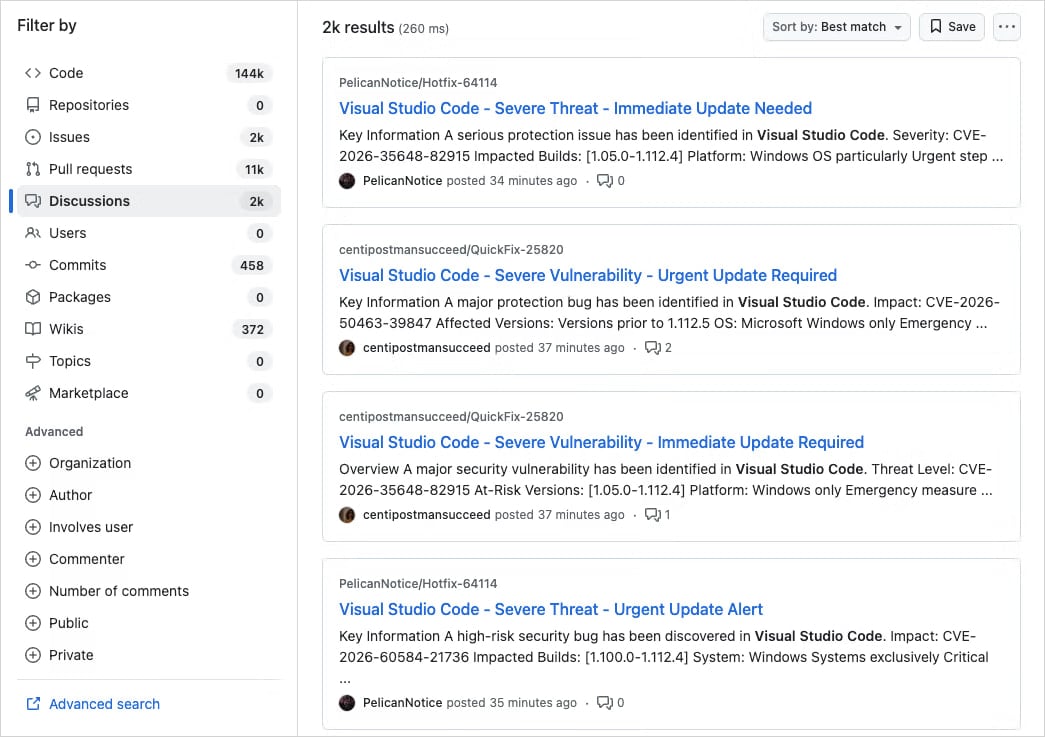
Source: Socket
According to Socket researchers, there are thousands of nearly identical posts across repositories, indicating a coordinated spam campaign rather than an isolated incident.
As GitHub Discussions trigger email notifications, these deceptive posts are delivered directly to developers’ inboxes.
The fraudulent posts contain links to supposedly updated versions of the affected VS Code extensions, hosted on external platforms like Google Drive.
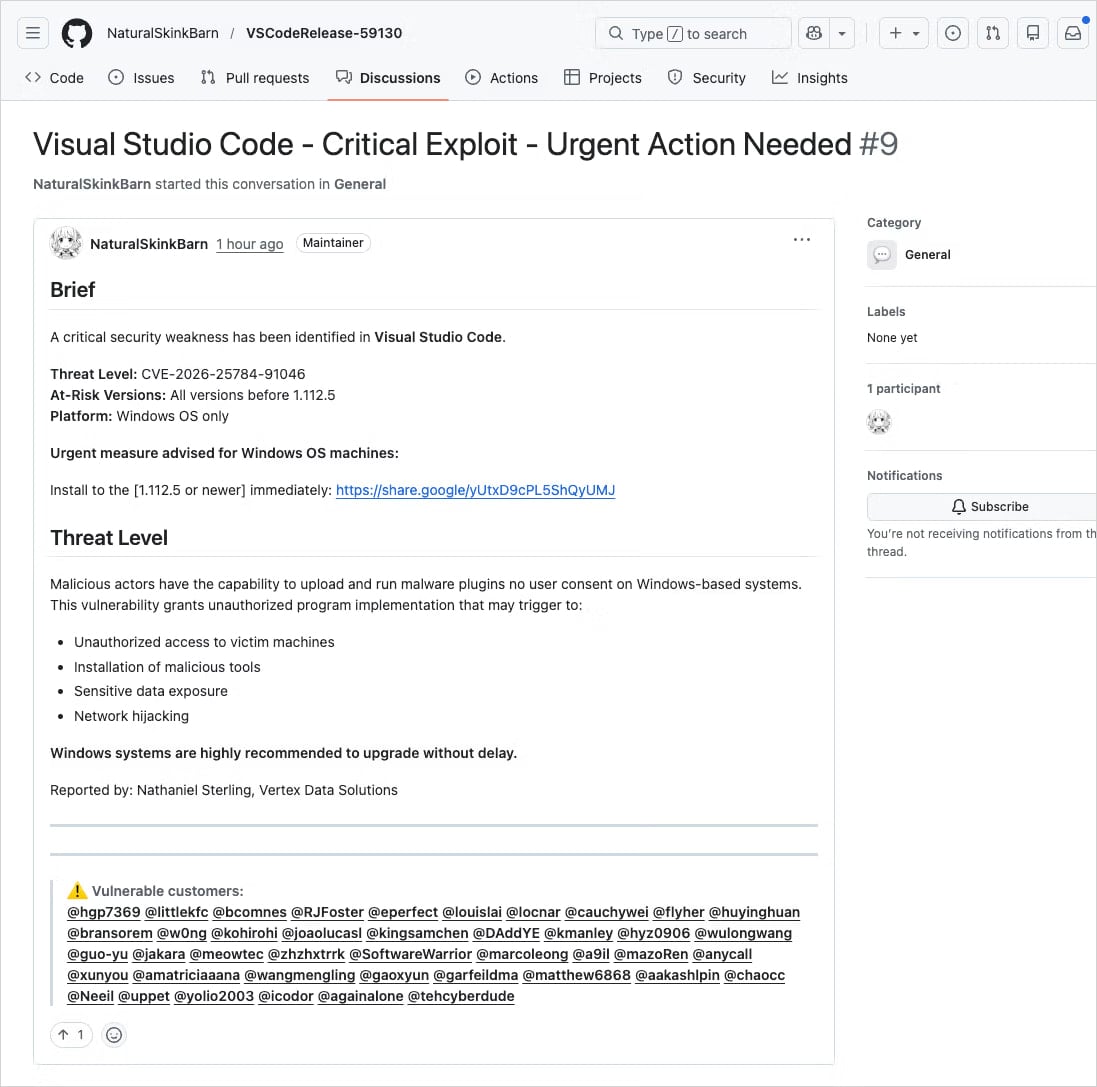
Source: Socket
Although Google Drive is not the official distribution channel for VS Code extensions, it is a trusted service. Users may overlook this red flag in their haste to update.
Clicking the Google Drive link initiates a series of redirects that lead users to drnatashachinn[.]com, where a JavaScript reconnaissance script runs.
This script gathers information such as the victim’s timezone, locale, user agent, operating system details, and automation indicators. The collected data is then sent to the command-and-control server via a POST request.
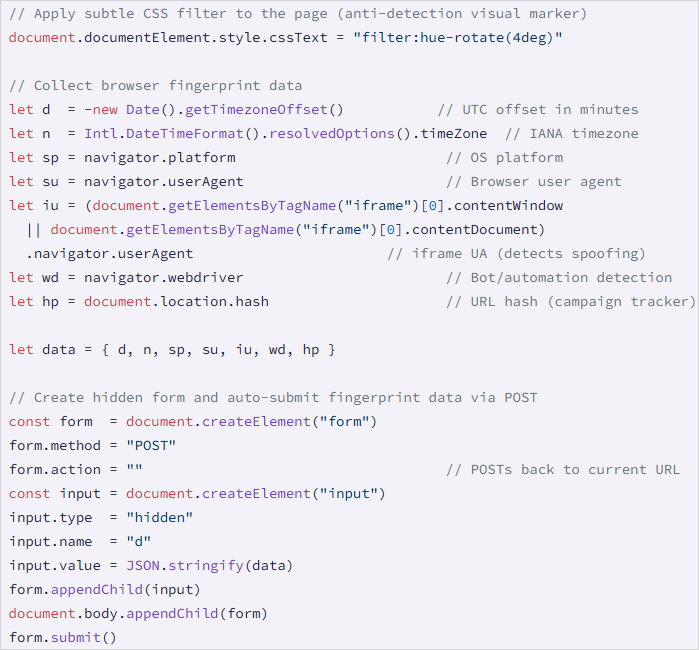
Source: Socket
This process acts as a traffic distribution system, filtering out bots and researchers and delivering the next stage of the attack only to verified victims.
While Socket did not capture the second-stage payload, they noted that the JavaScript script does not directly deliver it or attempt to steal credentials.
This is not the first instance of threat actors exploiting GitHub’s notification systems for distributing phishing and malware.
In a phishing campaign in March 2025, 12,000 GitHub repositories were targeted with fake security alerts to trick developers into authorizing a malicious OAuth app, granting attackers access to their accounts.
In June 2024, threat actors utilized GitHub’s email system to direct targets to phishing pages through spam comments and pull requests on repositories.
When encountering security alerts, users are advised to verify vulnerability identifiers from reputable sources like the National Vulnerability Database (NVD), CISA’s Known Exploited Vulnerabilities catalog, or MITRE’s Common Vulnerabilities and Exposures program.
It is essential for users to assess the legitimacy of such alerts before taking action, looking out for signs of fraud such as external download links, unverified CVEs, and excessive tagging of unrelated users.

Automated pentesting proves the path exists. BAS proves whether your controls stop it. Most teams run one without the other.
This whitepaper maps six validation surfaces, shows where coverage ends, and provides practitioners with three diagnostic questions for any tool evaluation.






![Apple pushing back on 'vibe coding' iPhone apps, developers say [U]](https://bennetttechinnovation.com/wp-content/uploads/2026/03/Apple-Stands-Firm-Against-Vibe-Coding-iPhone-Apps-Defying-Developers-400x240.jpg)
![Apple pushing back on 'vibe coding' iPhone apps, developers say [U]](https://bennetttechinnovation.com/wp-content/uploads/2026/03/Apple-Stands-Firm-Against-Vibe-Coding-iPhone-Apps-Defying-Developers-80x80.jpg)



Caroline’s Legacy: The Unique Bugatti Mistral

The BEST Smartphone of 2020 🏆

Beware: Malicious Code Alerts on GitHub Targeting Developers

Tomodachi Life: Unveiling Your Mii’s Dream Personality

Google Pixel 10a: A Review of Perfection

Aetherflux Secures $2 Billion in Series B Funding, Soaring to New Heights

The Ultimate Ranking: Top 50 Apple Products of All Time

Unlocking 7GB of Storage on Your Google Pixel Phone: A Step-by-Step Guide

When Can We Expect Apple’s First Beta Release?

EU Takes Action Against Instagram and Facebook for Violating Illegal Content Rules

Warning: Facebook Creators Face Monetization Loss for Stealing and Reposting Videos

Facebook Compliance: ICE-tracking Page Removed After US Government Intervention

Facebook’s New Look: A Blend of Instagram’s Style

Facebook and Instagram to Reduce Personalized Ads for European Users

InstaDub: Meta’s AI Translation Tool for Instagram Videos

Reclaim Your Account: Facebook and Instagram Launch New Hub for Account Recovery

Meta discontinues Messenger apps for Windows and macOS

Breaking Updates: Meta Connect 2025 Unveils Latest Developments
The BEST Smartphone of 2020 🏆

The Self-Healing Smartphones!

Apple is not what it used to be.

Smartphones are Boring now.

The Fastest Android Phone Ever.

Unboxing the $122,000 Smartphone. 🤯

Are Linux Smartphones about to KILL Android?

15 Smartphone FAILS to ruin your day 😂

World’s Biggest Smartphone Collection?
-
 Facebook5 months ago
EU Takes Action Against Instagram and Facebook for Violating Illegal Content Rules
-
 Facebook5 months ago
Warning: Facebook Creators Face Monetization Loss for Stealing and Reposting Videos
-
 Facebook5 months ago
Facebook Compliance: ICE-tracking Page Removed After US Government Intervention
-
 Facebook4 months ago
Facebook’s New Look: A Blend of Instagram’s Style
-
 Facebook4 months ago
Facebook and Instagram to Reduce Personalized Ads for European Users
-
 Facebook5 months ago
InstaDub: Meta’s AI Translation Tool for Instagram Videos
-
 Facebook4 months ago
Reclaim Your Account: Facebook and Instagram Launch New Hub for Account Recovery
-
 Apple5 months ago
Meta discontinues Messenger apps for Windows and macOS
