Microsoft Enhances Windows Update Experience for Users
Microsoft is implementing significant improvements to the Windows Update process, aiming to provide users with more control over how updates are installed while minimizing disruptions caused by untimely restarts.
Responding to user feedback that highlighted issues such as workflow disruptions and lack of control over update installation timings, Microsoft is rolling out these enhancements to Windows Insiders.
According to Aria Hanson from Microsoft, user feedback has been instrumental in shaping these changes. The primary focus is on addressing the issues of untimely updates causing disruptions and the need for more control over update schedules.
One of the key features introduced by Microsoft allows Windows users to skip updates during the out-of-box experience (OOBE), enabling quicker access to the desktop and the flexibility to install updates at a more convenient time.
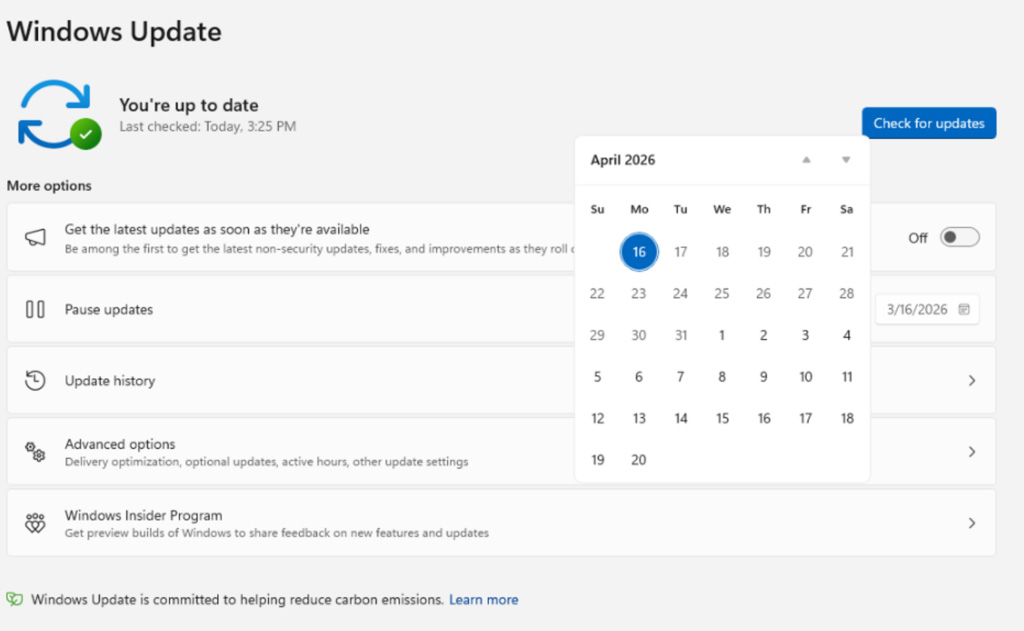
Additionally, changes have been made to how update pauses function, with users now able to select a specific date to pause updates for up to 35 days using a flyout calendar interface. This pause can be extended repeatedly without a fixed limit.
Windows Update calendar flyout for pausing updates Source: Microsoft
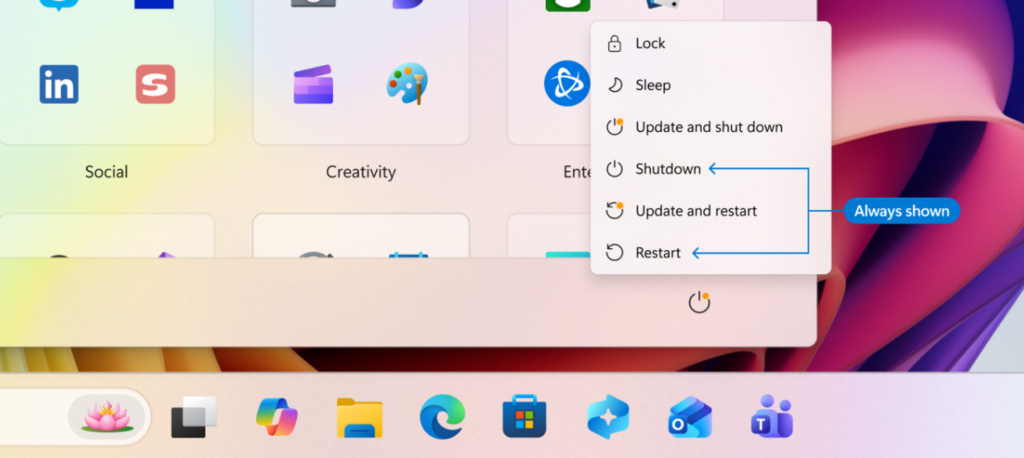
Addressing another common complaint, Microsoft has separated standard power options from update-related actions in the Power menu. This separation allows users to choose “Restart” and “Shut down” options without triggering updates, ensuring a smoother user experience.
New Update and Shutdown options when updates are available Source: Microsoft
Furthermore, Microsoft aims to provide clearer information about offered updates, especially drivers. By displaying the device type directly in the update title, users can easily identify the purpose of the update, whether it’s for display, audio, battery, or other components.
Streamlining the update process, Microsoft is consolidating different update types into a single monthly restart. This approach includes installing Driver, .NET, and firmware updates alongside the monthly cumulative updates, thereby reducing the number of necessary reboots.
Hanson emphasizes that updates will download in the background and wait for a coordinated installation and restart, aligning with the next Windows quality update. Users have the option to manually initiate download, install, and restart for available updates if desired.
The new features are currently being rolled out to Windows Insiders in the Dev and Experimental channels, with plans for a wider release to all users in the future.
AI chained four zero-days into one exploit that bypassed both renderer and OS sandboxes. A wave of new exploits is coming.
Discover how autonomous, context-rich validation can identify exploitable vulnerabilities, validate controls, and streamline the remediation process at the Autonomous Validation Summit (May 12 & 14).