
Mobile Tech
Seamless Sharing: Pixel 10 Enables Android Quick Share with AirDrop on iPhone

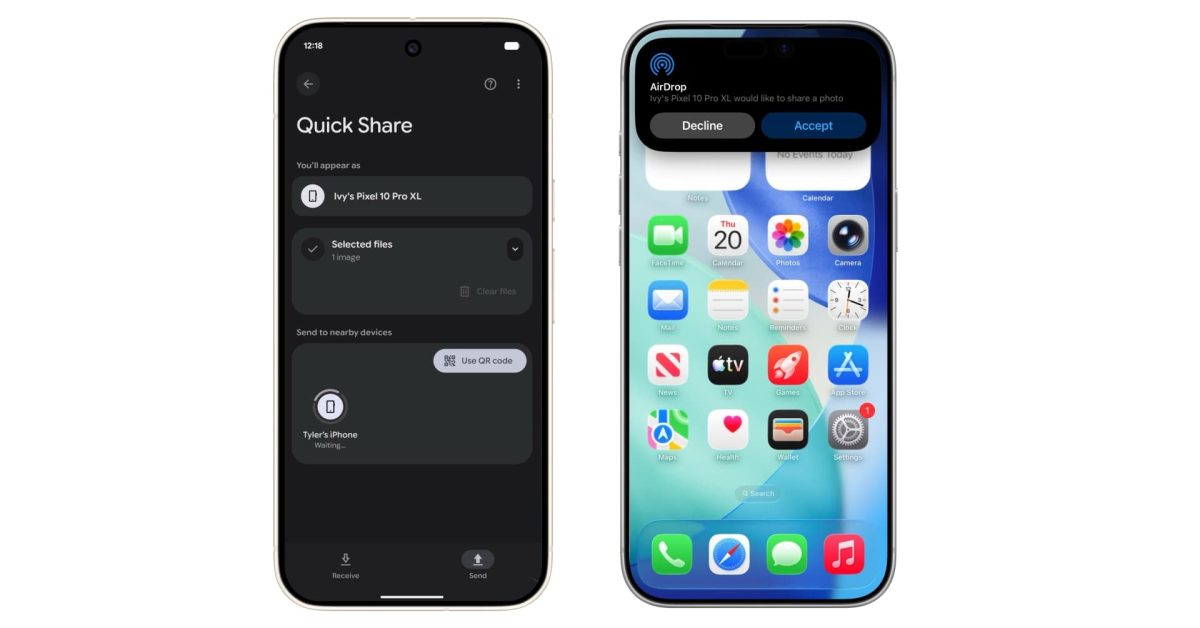
Google Enables Android’s Quick Share to Work with Apple’s AirDrop
Google has announced a significant development today, as Android’s Quick Share feature now integrates seamlessly with Apple’s AirDrop system. This enhancement allows for effortless file transfer between Android and Apple devices, including the iPhone, iPad, and Mac.
With this new functionality, Apple devices will appear as selectable sharing targets on Android devices when AirDrop’s “Everyone for 10 minutes” mode is active. Similarly, Android devices will be visible on Apple devices, enabling two-way sharing of photos, videos, and various files. Google emphasizes that this direct peer-to-peer connection ensures data is never routed through a server, no shared content is logged, and no additional data is exchanged.
It is worth noting that this interoperability between Android and Apple devices is a result of Google’s independent implementation, as the company did not collaborate with Apple for this feature.
Google expressed its openness to collaborating with Apple in the future to address interoperability issues, specifically mentioning the possibility of enabling a “Contacts Only” mode. This initiative aligns with Google’s ongoing efforts to enhance cross-platform communication for users.
This new feature simplifies the sharing of photos, videos, and files with individuals across different platforms, eliminating concerns about the type of device being used.
To activate this feature on Pixel 10 devices, users need to navigate to Settings > Google services > All services > Privacy & security > System services, update the “Quick Share Extension,” and reboot their phones.
Google reassures users about the security and privacy of this Quick Share-AirDrop interoperability, highlighting the multi-layered security approach implemented to ensure a safe sharing experience across platforms.
- Secure Sharing Channel: The communication channel is fortified using Rust, a memory-safe language known for building secure systems, providing protection against common vulnerabilities.
- Built-in Platform Protections: The feature leverages the robust security measures of Android and iOS, with Android’s security layers and iOS’s security architecture working together to safeguard data during sharing.
- You’re in Control: Users retain control over shared files, as each file requires approval before being received.
In addition to internal security measures, Google subjected the system to external validation by engaging with NetSPI, a prominent third-party penetration testing firm. The assessment confirmed the security and integrity of the Quick Share-AirDrop interoperability, highlighting its robust security compared to industry standards.
Based on internal and external assessments, Google’s implementation of cross-platform file sharing provides a strong security foundation for Android and iOS users. The company will continue to enhance security in collaboration with third-party partners.
This feature is currently available on the Pixel 10 series and will expand to more Android devices in the future, marking a significant step towards seamless cross-platform file sharing.
Stay tuned for updates on this evolving feature.


FTC: We use income earning auto affiliate links. More.









10 Incredible Android DIY Hacks!

Cyberpunk 2077: The Endless Battle with Phantom Liberty’s Chimera Tank

Unlock the Power of Adobe Premiere with a Free App for Android Phones – Tech Advisor

iBeer: How One App Took the App Store by Storm

Apple’s Innovative Approach to Fitness Tracking: A Screenless Solution in the Works

Rolls-Royce Cullinan Dominates Russian Luxury Car Market, Outselling Spectre, Ghost & Phantom Combined

Microsoft Appoints Brad Smith as Head of Corporate Communications

The Lord of the Rings: War in the North Legacy Edition – Patch One: The Beginning of a New Journey

Revolutionizing Android: 5 Innovative Features That Will Transform User Experience

EU Takes Action Against Instagram and Facebook for Violating Illegal Content Rules

Warning: Facebook Creators Face Monetization Loss for Stealing and Reposting Videos

Facebook’s New Look: A Blend of Instagram’s Style

Facebook Compliance: ICE-tracking Page Removed After US Government Intervention

Facebook and Instagram to Reduce Personalized Ads for European Users

InstaDub: Meta’s AI Translation Tool for Instagram Videos

Reclaim Your Account: Facebook and Instagram Launch New Hub for Account Recovery

Meta discontinues Messenger apps for Windows and macOS

Breaking Updates: Meta Connect 2025 Unveils Latest Developments
10 Incredible Android DIY Hacks!

Does a Cheap 2018 Smartphone beat a 2013 Flagship?

Samsung Galaxy S9 & S9+ UNBOXING!

Samsung Galaxy S9 Plus vs iPhone X

The BEST $300 Phone (2018) ft. MKBHD, Technical Guruji, iJustine + More

Samsung Galaxy S9 Plus Gaming Review! (vs OnePlus 5T)

THE BEST PHONE HTC EVER MADE?

The Truth about Google?

Samsung S9/ S9+ vs iPhone X vs Galaxy Note 8 Battery Life DRAIN TEST
-
 Facebook11 months ago
EU Takes Action Against Instagram and Facebook for Violating Illegal Content Rules
-
 Facebook12 months ago
Warning: Facebook Creators Face Monetization Loss for Stealing and Reposting Videos
-
 Facebook10 months ago
Facebook’s New Look: A Blend of Instagram’s Style
-
 Facebook12 months ago
Facebook Compliance: ICE-tracking Page Removed After US Government Intervention
-
 Facebook10 months ago
Facebook and Instagram to Reduce Personalized Ads for European Users
-
 Facebook12 months ago
InstaDub: Meta’s AI Translation Tool for Instagram Videos
-
 Facebook10 months ago
Reclaim Your Account: Facebook and Instagram Launch New Hub for Account Recovery
-
 Apple11 months ago
Meta discontinues Messenger apps for Windows and macOS
