
Security
Beware: Scammers Flood Inboxes with Fake Cloud Storage Renewal Notices


Over the past few months, a large-scale cloud storage subscription scam campaign has been targeting users worldwide with repeated emails falsely warning recipients that their photos, files, and accounts are about to be blocked or deleted due to an alleged payment failure.
Based on numerous emails seen by BleepingComputer, the campaign has escalated over the past few months, with people receiving multiple versions of the scam each day, all appearing to be sent by the same scammers.
While the email text, the messages all attempt to create a sense of urgency by claiming a payment problem or storage issue must be resolved immediately, or people’s files will be deleted or blocked.

The cloud storage scam email campaign
The phishing emails originate from a wide range of domains, with most appearing to be randomly generated for the spam campaign, as shown in the sample list below.
        xavpy@njyihuhzhyjumdjenwdsugjsku.us

        hxsupportxf@bjmbsjabnjjvdfdlntduihco.com

        zwblygwgtrmwag.18445435479309@qqjon7.oleglp.4mzrly.us

        [name]-6704@ucv9q.333.sb100014.tour.za.com
The emails themselves use a wide variety of subject lines, all designed to scare a recipient into opening the email.
Example subject lines seen by BleepingComputer include:
- Immediate Action Required. Payment Declined
- Cloud Storage 1TB: Payment overdue
- [personal name]¸Your Account Has been Blocked! Your Photos and Videos will be Removed Fri,30 Jan-2026. take action!!
- We’ve blocked your account! Your photos and videos will be deleted. Renew your subscription for free now!
- [personal name] – Your store is full, click to check and save 80%, ID#88839
- [personal name], Your Cloud Account has been locked on Mon,26 Jan-2026. Your photos and videos will be removed!
- Sorry [<personal email address>], We Have To Suspend Your Account Today! Sat,24 Jan-2026
- [name] – Your store is full, click to check and save 80%
- Cloud Storage 1TB: Payment overdue
Many of the subject lines are personalized with the recipient’s name or email address and include specific dates or identifiers to increase urgency and make the messages appear legitimate.
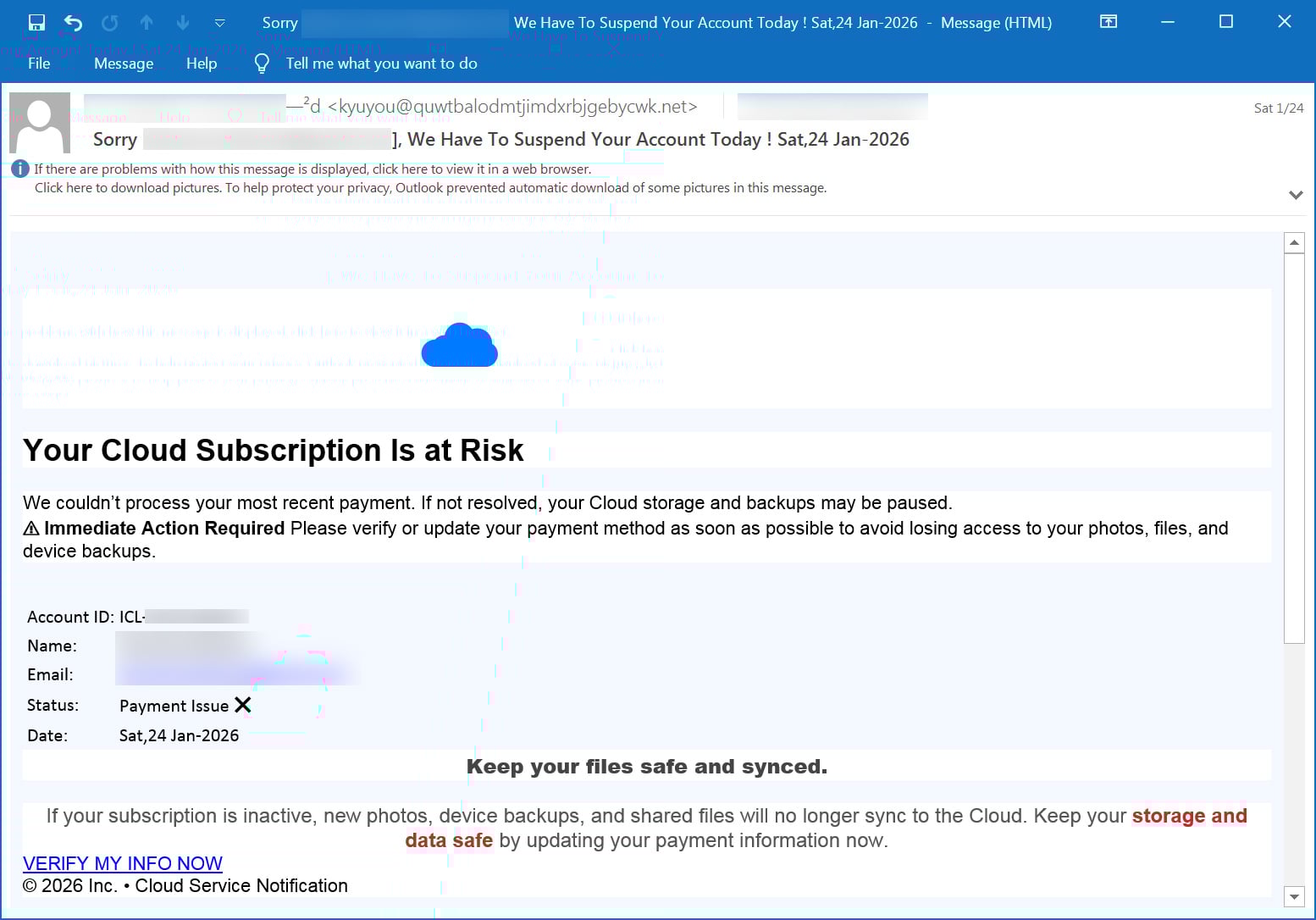
The email seen by BleepingComputer claim that a cloud subscription renewal failed or that a payment method has expired, with recipients warned that backups may stop syncing and that photos, videos, documents, and device backups could be lost if the issue is not resolved.
Source: BleepingComputer
The emails seen by BleepingComputer claim that a cloud subscription renewal failed or that a payment method has expired, and warn recipients that backups may stop syncing and that photos, videos, documents, and device backups could be lost if the issue is not resolved.
The messages frequently include made-up account IDs, subscription numbers, and expiration dates to add legitimacy.
“Your Cloud Subscription Is at Risk. We couldn’t process your most recent payment. If not resolved, your Cloud storage and backups may be paused,” reads an email seen by BleepingComputer.
“Immediate Action Required Please verify or update your payment method as soon as possible to avoid losing access to your photos, files, and device backups.”
All spam emails in this campaign contained a link to https://storage.googleapis.com/, which is part of Google Cloud Storage, where threat actors hosted static redirector HTML files. When a visitor clicks this, the URL redirects them to a scam/phishing site hosted on random domains.
All of the links tested by BleepingComputer lead to the same set of scam pages.
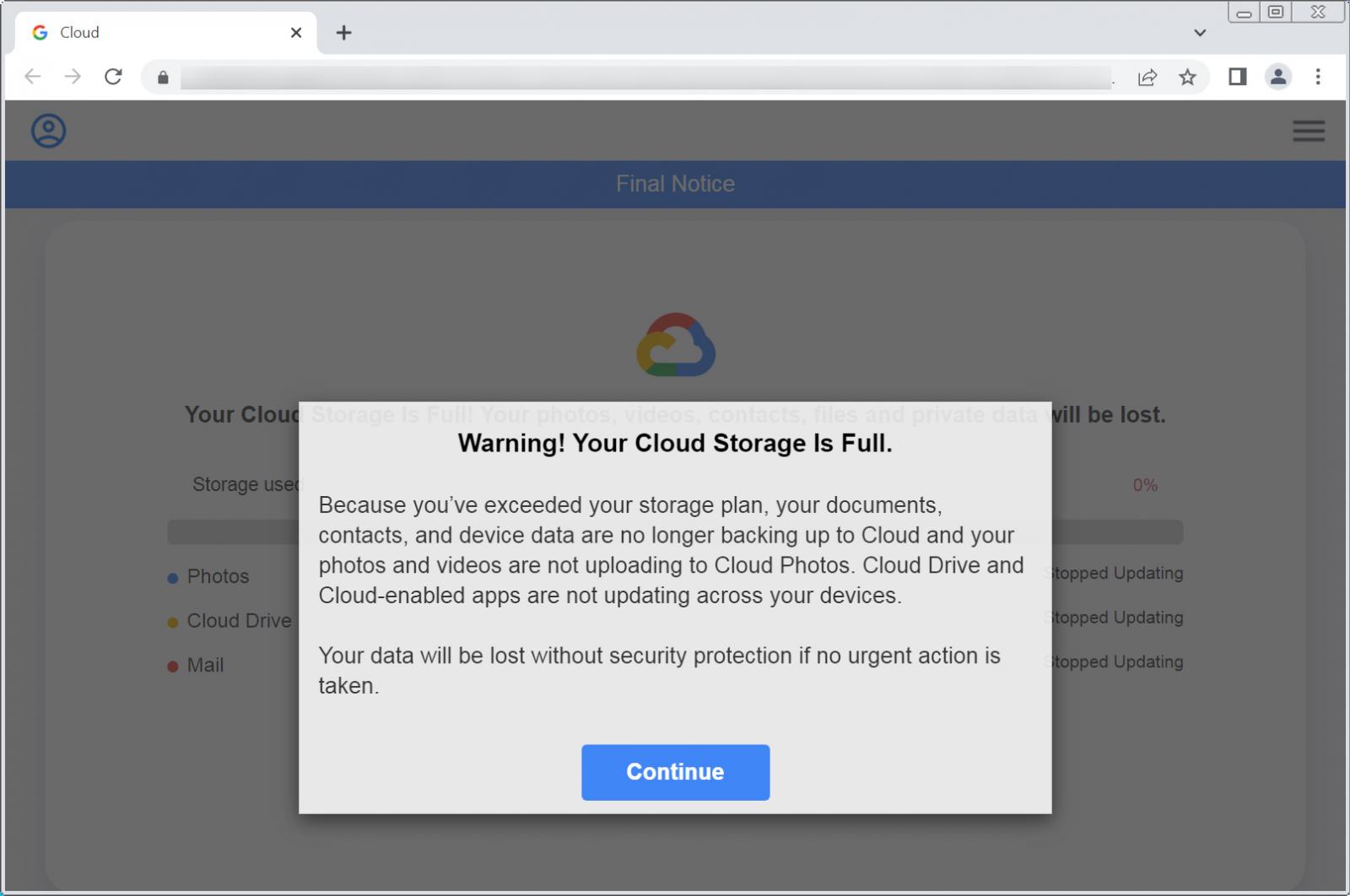
The phishing pages impersonate cloud service portals and prominently display cloud-themed branding, including the Google Cloud logo. The web pages claim the user’s cloud storage is full and warn that photos, videos, contacts, files, and private data are no longer being backed up and will be deleted.
“Because you’ve exceeded your storage plan, your documents, contacts, and device data are no longer backing up to Cloud and your photos and videos are not uploading to Cloud Photos. Cloud Drive and Cloud-enabled apps are not updating across your devices,” reads the phishing site shown below.
“Your data will be lost without security protection if no urgent action is taken.”
Source: BleepingComputer
Clicking on the “Continue” button brings targets to a fake storage scan that always reports that Photos, Cloud Drive, and Mail are all full. The pages then warn that data will be lost unless the cloud storage is upgraded, claiming that the person is eligible for a limited-time “loyalty” upgrade at an 80% discount.
However, after clicking the update storage button, instead of being taken to a legitimate cloud services page, you are redirected to affiliate marketing pages promoting unrelated products.
Products promoted in this phishing campaign include VPN services, little-known security software, and other subscription-based offerings with no connection to cloud storage.
The pages ultimately lead to checkout forms designed to collect credit card details and generate affiliate revenue for the threat actors behind the campaign.
Unfortunately, many people who receive these emails may not realize they’re scams and purchase a product they don’t need, thinking it will solve the fake cloud storage issues.
It is important to understand that these emails and landing pages are not legitimate cloud service notifications.
Best Practices for Cloud Storage Billing and Security
When it comes to cloud storage services, it is essential to be aware of how legitimate providers handle billing issues and data storage. One key point to remember is that legitimate cloud providers do not send emails that prompt users to click on links for storage scans or third-party security products to resolve billing problems.
Furthermore, reputable cloud storage providers typically have policies in place to protect your data in case of payment failures. For example, if you miss a payment, most providers will block access to your additional storage rather than immediately deleting your files.
Google Drive, for instance, states that if a plan is canceled due to non-payment, access to additional storage will be restricted until payment is made again. Your files will only be permanently deleted after a period of 2 years.
Similarly, Microsoft OneDrive follows a similar approach but may delete files after 6 months if the account exceeds its allocated storage limit.
If you receive suspicious emails claiming to be from a cloud storage provider, it is crucial to avoid clicking on any links and refrain from purchasing any products or services advertised in the email. These emails are often part of phishing campaigns designed to scare users into making unnecessary purchases.
The best course of action in such situations is to delete the emails and ignore any demands or threats they may contain. By not engaging with these messages, you can protect yourself from falling victim to fraudulent schemes.
If you have any concerns about your cloud storage account or billing issues, it is recommended to verify the information manually by visiting the official website or app of the legitimate cloud service. This way, you can ensure that your data and financial information are secure.
Securing LLMs with MCP Best Practices
As the adoption of Model Context Protocol (MCP) grows, security teams are facing new challenges in ensuring the safety of connected Local Logic Modules (LLMs) and data. To help address these challenges, we have compiled a list of 7 best practices that you can implement today.
Download our free cheat sheet to learn more about how you can enhance the security of your LLMs and protect your data effectively.











Can You Use an iPhone 17 Pro Case on the iPhone 18 Pro?

BMW M2 CS Production Concludes with Record-Breaking 2,882 Cars Sold, a 21% Increase from Previous Model

Fortnite Hearts: Keyblade Chaos under the Heart Moon

The Imperfect Brilliance of the Google Pixel 11 Pro

Cycloid Secures Spot in European Commission’s €180 Million Sovereign Cloud Framework after Successful Series A Funding Round

Exploring the Exciting Updates of iOS 27: A Look Beyond Artificial Intelligence

A $50,000 Smartphone for $400?

Ram Trucks Australia Braces for Price Increases Due to Emissions Regulations

Revving Up: Tractor Battle Adventure RPG Expands with Mod Support on Steam Workshop

EU Takes Action Against Instagram and Facebook for Violating Illegal Content Rules

Warning: Facebook Creators Face Monetization Loss for Stealing and Reposting Videos

Facebook’s New Look: A Blend of Instagram’s Style

Facebook Compliance: ICE-tracking Page Removed After US Government Intervention

Facebook and Instagram to Reduce Personalized Ads for European Users

InstaDub: Meta’s AI Translation Tool for Instagram Videos

Reclaim Your Account: Facebook and Instagram Launch New Hub for Account Recovery

Meta discontinues Messenger apps for Windows and macOS

Breaking Updates: Meta Connect 2025 Unveils Latest Developments
A $50,000 Smartphone for $400?

Huawei P20 Pro Unboxing!

Huawei P20 Pro vs Samsung S9 Plus!

Huawei P20 vs P20 Pro vs iPhone 8 Plus vs S9 Battery Drain Test!

10 Android Mods that Change Everything

I used the first Android Phone in the World.

DOOGEE MIX 4 UNBOXING (PROTOTYPE)!

MYSTERY UNBOXING FROM SAMSUNG!

The Truth about Huawei P20 Pro – REAL Review
-
 Facebook11 months ago
EU Takes Action Against Instagram and Facebook for Violating Illegal Content Rules
-
 Facebook11 months ago
Warning: Facebook Creators Face Monetization Loss for Stealing and Reposting Videos
-
 Facebook9 months ago
Facebook’s New Look: A Blend of Instagram’s Style
-
 Facebook11 months ago
Facebook Compliance: ICE-tracking Page Removed After US Government Intervention
-
 Facebook9 months ago
Facebook and Instagram to Reduce Personalized Ads for European Users
-
 Facebook11 months ago
InstaDub: Meta’s AI Translation Tool for Instagram Videos
-
 Facebook10 months ago
Reclaim Your Account: Facebook and Instagram Launch New Hub for Account Recovery
-
 Apple11 months ago
Meta discontinues Messenger apps for Windows and macOS
