Microsoft has acknowledged a recent problem affecting Windows security warnings when opening Remote Desktop (.rdp) files.
This issue impacts all supported Windows versions, including Windows 11 (KB5083768 & KB5083769), Windows 10 (KB5082200), and Windows Server (KB5082063).
According to Microsoft, there is a known issue where the security warning displayed when opening Remote Desktop (RDP) files may not appear correctly in certain instances.
On affected systems, the text within the warning windows is challenging to read, and the buttons are out of place, making it challenging to interact with the security dialog.
“This issue may occur when using multiple monitors with different display scaling settings,” Microsoft explains.
“When this happens, the warning window may display overlapping text or partially hidden buttons, making it difficult to read or interact with the message.”
These new protections were introduced by Microsoft on Windows systems as part of the April 2026 cumulative updates to prevent malicious RDP connection files from being utilized on devices.
After installing the April 2026 security update, users will receive an educational prompt the first time they open an RDP file, alerting them to potential risks.
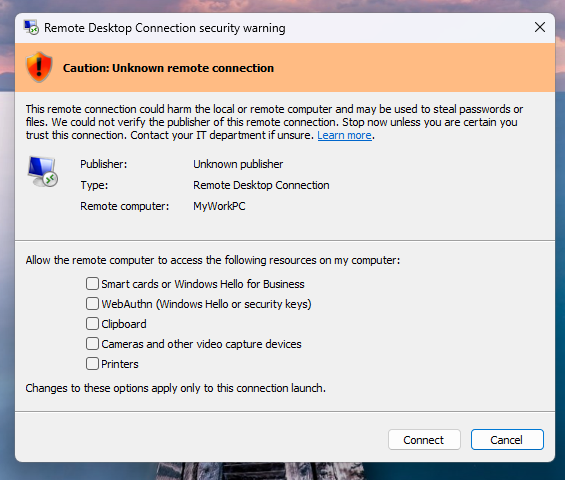
Subsequently, when opening RDP files, a security dialog will appear before any connection is established, indicating if the file is signed by a verified publisher, the remote system’s address, and a list of local resource redirections, all disabled by default.
For unsigned RDP files, Windows will display a “Caution: Unknown remote connection” warning, identifying the publisher as unknown. If the RDP files are digitally signed, Windows will display the publisher and caution users to validate their authenticity before connecting.
RDP files are commonly utilized in business settings to connect to remote systems, as administrators can preconfigure them to redirect local resources to the remote host.
Threat actors have increasingly exploited RDP files in phishing campaigns, with groups like APT29 using them to remotely access victims’ devices and steal sensitive information.
AI combined four zero-day vulnerabilities into one exploit that bypassed both renderer and OS sandboxes. Prepare for a wave of new exploits.
Join the Autonomous Validation Summit (May 12 & 14) to discover how autonomous, context-rich validation identifies vulnerabilities, confirms control efficacy, and completes the remediation process.