
Security
Microsoft Bolsters Windows Security with Enhanced Remote Desktop File Protections

Microsoft has recently implemented enhanced protections for Windows to safeguard against phishing attacks exploiting Remote Desktop connection (.rdp) files. These new measures include warnings and the default disabling of risky shared resources.
Remote Desktop Protocol (RDP) files are commonly utilized in enterprise settings to establish connections with remote systems. System administrators often preconfigure these files to automatically redirect local resources to the remote host.
Unfortunately, threat actors have been leveraging this functionality in phishing campaigns. For instance, the Russian state-sponsored APT29 hacking group has previously utilized rogue RDP files to illicitly steal data and credentials from unsuspecting victims.

Upon opening these compromised files, connections can be established with attacker-controlled systems, allowing for the redirection of local drives to the connected device. This enables the attacker to pilfer files and credentials stored on the disk.
Moreover, these malicious files can intercept clipboard data, including sensitive information like passwords, or reroute authentication mechanisms such as smart cards or Windows Hello to impersonate users.
New Protections for RDP Implementation
As part of the April 2026 cumulative updates for Windows 10 (KB5082200) and Windows 11 (KB5083769 and KB5082052), Microsoft has rolled out new protections to thwart the misuse of malicious RDP connection files on devices.
Microsoft issued a warning stating, “Malicious actors exploit this capability by distributing RDP files via phishing emails.” Once a victim opens such a file, their device silently connects to a server controlled by the attacker, facilitating access to files, credentials, and more.
Following the installation of this update, when users attempt to open an RDP file for the first time, an educational prompt will be displayed. This prompt explains the nature of RDP files and highlights associated risks. Users are required to acknowledge these risks and press OK to prevent further alerts.
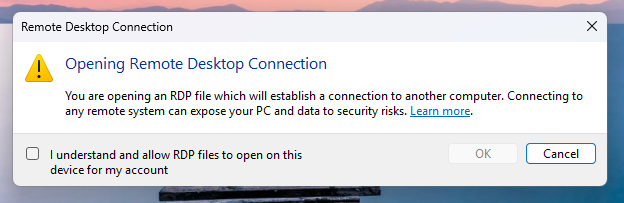
Source: Microsoft
Subsequent attempts to open RDP files will trigger a security dialog before any connection is established. This dialog provides information on whether the RDP file is signed by a verified publisher, the remote system’s address, and details all local resource redirections, with all options initially disabled.
If an RDP file lacks digital signature, Windows displays a “Caution: Unknown remote connection” warning, identifying the publisher as unknown, signifying the inability to verify the file’s creator.
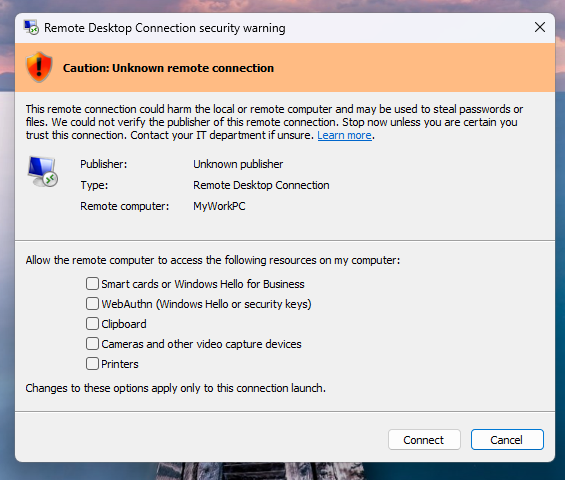
Source: Microsoft
For digitally signed RDP files, Windows will display the publisher’s information, still advising users to validate their legitimacy prior to connection.
It is important to note that these enhanced protections pertain solely to connections initiated through opening RDP files and not those established via the Windows Remote Desktop client.
Microsoft offers the option for Administrators to temporarily disable these protections by adjusting the RedirectionWarningDialogVersion value in the HKLM\Software\Policies\Microsoft\Windows NT\Terminal Services\Client Registry key to 1. However, given the historical misuse of RDP files in cyberattacks, it is strongly recommended to maintain these protections enabled.

Automated penetration testing validates the existing vulnerabilities, while Breach and Attack Simulation (BAS) assesses the effectiveness of your security controls. Many teams conduct one without the other.
This informative whitepaper delineates six validation surfaces, identifies coverage limitations, and furnishes practitioners with three key evaluative questions for any tool assessment.












Solidarity in Ashes: A Charcoal Tale of Love and Rebellion

Android 17’s Advanced Security Feature: Safeguarding Stolen Phones

Mastering Property Damage Insurance Claims: A Guide to Navigating the Process

Tech Giants OpenAI, Anthropic, and Nvidia Break Records with Lobbying Quarters

Important Update: Permanent Daylight Saving Time Implemented in Parts of Canada for Android Users

Next-Generation iPhone Duo 2: Revolutionary Under-Display Face ID Technology Put to the Test

Should you buy your Smartphones Refurbished!?

2027 BMW iX5: A Fast and Furious Ride – Quick Drive Review

Navigating the Turbulent Waters of AI: Insights from Bill Gates

EU Takes Action Against Instagram and Facebook for Violating Illegal Content Rules

Warning: Facebook Creators Face Monetization Loss for Stealing and Reposting Videos

Facebook’s New Look: A Blend of Instagram’s Style

Facebook Compliance: ICE-tracking Page Removed After US Government Intervention

Facebook and Instagram to Reduce Personalized Ads for European Users

InstaDub: Meta’s AI Translation Tool for Instagram Videos

Reclaim Your Account: Facebook and Instagram Launch New Hub for Account Recovery

Meta discontinues Messenger apps for Windows and macOS

Breaking Updates: Meta Connect 2025 Unveils Latest Developments
Should you buy your Smartphones Refurbished!?

6 Amazing SECRET Android Launchers (2017 / 2018)

6 Value for Money Tech Products you NEED to try!

iPhone X Helicopter 1200ft Drop Test!! + Mous Case Review

7 UNBELIEVABLE Smartphone Magic Tricks!

Oneplus 5T vs Oneplus 1 – 3 Years Later.

Top 20 BEST Smartphones of 2017!

5 Amazing Upcoming Smartphone Features – 2018 / 2019

ULTIMATE Power Banks / The Best Power Banks (2017-2018)
-
 Facebook12 months ago
EU Takes Action Against Instagram and Facebook for Violating Illegal Content Rules
-
 Facebook1 year ago
Warning: Facebook Creators Face Monetization Loss for Stealing and Reposting Videos
-
 Facebook11 months ago
Facebook’s New Look: A Blend of Instagram’s Style
-
 Facebook1 year ago
Facebook Compliance: ICE-tracking Page Removed After US Government Intervention
-
 Facebook11 months ago
Facebook and Instagram to Reduce Personalized Ads for European Users
-
 Facebook1 year ago
InstaDub: Meta’s AI Translation Tool for Instagram Videos
-
 Facebook11 months ago
Reclaim Your Account: Facebook and Instagram Launch New Hub for Account Recovery
-
 Apple1 year ago
Meta discontinues Messenger apps for Windows and macOS
