
Mobile Tech
Complete Guide to the Latest iCloud Shared Albums Updates in iOS 27

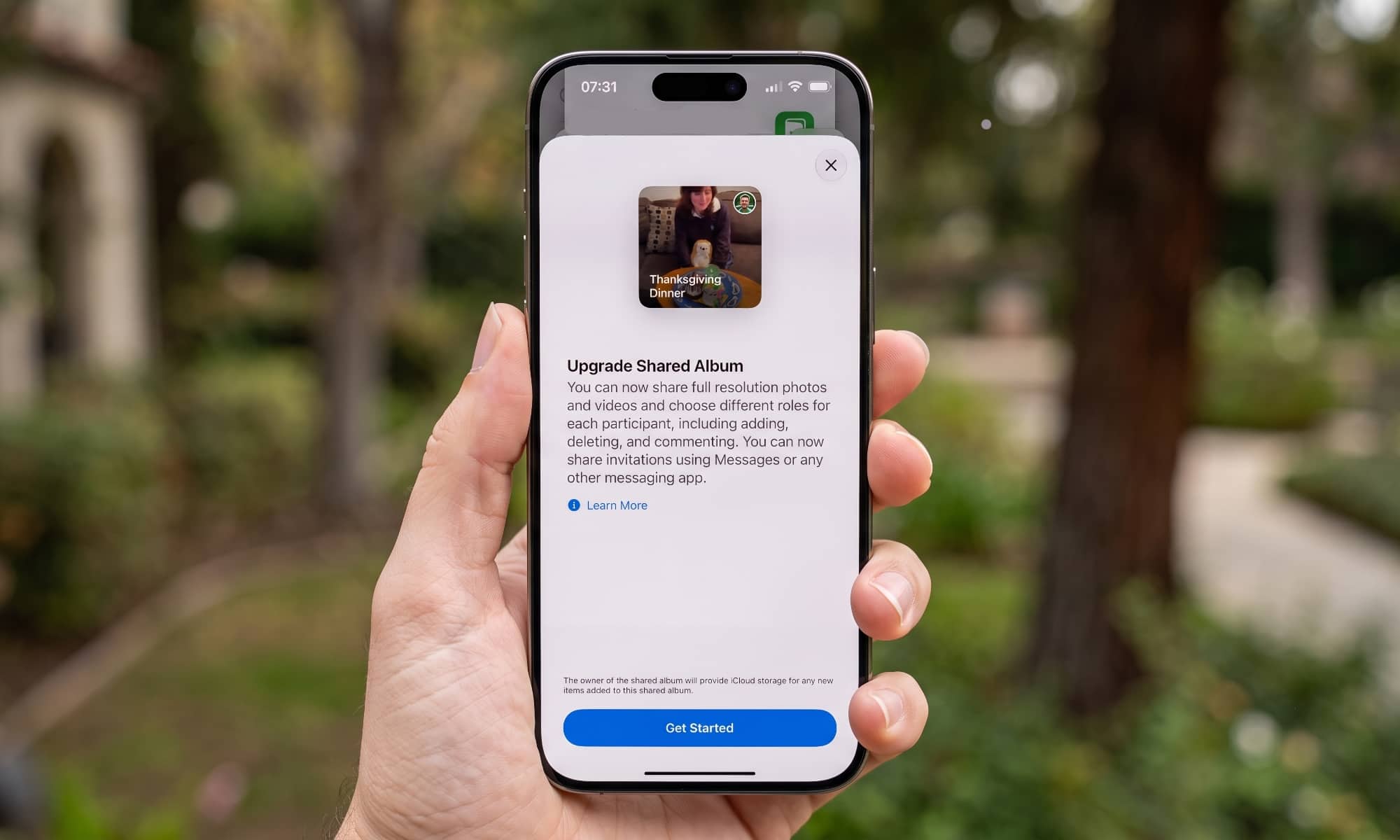
Although Apple is bringing some big AI changes to Photos in iOS 27, there’s one other enhancement that’s flying a bit more under the radar as it’s as much a change on the back end as in the Photos app itself — but it’s also much more significant than it sounds at first glance.
During its Worldwide Developers Conference (WWDC) last month, Apple’s Stacey Ford briefly mentioned that Shared Albums would be getting two big improvements for broader and higher-quality sharing:
In Photos, your iCloud shared albums can now include all of the photos and videos from your latest adventures, because your friends on Android or Windows can join and contribute their own captures to the album. And what’s more, Shared Albums now support full-resolution sharing.
Stacey Ford, VP, OS Program Management
However, what she didn’t mention was how Apple is overhauling the entire Shared Album experience under the hood to deliver these two changes.
There’s more going on here than just flipping a switch to allow for higher-resolution photos and creating a Windows- and Android-friendly web experience.
Apple has changed how Shared Albums work in a few other crucial ways, which makes sense when you realize that the existing Shared Albums are essentially a 14-year-old “legacy” feature. There’s every indication Apple is rearchitecting and modernizing the whole thing under the hood, both in iOS 27 and the rest of its operating systems, and on the iCloud back end.
It was such a long time ago in iPhone years that you may be surprised to learn that Shared Albums actually pre-date iCloud Photos by two years. This feature launched with the original debut of iCloud in 2012, along with iCloud Photo Stream, back when iPhoto was Apple’s standard way of managing photos on the Mac (and the more advanced Aperture app still existed for pros).
The Legacy of iCloud Shared Albums
Apple’s strategy in those days was to provide a simple way for users to get photos from their iPhone to their Mac and share photos with others — all without worrying about taking up their free 5 GB of iCloud storage (yes, Apple hasn’t ever upgraded its free iCloud storage allotment either).
To accomplish this, iCloud Photo Stream provided a temporary cloud-based repository to store up to 1,000 full-resolution photos for up to 30 days (and only photos — not videos). This was intended to give users enough time to fire up iPhoto or Aperture and suck those photos down onto their Mac’s hard drive.
The other iCloud photo feature, Shared Albums, allowed users to store up to 5,000 photos at lower resolutions of around 3 to 3.5 megapixels. The limit was technically 2,048 pixels on the longest side, which meant that standard 4:3 shots were scaled down to 2048 x 1536. Videos could also be included in Shared Albums, but they were limited to 720p and up to 15 minutes in length.
This was arguably a fair compromise, as Apple didn’t count any of this against users’ iCloud storage allotments — you could create up to 200 Shared Albums of 5,000 photos each without using a single byte of your cloud storage. It was also more than reasonable in an era when the third-generation iPad’s 9.7-inch Retina display only offered the same 2048 x 1536 resolution as an iCloud shared photo, and the newly-launched iPhone 5 boasted an 1136 x 640 screen.
It’s like the old meme about Bill Gates allegedly saying in the 1980s that 640 KB of RAM should be enough for anyone. While Apple surely foresaw a day when Shared Albums might need to grow beyond these limitations, the code for this feature would remain virtually unchanged for the next 14 years — even as Apple introduced more advanced features like a full-featured iCloud Photo Library in 2014 (now known simply as “iCloud Photos”) and iCloud Shared Photo Libraries in 2022.
Shared Albums Finally Grow Up in iOS 27
Thankfully, Apple’s engineers have decided it’s time for this to change. However, they’re not so much upgrading Shared Albums as they are replacing them.
While the iOS 27 version of Shared Albums is remarkably similar to the one we’ve been using for years, there are several indications Apple has built an entirely new system under the hood. That’s not too surprising, considering Apple shuttered iCloud Photo Stream in 2023. It’s probably been looking for ways to do the same with the legacy Shared Albums feature.
Hence, what we’re getting in iOS 27 and the gang is something that’s familiar, but likely also entirely rebuilt from the ground up to be bigger and better than before.
I’ve taken the new feature for a spin in iOS 27, iPadOS 27, and macOS 27 Golden Gate, and while we’re still only in the developer beta stages, it’s working well enough to give me a pretty good idea of how much has changed and what we can expect.
Here’s a quick rundown on the improvements in the new Shared Albums:
- As Apple mentioned, all photos and videos will be stored in their original, full resolutions.
- Android and Windows users will be able to view and contribute to albums, presumably through an improved web interface (there’s no indication that Apple plans to release actual apps for this, but it’s possible that could be coming later).
- The Shared Albums will become more like a social feed, thanks to new ways to comment and react to photos.
- It’s now possible to create Temporary Shared Albums that automatically expire after 30 days.
- More granular permissions will allow you to decide whether individuals can manage the whole album, only add photos, or only view and comment.
That last one is a big improvement over legacy Shared Albums, where the ability to add photos is currently a global switch — you had to either allow all participants to add photos, or nobody at all.
There’s also been no way before now to delegate full management of the Shared Album.
In the new Shared Albums feature, users can still delete photos they have contributed, even if they are switched to “View and Comment” mode. This allows for fair control over the content. Additionally, users can now be given permission to “Manage Albums and Photos,” which gives them almost the same capabilities as the owner, with the exception of removing the owner or deleting the album entirely. Android and Windows users will still need an Apple Account to contribute to Shared Albums, but they can sign up for a free Apple Account without needing an Apple device.
Instead of explicitly inviting people to Shared Albums, users can share a link for them to log in with their own Apple Account and request access. The new Shared Albums have a more modern and user-friendly web page presentation, replacing the “Public Website” toggle from the legacy version. Users need to upgrade their existing Shared Albums to the new format to utilize the new features, but this will cut off access for devices not running the latest OS versions.
Permanent Shared Albums will use iCloud storage, while Temporary Shared Albums will not. The owner is responsible for providing storage for a Shared Album, and photos added by others will count against the owner’s iCloud storage. Changes made to Shared Albums, such as deleting photos, will not affect the original iCloud Photos library. Users have the option to switch an existing Shared Album to Temporary to stop it from using iCloud storage, with the ability to switch back to Permanent if needed.
When using iCloud Storage for Shared Albums, it is important to be cautious about who you invite to contribute photos and videos. While the owner of a Shared Album can easily delete content to free up space, other members could quickly fill up the remaining storage in a lower-tiered iCloud plan.
It is important to note that although existing legacy Shared Albums will still function in iOS 27, you will not be able to create new ones in the older style. This may result in less seamless sharing with individuals using iOS 26 or earlier versions. To address this issue, consider creating placeholder “dummy” Shared Albums before updating to iOS 27, or keep an older device that has not been updated to create them from.

![Apple releases fourth iOS 27.2 developer beta for iPhone [U: Public]](https://bennetttechinnovation.com/wp-content/uploads/2026/10/Apple-unveils-latest-iOS-272-developer-beta-for-iPhone-Now-400x240.jpg)
![Apple releases fourth iOS 27.2 developer beta for iPhone [U: Public]](https://bennetttechinnovation.com/wp-content/uploads/2026/10/Apple-unveils-latest-iOS-272-developer-beta-for-iPhone-Now-80x80.jpg)








Mesmerizing Aurora Captured by NASA Astronaut on iPhone from ISS

Cool Tech under $100 – December!

Zeekr 7X: Unveiling the Global Makeover, Chinese Upgrades Left Behind

Honey, Xbox’s Mini Controller

We Unleashed a Cutting-Edge Platform: Introducing the Mighty Games Forge Launcher – The Next Evolution in Gaming Excellence

Unlocking the Potential: Reimagining Tech Advisor with 3 Key Features

Fitbit Air Unveils Exciting New Features in Latest Update

Understanding the Differences: Solar Tubular Batteries vs. Standard IT Batteries

Protect Your Investment: The Importance of AppleCare+

EU Takes Action Against Instagram and Facebook for Violating Illegal Content Rules

Warning: Facebook Creators Face Monetization Loss for Stealing and Reposting Videos

Facebook’s New Look: A Blend of Instagram’s Style

Facebook Compliance: ICE-tracking Page Removed After US Government Intervention

Facebook and Instagram to Reduce Personalized Ads for European Users

InstaDub: Meta’s AI Translation Tool for Instagram Videos

Reclaim Your Account: Facebook and Instagram Launch New Hub for Account Recovery

Meta discontinues Messenger apps for Windows and macOS

Breaking Updates: Meta Connect 2025 Unveils Latest Developments
Cool Tech under $100 – December!

MYSTERY UNBOXING FROM GOOGLE!

TOP 6 Smartphones from Companies you NEVER Expected!

A Surprise Smartphone from EE!

DOOGEE MIX 2 VS DOOGEE MIX 1!

INCREDIBLE Smartphone Gadgets on Amazon!

10 Android Apps you NEED to try in 2017 / 2018

The Most Bizarre Smartphone we’ve seen all year.

Best Tech under $2000 – December 2017 / January 2018!
-
 Facebook12 months ago
EU Takes Action Against Instagram and Facebook for Violating Illegal Content Rules
-
 Facebook12 months ago
Warning: Facebook Creators Face Monetization Loss for Stealing and Reposting Videos
-
 Facebook10 months ago
Facebook’s New Look: A Blend of Instagram’s Style
-
 Facebook1 year ago
Facebook Compliance: ICE-tracking Page Removed After US Government Intervention
-
 Facebook10 months ago
Facebook and Instagram to Reduce Personalized Ads for European Users
-
 Facebook1 year ago
InstaDub: Meta’s AI Translation Tool for Instagram Videos
-
 Facebook10 months ago
Reclaim Your Account: Facebook and Instagram Launch New Hub for Account Recovery
-
 Apple12 months ago
Meta discontinues Messenger apps for Windows and macOS
