
Tech News
Trading in My Laptop for the Google Pixel 10 Pro Fold: A Review

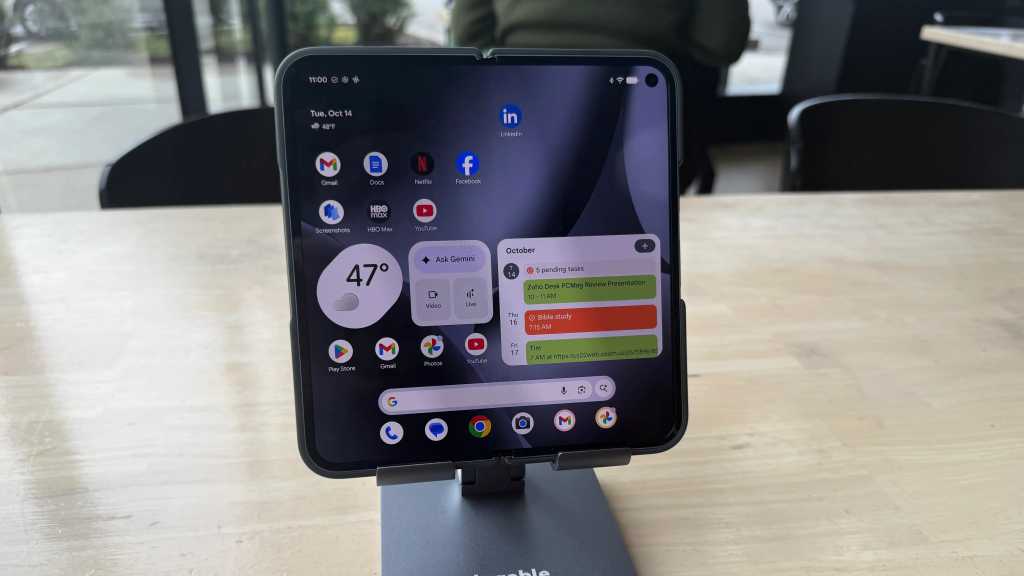
In the realm of mobile computing, the ongoing debate for the past decade has centered around whether the smartphone in your pocket can effectively replace the laptop in your bag. The latest smartphones boast impressive capabilities, such as running word processing apps, web browsing, and even utilizing chatbots like Google Gemini for generating content.
The introduction of the Pixel 10 Pro Fold by Google has reignited this debate, featuring an 8-inch fold-open inner screen powered by the Google Tensor G5 processor. This new model offers improved speed, longer battery life, and enhanced features like the Google Gemini chatbot.
To determine if the Pixel 10 Pro Fold can truly serve as a laptop replacement, I conducted a thorough test by using the device throughout a typical workday at a local coffee shop. Equipped with a keyboard, mouse, and smartphone stand, I utilized various productivity tools like Google Docs, Gmail, Gemini, and the Chrome browser. Below are the key insights from my hands-on experience, along with valuable tips and tricks.
Be prepared for trade-offs
Upon using the Pixel 10 Pro Fold, I quickly realized that a shift in mindset was necessary due to the device operating on Android 16. Tasks that are intuitive on Windows or macOS may require adjustment on Android. For instance, text selection in Google Docs differs from traditional methods, and the mouse performance can be somewhat erratic.
Adapting to a new workflow is essential when using a keyboard and mouse with the Pixel 10 Pro Fold.
Minor inconveniences, like the inability to right-click on emails for deletion or the absence of a constant row of apps on the screen, can be somewhat frustrating. Adjusting to these nuances takes time but becomes more manageable with practice.
While some features may differ, tasks like app switching using a keyboard shortcut are still feasible on the Pixel Fold. Utilizing the swipe gesture on the screen as an alternative method proved effective, albeit with a slight learning curve.
Integration with tools like Gemini for research and task assistance was seamless, with the chatbot readily accessible for various tasks.
External hardware matters
One significant consideration when comparing the 8-inch screen of the Pixel 10 Pro Fold to a laptop is the external hardware used. Testing the device with a Targus Compact Multi-Device Bluetooth Antimicrobial Keyboard and mouse showcased the portability and functionality of these accessories.
Alternatively, the Logitech Keys-To-Go 2 keyboard and MX Anywhere 3S mouse offer enhanced portability, albeit with slightly reduced typing space. Accessories like the Plugable USB-C Stand and kickstand case provide additional flexibility and convenience for various work scenarios.
While lighter than a traditional laptop, managing multiple peripherals for the Pixel Fold setup is essential. The longevity of battery life in the keyboard and mouse ensures extended usability without frequent recharging.
Supplementing the setup with tools like the Pixelsnap Ring Stand and official Pixelsnap case enhances the ergonomic and functional aspects of using the Pixel Fold.
A versatile work companion
With approximately 14 hours of battery life, the Pixel 10 Pro Fold offers extended usability over multiple days of steady work, reducing the need for frequent recharging. Carrying a backup battery like the Anker Prime Power Bank ensures uninterrupted productivity during extended work sessions.
Connecting the Pixel Fold to a computer monitor using accessories like the Anker 310 USB-C Adapter enables enhanced productivity and visual clarity, especially for prolonged work durations.
Enabling Desktop Experience mode on the Pixel Fold transforms the user interface into a more desktop-like environment, providing a taskbar similar to traditional operating systems. This feature enhances multitasking capabilities and overall productivity.
Balancing productivity and relaxation
Effective work habits include taking breaks to recharge and maintain productivity levels. The Pixel Fold offers a seamless transition between work and leisure activities, allowing users to enjoy multimedia content or games on the 8-inch screen during breaks.
Utilizing messaging apps and phone functionalities on the Pixel Fold, alongside productivity tasks, streamlines communication and personal tasks throughout the workday. The device’s versatility as both a work tool and communication device enhances overall efficiency.
Final thoughts on the Pixel 10 Pro Fold
While smartphones have evolved into powerful computing devices, the decision to replace a laptop with the Pixel 10 Pro Fold depends on individual needs and preferences. Despite its impressive capabilities, certain tasks like advanced photo editing, video production, and high-end gaming may still necessitate a traditional laptop.
However, the Pixel Fold offers a compelling alternative for everyday productivity and multitasking scenarios. With continuous advancements in mobile technology, the prospect of a smartphone replacing a laptop is becoming increasingly viable.







Revolutionary Safety Feature: Tesla Roadster with Retractable Movable Wing

Microsoft Announces Discontinuation of Copilot Plus PC Brand

Goblin Invasion: Hytale’s Chapter 1 Update Introduces Epic Boss Battles and Intricate Dungeons

Samsung Galaxy S27 Pro and Ultra: Enhanced with Larger Batteries

Innovative Health Benefits for Emerging Businesses

Comparing Apple Home’s AI Camera to Amazon and Google: A Test of Smart Home Technology

AirPods Enhancements: The Long-Awaited Update

The Evolution of the ALPINA X5: From Secret Prototype to BMW X5 4.6iS

Microsoft’s Revolutionary Copilot: A Game-Changer in the Battle Against Anthropic and OpenAI – GeekWire

EU Takes Action Against Instagram and Facebook for Violating Illegal Content Rules

Warning: Facebook Creators Face Monetization Loss for Stealing and Reposting Videos

Facebook’s New Look: A Blend of Instagram’s Style

Facebook Compliance: ICE-tracking Page Removed After US Government Intervention

Facebook and Instagram to Reduce Personalized Ads for European Users

InstaDub: Meta’s AI Translation Tool for Instagram Videos

Reclaim Your Account: Facebook and Instagram Launch New Hub for Account Recovery

Meta discontinues Messenger apps for Windows and macOS

Breaking Updates: Meta Connect 2025 Unveils Latest Developments

Samsung Galaxy S9 Plus vs iPhone X

The BEST $300 Phone (2018) ft. MKBHD, Technical Guruji, iJustine + More

Samsung Galaxy S9 Plus Gaming Review! (vs OnePlus 5T)

THE BEST PHONE HTC EVER MADE?

The Truth about Google?

Samsung S9/ S9+ vs iPhone X vs Galaxy Note 8 Battery Life DRAIN TEST

Samsung S9 / S9+ vs Mate 10 Pro vs iPhone X Charging SPEED Test

The BEST APPS in 2018 – ft. MKBHD, UrAvgConsumer, iJustine + More

The ULTIMATE Smartphone Unboxing!!
-
 Facebook11 months ago
EU Takes Action Against Instagram and Facebook for Violating Illegal Content Rules
-
 Facebook12 months ago
Warning: Facebook Creators Face Monetization Loss for Stealing and Reposting Videos
-
 Facebook10 months ago
Facebook’s New Look: A Blend of Instagram’s Style
-
 Facebook12 months ago
Facebook Compliance: ICE-tracking Page Removed After US Government Intervention
-
 Facebook10 months ago
Facebook and Instagram to Reduce Personalized Ads for European Users
-
 Facebook12 months ago
InstaDub: Meta’s AI Translation Tool for Instagram Videos
-
 Facebook10 months ago
Reclaim Your Account: Facebook and Instagram Launch New Hub for Account Recovery
-
 Apple11 months ago
Meta discontinues Messenger apps for Windows and macOS
