
Security
Streamlining Application Access: A Guide to Automating Just-In-Time Access with Tines


Managing Identity and Access Management (IAM) is crucial for organizations to maintain security and productivity in today’s digital landscape.
However, as businesses expand, the traditional controls in place to protect identities often struggle to keep up with the rapid changes and complexities of modern environments.
One common challenge faced is granting temporary access, also known as Just-In-Time (JIT) access, to sensitive applications. This process can create friction as IT teams balance the need for immediate access with stringent security requirements and audit trails.
This article delves into a ready-made Tines workflow specifically designed to address this challenge: Grant Temporary Application Access. By leveraging orchestration, this workflow helps organizations strike a balance between speed and security.
The Issue: Balancing Access and Risk
“Scaling access equals scaling risk,” emphasizes Stephen McKenna, IT Operations Technician at Tines, in a recent blog post on IAM orchestration. Each event involving a new joiner, mover, or leaver triggers a series of changes.
Many organizations still handle these changes manually across disparate systems. Some applications integrate seamlessly with Single Sign-On (SSO), while others require manual setup.
When a user requires JIT access, such as a developer needing production access for debugging purposes or a contractor needing entry for a specific project, the manual process often involves delays, permanent privilege accumulation, and scattered audit trails.
- Slow Response Times: Users submit tickets that may languish in queues until reviewed by an analyst.
- Permanent Privilege Creep: Access is sometimes granted indefinitely, leading to privilege escalation that can be exploited by attackers.
- Audit Nightmares: Tracking who approved access, when it was granted, and when it was revoked becomes challenging when information is scattered across various communication channels.
Without orchestration, accounts can linger, and privileges can accumulate unchecked.
The Solution: Streamlined, Time-Limited Provisioning
The Grant Temporary Application Access workflow automates the entire lifecycle of a JIT access request, ensuring swift approval, proper access provisioning, and automatic revocation when access is no longer needed.
By orchestrating tools like Jira Software, Okta, and Slack, this workflow enables quick access, secure approvals, and seamless revocation based on predefined time limits.
Here’s how the workflow functions:
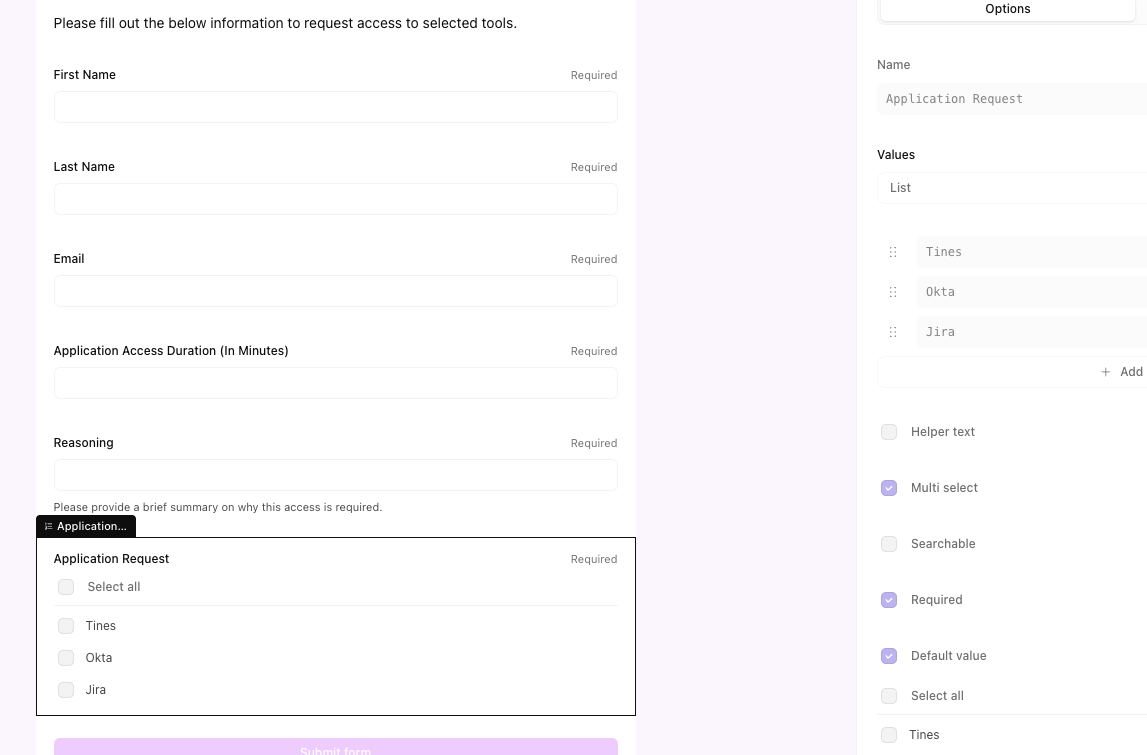
1. Self-Service Request: Users access a Tines Page—a user-friendly web form—to request application access, specify the required duration, and provide a business justification.
2. Automated Approval Routing: Upon submission, Tines automatically identifies and notifies the appropriate approver, whether it’s the user’s manager or the application owner, via Slack or Microsoft Teams. The notification includes request details and interactive approval options.
3. Instant Provisioning: If approved, the workflow triggers Okta to add the user to the relevant application group instantly, without manual intervention. Simultaneously, a ticket is created or updated in Jira Software to document the approval for compliance purposes.
4. Time-Bound Access: The workflow enters a waiting state for the specified duration (e.g., 2 hours) to ensure access remains active only for the necessary timeframe.
5. Automatic Revocation: Once the access duration expires, Tines automatically removes the user from the application group using Okta. The Jira ticket is updated to “Closed,” and the user is notified via Slack that their session has ended.
The Advantages
Implementing this intelligent workflow offers immediate benefits across three key areas:
- Enforced Least Privilege: By automating access revocation, the risk of lingering accounts is mitigated, reducing the attack surface.
- Audit-Ready Compliance: Every step of the access lifecycle is automatically logged in Jira, providing a centralized source of truth for auditors.
- Improved User Experience: Users gain quick access without prolonged waiting times, enhancing productivity.
- Efficiency: IT analysts are freed from manual user management tasks, allowing them to focus on higher-value security initiatives.
Setting Up the Workflow
Utilizing the pre-built workflow available in the Tines Library streamlines the configuration process.
Step 1: Import the Story: Access the Tines Library, search for “Grant temporary application access,” and import the template into your workspace.
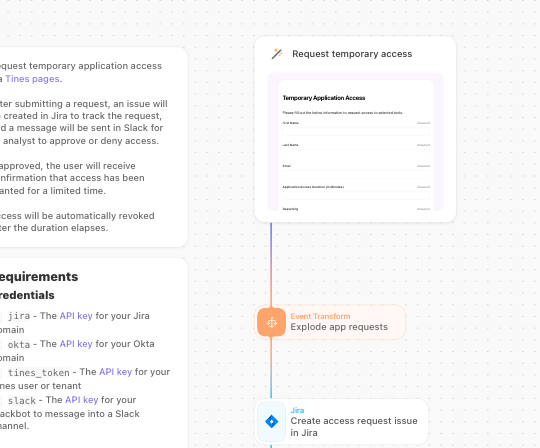
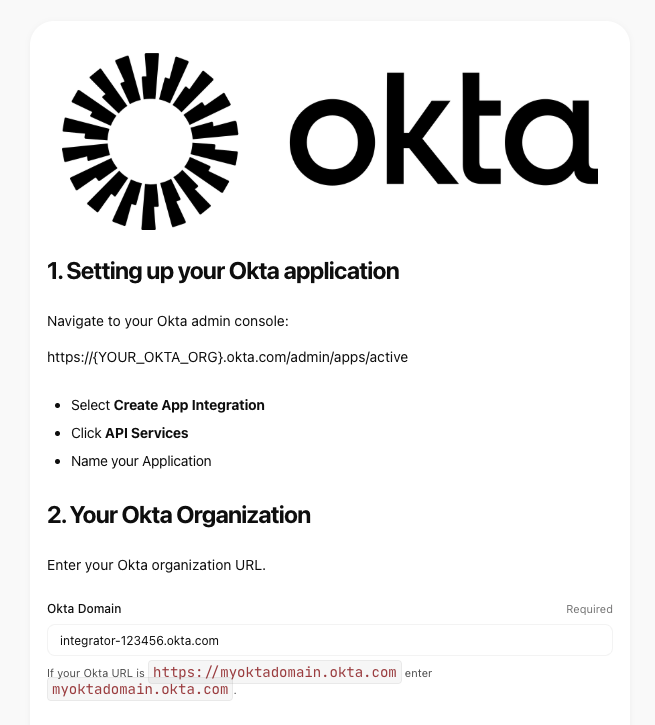
Step 2: Connect Your Tools: Establish connections to Okta, Jira Software, and Slack within the workflow to enable seamless communication between these tools.
- Okta: Manage group memberships for access provisioning.
- Jira Software: Track requests and approvals for compliance purposes.
- Slack: Facilitate notifications and interactive approval processes.
Step 3: Configure the Tines Page: Customize the form fields in the Tines Page to align with your organization’s specific application requirements, such as “Salesforce Admin” or “AWS Write Access.”
Step 4: Define Security Policies: Tailor the logic within the workflow to adhere to your organization’s security policies, such as setting maximum access durations or implementing additional approval layers for sensitive applications.
Step 5: Testing and Deployment: Conduct thorough testing to ensure the workflow functions as intended, including Slack notifications and Okta group changes. Once verified, publish the Tines Page and share it with your team.
To experience this workflow firsthand, sign up for a free Tines account and explore its capabilities.
This article is sponsored and written by Tines.












NUS Enterprise Expands Globally with Nova: A Revolutionary AI Platform for Research Commercialisation

Mastering the iPhone 18 Pro’s Aperture: Enhancing Your Photography with These Camera Apps

Reimagining the Next Generation: A Closer Look at the Apple TV 4K and HomePod Mini

Samsung Galaxy S9 & S9+ UNBOXING!

Revolutionary Safety Feature: Tesla Roadster with Retractable Movable Wing

Microsoft Announces Discontinuation of Copilot Plus PC Brand

Goblin Invasion: Hytale’s Chapter 1 Update Introduces Epic Boss Battles and Intricate Dungeons

Samsung Galaxy S27 Pro and Ultra: Enhanced with Larger Batteries

Innovative Health Benefits for Emerging Businesses

EU Takes Action Against Instagram and Facebook for Violating Illegal Content Rules

Warning: Facebook Creators Face Monetization Loss for Stealing and Reposting Videos

Facebook’s New Look: A Blend of Instagram’s Style

Facebook Compliance: ICE-tracking Page Removed After US Government Intervention

Facebook and Instagram to Reduce Personalized Ads for European Users

InstaDub: Meta’s AI Translation Tool for Instagram Videos

Reclaim Your Account: Facebook and Instagram Launch New Hub for Account Recovery

Meta discontinues Messenger apps for Windows and macOS

Breaking Updates: Meta Connect 2025 Unveils Latest Developments
Samsung Galaxy S9 & S9+ UNBOXING!

Samsung Galaxy S9 Plus vs iPhone X

The BEST $300 Phone (2018) ft. MKBHD, Technical Guruji, iJustine + More

Samsung Galaxy S9 Plus Gaming Review! (vs OnePlus 5T)

THE BEST PHONE HTC EVER MADE?

The Truth about Google?

Samsung S9/ S9+ vs iPhone X vs Galaxy Note 8 Battery Life DRAIN TEST

Samsung S9 / S9+ vs Mate 10 Pro vs iPhone X Charging SPEED Test

The BEST APPS in 2018 – ft. MKBHD, UrAvgConsumer, iJustine + More
-
 Facebook11 months ago
EU Takes Action Against Instagram and Facebook for Violating Illegal Content Rules
-
 Facebook12 months ago
Warning: Facebook Creators Face Monetization Loss for Stealing and Reposting Videos
-
 Facebook10 months ago
Facebook’s New Look: A Blend of Instagram’s Style
-
 Facebook12 months ago
Facebook Compliance: ICE-tracking Page Removed After US Government Intervention
-
 Facebook10 months ago
Facebook and Instagram to Reduce Personalized Ads for European Users
-
 Facebook12 months ago
InstaDub: Meta’s AI Translation Tool for Instagram Videos
-
 Facebook10 months ago
Reclaim Your Account: Facebook and Instagram Launch New Hub for Account Recovery
-
 Apple11 months ago
Meta discontinues Messenger apps for Windows and macOS
