
Microsoft
What’s Next for Xbox: A Sneak Peek at the New User Interface

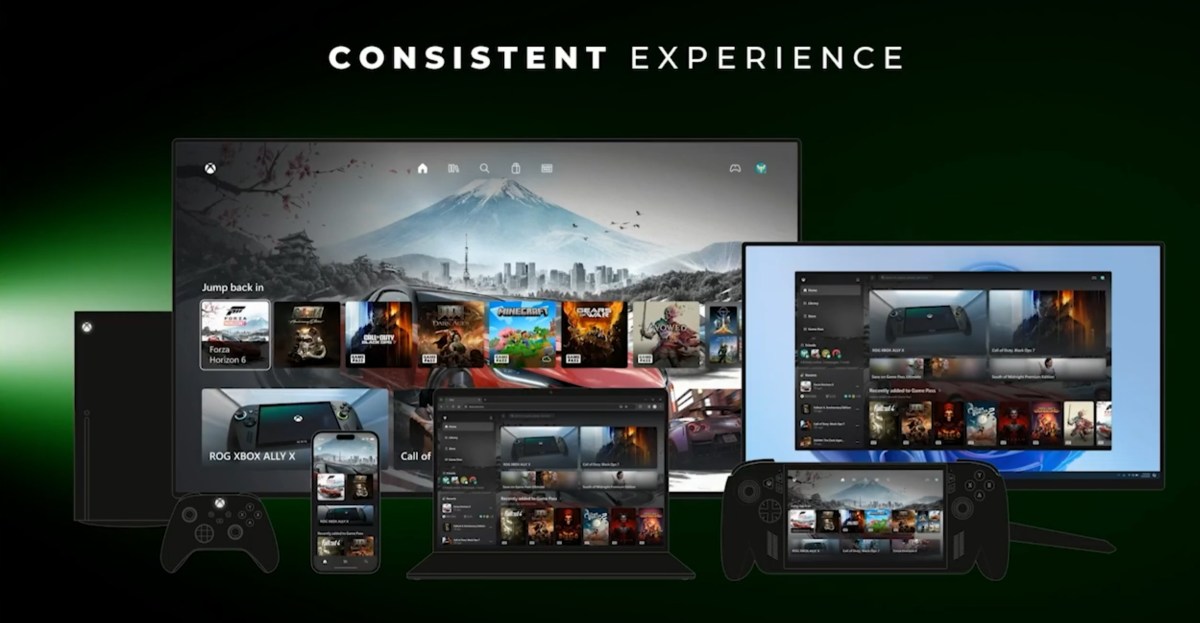
Microsoft Unveils Consistent Xbox UI Across Handhelds, Consoles, and Cloud Gaming
During the Xbox keynote at the Game Developers Conference in March, Microsoft showcased a “consistent” Xbox user interface (UI) that spans handheld devices, consoles, and cloud gaming platforms. While initial impressions from event videos and photos left some questioning the new UI’s novelty, Microsoft has now released a detailed video of the keynote, offering a closer look at the updated interface.
Jason Ronald, Vice President of Next Generation at Xbox, presented the new UI, addressing previous issues of fragmentation and inconsistency in user experiences across different devices. Ronald emphasized the team’s efforts to deliver a seamless and familiar Xbox experience regardless of the platform, stating, “What the team has been doing behind the scenes is doing a lot of work to deliver a consistent experience, so it feels very familiar and very distinctly Xbox no matter where you’re choosing to play.”
Although the new UI may appear similar at first glance, subtle differences can be observed across various devices. For instance, the Xbox console homescreen features the user profile in the top right corner and three ad slots at the bottom, deviating from the usual four. The handheld device displays a similar interface, while the PC application resembles the new Xbox Cloud Gaming design.
Initial testing of the Xbox Cloud Gaming UI hinted at a more console-like experience, incorporating new animations, a redesigned library section, and rounded aesthetics. Microsoft’s plans suggest that this revamped interface could extend to the Xbox PC app, although adjustments will be made based on factors such as screen size and input methods.
Furthermore, Microsoft teased a potential new Xbox store layout for Windows in the Xbox game dev update video. When asked for comments on the updated Xbox UI and store changes, Microsoft chose not to provide any details.
For those interested in a comprehensive overview of Ronald’s GDC keynote, Microsoft’s Xbox game dev update video offers an in-depth look. While the full video runs nearly 90 minutes, viewers can start directly at Ronald’s keynote using the embedded link below.
Update, May 7th: This article has been updated to mention Microsoft’s decision to withhold comments on the new Xbox UI.











Enhancing Visibility in Your Enterprise AI Ecosystem: Tips and Strategies

Unlocking Success: The Ultimate Guide to Maximizing Your Wins with the 2024 Microsoft Office Pro Plus Lifetime License

The ULTIMATE Smartphone Unboxing!!

The Fast Lane: Apple’s CEO John Ternus and his $800,000 Porsche 935

Twitch CEO Teases GTA 6 Online Multiplayer Launch for Next Year, PC Port Release Date Uncertain

Race Against Time: Achieving Success at Disrupt 2026

The AirTag Crime Wave: Stalking, Robbery, and a Multi-Million Dollar Scam

Revving Up: The Design Evolution of V8 Power with a Release Date

The Rise of Ballbylon: A New Chapter in Ball x Pit’s Adventure

EU Takes Action Against Instagram and Facebook for Violating Illegal Content Rules

Warning: Facebook Creators Face Monetization Loss for Stealing and Reposting Videos

Facebook’s New Look: A Blend of Instagram’s Style

Facebook Compliance: ICE-tracking Page Removed After US Government Intervention

Facebook and Instagram to Reduce Personalized Ads for European Users

InstaDub: Meta’s AI Translation Tool for Instagram Videos

Reclaim Your Account: Facebook and Instagram Launch New Hub for Account Recovery

Meta discontinues Messenger apps for Windows and macOS

Breaking Updates: Meta Connect 2025 Unveils Latest Developments
The ULTIMATE Smartphone Unboxing!!

HOW GOOD can a $250 Smartphone Camera be!?

10 Android Apps you NEED to try in 2018

They could not believe how cheap this Phone is

A $50,000 Smartphone for $400?

Huawei P20 Pro Unboxing!

Huawei P20 Pro vs Samsung S9 Plus!

Huawei P20 vs P20 Pro vs iPhone 8 Plus vs S9 Battery Drain Test!

10 Android Mods that Change Everything
-
 Facebook11 months ago
EU Takes Action Against Instagram and Facebook for Violating Illegal Content Rules
-
 Facebook11 months ago
Warning: Facebook Creators Face Monetization Loss for Stealing and Reposting Videos
-
 Facebook10 months ago
Facebook’s New Look: A Blend of Instagram’s Style
-
 Facebook11 months ago
Facebook Compliance: ICE-tracking Page Removed After US Government Intervention
-
 Facebook10 months ago
Facebook and Instagram to Reduce Personalized Ads for European Users
-
 Facebook11 months ago
InstaDub: Meta’s AI Translation Tool for Instagram Videos
-
 Facebook10 months ago
Reclaim Your Account: Facebook and Instagram Launch New Hub for Account Recovery
-
 Apple11 months ago
Meta discontinues Messenger apps for Windows and macOS
