
Gadgets
Unveiling the Power of the Dell Pro 16 Plus: A Comprehensive Review of the PB16250 with Intel Core Ultra 7 268V

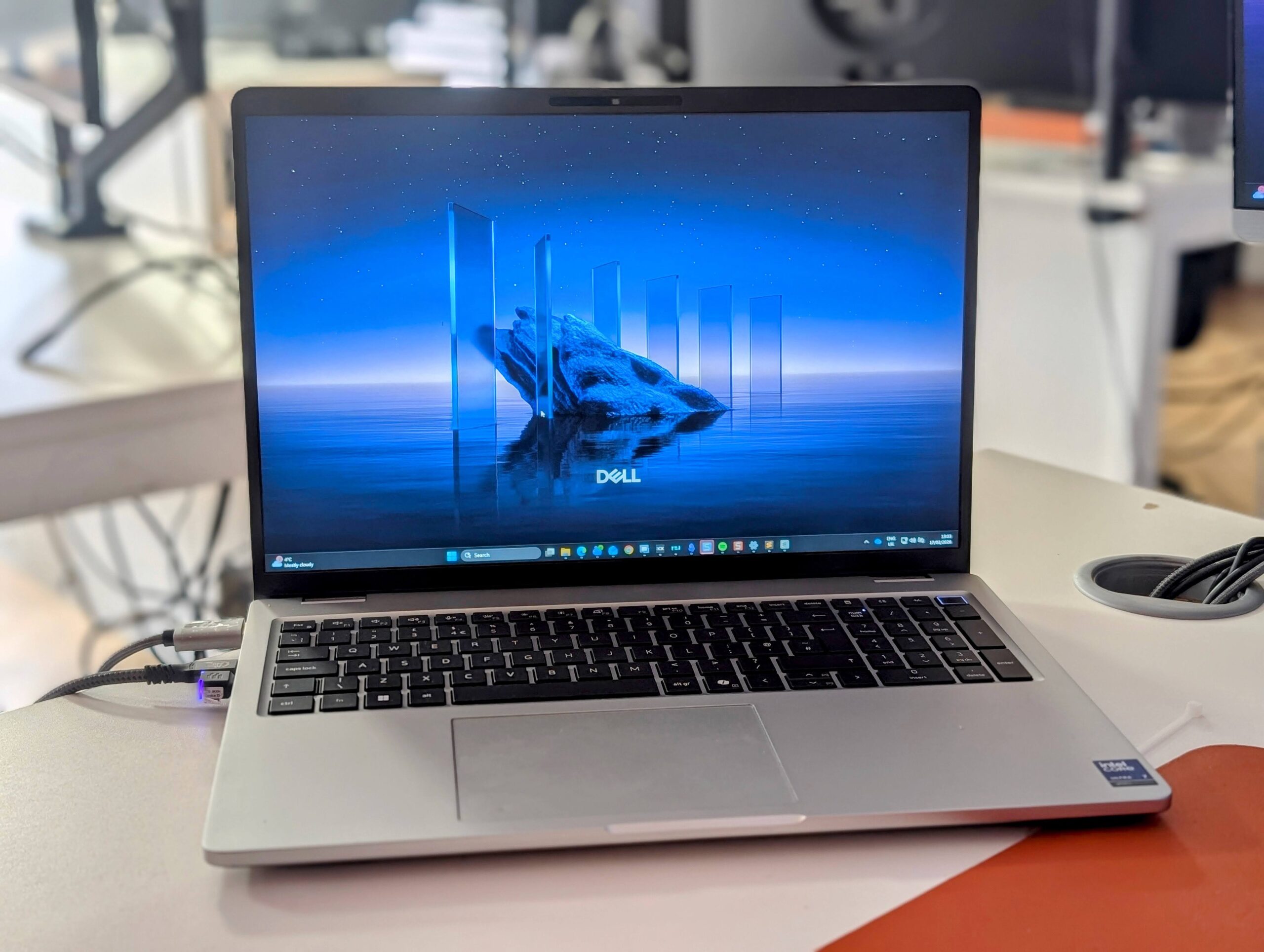
Dell Pro 16 Plus (PB16250) Review with Intel Core Ultra 7 268V
The Dell Pro 16 Plus (PB16250) is a competent business laptop that prioritizes efficiency, battery life, and practical usability over outright performance. The Lunar Lake-based Core Ultra 7 268V delivers responsive day-to-day performance for office workloads, while the solid aluminum chassis, good port selection, and comfortable keyboard make it well-suited to a professional environment. However, the relatively basic display, limited external monitor support, and modest multi-threaded performance mean it will not suit every workload. For general productivity and mobile work, it performs reliably, but buyers with heavier workloads or complex multi-monitor setups would be better served by one of the H-series or AMD configurations.
Pros
- Solid aluminum build quality
- Efficient Lunar Lake processor
- Comfortable keyboard with numpad
- Good port selection including USB-A
- 32 GB RAM standard
Cons
- Limited external monitor support
- Average 60 Hz display
- Multi-core performance fairly modest
- RAM cannot be upgraded
- 512 GB storage slightly small
Specification
The Dell Pro 16 Plus is available in multiple configurations with different processors, ranging from Intel Core Ultra U-series chips through to the V-series Lunar Lake processors and AMD Ryzen AI options. The specs below match the model I have reviewed.
| Specification | Details |
| Processor | Intel Core Ultra 7 268V (Series 2), 8-core (4P + 4E), up to 5.0 GHz |
| AI / NPU | Intel AI Boost NPU – up to 48 TOPS |
| Graphics | Intel Arc Graphics 140V |
| Memory | 32 GB LPDDR5X (soldered, on-package) |
| Storage | 512 GB PCIe 4.0 NVMe SSD |
| Display | 16-inch IPS, 1920 x 1200, 16:10 aspect ratio, 60 Hz |
| Brightness | 300 nits |
| Wireless | Wi-Fi 7 (Intel BE201) + Bluetooth |
| Ports | 2x USB4 (Thunderbolt 4), 2x USB-A, HDMI, 3.5 mm audio, microSD |
| Webcam | 1080p with IR for Windows Hello |
| Audio | Stereo speakers with dual microphones |
| Keyboard | Backlit with numeric keypad and Copilot key |
| Security | TPM 2.0, fingerprint reader |
| Battery | 55 Wh |
| Charging | 65 W USB-C power adapter |
| OS | Windows 11 Pro |
| Build | Aluminum chassis |
| Dimensions | 358 x 251.4 x 21.35 mm |
| Weight | 1.85 kg |
Design and Display
The Dell Pro 16 Plus has a clean, understated aluminum chassis that feels solid and well-built. It is not going to win any awards for being the most exciting-looking laptop on the market, but that is not really the point for a business-focused machine. The silver finish is professional without being boring, and the overall build quality is reassuring. At 1.85 kg and 21.35 mm at its thickest point, it is reasonably portable for a 16-inch laptop, though it is not exactly ultrabook territory either.
The 16-inch display uses an IPS panel with a 1920 x 1200 resolution in a 16:10 aspect ratio. The extra vertical space compared to a traditional 16:9 screen is welcome for productivity work, giving you a bit more room for documents, spreadsheets, and web pages. At 300 nits of brightness, it is adequate for indoor use but can struggle in bright sunlight or near large windows. The 60 Hz refresh rate is perfectly fine for office work, though it does feel a little behind the times when some competitors are offering 120 Hz panels at similar price points, including the consumer Dell 16 Plus which has a 2560 x 1600 120 Hz option.
Color accuracy is reasonable for a business laptop, though this is not a panel you would choose for color-critical creative work. The anti-glare coating does a decent job of reducing reflections, and the viewing angles are good enough for sharing your screen with a colleague. If you are coming from an OLED or high-resolution display, you will likely notice the difference, but for day-to-day IT support work, document editing, and web browsing, it gets the job done without complaint.
Ports
Port selection on the Dell Pro 16 Plus is genuinely good for a modern laptop. You get two USB4 ports with Thunderbolt 4 support, two USB-A ports, a full-size HDMI output, a 3.5 mm audio jack, and a microSD card slot. The inclusion of two USB-A ports is a welcome touch, as many modern laptops have dropped them entirely in favor of USB-C only. In an IT support role, where you are regularly plugging in USB drives, peripherals, and various dongles, having native USB-A is a real convenience.
The Thunderbolt 4 ports support DisplayPort 2.1 Alt Mode, power delivery, and USB4 data transfer at 40 Gbps. Both USB-C ports can be used for charging, which gives you flexibility depending on which side of your desk the power outlet is on. Some configurations also include an RJ45 Ethernet port, though this is limited to models with the Core Ultra 200U series or standard Core series processors, not the V-series Lunar Lake chip in my review unit.
Display Support
My biggest gripe with this laptop is the limited monitor support. It is not something I pay that much attention to with a normal review. However, with my work setup, I have the laptop monitor for Teams and email, one 4K monitor to make notes in my tickets, one monitor to remote onto a client machine, and then a portable monitor which I use to keep 3CX visible and for Sublime Notepad.
Unfortunately, this laptop only supports 3 monitors, including the laptop display.
I doubt many people use four monitors, so this is likely not an issue, but if you do, then I would recommend looking for a laptop that does support four monitors.
The Dell Premium laptops use the Core Ultra 7 255H or 9 285H, which support 4 monitors, and the AMD models also support it. This limitation is a direct consequence of the Lunar Lake V-series architecture, which has fewer display outputs than the H-series chips. The Intel Arc 140V GPU supports up to three simultaneous displays through a combination of HDMI 2.1, eDP 1.5, and DisplayPort 2.1, so you are stuck with the laptop screen plus two externals at most. For most office users running a single external display or even two, this will be absolutely fine. But if you have a multi-monitor setup like mine, it is genuinely frustrating and something I wish I had researched more carefully before purchasing.
Keyboard and Trackpad
The backlit keyboard is comfortable to type on for extended periods, with decent key travel and a layout that feels familiar. The inclusion of a numeric keypad is a definite bonus for anyone who regularly works with spreadsheets or data entry, though it does push the main keyboard slightly to the left, which can take a bit of getting used to. The Copilot key sits where you might expect a right-hand function key, and while I find myself rarely using it intentionally, it is not intrusive enough to be annoying.
The trackpad is large and responsive, with smooth multi-touch gestures. It handles Windows 11’s gesture controls well, including three-finger swipes for task switching and pinch-to-zoom. I found it to be reliable and accurate during day-to-day use, though like most trackpads on business laptops, it is not quite as satisfying as what you get on a MacBook. The click mechanism is consistent across the surface area, which is a nice touch compared to cheaper laptops where the click only works properly in the lower half.
Performance and Benchmarks
The benchmark results tell an interesting story about where the Core Ultra 7 268V sits in the current landscape. The Cinebench R23 single-core score of 1,833 is strong and competitive with most current-generation mobile processors. This translates into snappy day-to-day performance where most tasks are single-threaded anyway, including opening applications, browsing, and general office work.
The multi-core score of 7,747 is where things get more nuanced. This is decent for an 8-core, 8-thread chip running at a 17 W base power, but it falls well short of what you would get from the Core Ultra 7 255H or AMD Ryzen AI chips that are available in other configurations of this same laptop. The H-series processors have more cores, more threads, and higher power limits, which means they pull ahead significantly in sustained multi-threaded workloads. In third-party benchmarks, the Ryzen AI 9 HX 370 has been shown to be roughly 50-60% faster in multi-core tasks, though it does consume more power to achieve this.
The Intel Arc 140V integrated graphics scored around 4,200 in 3DMark Time Spy, which is a solid result for an iGPU. This puts it ahead of most AMD Radeon integrated graphics solutions and makes it perfectly capable for light gaming at lower settings, hardware-accelerated video encoding, and GPU-assisted productivity tasks. It will handle 4K video playback without breaking a sweat.
Storage performance from the 512 GB PCIe 4.0 NVMe SSD is fast. Sequential reads of nearly 6 GB/s are excellent, and the random 4K performance is perfectly adequate for typical workloads. The 512 GB capacity is a bit tight for a work laptop though, particularly if you need to run virtual machines or store large files locally. A 1 TB option would have been preferable as standard at this price point.
The PCMark 10 overall score of 7,494 places this firmly in the fast productivity laptop category. For the kind of work I do in IT support, including remote desktop sessions, running Teams calls, managing tickets, and having dozens of browser tabs open, the performance is more than sufficient. I rarely felt like the laptop was holding me back during normal use. Where you start to notice the limitations is if you are doing anything heavily multi-threaded, such as compiling code, running complex virtual machines, or heavy video editing. For those tasks, the H-series or AMD alternatives would serve you better.
Battery Life
The 55 Wh battery is on the smaller side for a 16-inch laptop. For comparison, last year’s Dell Inspiron 16 Plus offered a 90 Wh option, and the consumer Dell 16 Plus has a 64 Wh cell. The saving grace here is that the Lunar Lake processor is very efficient. Intel designed the V-series chips specifically for excellent battery life, and the 17 W base power means the processor sips energy during light workloads.
In my real-world usage, doing IT support work, which involves Teams calls, remote desktop sessions, web browsing, and document editing, I was consistently getting around 8 to 10 hours on a single charge with the screen at a comfortable brightness. This is a good result given the battery size, and it means you can comfortably get through a full working day without needing to plug in. Under heavier loads with multiple resource-intensive applications running, battery life drops to around 5 to 6 hours, which is still respectable.
The 65 W USB-C charger is compact and light, and it tops up the battery reasonably quickly. You can also charge via either of the two Thunderbolt 4 ports, which is convenient. One thing I would have liked is a larger battery option at the configuration stage. The efficiency of Lunar Lake paired with a 72 Wh or 90 Wh battery could potentially deliver genuinely exceptional battery life, but Dell has seemingly opted to keep the chassis slim and light rather than pack in more cells.
Windows and Pre-Installed Applications
The laptop ships with Windows 11 Pro, which is the right choice for a business machine. You get BitLocker encryption, Remote Desktop hosting, Hyper-V virtualization support, and Group Policy management out of the box. For anyone using this in a managed IT environment, Windows 11 Pro is more or less a requirement.
Dell includes its usual suite of pre-installed software. Dell Optimizer is probably the most useful of the bunch, allowing you to tweak power profiles, network priority, and audio settings. Dell SupportAssist handles driver updates and system diagnostics, and while it can be a bit aggressive with notifications, it is genuinely handy for keeping drivers up to date. There is also Dell Display Manager for configuring multi-monitor layouts, though with only three displays supported, its usefulness is somewhat limited in my case.
The Copilot+ PC features are present, leveraging the 48 TOPS NPU. At the time of writing, the practical benefits of having a local NPU are still fairly limited. Microsoft’s Recall feature has been delayed and reworked multiple times, and most AI-powered features in Windows still rely on cloud processing rather than the on-device NPU. Live captions and Windows Studio Effects for the webcam do use the NPU, and they work well without impacting system performance. Whether the NPU becomes more useful over time remains to be seen, but right now it is not a strong reason to choose this configuration over a non-V-series alternative.
One annoyance worth mentioning is the sheer amount of initial setup and configuration required. Between Windows 11’s own setup process, Dell’s various utilities, and Microsoft’s persistent attempts to get you to link everything to a Microsoft account, it took me a good 30 to 40 minutes before the laptop felt ready to use. This is not unique to Dell, but it is worth noting for anyone buying this for business deployment. Using a provisioning tool or a clean install image would save considerable time.
Price and Alternative Options
The Dell Pro 16 Plus with the Core Ultra 7 268V and 32 GB RAM configuration that I reviewed sits at the higher end of the range. In the UK, the Dell Pro 16 Plus starts from around £986 for the base specification, but the V-series Lunar Lake models with 32 GB of RAM push the price significantly higher, typically landing between £1,400 and £1,700 depending on the exact configuration and any current promotions. Dell frequently runs sales, so it is worth keeping an eye on pricing rather than paying full RRP.
For this kind of money, you have several alternatives worth considering. Within Dell’s own lineup, the Dell Pro 16 Plus with a Core Ultra 7 255H processor offers significantly better multi-threaded performance and support for four external displays, though it will use more power and have shorter battery life. The AMD Ryzen AI configurations also provide more multi-threaded headroom and better display output support.
Outside of Dell, the Lenovo ThinkPad T16 Gen 3 is a solid alternative in the business laptop space, offering similar build quality and a mature keyboard. The HP EliteBook 860 G11 is another strong contender with excellent display options and robust enterprise management features. If you are less concerned about having a business-class machine and are happy with a consumer laptop, the Dell 16 Plus (the non-Pro version) offers similar Lunar Lake processors at a noticeably lower price point, starting from around £950 in the UK, though it trades off some of the enterprise features like vPro support and the more robust port selection.
The key question is whether you specifically need the efficiency and battery life of Lunar Lake, or whether you would be better served by the higher performance of the H-series or AMD chips. If you spend most of your time on battery and your workload is primarily single-threaded office tasks, the V-series makes a lot of sense. If you need raw performance and multi-monitor support, the H-series or AMD alternatives are the better buy.
Overall
The Dell Pro 16 Plus is a decent laptop if the specification fits your needs. In my case, I clearly did not research the purchase properly, and I have been left feeling a bit disappointed.
My main issue is the limited monitor support, which likely will not be an issue for most buyers.
The performance is adequate, but far from great, as










Ram Trucks Australia Braces for Price Increases Due to Emissions Regulations

Revving Up: Tractor Battle Adventure RPG Expands with Mod Support on Steam Workshop

Troubleshooting Guide: Unable to Access 192.168.0.1

Choosing the Right AI: Ensuring Trust in Multi-Model Translation Systems

Friday Night Baseball Madness: iPhone 18 Pro Edition

Partnership Potential: JAC & Huawei in Talks to Produce Electric Maserati Vehicles

Grand Theft Auto VI: The Soundtrack – Limited Edition Physical Release

The Never-Ending Battle of the Galaxy S27 Ultra Camera: A Tech Advisor’s Perspective

Motorola Signature 27: Unveiled Specs and Vibrant Colour Options – Tech Advisor

EU Takes Action Against Instagram and Facebook for Violating Illegal Content Rules

Warning: Facebook Creators Face Monetization Loss for Stealing and Reposting Videos

Facebook’s New Look: A Blend of Instagram’s Style

Facebook Compliance: ICE-tracking Page Removed After US Government Intervention

Facebook and Instagram to Reduce Personalized Ads for European Users

InstaDub: Meta’s AI Translation Tool for Instagram Videos

Reclaim Your Account: Facebook and Instagram Launch New Hub for Account Recovery

Meta discontinues Messenger apps for Windows and macOS

Breaking Updates: Meta Connect 2025 Unveils Latest Developments

Huawei P20 Pro Unboxing!

Huawei P20 Pro vs Samsung S9 Plus!

Huawei P20 vs P20 Pro vs iPhone 8 Plus vs S9 Battery Drain Test!

10 Android Mods that Change Everything

I used the first Android Phone in the World.

DOOGEE MIX 4 UNBOXING (PROTOTYPE)!

MYSTERY UNBOXING FROM SAMSUNG!

The Truth about Huawei P20 Pro – REAL Review

How to Love your Android Phone again.
-
 Facebook11 months ago
EU Takes Action Against Instagram and Facebook for Violating Illegal Content Rules
-
 Facebook11 months ago
Warning: Facebook Creators Face Monetization Loss for Stealing and Reposting Videos
-
 Facebook9 months ago
Facebook’s New Look: A Blend of Instagram’s Style
-
 Facebook11 months ago
Facebook Compliance: ICE-tracking Page Removed After US Government Intervention
-
 Facebook9 months ago
Facebook and Instagram to Reduce Personalized Ads for European Users
-
 Facebook11 months ago
InstaDub: Meta’s AI Translation Tool for Instagram Videos
-
 Facebook10 months ago
Reclaim Your Account: Facebook and Instagram Launch New Hub for Account Recovery
-
 Apple11 months ago
Meta discontinues Messenger apps for Windows and macOS
