
Gadgets
Ultimate NAS Enclosure Showdown: Ugreen DXP4800 GT vs NASync DXP4800 Plus vs DXP4800 Pro – The Battle for Superior Storage

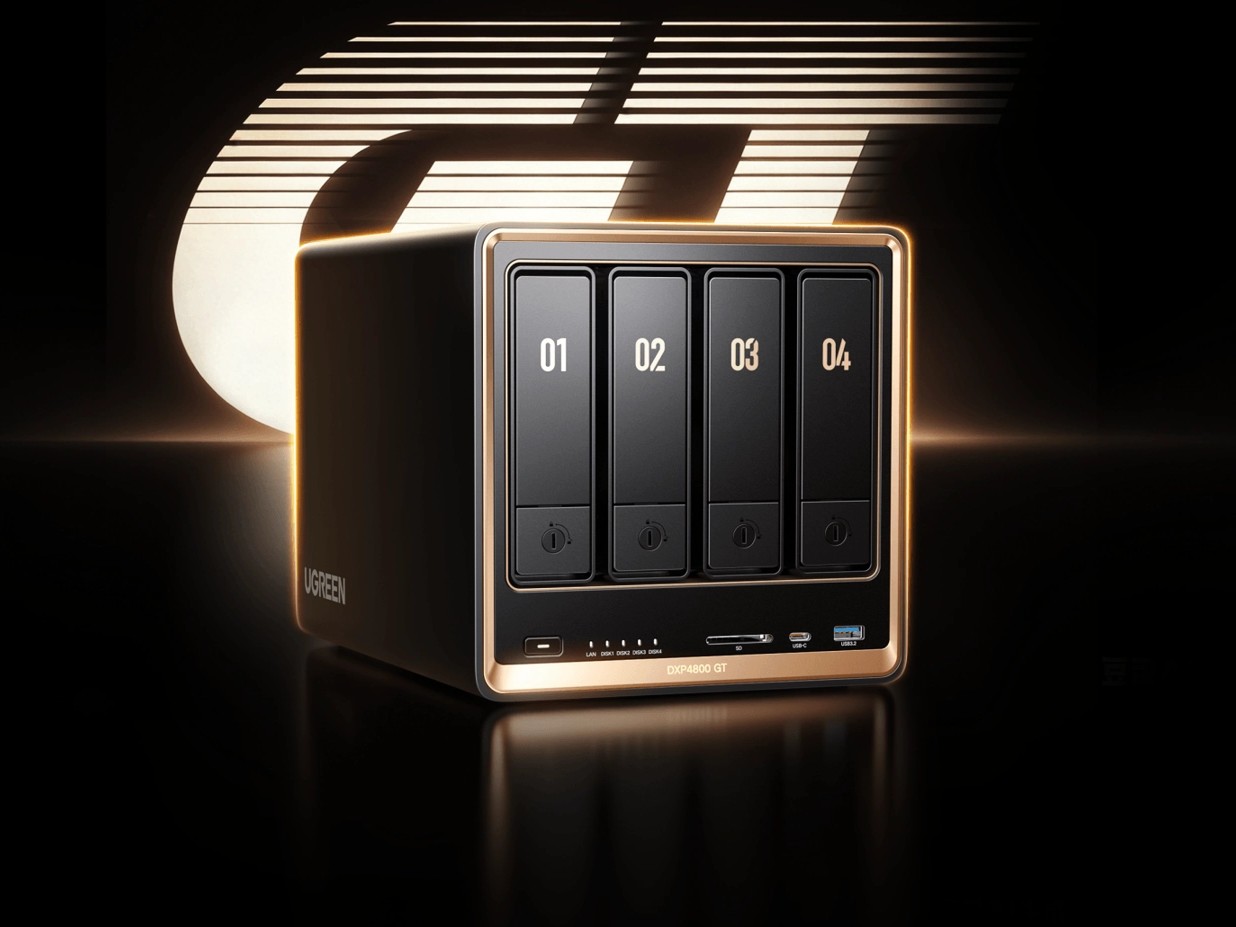
As a dedicated home lab enthusiast, I utilize various mini PCs and NAS enclosures for personal entertainment, such as watching TV and movies, as well as for backing up personal and work-related data, including website backups.
Ugreen has been gaining attention in the NAS enclosure market in recent years by offering superior hardware at a more reasonable price compared to established brands like Synology and QNAP. While UGOS may not match up to Synology DSM, it competes well with other budget-friendly options such as TerraMaster TOS. Overall, UGOS feels more polished than TOS.
I have recently assessed the outstanding Ugreen NASync DXP4800 Plus, NASync DH4300 Plus, and the most budget-friendly option in their lineup, the DH2300 NAS.
During the Computex event, Ugreen introduced the new GT series, which includes the four-bay DXP4800 GT and the two-bay DXP2800 GT. Although I am reviewing the 2-bay model, I wanted to compare the three 4-bay X86 models.
Ugreen DXP4800 GT vs NASync DXP4800 Plus vs DXP4800 Pro Specification
| Specification | Ugreen NASync DXP4800 GT | Ugreen NASync DXP4800 Plus | Ugreen NASync DXP4800 Pro |
| — | — | — | — |
| Drive Bays | 4 × SATA 3.5″/2.5″ | 4 × SATA 3.5″/2.5″ | 4 × SATA 3.5″/2.5″ |
| CPU | AMD Ryzen Embedded (4-core, 8-thread) | Intel Pentium Gold 8505 (5-core, 6-thread) | Intel Core i3-1315U (6-core, 8-thread) |
| Maximum CPU Frequency | 3.7GHz | Up to 4.4GHz | Up to 4.5GHz |
| Memory (RAM) | 8GB DDR4 | 8GB DDR5 | 8GB or 16GB DDR5 |
| ECC Memory Support | Not specified | Yes | Not specified |
| Maximum RAM | 64GB | 64GB | 96GB |
| System Drive | 64GB eMMC | 128GB SSD | 128GB SSD |
| M.2 NVMe Slots | 2 × M.2 2280 | 2 × M.2 2280 | 2 × M.2 2280 |
| Maximum Storage Capacity | 144TB (4 × 32TB + 2 × 8TB) | 144TB (4 × 32TB + 2 × 8TB) | 144TB (4 × 32TB + 2 × 8TB) |
| RAID Modes | JBOD, Basic, RAID 0, 1, 5, 6, 10 | JBOD, Basic, RAID 0, 1, 5, 6, 10 | JBOD, Basic, RAID 0, 1, 5, 6, 10 |
| Operating System | UGOS Pro | UGOS Pro | UGOS Pro |
| Network Ports | 2 × 10GbE | 1 × 10GbE, 1 × 2.5GbE | 1 × 10GbE, 1 × 2.5GbE |
| USB-C | 1 × USB 3.2 Gen 2 (10Gb/s) | 1 × USB-C (10Gb/s) | 1 × USB 3.2 Gen 2 (10Gb/s) |
| USB-A | 2 × USB 3.2 Gen 2 (10Gb/s) | 1 × USB-A (10Gb/s), 1 × USB-A (5Gb/s), 2 × USB 2.0 | 1 × USB 3.2 Gen 2 (10Gb/s) |
| Thunderbolt 4 | No | No | No |
| HDMI Output | 4K 60Hz | 4K | 4K 60Hz |
| SD Card Reader | SD 3.0 | SD 3.0 | SD 3.0 |
| PCIe Expansion | No | No | No |
| Power Supply | 150W | 150W | 150W |
| Dimensions | Not specified | 257 × 178 × 178mm | Not specified |
AMD Ryzen Embedded r2514 vs Intel Pentium Gold 8505 vs Core i3-1315u
| Specification | AMD Ryzen Embedded R2514 | Intel Pentium Gold 8505 | Intel Core i3-1315U |
| — | — | — | — |
| Architecture Family | Picasso (12 nm) | Alder Lake (Intel 7 / 10 nm) | Raptor Lake-U (Intel 7 / 10 nm) |
| Total Cores / Threads | 4 Cores / 8 Threads | 5 Cores / 6 Threads | 6 Cores / 8 Threads |
| Core Configuration | 4 Standard Cores | 1 Performance, 4 Efficient | 2 Performance, 4 Efficient |
| Base Frequency | 2.1 GHz | 0.90 GHz | 0.90 GHz |
| Max Turbo Frequency | 3.7 GHz | 4.4 GHz | 4.5 GHz |
| Cache Memory | 4 MB L3 Cache | 8 MB Intel Smart Cache | 10 MB Intel Smart Cache |
| Supported RAM Speed | Up to DDR4 2666 MT/s | Up to DDR5/LPDDR5 | Up to DDR5 5200 MT/s |
| Integrated Graphics | AMD Radeon Graphics (8 Execution Units) | Intel UHD Graphics (48 Execution Units) | Intel UHD Graphics (64 Execution Units) |
| Base Power (TDP) | 15 W | 15 W | 15 W |
| Maximum Turbo Power | Not specified | 55 W | 55 W |
CPU Performance
The AMD Ryzen Embedded R2514 may sound like a significant upgrade on paper with its 4-core, 8-thread configuration. However, it falls short in terms of PassMark CPU Mark compared to the Intel Pentium Gold 8505 and the Intel Core i3-1315U. While the R2514 is designed for continuous operation, it lags behind the Intel CPUs in multi-core throughput. The Intel CPUs are better suited for heavier workloads like transcoding, virtual machines, and dense container stacks.
Transcoding
None of the CPUs discussed excel in transcoding tasks, but the Intel models with Intel UHD integrated graphics perform better due to Quick Sync support. The AMD R2514 uses Radeon graphics, which are less effective for NAS transcoding. For multiple simultaneous transcoding streams, the Intel CPUs are more reliable.
RAM
While the GT uses DDR4 and the Plus/Pro models use DDR5, DDR4 offers a cost advantage as DDR4 modules are cheaper. The GT also supports ECC memory, typically found in enterprise storage systems. The Pro model has a higher maximum RAM capacity of 96GB.
Storage Options
All three models offer four SATA bays, two M.2 2280 NVMe slots, and support up to 144TB of total capacity. The GT stands out with U.2 support, allowing for higher throughput and endurance compared to standard SATA drives. U.2 drives are ideal for high-frequency read/write workloads.
Networking
The GT model boasts dual 10GbE ports, providing higher aggregate bandwidth compared to the Plus and Pro models. Dual 10GbE is beneficial for link aggregation and serving multiple high-speed clients simultaneously. However, the GT’s weaker CPU may limit its performance potential with dual 10GbE connectivity.
Price Comparison and Alternative Options
The Ugreen DXP4800 GT is priced at €659.99 / £589.99, with early-bird discounts reducing the cost to €527.99. In comparison, the DXP4800 Plus is listed at £620, and the DXP4800 Pro at £690. The GT’s dual 10GbE and U.2 support make it a compelling option for businesses requiring high-speed file serving and backup capabilities.
Overall
The Ugreen DXP4800 GT offers unique features like dual 10GbE and U.2 support, making it appealing for businesses and advanced users. However, the choice between the GT, Plus, and Pro models ultimately depends on individual needs and budget constraints.
Best Options
- Raw CPU performance: DXP4800 Pro
- Networking: DXP4800 GT (dual 10GbE)
- Memory technology: DXP4800 Plus / Pro (DDR5)
- Maximum RAM capacity: DXP4800 Pro (96GB)
- Value for virtualization and containers: DXP4800 Pro
- Value for high-speed file serving: DXP4800 GT
- General home and media server use: DXP4800 Plus
As a tech enthusiast with a keen interest in various technologies, I strive to provide informative and engaging content to my readers. Feel free to connect with me on Twitter, Instagram, Facebook, LinkedIn, and Strava for more tech-related updates.









Apple Strengthens Sensor Technology with Acquisition of Sonera

The most Beautiful Android Games you’ve never played.

Exploring the Future: A Sneak Peek at the 2027 BMW i3 and the Evolution of the 3 Series

Polyarc’s Closure: A Bittersweet Farewell to Moss

Strategic Planning for Sustainable Farm Growth: A Comprehensive Guide to Financing, Weather Resilience, and Seasonal Cash Flow Management

Exciting News: iOS 27 Set to Launch Next Week!

Ford Australia’s Strategic Expansion into the Chinese Market

Diablo V: The Long-Awaited Quest

Last Chance to Register for Disrupt 2026 Side Event – Register Before Midnight!

EU Takes Action Against Instagram and Facebook for Violating Illegal Content Rules

Warning: Facebook Creators Face Monetization Loss for Stealing and Reposting Videos

Facebook’s New Look: A Blend of Instagram’s Style

Facebook Compliance: ICE-tracking Page Removed After US Government Intervention

Facebook and Instagram to Reduce Personalized Ads for European Users

InstaDub: Meta’s AI Translation Tool for Instagram Videos

Reclaim Your Account: Facebook and Instagram Launch New Hub for Account Recovery

Meta discontinues Messenger apps for Windows and macOS

Breaking Updates: Meta Connect 2025 Unveils Latest Developments
The most Beautiful Android Games you’ve never played.

Charge your Smartphone in 5 Minutes – How Batteries are about to Change!

10 CHEAP Smartphone Gadgets that Change Everything.

Huawei Mobile Cloud – The Huawei P20 Feature you didn’t know about!

PUBG MOBILE on Android – Disastrous or Revolutionary?

Why you should buy the Galaxy S8 right now.

Customize your Android Smartphone!

Xiaomi Mi Mix 2S Review – Beauty and the BEAST.

Samsung Galaxy X – New Info!
-
 Facebook11 months ago
EU Takes Action Against Instagram and Facebook for Violating Illegal Content Rules
-
 Facebook11 months ago
Warning: Facebook Creators Face Monetization Loss for Stealing and Reposting Videos
-
 Facebook9 months ago
Facebook’s New Look: A Blend of Instagram’s Style
-
 Facebook11 months ago
Facebook Compliance: ICE-tracking Page Removed After US Government Intervention
-
 Facebook9 months ago
Facebook and Instagram to Reduce Personalized Ads for European Users
-
 Facebook11 months ago
InstaDub: Meta’s AI Translation Tool for Instagram Videos
-
 Facebook9 months ago
Reclaim Your Account: Facebook and Instagram Launch New Hub for Account Recovery
-
 Apple11 months ago
Meta discontinues Messenger apps for Windows and macOS
