
Mobile Tech
Apple Developing Secure Photo Authentication for iPhone Cameras

iOS 27 beta 5 includes references to a new authentication feature for iPhone photos, specifically designed to verify the camera source. Let’s delve into the details of this innovative feature.
Apple’s Innovative Reference Image Feature
With the escalating challenge of synthetic images mimicking authenticity, especially with the advent of generative AI imagery, Apple is stepping up to address this issue.
Previously, editing an image to a professional standard required substantial time and expertise. However, today, AI algorithms can replicate this process within seconds based on minimal input.
To combat this, various companies have introduced methods to detect AI-generated content. Google’s SynthID, for instance, embeds invisible watermarks in AI-generated images for identification purposes.
Similarly, Meta has implemented labels for AI-generated content on platforms like Facebook and Instagram. However, these systems have encountered challenges in accurately identifying manipulated media.
Apple is now developing the Apple Reference Image feature, aiming to authenticate photo sources using unique data linked to the iPhone camera hardware.
Maintaining its privacy-centric approach, Apple ensures that it cannot access the raw photo. Instead, the system sends the image to Private Cloud Compute for authentication, with only specific sensor data and metadata shared with Apple.
Moreover, if Apple suspects a compromised sensor, it may invalidate prior authentications associated with that specific sensor.
Initially disabled, users can activate the feature through ‘Settings > Camera > Reference Image’ by toggling the Reference Mode.
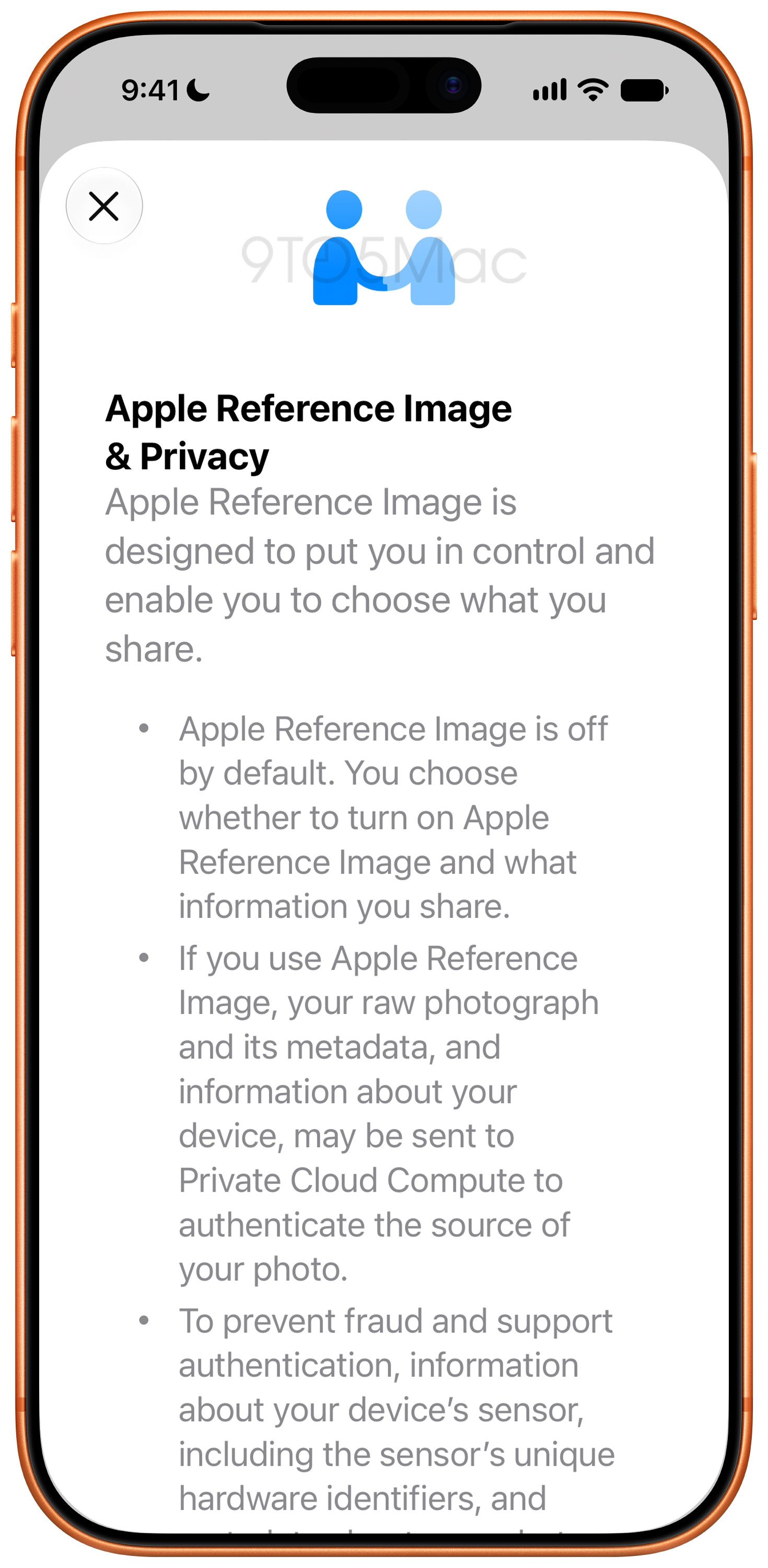
To ensure authentication, users must capture photos in a new “Reference” mode within the Camera app. Standard photos lack the necessary provenance information for later authentication.
Reference mode doesn’t automatically authenticate photos. Users can choose to authenticate them later, sending the raw image and provenance data to Private Cloud Compute for verification, where Apple assigns a unique ID to the photo.
An additional privacy feature allows authenticated photos to be shared with other Apple devices for local authentication without disclosing the images to Apple.
When sharing, the information transmitted varies based on the method used and the photo’s status (original, edited, or authenticated). Sharing “All Photos Data” may include unique hardware identifiers and uncropped footage.
Apple is introducing a “Transfer with Provenance” option for USB transfers. Authenticated photos sent to a Mac or PC will contain Reference Image data, while unauthenticated ones may still include hardware identifiers and uncropped footage.
Share your thoughts on Apple Reference Image in the comments section.
Explore on Amazon


FTC: We use income earning auto affiliate links. More.











Revolutionary Safety Feature: Tesla Roadster with Retractable Movable Wing

Microsoft Announces Discontinuation of Copilot Plus PC Brand

Goblin Invasion: Hytale’s Chapter 1 Update Introduces Epic Boss Battles and Intricate Dungeons

Samsung Galaxy S27 Pro and Ultra: Enhanced with Larger Batteries

Innovative Health Benefits for Emerging Businesses

Comparing Apple Home’s AI Camera to Amazon and Google: A Test of Smart Home Technology

AirPods Enhancements: The Long-Awaited Update

The Evolution of the ALPINA X5: From Secret Prototype to BMW X5 4.6iS

Microsoft’s Revolutionary Copilot: A Game-Changer in the Battle Against Anthropic and OpenAI – GeekWire

EU Takes Action Against Instagram and Facebook for Violating Illegal Content Rules

Warning: Facebook Creators Face Monetization Loss for Stealing and Reposting Videos

Facebook’s New Look: A Blend of Instagram’s Style

Facebook Compliance: ICE-tracking Page Removed After US Government Intervention

Facebook and Instagram to Reduce Personalized Ads for European Users

InstaDub: Meta’s AI Translation Tool for Instagram Videos

Reclaim Your Account: Facebook and Instagram Launch New Hub for Account Recovery

Meta discontinues Messenger apps for Windows and macOS

Breaking Updates: Meta Connect 2025 Unveils Latest Developments

Samsung Galaxy S9 Plus vs iPhone X

The BEST $300 Phone (2018) ft. MKBHD, Technical Guruji, iJustine + More

Samsung Galaxy S9 Plus Gaming Review! (vs OnePlus 5T)

THE BEST PHONE HTC EVER MADE?

The Truth about Google?

Samsung S9/ S9+ vs iPhone X vs Galaxy Note 8 Battery Life DRAIN TEST

Samsung S9 / S9+ vs Mate 10 Pro vs iPhone X Charging SPEED Test

The BEST APPS in 2018 – ft. MKBHD, UrAvgConsumer, iJustine + More

The ULTIMATE Smartphone Unboxing!!
-
 Facebook11 months ago
EU Takes Action Against Instagram and Facebook for Violating Illegal Content Rules
-
 Facebook12 months ago
Warning: Facebook Creators Face Monetization Loss for Stealing and Reposting Videos
-
 Facebook10 months ago
Facebook’s New Look: A Blend of Instagram’s Style
-
 Facebook12 months ago
Facebook Compliance: ICE-tracking Page Removed After US Government Intervention
-
 Facebook10 months ago
Facebook and Instagram to Reduce Personalized Ads for European Users
-
 Facebook12 months ago
InstaDub: Meta’s AI Translation Tool for Instagram Videos
-
 Facebook10 months ago
Reclaim Your Account: Facebook and Instagram Launch New Hub for Account Recovery
-
 Apple11 months ago
Meta discontinues Messenger apps for Windows and macOS
