
Gadgets
Roku Streaming Stick Buying Guide: HD vs Plus vs 4K – What You Need to Know

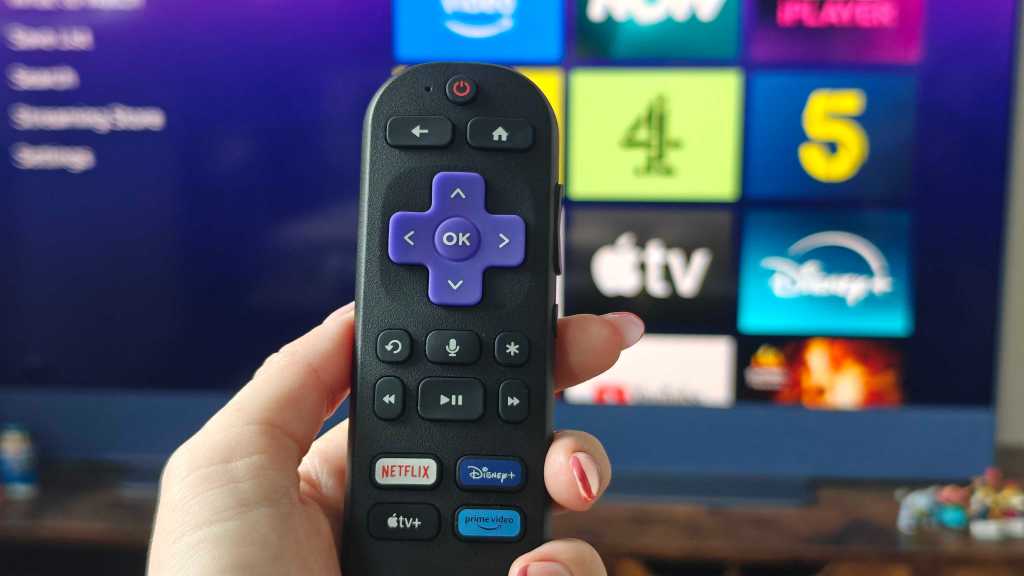
Improving TV Performance with Roku Streaming Devices
Streaming devices have become essential for enhancing the performance of older TVs, especially when the smart features start to slow down. Many users even prefer switching to a dedicated streamer for a better experience. Among the various options available, Roku stands out as one of the most popular choices. The Roku lineup includes the Roku Streaming Stick HD, Plus, and 4K, each offering unique features and capabilities that cater to different needs.
While all three models run on the same Roku OS, their performance, hardware, Wi-Fi stability, and daily usability vary significantly. To make the right choice, it’s crucial to consider your TV’s resolution, Wi-Fi setup, and the type of content you intend to stream.
1. Your TV Determines the Ideal Roku Model
When selecting a Roku model, it’s important to consider your TV’s capabilities. Buying a high-end streaming device won’t necessarily enhance your TV’s picture quality if it doesn’t support the necessary resolution. For instance, a Roku Plus or 4K device won’t stream in 4K if your TV is limited to 1080p resolution. It’s essential to choose a model that is compatible with your TV to maximize its features.
Additionally, ensure that the HDMI port on your TV supports HDCP 2.2 for proper 4K streaming with Roku. The Roku Stick also requires a power source, which can be connected to your TV’s USB port or an external socket.
2. Performance Discrepancies Over Time
While the Roku Stick HD may work fine initially, the performance gap becomes more evident over time. The Roku Plus and 4K models offer better performance with quicker navigation and faster app loading times. This difference is partly due to the hardware specifications, such as RAM capacity.
Devices with higher RAM, such as the Roku Plus and 4K, can handle background processes more efficiently, resulting in smoother app switching and overall performance.
3. Importance of Wi-Fi and Internet Stability
Regardless of the Roku model you choose, the quality of your internet connection plays a significant role in determining the streaming quality. All Roku devices rely on Wi-Fi connectivity, so a stable internet connection is crucial for optimal performance.
HD streaming typically requires 5-10Mbps, while 4K content demands higher bandwidth. Signal strength and network congestion can also impact streaming quality, highlighting the importance of a reliable Wi-Fi setup.
4. Limitations of Roku Compared to Android TV
While Roku excels in its core functionality, it offers limited app support compared to platforms like Android TV. Customization options and app flexibility are more restricted on Roku devices, making it less versatile for advanced users.
Moreover, Roku does not support offline content downloads due to limited storage space, so it may not be suitable as a storage platform for users requiring offline access to media.
5. Pricing and Model Differentiation
The Roku Stick, Plus, and 4K models cater to different user needs based on their TV resolution and streaming preferences. The pricing varies accordingly, with the Roku Stick being the most affordable option, followed by the Plus and 4K models offering additional features such as Dolby Vision support.
Ultimately, the choice between the Roku models depends on your specific requirements, with the Plus model striking a balance between price and performance for most users.
Conclusion: Choosing the Right Roku Streaming Device
When deciding on a Roku streaming device, consider factors such as your TV’s resolution, Wi-Fi setup, and streaming preferences to make an informed choice. The Roku Stick, Plus, and 4K models cater to different needs, with each offering unique features to enhance your viewing experience.
By selecting the model that aligns with your TV’s capabilities and streaming requirements, you can make the most of Roku’s features and enjoy seamless entertainment on your television.












Unveiling iOS 27.2: Enhanced features, official release date, and much more

THE BEST PHONE HTC EVER MADE?

Revolutionizing Luxury: The 2027 Bentley Torcal – A Fusion of British Elegance and Porsche Performance

Activision’s Halo Takeover: A Game-Changing Xbox Overhaul

AI Revolution: Amazon’s Seller Tools Embrace Anthropic’s Claude

Ragdoll Rampage: The Malicious Mod Menace

Apple Reportedly Developing a Fitbit Air Competitor, Tech Advisor Reports

AI: A Threat to Employee Retention?

AI Sentry: Enhancing Military Logistics Security with U.S. TRANSCOM’s Deployed Technology

EU Takes Action Against Instagram and Facebook for Violating Illegal Content Rules

Warning: Facebook Creators Face Monetization Loss for Stealing and Reposting Videos

Facebook’s New Look: A Blend of Instagram’s Style

Facebook Compliance: ICE-tracking Page Removed After US Government Intervention

Facebook and Instagram to Reduce Personalized Ads for European Users

InstaDub: Meta’s AI Translation Tool for Instagram Videos

Reclaim Your Account: Facebook and Instagram Launch New Hub for Account Recovery

Meta discontinues Messenger apps for Windows and macOS

Breaking Updates: Meta Connect 2025 Unveils Latest Developments
THE BEST PHONE HTC EVER MADE?

The Truth about Google?

Samsung S9/ S9+ vs iPhone X vs Galaxy Note 8 Battery Life DRAIN TEST

Samsung S9 / S9+ vs Mate 10 Pro vs iPhone X Charging SPEED Test

The BEST APPS in 2018 – ft. MKBHD, UrAvgConsumer, iJustine + More

The ULTIMATE Smartphone Unboxing!!

HOW GOOD can a $250 Smartphone Camera be!?

10 Android Apps you NEED to try in 2018

They could not believe how cheap this Phone is
-
 Facebook11 months ago
EU Takes Action Against Instagram and Facebook for Violating Illegal Content Rules
-
 Facebook11 months ago
Warning: Facebook Creators Face Monetization Loss for Stealing and Reposting Videos
-
 Facebook10 months ago
Facebook’s New Look: A Blend of Instagram’s Style
-
 Facebook11 months ago
Facebook Compliance: ICE-tracking Page Removed After US Government Intervention
-
 Facebook10 months ago
Facebook and Instagram to Reduce Personalized Ads for European Users
-
 Facebook11 months ago
InstaDub: Meta’s AI Translation Tool for Instagram Videos
-
 Facebook10 months ago
Reclaim Your Account: Facebook and Instagram Launch New Hub for Account Recovery
-
 Apple11 months ago
Meta discontinues Messenger apps for Windows and macOS
