
Gadgets
Exploring the Benefits and Drawbacks of Android Desktop Mode: A Comprehensive Review

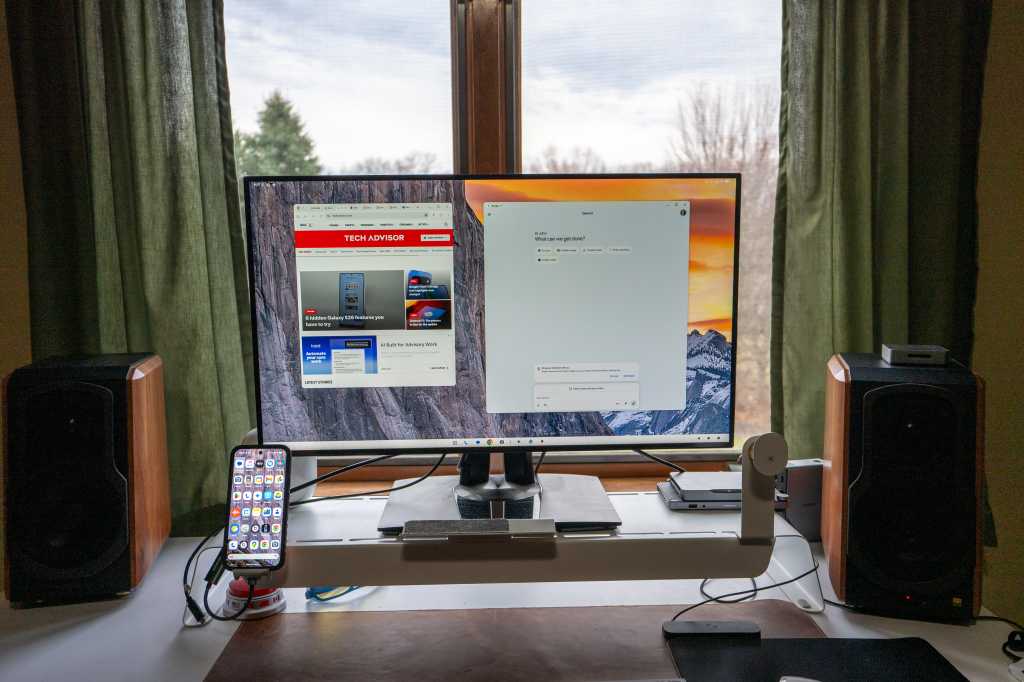
Exploring Android Desktop Mode: A Productivity Game-Changer
Being productive in a world full of distractions is a constant challenge. From social media apps to binge-worthy Netflix shows, it’s easy to lose focus. However, with a simple Android operating system update, a new way of working has emerged that promises to boost productivity effortlessly.
The latest Pixel Drop for March introduced an exciting feature – Android Desktop mode. This desktop mode, similar to Mac or Microsoft Windows, now rivals Samsung’s DeX mode. Previously available as a limited developer option and in beta, Android Desktop is now a full workstation mode designed to enhance productivity using a keyboard, mouse, and monitor.
No additional settings are required, and it’s accessible for Pixel 8 or later devices. By connecting your phone to a monitor using an HDMI cable and a USB-C adapter, Android automatically recognizes the connection and prompts you to activate Desktop mode. Simply select Desktop mode on your phone, and you’re ready to go.
Curious to test its capabilities, I decided to spend an entire workday using Android Desktop. While the experience had its share of pros and cons, it proved to be particularly beneficial for individuals who frequently work remotely or travel with their phones.
1. Pro: Seamless Windowing Functionality
Having previously tested the beta version, I was pleasantly surprised by the improved performance of the desktop mode. Windowing worked flawlessly, allowing me to multitask efficiently with apps like Chrome and Gemini running simultaneously. Adjusting the cursor speed in the settings eliminated any erratic mouse behavior, providing a stable desktop experience.
2. Pro: Smooth App Performance
Most apps installed on your phone seamlessly transition into desktop mode, offering a familiar and optimized user experience. From social media platforms like Facebook to essential tools like Gmail, app functionality remains smooth and responsive. Google has significantly enhanced the user experience, enabling features like right-clicking to paste in Google Docs and triple-clicking to select text effortlessly.
3. Con: Inconsistent Mouse Functionality
While using a mouse enhances productivity, I encountered challenges with zooming in on documents and navigating certain app interfaces. For example, Google Docs’ placement of the X button for closing documents without warning seemed counterintuitive. Additionally, the Apple Magic Mouse lacked scrolling functionality due to the need for a dedicated desktop driver.
4. Pro: Stunning Desktop Wallpapers
Customizing desktop wallpapers in Android Desktop mode offers a visually appealing experience. By accessing the Wallpaper & Style settings, users can select and apply wallpapers seamlessly. Despite occasional delays or glitches, the option to generate AI wallpapers or use personal photos adds a personalized touch to the desktop environment.
5. Pro: Enhanced Productivity with the Journal App
Google’s Journal app serves as a valuable tool for note-taking and task management. Running the app in a window alongside other applications streamlines workflow, allowing users to jot down notes, research findings, or action items conveniently. The integration of the Journal app enhances productivity by facilitating quick access to essential information.
6. Con: Website Compatibility Issues
During extensive website browsing, I encountered instances where certain websites failed to render correctly in desktop mode. Issues such as non-displaying ads, crashing elements, and overlapping content were prevalent, affecting the overall browsing experience. While the automatic display of desktop versions of websites is a notable feature, inconsistencies in rendering pose challenges.
7. Pro: Boosting Productivity with the Recorder App
The Recorder app offers a convenient solution for voice memos and recordings, aiding in efficient information capture. Running the app in a window ensures easy accessibility, allowing users to record memos, interviews, or summaries seamlessly. The app’s integration with desktop mode enhances productivity by providing quick access to recording functionalities.
8. Pro: Seamless Phone Call Integration
Android Desktop mode facilitates seamless phone call management, enabling users to initiate and manage calls directly from the desktop interface. While the calls occur on the phone itself, the integration with desktop mode offers convenient access to contacts, call duration, and caller information. This feature enhances communication efficiency and multitasking capabilities.
9. Pro: Streamlined News Consumption with Google News
Accessing Google News as an app within the desktop environment enhances news consumption and monitoring capabilities. The app’s layout, featuring thumbnail previews and easy refresh options, provides a user-friendly news browsing experience. By running Google News as an app rather than in a browser tab, users can stay informed and engaged with current events effortlessly.
10. Pro: Enhanced Functionality with Google Gemini
One standout feature of Android Desktop mode is the seamless integration of Google Gemini as an app. This versatile tool offers prompt access to various prompts and tasks, enhancing productivity and task management. By clicking the app button on the taskbar, users can leverage Gemini’s features to streamline workflow and boost efficiency.












Malevolent Warlock Harnesses SharePoint Vulnerabilities to Disable Security Measures and Unleash Ransomware

Resident Evil: Timelines Collide – A Mysterious Crossover Adventure

Tech Titan’s Body Scan Revolution Hits US Shores

GrayKey Tool Outsmarts iPhone’s 72-Hour Inactivity Reboot

Unleashing Power: The Mercedes-AMG GT 63 Pro Hits Malaysian Roads at RM 2.09 million

Revised Game++: Conquering Bugs and Keeping Pants Intact

Power Players: Europe’s Top AI Influencers

Beware: The Secret iOS 27 Setting That’s Sapping Your Battery Life

Concept Smartphones that are better than Real Smartphones

EU Takes Action Against Instagram and Facebook for Violating Illegal Content Rules

Warning: Facebook Creators Face Monetization Loss for Stealing and Reposting Videos

Facebook’s New Look: A Blend of Instagram’s Style

Facebook Compliance: ICE-tracking Page Removed After US Government Intervention

Facebook and Instagram to Reduce Personalized Ads for European Users

InstaDub: Meta’s AI Translation Tool for Instagram Videos

Reclaim Your Account: Facebook and Instagram Launch New Hub for Account Recovery

Meta discontinues Messenger apps for Windows and macOS

Breaking Updates: Meta Connect 2025 Unveils Latest Developments
Concept Smartphones that are better than Real Smartphones

Samsung Galaxy SII Unboxing!

The SECRET to Maximise Smartphone Battery Life?

We Designed the Ultimate Gaming Smartphone of 2018!

Using the Cheapest Smartphone in the World.

Samsung Galaxy S9+ Unboxing! (Clone)

Unboxing the First Ever Samsung Galaxy S!!

Huawei P Smart – Huawei’s new Killer Budget Smartphone!

MYSTERY Package from Xiaomi – HUGE UNBOXING!
-
 Facebook11 months ago
EU Takes Action Against Instagram and Facebook for Violating Illegal Content Rules
-
 Facebook12 months ago
Warning: Facebook Creators Face Monetization Loss for Stealing and Reposting Videos
-
 Facebook10 months ago
Facebook’s New Look: A Blend of Instagram’s Style
-
 Facebook12 months ago
Facebook Compliance: ICE-tracking Page Removed After US Government Intervention
-
 Facebook10 months ago
Facebook and Instagram to Reduce Personalized Ads for European Users
-
 Facebook12 months ago
InstaDub: Meta’s AI Translation Tool for Instagram Videos
-
 Facebook10 months ago
Reclaim Your Account: Facebook and Instagram Launch New Hub for Account Recovery
-
 Apple12 months ago
Meta discontinues Messenger apps for Windows and macOS
