
Google Unveils Gemini AI App for Mac Users

Google Launches Gemini App on Mac for Seamless AI Assistant Interaction
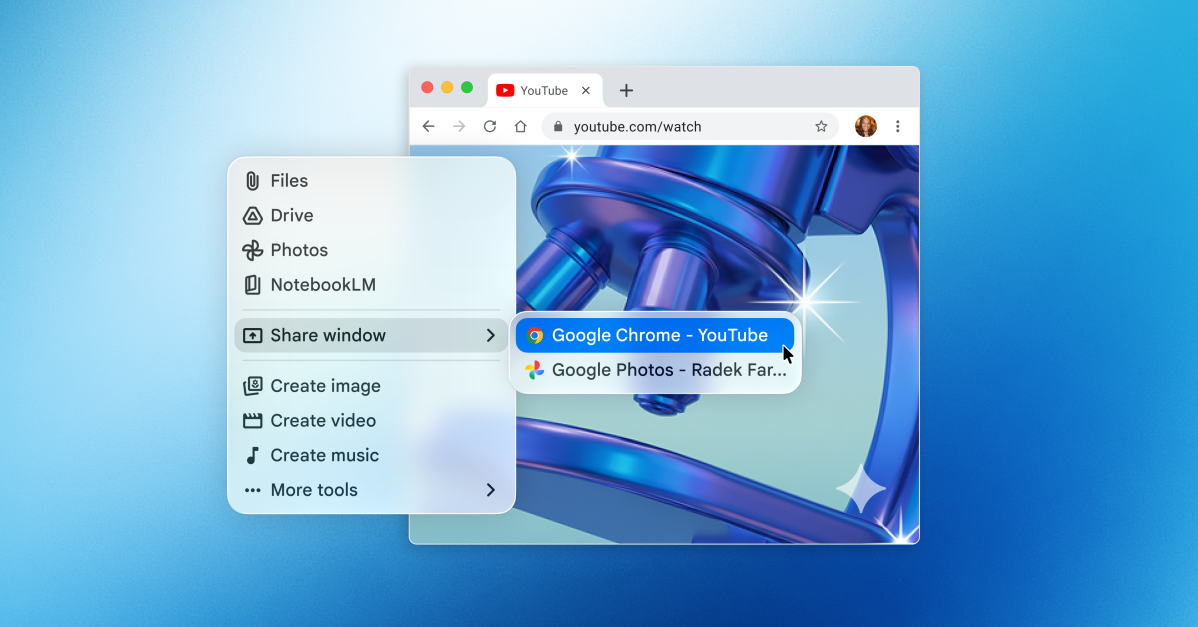
Google has introduced a new Gemini app for Mac users, revolutionizing the way you can interact with the AI assistant without the need to switch windows on your desktop. By simply using the Option + Space shortcut, a floating chat bubble will appear, allowing you to ask Gemini questions and share your window effortlessly.
Before sharing your window, it is necessary to grant Gemini permission to access your system’s information. Once granted, the AI assistant will extract relevant information from your screen to provide accurate responses to your queries.
The Gemini app bears resemblance to Apple’s advanced version of Spotlight, enabling users to carry out actions on their devices and access AI models such as OpenAI’s ChatGPT. This move positions Google to compete with Anthropic, OpenAI, and Perplexity in the desktop AI market. However, ChatGPT and Anthropic’s Claude app for Mac offer additional features that empower their AI assistants to execute tasks on the user’s behalf.
Similar to its web and mobile counterparts, the Mac version of Gemini allows users to upload files, photos, and documents from Google Drive, as well as generate images, videos, and music using the AI assistant. Moreover, the app enables users to review past Gemini conversations linked to their Google account. This launch closely follows Google’s release of a Spotlight-like app for Windows.
The Gemini app is available for free download in all supported languages and countries. It is compatible with macOS Sequoia (15.0) and newer versions.












Pushing the Limits: Customizing Our Ultimate 2027 BMW 3 Series

AMD’s FSR 4.1 Enhancements Coming to Xbox Consoles and Handhelds

Introducing Kindle Plus: Your All-in-One Reading and Listening Experience

Solidarity in Ashes: A Charcoal Tale of Love and Rebellion

Android 17’s Advanced Security Feature: Safeguarding Stolen Phones

Mastering Property Damage Insurance Claims: A Guide to Navigating the Process

Tech Giants OpenAI, Anthropic, and Nvidia Break Records with Lobbying Quarters

Important Update: Permanent Daylight Saving Time Implemented in Parts of Canada for Android Users

Next-Generation iPhone Duo 2: Revolutionary Under-Display Face ID Technology Put to the Test

EU Takes Action Against Instagram and Facebook for Violating Illegal Content Rules

Warning: Facebook Creators Face Monetization Loss for Stealing and Reposting Videos

Facebook’s New Look: A Blend of Instagram’s Style

Facebook Compliance: ICE-tracking Page Removed After US Government Intervention

Facebook and Instagram to Reduce Personalized Ads for European Users

InstaDub: Meta’s AI Translation Tool for Instagram Videos

Reclaim Your Account: Facebook and Instagram Launch New Hub for Account Recovery

Meta discontinues Messenger apps for Windows and macOS

Breaking Updates: Meta Connect 2025 Unveils Latest Developments

Should you buy your Smartphones Refurbished!?

6 Amazing SECRET Android Launchers (2017 / 2018)

6 Value for Money Tech Products you NEED to try!

iPhone X Helicopter 1200ft Drop Test!! + Mous Case Review

7 UNBELIEVABLE Smartphone Magic Tricks!

Oneplus 5T vs Oneplus 1 – 3 Years Later.

Top 20 BEST Smartphones of 2017!

5 Amazing Upcoming Smartphone Features – 2018 / 2019

ULTIMATE Power Banks / The Best Power Banks (2017-2018)
-
 Facebook12 months ago
EU Takes Action Against Instagram and Facebook for Violating Illegal Content Rules
-
 Facebook1 year ago
Warning: Facebook Creators Face Monetization Loss for Stealing and Reposting Videos
-
 Facebook11 months ago
Facebook’s New Look: A Blend of Instagram’s Style
-
 Facebook1 year ago
Facebook Compliance: ICE-tracking Page Removed After US Government Intervention
-
 Facebook11 months ago
Facebook and Instagram to Reduce Personalized Ads for European Users
-
 Facebook1 year ago
InstaDub: Meta’s AI Translation Tool for Instagram Videos
-
 Facebook11 months ago
Reclaim Your Account: Facebook and Instagram Launch New Hub for Account Recovery
-
 Apple1 year ago
Meta discontinues Messenger apps for Windows and macOS
