
Seamlessly Syncing Files: The Ultimate Guide for Sharing Between Android and Mac Devices

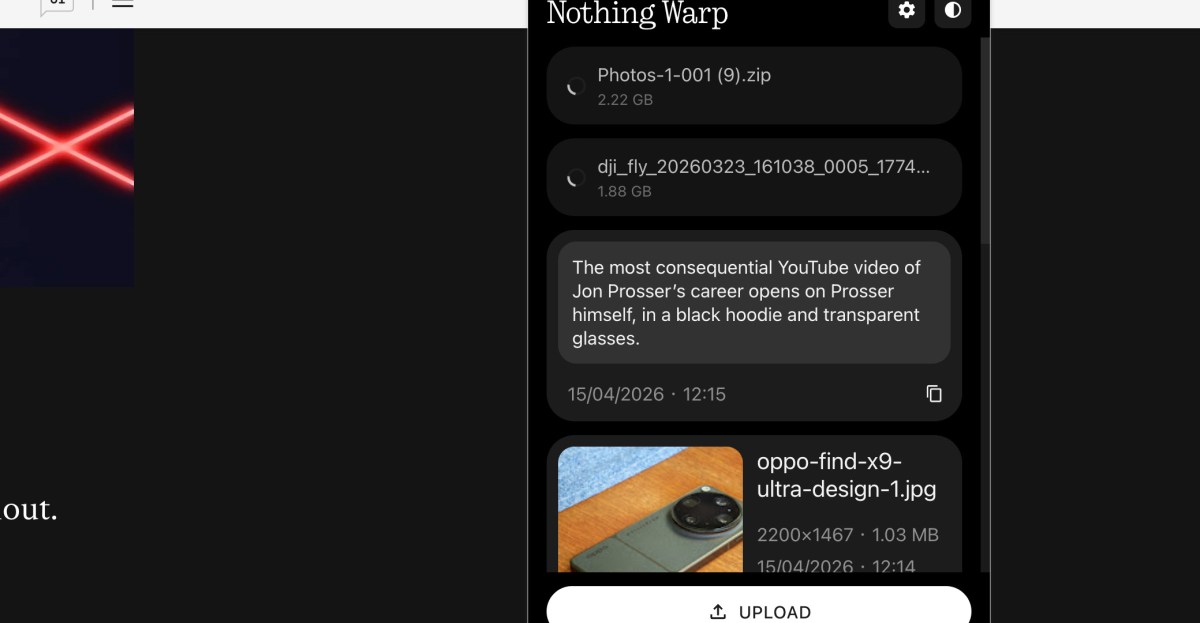
Enhancing Cross-Platform File Sharing with Nothing’s Warp App
As a professional who tests Android phones for a living, I often find myself faced with the challenge of seamlessly transferring files between different platforms. While both Android and Apple devices have their strengths, they aren’t always compatible when it comes to file sharing. However, a new solution called Warp aims to bridge this gap and provide users with a more universal way to transfer files.
How Does Warp Work?
Warp is a combination of an Android app and a browser extension, making it compatible with Chrome-based browsers on macOS, Windows, and Linux. This unique setup allows users to easily share files, text, images, videos, and documents between their Android phones and computers.
The process is simple – on your Android phone, you can upload files to Warp using the Quick Share menu, while on your computer, you can send text or upload files directly to the app. Warp even supports multiple devices, enabling users to transfer files between multiple phones or PCs effortlessly.
One of the key advantages of Warp is its ability to transfer files quickly using a server-based approach. While larger files may take some time to upload, smaller files such as text and web images are transferred almost instantly. Additionally, Warp ensures the security and privacy of your files by utilizing Google Drive for file transfers.
According to Nothing, the company behind Warp, the app only retains the latest 10 files to prevent storage clutter. This means that users can enjoy seamless file sharing without worrying about their Google Drive storage being filled up.
Is Warp the Ultimate File Sharing Solution?
Warp, currently in beta, offers a free and universal solution for cross-platform file sharing. Unlike Google’s AirDrop integration or other Android-to-Mac file-sharing options, Warp provides users with a versatile tool that can be used across various devices. While Warp excels at transferring smaller files efficiently, users may still need to explore alternative methods for sharing larger files directly between their devices.
Update, April 15th: Added details on how long files are retained.









Pushing the Limits: Customizing Our Ultimate 2027 BMW 3 Series

AMD’s FSR 4.1 Enhancements Coming to Xbox Consoles and Handhelds

Introducing Kindle Plus: Your All-in-One Reading and Listening Experience

Solidarity in Ashes: A Charcoal Tale of Love and Rebellion

Android 17’s Advanced Security Feature: Safeguarding Stolen Phones

Mastering Property Damage Insurance Claims: A Guide to Navigating the Process

Tech Giants OpenAI, Anthropic, and Nvidia Break Records with Lobbying Quarters

Important Update: Permanent Daylight Saving Time Implemented in Parts of Canada for Android Users

Next-Generation iPhone Duo 2: Revolutionary Under-Display Face ID Technology Put to the Test

EU Takes Action Against Instagram and Facebook for Violating Illegal Content Rules

Warning: Facebook Creators Face Monetization Loss for Stealing and Reposting Videos

Facebook’s New Look: A Blend of Instagram’s Style

Facebook Compliance: ICE-tracking Page Removed After US Government Intervention

Facebook and Instagram to Reduce Personalized Ads for European Users

InstaDub: Meta’s AI Translation Tool for Instagram Videos

Reclaim Your Account: Facebook and Instagram Launch New Hub for Account Recovery

Meta discontinues Messenger apps for Windows and macOS

Breaking Updates: Meta Connect 2025 Unveils Latest Developments

Should you buy your Smartphones Refurbished!?

6 Amazing SECRET Android Launchers (2017 / 2018)

6 Value for Money Tech Products you NEED to try!

iPhone X Helicopter 1200ft Drop Test!! + Mous Case Review

7 UNBELIEVABLE Smartphone Magic Tricks!

Oneplus 5T vs Oneplus 1 – 3 Years Later.

Top 20 BEST Smartphones of 2017!

5 Amazing Upcoming Smartphone Features – 2018 / 2019

ULTIMATE Power Banks / The Best Power Banks (2017-2018)
-
 Facebook12 months ago
EU Takes Action Against Instagram and Facebook for Violating Illegal Content Rules
-
 Facebook1 year ago
Warning: Facebook Creators Face Monetization Loss for Stealing and Reposting Videos
-
 Facebook11 months ago
Facebook’s New Look: A Blend of Instagram’s Style
-
 Facebook1 year ago
Facebook Compliance: ICE-tracking Page Removed After US Government Intervention
-
 Facebook11 months ago
Facebook and Instagram to Reduce Personalized Ads for European Users
-
 Facebook1 year ago
InstaDub: Meta’s AI Translation Tool for Instagram Videos
-
 Facebook11 months ago
Reclaim Your Account: Facebook and Instagram Launch New Hub for Account Recovery
-
 Apple1 year ago
Meta discontinues Messenger apps for Windows and macOS
