
Unleashing the Power of Communication: Chatting with Gmail, Docs, and Keep in Google

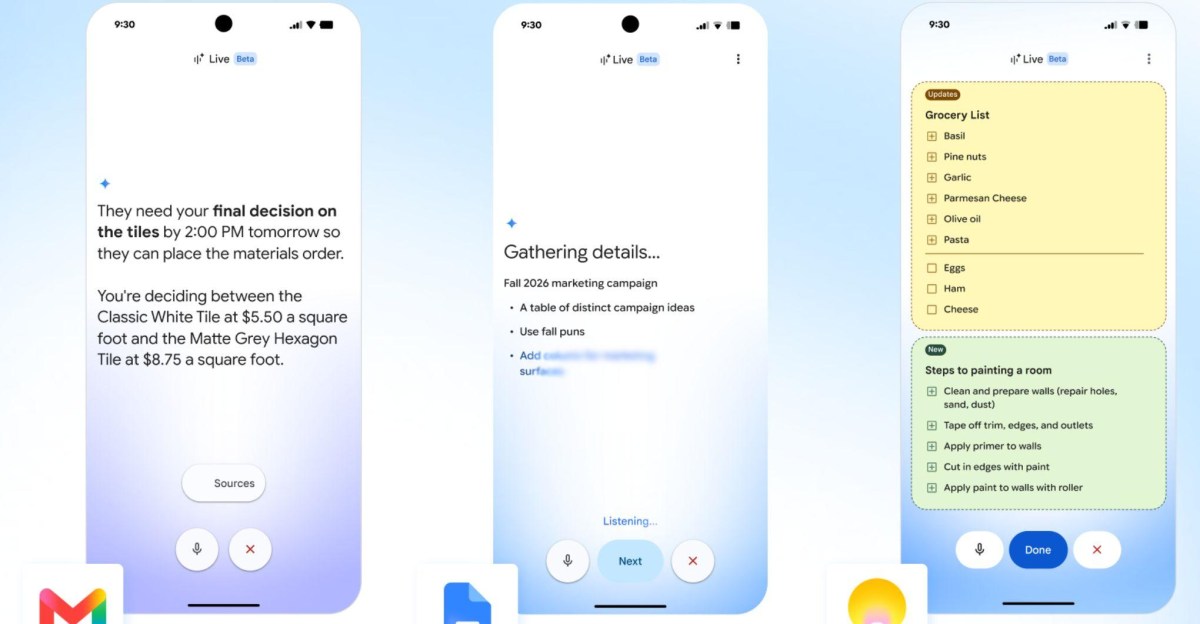
Google has introduced new AI-powered voice assistant modes for Gmail, Docs, and Keep, allowing users to manage these apps through voice commands. These real-time conversational capabilities, known as Gmail Live, Docs Live, and Keep Live, are designed to make it easier to access and organize information while on the go or when manual input is not possible.
Gmail Live focuses on surfacing important details from your inbox without the need to search through lengthy email threads. Users can ask questions like “when is my child’s next school event?” and the voice assistant will retrieve the relevant information from your Gmail inbox, providing a summarized version verbally and linking back to the original email source in an onscreen transcript. Users can also ask follow-up questions and interrupt the assistant mid-sentence.
Docs Live assists in formatting ideas into structured documents based on conversational descriptions. Users can ask the assistant to summarize documents or create business proposals, and it can pull information from Gmail, Drive, Chat, and the web to personalize outputs. Keep Live allows users to transcribe notes naturally, with the assistant contextualizing the information without the need for specific keywords.
These features were initially introduced at Google I/O and are now available on mobile platforms globally in English. Gmail Live is accessible on iOS and Android for users on Google AI Plus, Pro, and Ultra plans, while Docs Live and Keep Live are available for AI Pro and Ultra plans. Keep Live is only available on Android, while Docs Live can be used on both iOS and Android. These features will soon be available for Workspace business customers.
By integrating these new voice assistant modes, users can enhance their productivity and efficiency when using Gmail, Docs, and Keep.













Chery’s Luxeed: The Ultimate Luxury People Mover Arriving in Australia in 2027

Microsoft Welcomes Stripe Co-Founder John Collison to Board as Two Directors Step Down

Enhanced Edgerunners: New Quests, Dual Wielding, and Blade Customization in Cyberpunk 2077

Staying the Course: A27 Tech Advisor’s Continual Success

Tech Advisor’s Guide to the Latest Release Date, New Features, and Compatible Devices

Signal Success: How Marketing Metrics Drive B2B Growth and Decision-Making

Limited Availability: Apple’s iPhone Duo for In-Store Sales

tvOS 27.2: Snoopy Icons, Screen Saver Shuffle, and Enhanced Privacy Features

6 Value for Money Tech Products you NEED to try!

EU Takes Action Against Instagram and Facebook for Violating Illegal Content Rules

Warning: Facebook Creators Face Monetization Loss for Stealing and Reposting Videos

Facebook’s New Look: A Blend of Instagram’s Style

Facebook Compliance: ICE-tracking Page Removed After US Government Intervention

Facebook and Instagram to Reduce Personalized Ads for European Users

InstaDub: Meta’s AI Translation Tool for Instagram Videos

Reclaim Your Account: Facebook and Instagram Launch New Hub for Account Recovery

Meta discontinues Messenger apps for Windows and macOS

Breaking Updates: Meta Connect 2025 Unveils Latest Developments
6 Value for Money Tech Products you NEED to try!

iPhone X Helicopter 1200ft Drop Test!! + Mous Case Review

7 UNBELIEVABLE Smartphone Magic Tricks!

Oneplus 5T vs Oneplus 1 – 3 Years Later.

Top 20 BEST Smartphones of 2017!

5 Amazing Upcoming Smartphone Features – 2018 / 2019

ULTIMATE Power Banks / The Best Power Banks (2017-2018)

TOP 5 BEST UPCOMING SMARTPHONES – 2018!!

How to Apply a Screen Protector
-
 Facebook12 months ago
EU Takes Action Against Instagram and Facebook for Violating Illegal Content Rules
-
 Facebook1 year ago
Warning: Facebook Creators Face Monetization Loss for Stealing and Reposting Videos
-
 Facebook11 months ago
Facebook’s New Look: A Blend of Instagram’s Style
-
 Facebook1 year ago
Facebook Compliance: ICE-tracking Page Removed After US Government Intervention
-
 Facebook11 months ago
Facebook and Instagram to Reduce Personalized Ads for European Users
-
 Facebook1 year ago
InstaDub: Meta’s AI Translation Tool for Instagram Videos
-
 Facebook11 months ago
Reclaim Your Account: Facebook and Instagram Launch New Hub for Account Recovery
-
 Apple1 year ago
Meta discontinues Messenger apps for Windows and macOS
