
Mobile Tech
Revamped Layout: Apple Weather’s Refreshing Makeover in iOS 27

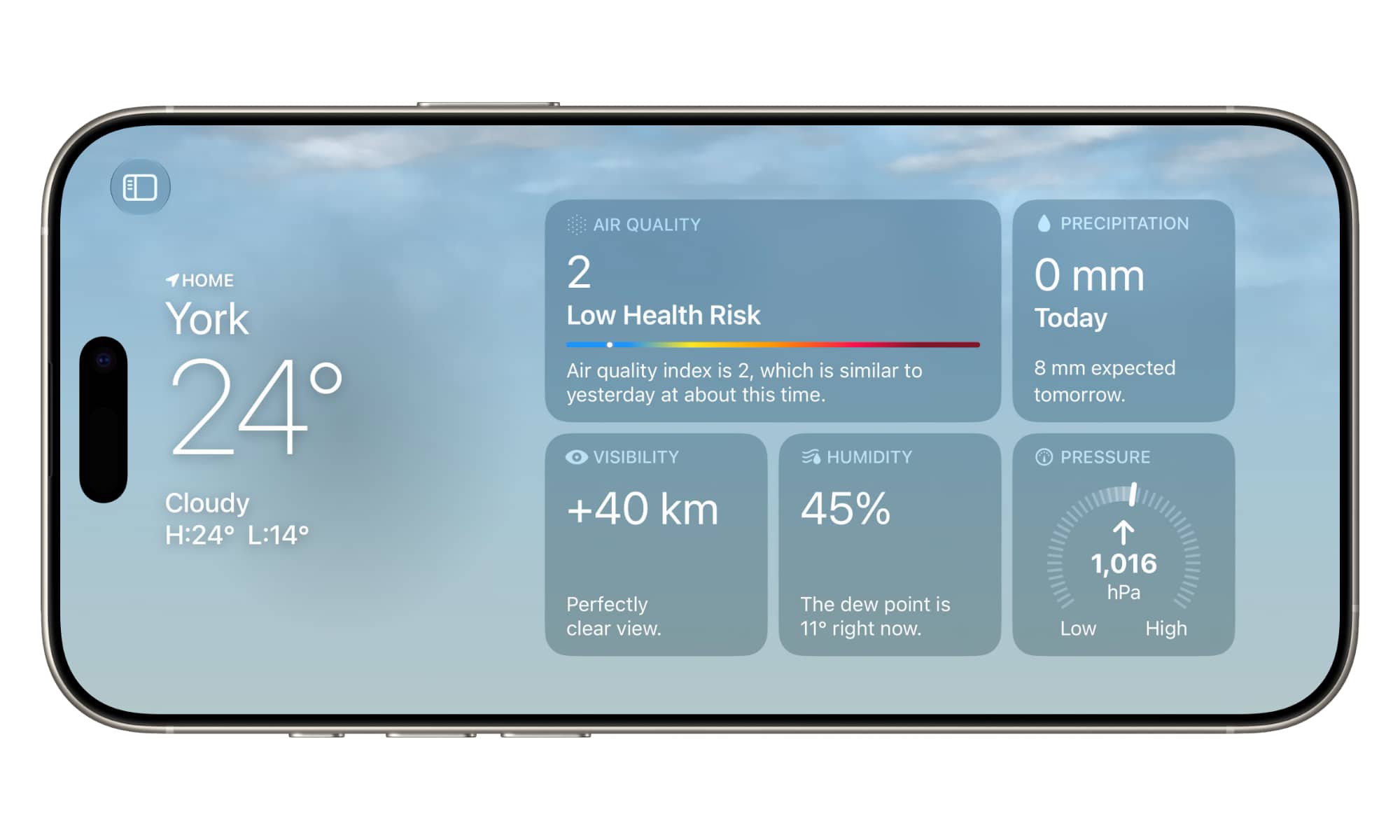
iOS 27 has generated a lot of excitement, particularly with the evolution of Siri into a more advanced AI assistant. However, Apple’s latest iPhone update offers more than just enhanced AI capabilities. The Weather app, in particular, has received significant improvements that could make it a viable alternative to third-party weather apps. Here’s a breakdown of the new features.
Landscape Orientation
One notable change in iOS 27 is the introduction of landscape orientation for many apps, including the Weather app. This feature, likely paving the way for Apple’s rumored foldable iPhone, offers a more intuitive experience for users, especially when viewing charts, graphs, and the weather map.
Even the main view of the Weather app has been optimized for landscape mode, with the current conditions overview shifted to the left side to allow for better utilization of screen space. Additionally, a list of locations can be accessed by tapping a button in the top-left corner, similar to other apps like Mail.
See Highlights at a Glance
A new Highlights card at the top of the Weather app provides a quick overview of the weather forecast for the next five days, highlighting key information such as precipitation and temperature changes. While the Highlights card itself does not expand further, tapping on specific entries leads to detailed screens for more information.
The inclusion of a “Feedback” button suggests that Apple may be leveraging AI to curate the highlights displayed in this section, offering more detailed and natural language descriptions compared to previous versions.
Condition Views
One noticeable enhancement in iOS 27 is the addition of mini-charts on the main screen of the Weather app, showcasing hourly precipitation and wind conditions. These views adjust based on the current weather conditions, providing a more detailed and visual representation of what to expect.
Users can toggle between different views using the selection buttons in the top-right corner, which not only affects the current conditions card but also influences the ten-day forecast and mini-map below. This feature offers a more practical way to interpret weather forecasts compared to traditional icons.
A Massive Widget
In addition to the large widget, iOS 27 introduces an extra-large widget that transforms an entire Home Screen page into a comprehensive forecast view. While this widget is not highly customizable, it provides a convenient way to access weather information at a glance.
The extra-large widget can be added to the Today View, allowing users to scroll through various widgets and access the forecast easily. This feature hints at Apple’s preparation for a foldable iPhone with additional screen real estate.










Unveiling the New Adventure Model

Enhanced Precision: The New Surface Mouse with Haptic Feedback and Customizable Action Button

Purdue and University of Illinois Join Forces to Enhance Semiconductor Industry Talent Pool

Unveiling the Secrets of ARC Raiders: Exploring Frozen Trails, Pendola Pass, Weapon Amplification, and Beyond

Samsung Galaxy S25: Unveiling Android 17 in September – Tech Advisor

Top Phones to Run Qualcomm Snapdragon 8 Elite Gen 6 – Tech Advisor’s Picks

Navigating Expansion: Essential Tips for European Founders Entering the US Market (Sponsored)

Unveiling iOS 27.2: Enhanced features, official release date, and much more

THE BEST PHONE HTC EVER MADE?

EU Takes Action Against Instagram and Facebook for Violating Illegal Content Rules

Warning: Facebook Creators Face Monetization Loss for Stealing and Reposting Videos

Facebook’s New Look: A Blend of Instagram’s Style

Facebook Compliance: ICE-tracking Page Removed After US Government Intervention

Facebook and Instagram to Reduce Personalized Ads for European Users

InstaDub: Meta’s AI Translation Tool for Instagram Videos

Reclaim Your Account: Facebook and Instagram Launch New Hub for Account Recovery

Meta discontinues Messenger apps for Windows and macOS

Breaking Updates: Meta Connect 2025 Unveils Latest Developments
THE BEST PHONE HTC EVER MADE?

The Truth about Google?

Samsung S9/ S9+ vs iPhone X vs Galaxy Note 8 Battery Life DRAIN TEST

Samsung S9 / S9+ vs Mate 10 Pro vs iPhone X Charging SPEED Test

The BEST APPS in 2018 – ft. MKBHD, UrAvgConsumer, iJustine + More

The ULTIMATE Smartphone Unboxing!!

HOW GOOD can a $250 Smartphone Camera be!?

10 Android Apps you NEED to try in 2018

They could not believe how cheap this Phone is
-
 Facebook11 months ago
EU Takes Action Against Instagram and Facebook for Violating Illegal Content Rules
-
 Facebook11 months ago
Warning: Facebook Creators Face Monetization Loss for Stealing and Reposting Videos
-
 Facebook10 months ago
Facebook’s New Look: A Blend of Instagram’s Style
-
 Facebook11 months ago
Facebook Compliance: ICE-tracking Page Removed After US Government Intervention
-
 Facebook10 months ago
Facebook and Instagram to Reduce Personalized Ads for European Users
-
 Facebook11 months ago
InstaDub: Meta’s AI Translation Tool for Instagram Videos
-
 Facebook10 months ago
Reclaim Your Account: Facebook and Instagram Launch New Hub for Account Recovery
-
 Apple11 months ago
Meta discontinues Messenger apps for Windows and macOS
