
Mobile Tech
Enhanced iPhone Compatibility: Exploring New Features and Upgrades

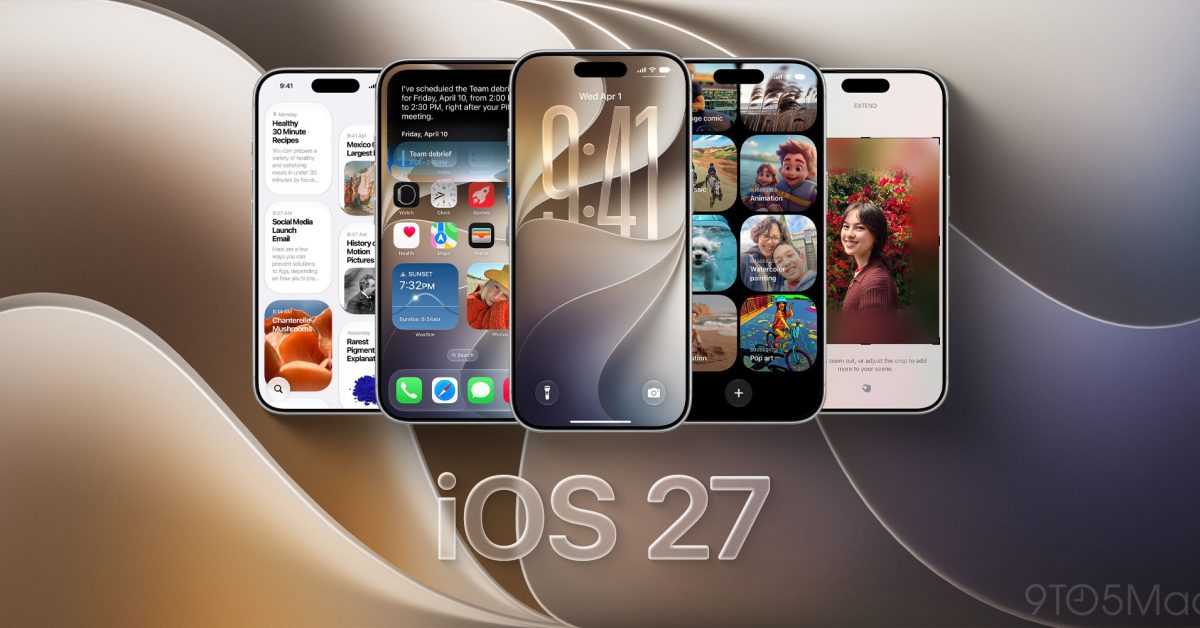
iOS 27 has finally been released after a period of beta testing, and it is now available for all users. This free software update brings a range of new features and improvements, including Siri AI, new Apple Intelligence features, enhanced control over Liquid Glass, and overall system enhancements. In this article, we will explore the key highlights of iOS 27, the supported iPhone models, and how to update to this latest version.
To install iOS 27 on your iPhone, you can simply navigate to Settings, then General, and select Software Update. From there, follow the onscreen instructions to complete the installation process. It is recommended to back up your iPhone before installing the update, either through iCloud or a computer. Apple also provides detailed installation instructions for assistance if needed.
One of the standout features of iOS 27 is the introduction of Siri AI, a more conversational assistant that utilizes personal context to provide information from messages, emails, photos, and other content. The new Siri can also understand onscreen information and support actions across various apps, allowing for more intuitive interactions.
In addition, iOS 27 introduces a dedicated Siri app for revisiting conversations and continuing them across supported Apple devices. Siri mode in Camera brings Visual Intelligence to the viewfinder, enabling users to ask questions about their surroundings. The ‘Write with Siri’ feature assists in drafting and revising text, adapting to the user’s writing style in Messages and Mail.
It is important to note that Siri AI and the new Apple Intelligence features are available on iPhone 15 Pro, iPhone 15 Pro Max, iPhone 16 models, iPhone Air, and iPhone Duo. These devices support the advanced capabilities of Siri AI.
Another significant update in iOS 27 is the inclusion of a Liquid Glass slider in Settings, allowing users to adjust the transparency of Liquid Glass from clear to fully tinted. Apple has also refined app icons and the overall appearance of the system for a more polished user experience.
Performance improvements in iOS 27 include faster app launches, quicker loading of newly captured photos, and faster AirDrop transfers. Search enhancements aim to deliver more useful results in Spotlight, Photos, and Mail.
The Photos app in iOS 27 offers new editing options such as Spatial Reframing, Extend, and Clean Up, allowing users to enhance their photos creatively. Safari now features automatic tab grouping by topic, while Notify Me can monitor webpages for changes like price drops or item availability.
Additional features in iOS 27 include AirPods Custom EQ for personalized audio adjustments, separate alarm and timer volume controls, expanded parental controls, Communication Safety updates, Call Context for relevant information during calls, and Accessibility improvements across VoiceOver, Magnifier, Accessibility Reader, and Voice Control.
For a complete list of features and updates in iOS 27, users can refer to Apple’s detailed release notes. Which iOS 27 feature are you most excited to try out? Let us know in the comments.
Please note that this article contains affiliate links. For more information, visit our disclaimer page. Transform the following sentence using a different sentence structure:
Original: “She quickly ran to catch the bus before it left.”
Revised: “Before it left, she ran quickly to catch the bus.”












Google Pixel 2 XL vs Galaxy Note 8 vs iPhone 8 Plus- Battery Life Drain Test

Insane Holographic AND Transparent Wallpapers for Android!

Best Tech – October 2017!

TOP 5 MOST UNUSUAL SMARTPHONES

Umidigi S2 – Flagship Smartphone for $199??

Mystery Unboxing from Logitech!

7 Smartphone Life Hacks YOU SHOULD KNOW!

The Oneplus 5T has been LEAKED!

iPhone X – ULTIMATE PACKAGE UNBOXING!

EU Takes Action Against Instagram and Facebook for Violating Illegal Content Rules

Warning: Facebook Creators Face Monetization Loss for Stealing and Reposting Videos

Facebook’s New Look: A Blend of Instagram’s Style

Facebook Compliance: ICE-tracking Page Removed After US Government Intervention

Facebook and Instagram to Reduce Personalized Ads for European Users

InstaDub: Meta’s AI Translation Tool for Instagram Videos

Reclaim Your Account: Facebook and Instagram Launch New Hub for Account Recovery

Meta discontinues Messenger apps for Windows and macOS

Breaking Updates: Meta Connect 2025 Unveils Latest Developments
Google Pixel 2 XL vs Galaxy Note 8 vs iPhone 8 Plus- Battery Life Drain Test
Insane Holographic AND Transparent Wallpapers for Android!
Best Tech – October 2017!
TOP 5 MOST UNUSUAL SMARTPHONES
Umidigi S2 – Flagship Smartphone for $199??
Mystery Unboxing from Logitech!
7 Smartphone Life Hacks YOU SHOULD KNOW!
The Oneplus 5T has been LEAKED!
iPhone X – ULTIMATE PACKAGE UNBOXING!
-
 Facebook1 year ago
EU Takes Action Against Instagram and Facebook for Violating Illegal Content Rules
-
 Facebook1 year ago
Warning: Facebook Creators Face Monetization Loss for Stealing and Reposting Videos
-
 Facebook11 months ago
Facebook’s New Look: A Blend of Instagram’s Style
-
 Facebook1 year ago
Facebook Compliance: ICE-tracking Page Removed After US Government Intervention
-
 Facebook11 months ago
Facebook and Instagram to Reduce Personalized Ads for European Users
-
 Facebook1 year ago
InstaDub: Meta’s AI Translation Tool for Instagram Videos
-
 Facebook11 months ago
Reclaim Your Account: Facebook and Instagram Launch New Hub for Account Recovery
-
 Apple1 year ago
Meta discontinues Messenger apps for Windows and macOS
