
Tech News
Unleashing the Power of the Galaxy Tab S12 Ultra: A 24-Hour Journey with Multiple Expletives

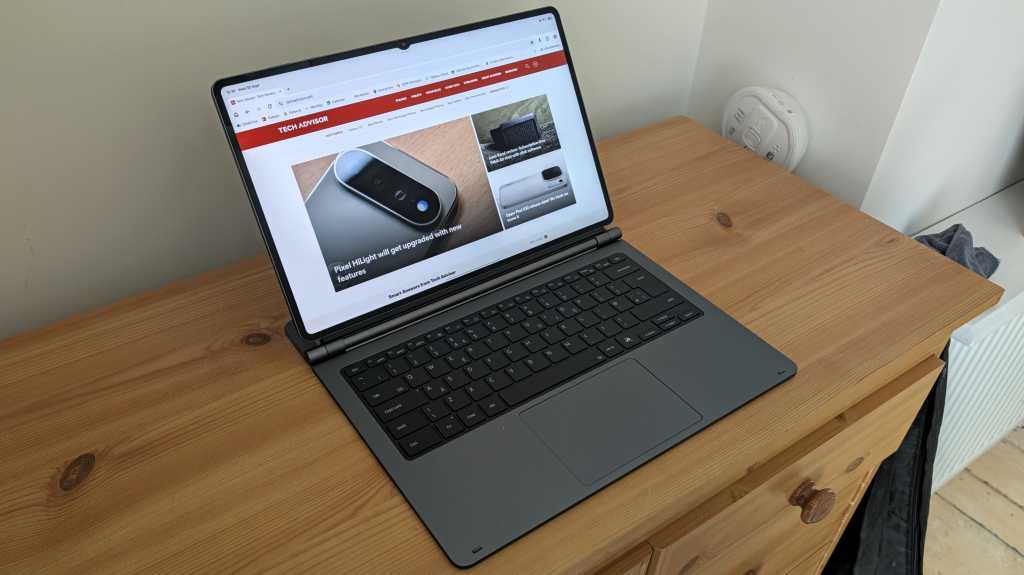
Upon receiving my Galaxy Tab S12 Ultra sample, I anticipated a quick hands-on review. However, upon unboxing the accompanying keyboard cover, the comparison to a laptop became impossible to ignore. While high-end tablets have aimed to replace laptops, the explicit attempt made by the Tab S12 Ultra stood out.
When I attached the Tab S12 Ultra to the keyboard, it resembled a premium laptop, boasting a large 14.6-inch display that offered more screen real estate than most Windows machines. Despite my initial optimism, a full day of use quickly shattered any illusions of a seamless experience.
It’s literally a big phone
Prepared with apps like OneDrive, Outlook, Microsoft Word, and Slack, I expected a productive day. However, the reality was different. Slack’s mobile-like interface on the tablet made navigation cumbersome, with wasted blank space and an unoptimized layout for keyboard and mouse usage.
Switching to the web version of Slack in Chrome provided some relief, but challenges persisted with other apps like Outlook. The lack of familiarity between the mobile and desktop versions hindered productivity, requiring a shift to the website for a better experience.
Navigating through tasks on WordPress, essential for article uploads, felt smoother on the desktop mode. However, certain functions like adding links became cumbersome, and relying on Samsung’s cluttered Files app for image management proved to be challenging.
One UI is inferior to Windows 11 in basically every way that matters for genuine productivity.
While multitasking was touted as a strength of the Tab S12 Ultra, it proved cumbersome with a mouse or trackpad. Samsung’s DeX mode, while resembling a traditional laptop interface, failed to address key usability issues, leaving the device optimized for touch input rather than cursor control.
All-day battery life? Yeah right!
Despite a promising 11600mAh battery, the Tab S12 Ultra fell short in battery performance. With a moderate workload, the device struggled to last a full workday, necessitating frequent charging. The inconvenience was exacerbated by the device’s slow charging speeds and awkward USB-C port placement.
When you replace a laptop with a tablet, giving up on ports is an inevitability.
The Tab S12 Ultra’s limited port selection, featuring only a single USB-C port, posed challenges for connectivity. Adapting to this constraint required additional accessories, detracting from the device’s design and usability.
A webcam reprieve
Despite its shortcomings, the Tab S12 Ultra excelled in certain aspects, particularly in video conferencing. The device’s 12Mp front-facing camera and audio setup provided a superior video call experience compared to many laptops, eliminating the need for external accessories.
Superb hardware can’t undo the inherent software limitations of an Android tablet.
Additionally, the Tab S12 Ultra impressed with its performance powered by the MediaTek Dimensity 9500 chipset and a stunning 120Hz AMOLED display. However, these hardware strengths were overshadowed by the software limitations of an Android tablet.
How much?!
Despite its features, the Galaxy Tab S12 Ultra’s premium pricing raised eyebrows. Priced at £1,399/$1,399, the tablet demanded a significant investment, especially when factoring in additional accessories like the keyboard cover. The high price point positioned the device as a luxury item rather than a practical laptop replacement.
In conclusion, the Tab S12 Ultra’s hardware prowess was commendable, but its software limitations hindered its potential as a laptop replacement. Until these issues are addressed, the device may struggle to find a niche in the market.












24/7 Surveillance: The Controversial Reality of Amazon’s Delivery Driver Smart Glasses

October 2026’s PS Plus Lineup: Join the Battle in EDF: World Brother 2

Unleashing the Power of the Galaxy Tab S12 Ultra: A 24-Hour Journey with Multiple Expletives

Startup Safety: The Ultimate Guide to Protecting Your Business as a First-Time Founder

Insights from AI Experts: Evaluating Trump’s latest safety initiative

California Highway Patrol Unveils Last Chevrolet Camaro in Fleet

Revolutionizing Home Entertainment: The Fire TV Stick 4K’s Power-Saving Feature

Arkansas Semiconductor Institute: Pioneering Innovation in Technology

The Isle of Beautiful Monsters: A First-person RPG Adventure

EU Takes Action Against Instagram and Facebook for Violating Illegal Content Rules

Warning: Facebook Creators Face Monetization Loss for Stealing and Reposting Videos

Facebook’s New Look: A Blend of Instagram’s Style

Facebook Compliance: ICE-tracking Page Removed After US Government Intervention

Facebook and Instagram to Reduce Personalized Ads for European Users

InstaDub: Meta’s AI Translation Tool for Instagram Videos

Reclaim Your Account: Facebook and Instagram Launch New Hub for Account Recovery

Meta discontinues Messenger apps for Windows and macOS

Breaking Updates: Meta Connect 2025 Unveils Latest Developments

Unboxing the First Ever Samsung Galaxy S!!

Huawei P Smart – Huawei’s new Killer Budget Smartphone!

MYSTERY Package from Xiaomi – HUGE UNBOXING!

5 ways you’re using your Smartphone wrong.

THE INSANE DUAL BATTERY SMARTPHONE!

ELEPHONE U PRO UNBOXING AND REVIEW!

Mrwhosetheboss – 1 Million Subscribers

The Surprising TRUTH about Samsung – 15 things you did not know.

10 Incredible Android DIY Hacks!
-
 Facebook11 months ago
EU Takes Action Against Instagram and Facebook for Violating Illegal Content Rules
-
 Facebook12 months ago
Warning: Facebook Creators Face Monetization Loss for Stealing and Reposting Videos
-
 Facebook10 months ago
Facebook’s New Look: A Blend of Instagram’s Style
-
 Facebook12 months ago
Facebook Compliance: ICE-tracking Page Removed After US Government Intervention
-
 Facebook10 months ago
Facebook and Instagram to Reduce Personalized Ads for European Users
-
 Facebook12 months ago
InstaDub: Meta’s AI Translation Tool for Instagram Videos
-
 Facebook10 months ago
Reclaim Your Account: Facebook and Instagram Launch New Hub for Account Recovery
-
 Apple12 months ago
Meta discontinues Messenger apps for Windows and macOS
