
Gadgets
Unleashing the Power of the EPOMAKER TH108PRO Mechanical Keyboard: A Comprehensive Review

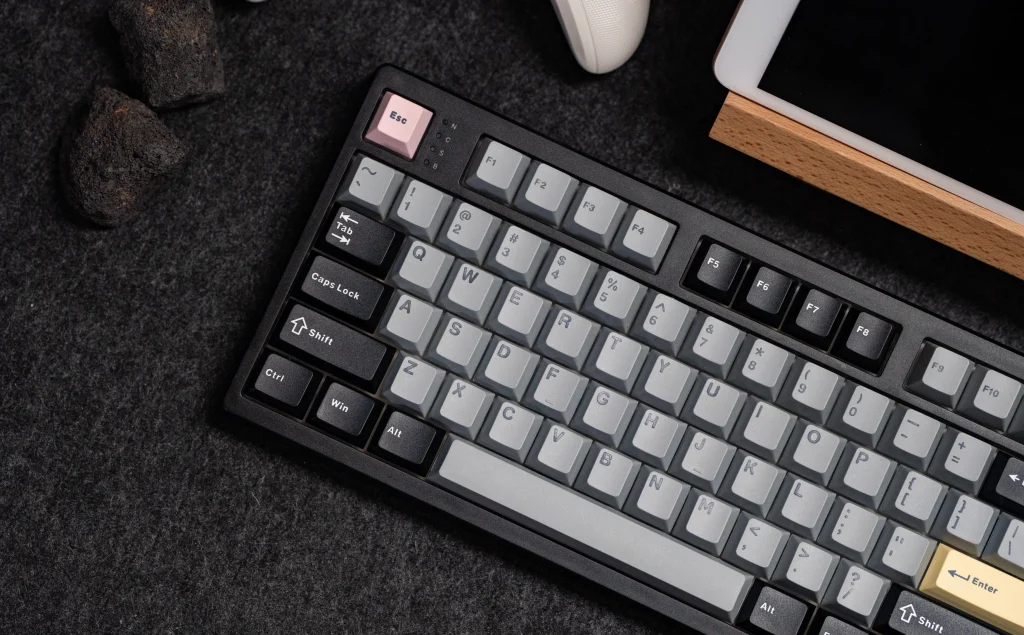
I recently reviewed the 98% PIIFOX LUNA Grid98 Mechanical Keyboard, which I thought was excellent.
While I appreciate that full-sized keyboards have fallen out of fashion, I am old-fashioned and like a number pad and generally as many keys as possible.
If, like me, you are a fan of fully sized keyboards, then the EPOMAKER TH108PRO is well worth your consideration. It is a well-specced keyboard considering the price of £100 from Amazon.
This mechanical keyboard has hot-swappable switches, 5-layer sound optimisation and tri-mode connectivity, as well as a smart display and a volume knob.
Related Reviews
Specification
| Specification | EPOMAKER TH108 PRO |
| Layout | Full-size (100%) |
| Number of keys | 104 |
| Layout options | ANSI, ISO-DE and JIS |
| Colourways | Black Grey, White Blue and Pink |
| Connectivity | 2.4 GHz wireless, Bluetooth and USB wired |
| Compatibility | Windows, macOS and Android |
| Battery | 10,000 mAh rechargeable |
| Switches | Factory-lubricated EPOMAKER Creamy Jade or Sea Salt Silent V2 |
| Hot-swappable | Yes; supports 3-pin and 5-pin mechanical switches |
| Mounting structure | Gasket-mounted |
| Case material | ABS plastic |
| Plate | Flex-cut polycarbonate (PC) |
| PCB | Flex-cut FR4 |
| Stabilisers | Plate-mounted; incompatible with PCB-mounted or screw-in stabilisers |
| Sound dampening | Five layers: PORON sandwich foam, IXPE switch pad, sound-enhancement PET, EPDM switch socket foam and bottom silicone |
| Keycaps | Double-shot PBT, Cherry profile |
| RGB lighting | Per-key LEDs; south-facing on ANSI models, north-facing on ISO models |
| Display | 23.3 x 14 mm TFT |
| Knob | Aluminium |
| Polling rate | USB and 2.4 GHz: 1,000 Hz; Bluetooth: 125 Hz |
| Stated latency | USB: 2 ms; 2.4 GHz: 5 ms; Bluetooth: 11 ms |
| Anti-ghosting | N-key rollover |
| Typing angles | 6°, 8° and 10.5° |
| Kickstand | Two-stage adjustable |
| Front height (spacebar side) | 28 mm with keycaps; 20 mm without |
| Rear height (Esc side) | 42 mm with keycaps; 34 mm without |
| Dimensions | 445 x 140 x 42 mm |
| Weight | 1.12 kg |
Switch Options
The two switch options are the EPOMAKER Creamy Jade and the Sea Salt Silent V2. Both are factory-lubricated linear switches, and there is little or no price difference between them.
My keyboard came with the Creamy Jade switches. These have a 45gf actuation force, 50gf bottom-out force, 2.0 mm pre-travel and 3.6 mm total travel. They are smooth, with no noticeable scratchiness or spring ping.
The product page is slightly confusing here. It lists the Creamy Jade as linear, but also describes it as “tactile and crisp” with a “satisfying bump”. In use, it is a linear switch with no tactile bump, so ignore that part of the description.
The Sea Salt Silent V2 is a silent linear switch with a 45gf actuation force, 51gf bottom-out force, 1.8 mm pre-travel and 3.5 mm total travel. The feel is similar on paper, but the switch is dampened to reduce noise. If you are buying for a shared office or for typing late at night, this is the one I would choose.
The PCB is hot-swappable and accepts both 3-pin and 5-pin switches, and EPOMAKER includes two spare switches and a 2-in-1 keycap and switch puller in the box. epomaker.com also sells a wide range of alternative switches you could swap to, including tactile, silent and linear options.
EPOMAKER sells magnetic switches too, but these are designed for Hall Effect keyboards. They will not work in the TH108 PRO, which uses standard mechanical switch sockets.
Design & Build
The TH108 PRO is a full-size 104 key keyboard in an ABS plastic case, measuring 445 x 140 x 42 mm and weighing 1.12 kg. Much of that weight comes from the 10,000mAh battery and the five layers of foam and silicone inside, and it means the keyboard stays put on the desk. A plastic case is normal at this price, and the Keychron V5 Max takes the same approach. The shell feels well put together, but it lacks the dense, cold feel of an aluminium board.
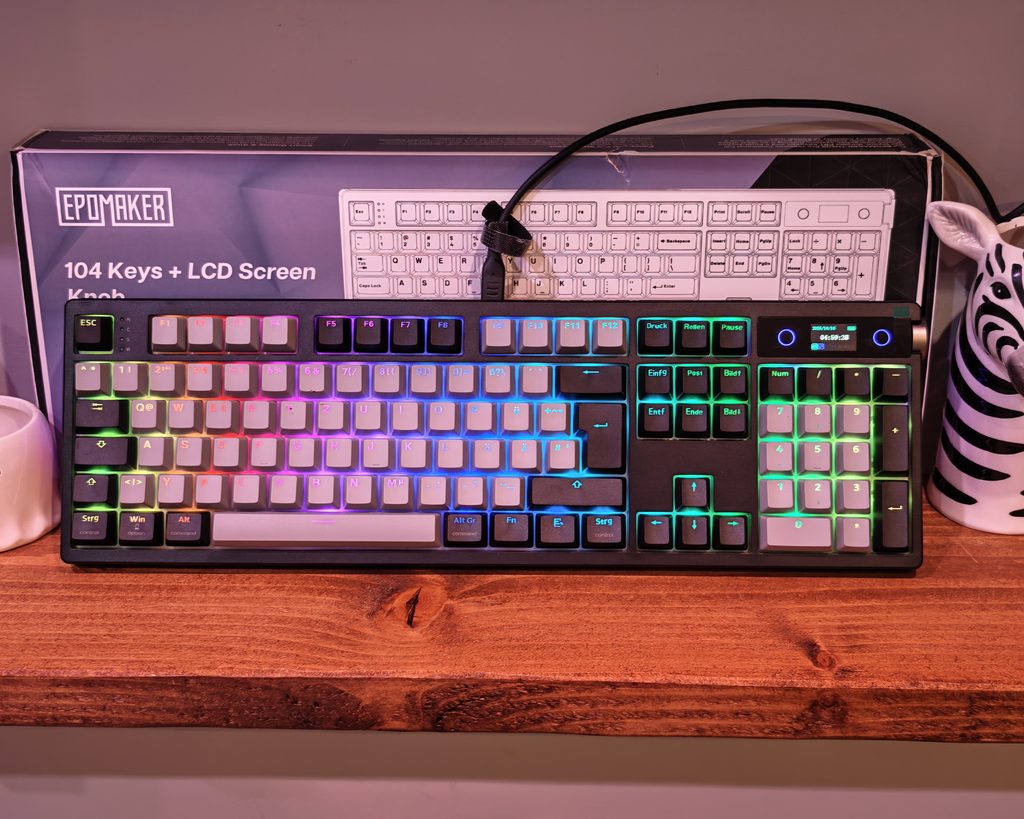
I have the black version, which pairs grey alphas with black modifiers and adds a few accent keys. There is a pink Esc, yellow Enter keys on the main block and the numpad, and a pastel arrow cluster where each key is a different colour. The result is a retro look that avoids being too loud, although the multi-coloured arrows will not suit everyone.
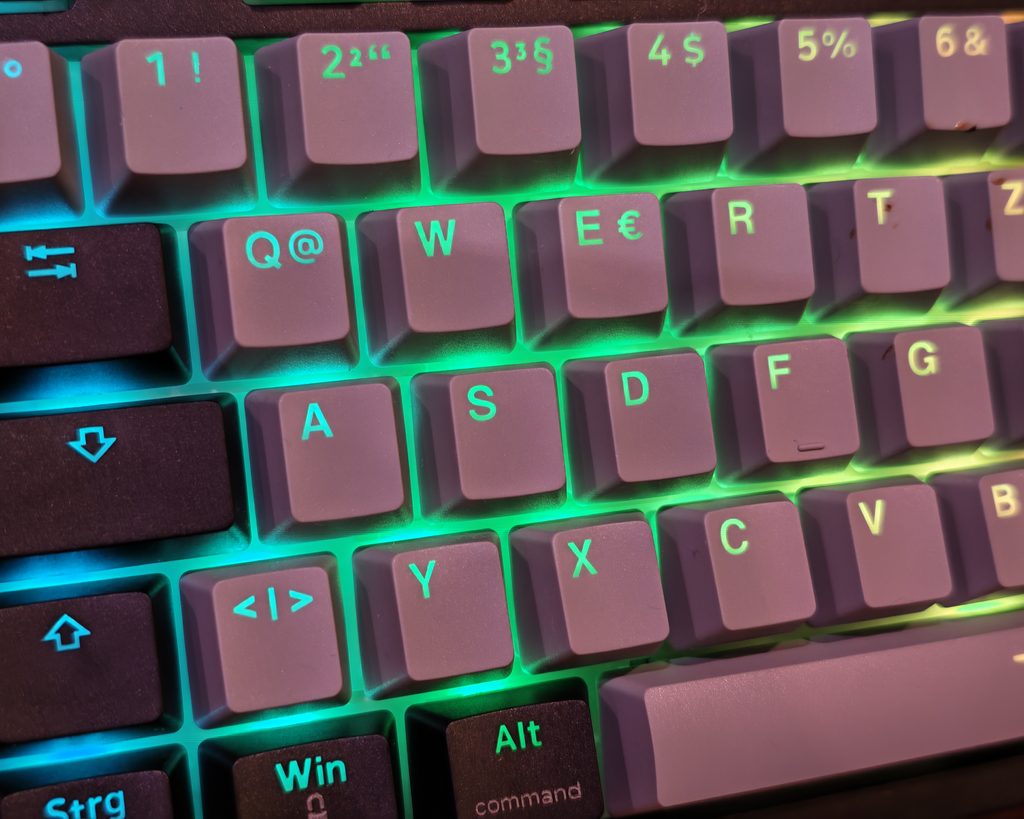
The keycaps are double-shot PBT in Cherry profile. They have a lightly textured finish that should resist shine for a long time, and Cherry profile sits lower than OEM, which I find more comfortable for long typing sessions. The legends are not shine-through, so the south-facing RGB works as underglow around the keys rather than lighting up the characters. If you type in the dark, that is a drawback. Personally, I prefer the underglow as it is a bit more subtle. The modifiers carry both Windows and macOS labels to match the Mac/Win toggle on the back.
I was sent two samples. One uses the US ANSI layout, so there is a long left Shift, a single-height Enter, and the @ and ” symbols are swapped compared with a UK keyboard. As far as I can tell, there is no UK ISO version, which will put some buyers off.
The second sample was ISO-DE, which is quite different from the UK layout as it is QWERTZ and has various accented keys. However, if you really need a UK layout, this may be the better choice, as there are far more keycap options for ISO-UK than ANSI-UK, which are quite hard to get. The ISO-DE board has the same physical key shapes as a UK keyboard, including the tall Enter and short left Shift, so a standard UK ISO keycap set will fit.
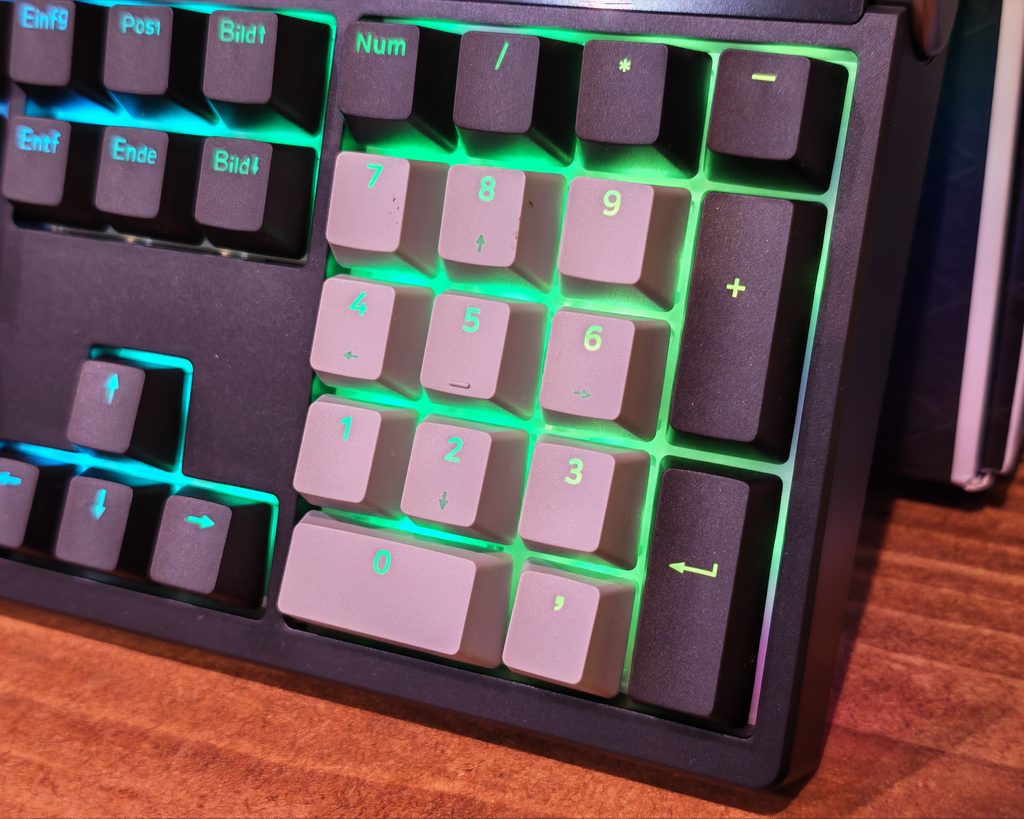
EPOMAKER has rearranged the top right corner.
The Num Lock, Caps Lock, Scroll Lock, and Win lock status LEDs are now located between Esc and F1 on the keyboard. This design choice allows for a small TFT display above the numpad, flanked by illuminated rings, and a metal volume knob in the corner of the case. The aluminium knob feels solid and has a good weight to it.
On the rear edge of the keyboard, there is a recessed panel with a Mac/Win slider, USB-C port, and a 2.4G/USB/BT slider. Physical switches are preferred over key combinations as they allow for easy identification of the keyboard’s current mode.
Underneath the keyboard, there are rubber pads and two-stage flip-out feet with rubber tips, providing typing angles of 6°, 8°, and 10.5°. Translucent light bars run along both sides, and the 2.4 GHz dongle is conveniently stored under the left kickstand.
The front edge of the keyboard is 28 mm tall with keycaps, which may require a wrist rest for some users during long typing sessions. The width of the keyboard is also something to consider, with options like the PIIFOX LUNA Grid98 or Ajazz AK980 offering compact layouts while retaining a numpad.
The smart display on the keyboard is a small 23.3 x 14 mm color TFT panel that displays the date, time, battery level, and various status indicators. It can be customized with a custom image or animated GIF using EPOMAKER’s software, though changes can only be made in wired mode.
The keyboard’s connectivity options include USB-C wired, 2.4 GHz wireless, and Bluetooth with support for up to three paired devices. The keyboard’s 10,000mAh battery provides long battery life, with over 42 hours of continuous use with lighting and screen on, and over 200 hours with them off.
Overall, the EPOMAKER TH108 PRO offers a unique design with a smart display and customizable features, making it a versatile option for users looking for a modern mechanical keyboard. Charging your device while connected to your PC is fine, but it is not recommended to leave it charging overnight on a phone charger.
As for RGB lighting, some may find it unnecessary or too flashy. Depending on your preferences, the RGB on this keyboard may not be ideal. The ANSI model has south-facing LEDs, which results in a glow around the keys rather than illuminated legends. This gives the lighting a more subtle look, which may not be preferred by those who game or work in the dark. On the other hand, the ISO-DE model uses north-facing LEDs, which is more typical for ISO keyboards.
The white polycarbonate plate helps spread the light, with the grey alphas reflecting it reasonably well. The LEDs are bright enough to be noticeable without being distracting, and there are three lighting zones – the main backlight, light bars on the sides, and rings around the display. You can adjust these lighting zones using shortcuts on the keyboard.
Overall, the RGB lighting on this keyboard adds some ambient lighting without making it look like a toy. The software also offers preset effects, custom colors, and a music mode that reacts to audio. Please change the format of the following. Transform the following sentence into the active voice:
“The cake was baked by Sarah.”
Sarah baked the cake. Transform the following sentence into the passive voice:
“The teacher assigned homework to the students.”
“The homework was assigned to the students by the teacher.” Transform the following sentence into the active voice:
“The cake was baked by Sarah.”
Sarah baked the cake. Transform the following:
Original: I want to improve my communication skills.
Transformed: My goal is to enhance my communication abilities. Transform the following:
Original: She is going to the store to buy groceries.
Transformed: She is going to the store to purchase some groceries.












Top 20 BEST Smartphones of 2017!

2027 Toyota Fortuner Spotted Once More in Thailand: Sneak Peek at the Latest Model

Securing the Future: A Comprehensive Guide to OT Security for Connected Robots

Ascending to the Zenith: Boss Rush Mode and New Game+ in Saros’ Update

Upgrade Alert: Exciting Changes Coming to Your Old Google Home & Nest Speakers

Samsung Galaxy S27+: Why Downgrading Would Be a Mistake

Nordic DeepTech Fund: Bridging Startups and Industry Leaders

Exciting Updates Await: Apple’s MacBook Pro Event Unveiled

Apple Retail Staff Issue Warning on iPhone Duo Walk-In Policy

EU Takes Action Against Instagram and Facebook for Violating Illegal Content Rules

Warning: Facebook Creators Face Monetization Loss for Stealing and Reposting Videos

Facebook’s New Look: A Blend of Instagram’s Style

Facebook Compliance: ICE-tracking Page Removed After US Government Intervention

Facebook and Instagram to Reduce Personalized Ads for European Users

InstaDub: Meta’s AI Translation Tool for Instagram Videos

Reclaim Your Account: Facebook and Instagram Launch New Hub for Account Recovery

Meta discontinues Messenger apps for Windows and macOS

Breaking Updates: Meta Connect 2025 Unveils Latest Developments
Top 20 BEST Smartphones of 2017!

5 Amazing Upcoming Smartphone Features – 2018 / 2019

ULTIMATE Power Banks / The Best Power Banks (2017-2018)

TOP 5 BEST UPCOMING SMARTPHONES – 2018!!

How to Apply a Screen Protector

The Flagship Samsung Smartphone you Never Considered.

Finally Fixing my Wi-Fi – Zyxel Multy X!

$25,000 Gaming Setup – EVOLUTION!

The Maze Alpha X is HERE!
-
 Facebook12 months ago
EU Takes Action Against Instagram and Facebook for Violating Illegal Content Rules
-
 Facebook1 year ago
Warning: Facebook Creators Face Monetization Loss for Stealing and Reposting Videos
-
 Facebook10 months ago
Facebook’s New Look: A Blend of Instagram’s Style
-
 Facebook1 year ago
Facebook Compliance: ICE-tracking Page Removed After US Government Intervention
-
 Facebook10 months ago
Facebook and Instagram to Reduce Personalized Ads for European Users
-
 Facebook1 year ago
InstaDub: Meta’s AI Translation Tool for Instagram Videos
-
 Facebook11 months ago
Reclaim Your Account: Facebook and Instagram Launch New Hub for Account Recovery
-
 Apple12 months ago
Meta discontinues Messenger apps for Windows and macOS
