
Mobile Tech
Introducing iOS 26.2: The Ultimate Solution to AirDrop Spam

In an unusual turn of events for a Friday, Apple has just released an entire set of OS 26.2 updates for the iPhone, iPad, Mac, Apple Watch, Apple TV, HomePod, and Vision Pro.
While a weeks-long beta cycle means there aren’t too many surprises in today’s releases, it’s highly unusual for Apple to push out any new software updates this late in the week. These typically land on a Monday or Tuesday. We’ve been anticipating iOS 26.2 and the rest of the gang for a while, so when Thursday passed without a peep, we figured we’d be kept waiting until next week.
It’s possible Apple planned to release these sooner, as it seeded out the first Release Candidate (RC) build to developers and public beta testers early last week. However, Monday brought a rare second RC build of iOS 26.2, suggesting Apple’s software engineers found some show-stopping bugs they wanted to address before unleashing the new build on the public.
That’s a good thing, of course. “Stable” beats “early” every time. Either way, the 26.2 updates are now here, along with a full set of release notes that confirm what we saw during the beta cycle with a few smaller enhancements that nobody found before now. Here’s what’s new across all of Apple’s platforms.
AirDrop Codes to Stop Unwanted Sharing
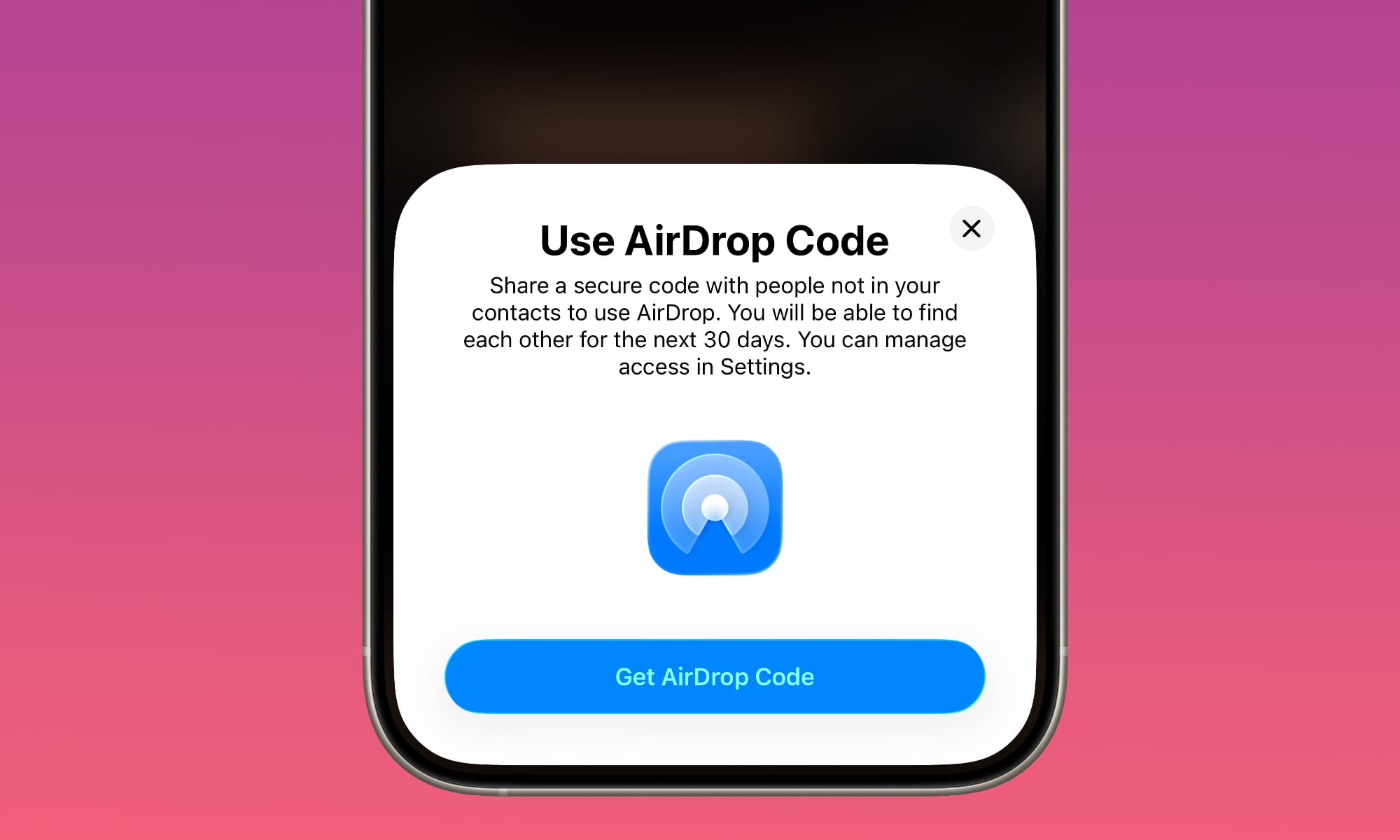
We saw hints of temporary AirDrop sharing codes during the beta cycle, but it wasn’t clear exactly how this would work or even if it was coming in the final release. However, it turns out it’s actually more of a new security feature than we expected.
Initial speculation on the feature suggested that it would be purely a way to pair up devices between two people for one-time AirDrop sharing without needing to leave your iPhone or iPad open to receiving links and photos from everyone around you. However, it turns out it’s actually a new hard requirement to prevent AirDrop spam.
With iOS 26.2 and later, nobody will be able to send you anything via AirDrop unless they’re in your contacts or you specifically authorize the transfer by giving them the code.
Here’s how Apple describes it in the release notes:
AirDrop codes offer an additional layer of verification when using AirDrop with unknown contacts by providing a code on the receiver’s device that the sender must enter to complete the transfer
In other words, these codes aren’t for “temporary” sharing, per se. Rather, they act as a gatekeeper to ensure that you don’t have AirDrop requests from random people popping up on your iPhone, even when you’ve set AirDrop to receive from “Everyone.” For greater clarity, here’s Apple’s updated iOS 26 user guide:
With iOS 26.2, iPadOS 26.2, macOS 26.2, or later, if someone tries to send you an item with AirDrop and they’re not in your contacts, they must use an AirDrop code.
If you choose to receive the item, select Continue. The AirDrop code appears on your device. After you share the code with the sender and they enter it on their device, the item is shared.
The instructions note that once they’ve entered the code, they can continue to AirDrop items to you for 30 days without the need for a second code. The sender and code will appear in the “Other Known” list in the Contacts app during that 30-day period, but you can remove them from there at any time if you want to cancel their sharing privileges.
You can also manage this via a new Manage Known AirDrop Contacts button under Settings > General > AirDrop. It links to your “Other Known” list, which now combines these AirDrop codes with the senders you’ve previously marked as “Known” in the Messages and Phone apps.
This effectively creates a whitelist that will also presumably let them continue to share with you via AirDrop even if you set your iPhone back to “Contacts Only” since the other person technically is now listed in your known contacts, albeit temporarily.
Reminders Can Now Be Urgent
The first beta of iOS 26.2 in early November introduced a new “Urgent” setting for Reminders that can be used to ensure they get your attention. When toggled on, an alert at the appointed time will show up in much the same way as an alarm from the Clock app: Full-screen and impossible to miss.
It’s shown in blue instead of orange to help distinguish it from a Clock alarm, but otherwise works mostly the same, with a prominent Snooze and Slide-to-Stop control, which can be swapped out for a “Complete” button if you want to be able to mark your Reminders as done right from the alarm screen.
This feature takes advantage of a new AlarmKit framework Apple added in iOS 26.0, so it’s something third-party apps can implement also — and hopefully some will now that Reminders has led the way.
Reminders can be marked as Urgent in the Reminders app on macOS 26.2 and iPadOS 26.2, but the alarms will only be triggered on the iPhone or iPad.
Podcasts Get Automatic Chapters
Apple is now automatically generating chapters for Podcasts that don’t already have them, and allowing creators to insert links to content on Apple services they mention in their podcasts, such as other podcasts, Apple TV shows, Apple News articles, and Apple Music songs and albums.
Like Podcast Transcripts in iOS 17.4, this is more of a back-end update on Apple’s part. It’s almost certainly using AI to generate the chapter breaks, and podcasters will need to manually insert the appropriate “Timed Links” into those episodes where they want them to appear.
The latest OS 26.2 Podcasts app is necessary to experience the following changes.
### Utilize Your Mac Screen as an Edge Light
macOS 26.2 introduces several new features like AirDrop code-based sharing limitations and Podcasts improvements. Additionally, it introduces a unique feature that eliminates the need for external ring lights for Zoom calls.
When using a supported camera app such as FaceTime, Zoom, or Google Meet, you can activate an edge light that creates a virtual ring light around the edges of your screen. This feature can be found in the Camera menu, alongside settings for backgrounds and Center Stage. Once enabled, you can adjust the intensity and color temperature to your preference by clicking the arrow on the right. Importantly, the edge light will not appear in screenshots or recordings.
### Refinements to Sleep Score
Apple has refined its Sleep Score classifications by replacing “Excellent” with “Very High” and adjusting the ranges for each grade. The new numbers compared to the old ones are as follows:
Introduced in iOS 26 and watchOS 26, Sleep Score provides a numerical rating based on various factors such as bedtime, sleep duration, and interruptions during sleep. This feature is not exclusive to the Apple Watch and can utilize sleep data from third-party trackers or manual entries in the Health app on iPhone and iPad.
### Other OS 26.2 Changes
The latest updates also bring several smaller changes:
– A new Accessibility toggle allows the device screen to flash when receiving alerts, in addition to triggering the LED flash.
– Further refinements to Liquid Glass enable adjustments to the glass appearance on the Lock Screen.
– Apple News receives design tweaks for improved navigation.
– New multitasking gestures in iPadOS 26.2 enhance window management.
– Apple Music now supports offline lyrics and includes the Favorite Songs playlist in Top Picks.
– The Games app offers improved filters and support for connected controllers.
– The Home app simplifies accessory kit enrollment with Multipack accessory pairing.
– The Freeform app enhances table functionality for text, images, documents, and drawings.
In addition to these changes, Apple’s OS 26.2 updates address bug fixes, performance enhancements, and security patches. It is crucial to update to the latest version promptly to ensure device security and access new features.







Microsoft’s Revolutionary Copilot: A Game-Changer in the Battle Against Anthropic and OpenAI – GeekWire

Building the Future: The Evolution of Europe’s First Digital Experimentation Infrastructure

Titan Quest II: Rise of the Gods – Official Launch in January 2027

Ultimate Guide to Googlebook: Everything You Need to Know about Price, Release Date, Key Specs & Features

Apple’s Latest Challenge: A Fitbit Air and Whoop Rival in the Works

The Importance of Understanding Your Business’s Value Before Making a Big Financial Move

Google’s Groundbreaking AI Satellite Launching into Space Next Week

Unlocking AI Potential: Solving the GPU Shortage in Your Infrastructure

The Downfall of OpenAI’s Siri ChatGPT Extension on iPhone

EU Takes Action Against Instagram and Facebook for Violating Illegal Content Rules

Warning: Facebook Creators Face Monetization Loss for Stealing and Reposting Videos

Facebook’s New Look: A Blend of Instagram’s Style

Facebook Compliance: ICE-tracking Page Removed After US Government Intervention

Facebook and Instagram to Reduce Personalized Ads for European Users

InstaDub: Meta’s AI Translation Tool for Instagram Videos

Reclaim Your Account: Facebook and Instagram Launch New Hub for Account Recovery

Meta discontinues Messenger apps for Windows and macOS

Breaking Updates: Meta Connect 2025 Unveils Latest Developments

Samsung Galaxy S9 Plus vs iPhone X

The BEST $300 Phone (2018) ft. MKBHD, Technical Guruji, iJustine + More

Samsung Galaxy S9 Plus Gaming Review! (vs OnePlus 5T)

THE BEST PHONE HTC EVER MADE?

The Truth about Google?

Samsung S9/ S9+ vs iPhone X vs Galaxy Note 8 Battery Life DRAIN TEST

Samsung S9 / S9+ vs Mate 10 Pro vs iPhone X Charging SPEED Test

The BEST APPS in 2018 – ft. MKBHD, UrAvgConsumer, iJustine + More

The ULTIMATE Smartphone Unboxing!!
-
 Facebook11 months ago
EU Takes Action Against Instagram and Facebook for Violating Illegal Content Rules
-
 Facebook12 months ago
Warning: Facebook Creators Face Monetization Loss for Stealing and Reposting Videos
-
 Facebook10 months ago
Facebook’s New Look: A Blend of Instagram’s Style
-
 Facebook12 months ago
Facebook Compliance: ICE-tracking Page Removed After US Government Intervention
-
 Facebook10 months ago
Facebook and Instagram to Reduce Personalized Ads for European Users
-
 Facebook12 months ago
InstaDub: Meta’s AI Translation Tool for Instagram Videos
-
 Facebook10 months ago
Reclaim Your Account: Facebook and Instagram Launch New Hub for Account Recovery
-
 Apple11 months ago
Meta discontinues Messenger apps for Windows and macOS
