
Gadgets
Battle of the Note-Taking Titans: Plaud NotePin S Review vs Plaud Note Pro Voice Recorder & AI Transcription

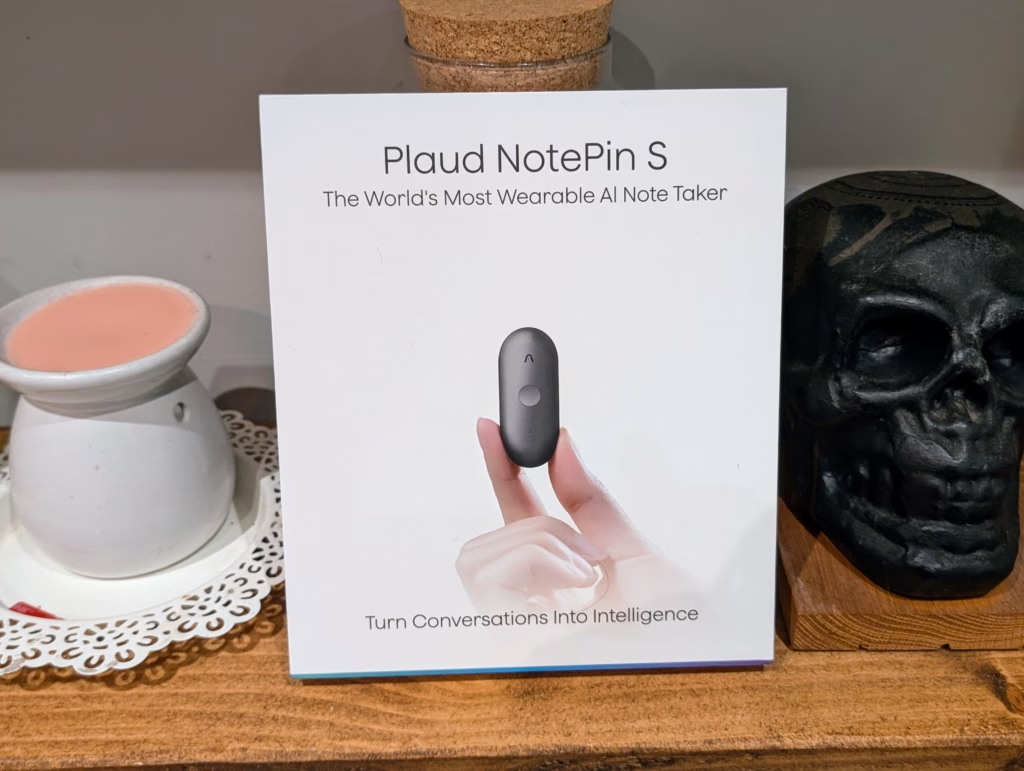
Plaud NotePin S Review
The Plaud NotePin S refines an already capable concept with a more practical wearable design and a genuinely useful tactile button, making it an effective tool for professionals who regularly record meetings, lectures, or conversations. While it lacks phone call recording and does not match the extended microphone performance of the Note Pro, its strong AI transcription, flexible summaries, and improved usability make it a well-judged option for personal, close-range recording, particularly for those who found the card-style Note form factor inconvenient.
Pros
- Practical wearable form factor with multiple carrying options
- Physical tactile button improves reliability and ease of use
- Accurate transcription and highly flexible AI summaries
- Generous free transcription tier with full feature access
- Strong privacy and security credentials suitable for professional use
Cons
- No phone call recording support
- Microphone performance is limited compared to the Note Pro
- Subscription required for heavier transcription use
- Only minor upgrades over the original NotePin for existing owners
I have previously reviewed the Plaud Note Pro and the original Plaud Note and was pleasantly surprised at how much I liked them.
I was originally sceptical due to the advancements in call recording on phones, with many phones now offering live transcribing, and I still think a phone is going to be adequate for casual or infrequent use. But I found the transcription features and summaries of the Plaud devices both accurate and useful, and I think they are a great choice for anyone who needs to record meetings regularly.
Recently, Plaud launched the new NotePin S, which appears to be a minor refresh of the original NotePin. I didn’t review the original model, but I do find the form factor very appealing in comparison to the Note, and I was eager to review it.
Related Reviews
Specification
| Specification | Plaud NotePin S | Plaud NotePin |
| Record button | Physical tactile button | Pressure-sensitive button |
| Press to highlight | Available | Not available |
| Battery capacity | 320 mAh | 270 mAh |
| Battery life | Up to 20 hours continuous recording (up to 40 days standby) | Up to 20 hours continuous recording (up to 40 days standby) |
| Apple Find My support | Coming soon | Available |
| File transfer options | Bluetooth (BLE 5.2), Wi-Fi (2.4 GHz) | Bluetooth (BLE 5.2), Wi-Fi (2.4 GHz) |
| Upload to cloud while charging | Supported | Supported |
| Device storage | 64 GB | 64 GB |
| Carrying options | Magnetic pin, clip, lanyard, or wristband | Magnetic pin, clip, lanyard, or wristband |
| Weight (without magnetic pin) | 17.4 g | 16.6 g |
| Dimensions | 51 × 21 × 11 mm | 51 × 21 × 11 mm |
| Accessories included | Magnetic pin, clip, wristband, lanyard, charging dock, cable | Magnetic pin, clip, charging dock, cable |
The most significant hardware change is the physical tactile button replacing the pressure-sensitive button found on the original NotePin. This is a small but meaningful improvement that makes the device more intuitive to use, particularly when you cannot see the device and need tactile feedback to confirm your actions.
Plaud Note Plans
The Plaud NotePin S comes with 300 minutes per month of free transcription. If you need more than this, you will need to subscribe to one of the plans.
Thankfully, the free plan shares all the same features as the Pro and Unlimited plans, whereas many companies would wall off certain features behind paid tiers. This means casual users can still access the full suite of AI capabilities, just with limited minutes.
The Pro plan costs £8.40 per month if billed annually, or £17.99 monthly. This increases the minutes to 1200 per month, which should be sufficient for most professionals who attend several meetings per week.
The unlimited plan is £18.80 per month billed annually, or £28.49 monthly. For heavy users who record multiple hours of audio daily, this plan removes any concerns about running out of transcription minutes.
It is worth noting that Plaud includes access to their new Desktop application with the NotePin S, which allows you to record online meetings without intrusive meeting bots. This is a nice addition that extends the usefulness of the Plaud ecosystem beyond in-person recordings.
Design
The Plaud NotePin S has a completely different design to the Note, and it is a tweaked design of the original NotePin.
Rather than a flat card-shaped design that attaches to the back of your phone, you have a small pill-shaped design with a magnetic back that can then be attached to a clip, lanyard or bracelet.
Personally, I like this design as it gives you some flexibility on how to wear or carry it. While I love the call recording feature of the Note, I do really like having it attached to the back of my phone, as it adds bulk, and I am constantly having to take it off for contactless payments.
In comparison to the original NotePin, the main difference is a physical button that you hold down to start recording. You then get more accessories, including a wristband and a lanyard.
Set Up
Setting up the Plaud NotePin S is identical to the other Plaud models, it requires downloading the Plaud app.
Setting up the device is simple – just enable Bluetooth, search for the device, and you’ll be connected in seconds.
The Plaud NotePin S features two MEMS microphones that can capture audio from up to three meters away, providing clear recording quality in various meeting settings. The device does not include a VPU, so it is not ideal for phone call recording, focusing instead on ambient recording for meetings, lectures, and conversations.
During testing, the dual microphones performed well in typical meeting environments, with clear audio captured when positioned close to the speakers. The quality was slightly reduced in larger meeting rooms with more participants or when speakers were further away.
The NotePin S lacks the advanced microphone array of the Note Pro, but it still offers more than adequate performance for personal recording.
The transcription and AI features on the NotePin S are similar to other Plaud models, utilizing OpenAI’s Whisper Large V3 model and Azure’s speech services to support 112 languages. The transcription accuracy is high for clear speech, although complex words and technical terms may pose challenges.
The AI summary feature on the NotePin S has improved significantly, offering Multidimensional Summaries that can be customized for different types of information and stakeholders. The system does a decent job of highlighting important points, though it may occasionally focus on minor details.
Overall, the Plaud NotePin S is a reliable device for capturing and summarizing meetings and conversations, providing clear audio quality and accurate transcriptions in various settings. The AI mind map feature creates visual representations of discussions, but may be chaotic for complex topics. It lacks manual adjustment capabilities, limiting its usefulness. It works well for lectures or presentations with clear structures, providing a quick overview of main topics.
Battery life on the NotePin S is sufficient for normal use, with a larger 320 mAh battery compared to the original NotePin. The device can upload recordings to the cloud while charging, and the 64 GB of local storage allows for days of continuous recording. Privacy and security measures are robust, with certifications for data encryption and storage compliance.
The Plaud NotePin S is priced at £159, with competition from other brands offering similar products. The physical button and accessories on the NotePin S make it a worthwhile upgrade from the original NotePin. The press-to-highlight feature allows for marking important moments during recordings, improving the AI’s summarization accuracy.
The wearable form factor of the NotePin S offers advantages over card-style devices, making it more convenient to carry and use. However, there are limitations to consider, such as the lack of phone call recording features. Overall, the NotePin S is a solid choice for professionals in need of a reliable voice recorder with AI capabilities. The Note Pro’s four MEMS plus VPU array outperforms the dual MEMS microphones of the NotePin S. If you frequently record large meetings or require extended range, the Note Pro is still the preferred option despite its less convenient size. The NotePin S is more suitable for personal recording situations where you are in close proximity to the conversation.
The absence of phone call recording is the most significant feature lacking in comparison to the Note models. If phone call recording is essential, considering the Note or Note Pro is necessary.
For individuals who regularly record meetings, lectures, or conversations, the NotePin S is a reliable choice. While the subscription model for extended transcription is something to consider, the 300 minutes per month free tier is adequate for occasional use. Professionals who record frequently will find the Pro or Unlimited plans reasonably priced for the time-saving benefits they offer.
The AI transcription accuracy, along with helpful summary features and cross-platform synchronization, elevates the NotePin S beyond a simple voice recorder. The integration of all aspects into one ecosystem – from recording to searchable, summarized notes – is where the true value lies.
I recommend the NotePin S for those who find the Note’s form factor inconvenient or prefer a more discreet recording solution. For individuals who require phone call recording or superior audio quality in challenging environments, the Note Pro remains the better option. Casual users who only sporadically need to record may find their phone to be the most cost-effective solution.
The Plaud NotePin S review highlights the device’s refined wearable design and practical tactile button, making it effective for professionals who frequently record meetings, lectures, or conversations. While lacking phone call recording and not matching the Note Pro’s microphone performance, the strong AI transcription, versatile summaries, and improved usability make it a well-suited option for personal, close-range recording, especially for those who found the original Note’s form factor cumbersome.
Pros:
– Practical wearable design with multiple carrying options
– Physical tactile button enhances reliability and ease of use
– Accurate transcription and highly flexible AI summaries
– Generous free transcription tier with full feature access
– Strong privacy and security credentials suitable for professional use
Cons:
– Lack of phone call recording support
– Limited microphone performance compared to the Note Pro
– Subscription required for heavier transcription use
– Only minor upgrades over the original NotePin for existing owners
In conclusion, the NotePin S offers a valuable recording solution for those seeking convenience and reliability in their personal recording needs. Transform the following text into what?
Please provide more context or specify what kind of transformation you would like to see. Transform the following:
Original: The cat is sleeping on the couch.
Transformed: The couch is being slept on by the cat.











Cloudscape Chronicles: A Fumito Ueda-inspired Parkour Adventure

Rising Prices: Samsung Galaxy Tab S12 and Xiaomi Pad 9 Series

Uncovering the Hidden Profit Potential: Startup Lessons from Healthy Averages

Apple’s Costly Conundrum: $5.7 Billion Damages for Haptic Patent Infringement

Snack Time and Screen Time: Free Peanuts and Fresh Shows

The Ultimate BMW N62 V8 Engine Handbook: Troubleshooting, Performance Upgrades, and Durability

Black Salt Games Launches Team Trifold Studio, Unveiling Nothing Lost

Unlocking Your Phone Made Easy: How Android Users Can Use Their Google Account

Bixdo Glossonic Brush Pro: The Ultimate Electric Toothbrush for Whiter Teeth – A Tech Advisor Review

EU Takes Action Against Instagram and Facebook for Violating Illegal Content Rules

Warning: Facebook Creators Face Monetization Loss for Stealing and Reposting Videos

Facebook’s New Look: A Blend of Instagram’s Style

Facebook Compliance: ICE-tracking Page Removed After US Government Intervention

Facebook and Instagram to Reduce Personalized Ads for European Users

InstaDub: Meta’s AI Translation Tool for Instagram Videos

Reclaim Your Account: Facebook and Instagram Launch New Hub for Account Recovery

Meta discontinues Messenger apps for Windows and macOS

Breaking Updates: Meta Connect 2025 Unveils Latest Developments

10 Incredible Android DIY Hacks!

Does a Cheap 2018 Smartphone beat a 2013 Flagship?

Samsung Galaxy S9 & S9+ UNBOXING!

Samsung Galaxy S9 Plus vs iPhone X

The BEST $300 Phone (2018) ft. MKBHD, Technical Guruji, iJustine + More

Samsung Galaxy S9 Plus Gaming Review! (vs OnePlus 5T)

THE BEST PHONE HTC EVER MADE?

The Truth about Google?

Samsung S9/ S9+ vs iPhone X vs Galaxy Note 8 Battery Life DRAIN TEST
-
 Facebook11 months ago
EU Takes Action Against Instagram and Facebook for Violating Illegal Content Rules
-
 Facebook12 months ago
Warning: Facebook Creators Face Monetization Loss for Stealing and Reposting Videos
-
 Facebook10 months ago
Facebook’s New Look: A Blend of Instagram’s Style
-
 Facebook12 months ago
Facebook Compliance: ICE-tracking Page Removed After US Government Intervention
-
 Facebook10 months ago
Facebook and Instagram to Reduce Personalized Ads for European Users
-
 Facebook12 months ago
InstaDub: Meta’s AI Translation Tool for Instagram Videos
-
 Facebook10 months ago
Reclaim Your Account: Facebook and Instagram Launch New Hub for Account Recovery
-
 Apple11 months ago
Meta discontinues Messenger apps for Windows and macOS
