
Security
Copy and Paste Chaos: How the Edge Update Bug Broke Microsoft Teams Functionality


Microsoft Teams Bug Breaks Right-Click Paste Functionality
In a recent update to the Microsoft Edge browser, a bug has been introduced that affects the right-click paste functionality in the Microsoft Teams desktop client. Users have reported being unable to paste URLs, text, or images into Teams chats using the right-click context menu, as the “Paste” option is greyed out.
To address this issue, Microsoft recommends using keyboard shortcuts to copy and paste content. On Windows, users can use Ctrl + C to copy and Ctrl + V to paste, while on macOS, the shortcuts are Cmd + C and Cmd + V.
According to Microsoft, impacted users are experiencing difficulties copying and pasting content in Microsoft Teams chats due to the greyed-out paste option in the right-click dropdown menu. The workaround involves using keyboard shortcuts for copying and pasting.
The bug is attributed to a code regression in Microsoft Edge, which is used by Microsoft Teams for certain functionalities. Reports from administrators on Reddit and Microsoft forums indicate that the issue is affecting both corporate and individual users.
One administrator posted on the Microsoft Forums, “I have multiple users experiencing this issue, including myself. Cannot right-click Paste, but CTRL+V and paste as text are allowed.”
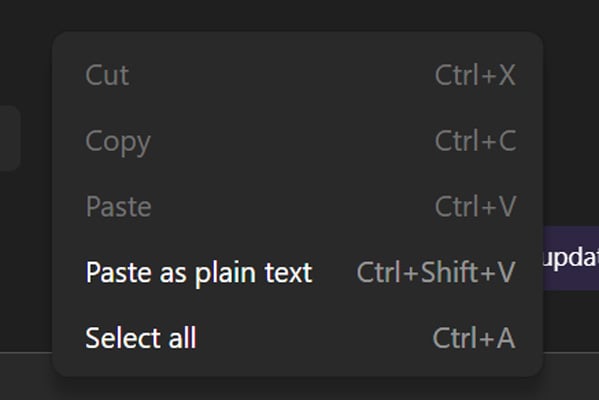
Attempts to resolve the issue by reinstalling Teams or clearing the cache have been unsuccessful for some users. Microsoft has identified the cause of the problem and is rolling out a fix gradually while monitoring system telemetry for recovery.
As of the latest update on April 16, Microsoft has not provided a specific timeline for the complete rollout of the fix.

AI chained four zero-days into one exploit that bypassed both renderer and OS sandboxes. A wave of new exploits is coming.
At the Autonomous Validation Summit (May 12 & 14), see how autonomous, context-rich validation finds what’s exploitable, proves controls hold, and closes the remediation loop.













Oneplus 5T vs Oneplus 1 – 3 Years Later.

Unleashing the Beast: Aston Martin’s Aerodynamic Single-Seater Track Car

The Rising Tide of CoreWeave’s Debt: The AI Industry’s Collective Challenge

Tech Talk for Everyone: A Guide to Making the Non-Technical Understand and Succeed

.

Samsung Health Sleep Upgrade Revolutionizes Galaxy Watch and Ring Owners’ Health Monitoring

Top 15 Tech Companies Scaling with New COO Hires in 2026

Apple Unveils iOS 27.2 RC in Preparation for October Release

Driving Through History: The Legacy of 9 Million Cars Built Since 1986

EU Takes Action Against Instagram and Facebook for Violating Illegal Content Rules

Warning: Facebook Creators Face Monetization Loss for Stealing and Reposting Videos

Facebook’s New Look: A Blend of Instagram’s Style

Facebook Compliance: ICE-tracking Page Removed After US Government Intervention

Facebook and Instagram to Reduce Personalized Ads for European Users

InstaDub: Meta’s AI Translation Tool for Instagram Videos

Reclaim Your Account: Facebook and Instagram Launch New Hub for Account Recovery

Meta discontinues Messenger apps for Windows and macOS

Breaking Updates: Meta Connect 2025 Unveils Latest Developments
Oneplus 5T vs Oneplus 1 – 3 Years Later.

Top 20 BEST Smartphones of 2017!

5 Amazing Upcoming Smartphone Features – 2018 / 2019

ULTIMATE Power Banks / The Best Power Banks (2017-2018)

TOP 5 BEST UPCOMING SMARTPHONES – 2018!!

How to Apply a Screen Protector

The Flagship Samsung Smartphone you Never Considered.

Finally Fixing my Wi-Fi – Zyxel Multy X!

$25,000 Gaming Setup – EVOLUTION!
-
 Facebook12 months ago
EU Takes Action Against Instagram and Facebook for Violating Illegal Content Rules
-
 Facebook1 year ago
Warning: Facebook Creators Face Monetization Loss for Stealing and Reposting Videos
-
 Facebook10 months ago
Facebook’s New Look: A Blend of Instagram’s Style
-
 Facebook1 year ago
Facebook Compliance: ICE-tracking Page Removed After US Government Intervention
-
 Facebook11 months ago
Facebook and Instagram to Reduce Personalized Ads for European Users
-
 Facebook1 year ago
InstaDub: Meta’s AI Translation Tool for Instagram Videos
-
 Facebook11 months ago
Reclaim Your Account: Facebook and Instagram Launch New Hub for Account Recovery
-
 Apple12 months ago
Meta discontinues Messenger apps for Windows and macOS
