Introducing Intelligent Terminal: Microsoft’s AI-Powered Windows Terminal Fork
In the realm of technology, Microsoft has unveiled a groundbreaking open-source iteration of Windows Terminal dubbed “Intelligent Terminal.” This innovative creation enables users to seamlessly integrate AI functionalities within the Terminal environment without disrupting their regular workflow.
Described by Microsoft as an in-built assistant, the Intelligent Terminal is designed to assist users in elucidating errors, formulating commands, and resolving issues right from the Terminal interface.
The key features of the Intelligent Terminal include the ability for the AI agent to monitor ongoing Terminal activities and provide assistance when a command fails. Additionally, it can retain information about active and past agent sessions, allowing users to revisit previous work without losing progress.
Customizing Your Intelligent Terminal Experience
Upon the initial launch of Intelligent Terminal, users are presented with the option to select their preferred AI agent for the Terminal pane. Available agents include GitHub Copilot, Claude, Codex, and Gemini, with GitHub Copilot requiring installation while the others come pre-installed.
Users can also toggle features such as Automatic error detection and Automatic error suggestion, allowing the Terminal to identify failed commands and potentially offer solutions via the selected AI agent.
Another noteworthy feature is Session management, which enables Intelligent Terminal to keep track of active and past agent sessions, facilitating seamless navigation between different work sessions.
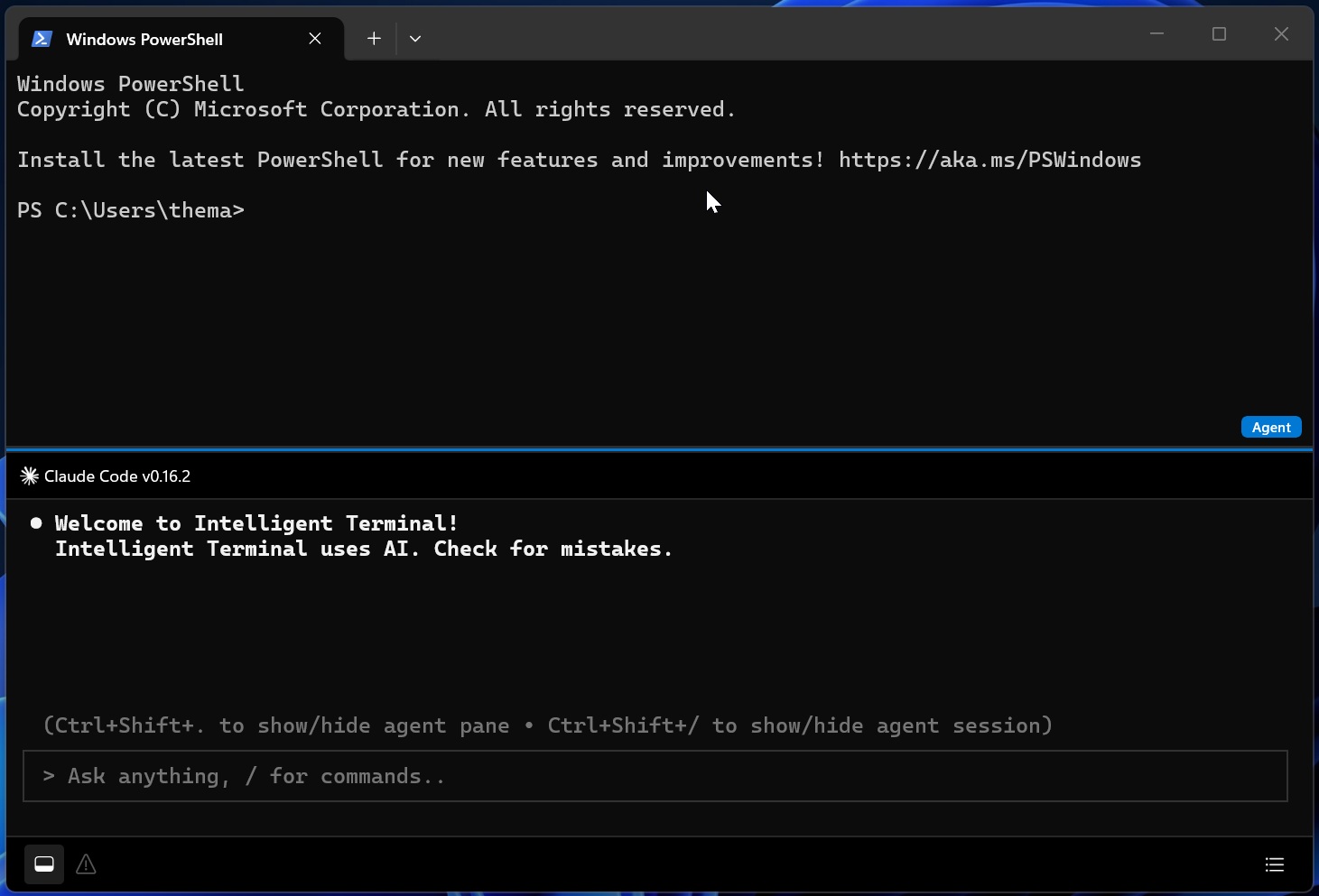
Once the Terminal AI is configured, users will find it effortless to use, as the AI pane appears below the standard shell, welcoming them to the Intelligent Terminal environment.
AI shell appears below the standard PS shell in Intelligent Terminal Source: BleepingComputer
Enhancing Developer Productivity with Intelligent Terminal
For developers, the ability to leverage AI models like Claude Code within Windows Terminal can significantly boost productivity. The Intelligent Terminal’s Resume session feature stands out as a valuable asset, allowing users to seamlessly resume previous work sessions with ease.
While the concept of Terminal AI is undoubtedly innovative, Microsoft has ensured that it remains a separate application, not integrated into standard Windows installations yet. This approach caters to users who may find the AI functionalities more suitable for their workflow.
For those intrigued by the possibilities offered by Intelligent Terminal, the application can be downloaded from the Microsoft Store or GitHub.
Security teams log 54% of successful attacks and alert on just 14%. The rest move through your environment unseen.
The Picus whitepaper shows how breach and attack simulation tests your SIEM and EDR rules so threats stop slipping by detection.