
Mobile Tech
Revamping HomeView: Bringing CarPlay’s Best Apps to Your Home

Apple recently introduced the HomeView, a groundbreaking addition to its home product lineup, marking the first major release in this category since the original HomePod in 2018.
Although the HomeView bears a resemblance to a supersized iPhone or a compact iPad, Apple has taken a unique approach with its inaugural smart display. Unlike its predecessors, the HomeView relies on a built-in app experience without the support of an App Store.
This strategy is consistent with Apple’s historical pattern of gradually introducing App Stores to its products. The App Store was not introduced until 2008 with the iPhone 3G, and the Apple Watch initially served as an extension of iPhone apps in 2015. It took eight years for the Apple TV to finally have its own App Store.
Given this background, it’s not surprising that Apple has chosen a similar path for the HomeView. While there are currently no plans for an App Store on the smart home hub, Apple’s revenue dependency on the App Store suggests that the company may be contemplating this possibility.
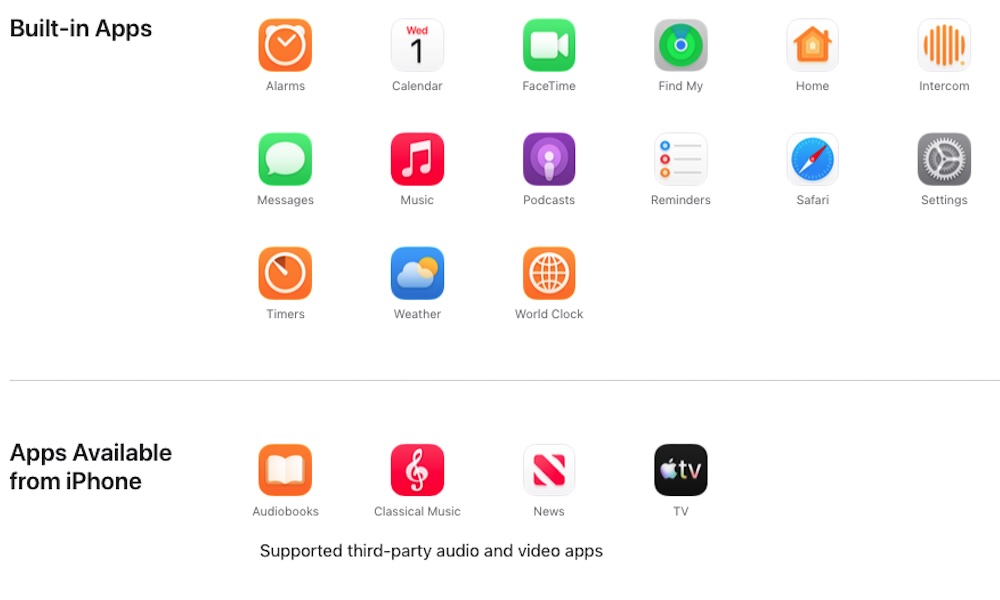
For now, the HomeView functions primarily as an appliance-style accessory with fifteen pre-installed apps. Additional functionalities are limited, and the device mainly serves as a secondary screen for the iPhone, reminiscent of the Apple Watch’s early days.
Out of the box, users can access Alarms, Calendar, FaceTime, Find My, Home, Intercom, Messages, Music, Podcasts, Reminders, Safari, Settings, Timers, Weather, and World Clock. Approximately half of these apps fall under the “utility” category.
Apple has also highlighted the ability to stream audiobooks from Apple Books, classical music from Apple Music Classical, videos from Apple TV, and content from Apple News. The mention of “supported third-party audio and video apps” hints at a broader range of content.
Furthermore, Apple has devised a clever way to incorporate additional apps into the HomeView by leveraging CarPlay.
Utilizing CarPlay Integration
The HomeView essentially acts as an extension of the iPhone, allowing users to access CarPlay-supported apps on the device. This integration streamlines the user experience and eliminates the need to develop separate apps for the HomeView.
Apps that currently support CarPlay can be seamlessly displayed on the HomeView screen, provided the paired iPhone is within proximity. However, only audio and video apps are compatible with the HomeView interface, as per the updated CarPlay Developer Guide.
While this integration offers convenience, it also imposes limitations on the types of apps that can be accessed on the HomeView. Apple’s stringent guidelines for CarPlay app approval may hinder the availability of certain apps on the platform.
Despite the potential for expansion as the HomeView evolves, the current focus remains on delivering a consistent user experience. The HomeView’s functionality may expand in the future, but users should temper their expectations for immediate changes.
Transform the following into what? Please provide more information or context for me to assist you accurately.










Revamping HomeView: Bringing CarPlay’s Best Apps to Your Home

The Maze Alpha X is HERE!

Mercedes CEO Teases Early Arrival of Baby G-Class

Defending Integrity: Microsoft’s Brad Smith Responds to Accusations from VP JD Vance on Visa Fraud

Early Access: The Highly Anticipated GTA 6 Launch Trailer Unveiled Ahead of Schedule

iPhone 18 Set to Break Records with Massive Pre-Orders Launching in November

Revolutionary Phones Set to Shake Up 2026: A Wake-Up Call for the Tech World

German AI Procurement Automation Startup Elevatry Raises €3 Million in Funding

Maximizing Muse: How Meta and Apple’s Collaboration Enhances AI Performance on Macs

EU Takes Action Against Instagram and Facebook for Violating Illegal Content Rules

Warning: Facebook Creators Face Monetization Loss for Stealing and Reposting Videos

Facebook’s New Look: A Blend of Instagram’s Style

Facebook Compliance: ICE-tracking Page Removed After US Government Intervention

Facebook and Instagram to Reduce Personalized Ads for European Users

InstaDub: Meta’s AI Translation Tool for Instagram Videos

Reclaim Your Account: Facebook and Instagram Launch New Hub for Account Recovery

Meta discontinues Messenger apps for Windows and macOS

Breaking Updates: Meta Connect 2025 Unveils Latest Developments
The Maze Alpha X is HERE!

Cool Tech under $100 – December!

MYSTERY UNBOXING FROM GOOGLE!

TOP 6 Smartphones from Companies you NEVER Expected!

A Surprise Smartphone from EE!

DOOGEE MIX 2 VS DOOGEE MIX 1!

INCREDIBLE Smartphone Gadgets on Amazon!

10 Android Apps you NEED to try in 2017 / 2018

The Most Bizarre Smartphone we’ve seen all year.
-
 Facebook12 months ago
EU Takes Action Against Instagram and Facebook for Violating Illegal Content Rules
-
 Facebook1 year ago
Warning: Facebook Creators Face Monetization Loss for Stealing and Reposting Videos
-
 Facebook10 months ago
Facebook’s New Look: A Blend of Instagram’s Style
-
 Facebook1 year ago
Facebook Compliance: ICE-tracking Page Removed After US Government Intervention
-
 Facebook10 months ago
Facebook and Instagram to Reduce Personalized Ads for European Users
-
 Facebook1 year ago
InstaDub: Meta’s AI Translation Tool for Instagram Videos
-
 Facebook10 months ago
Reclaim Your Account: Facebook and Instagram Launch New Hub for Account Recovery
-
 Apple12 months ago
Meta discontinues Messenger apps for Windows and macOS
