
Apple
Exploring Apple’s HomeView: A Smart Display Review

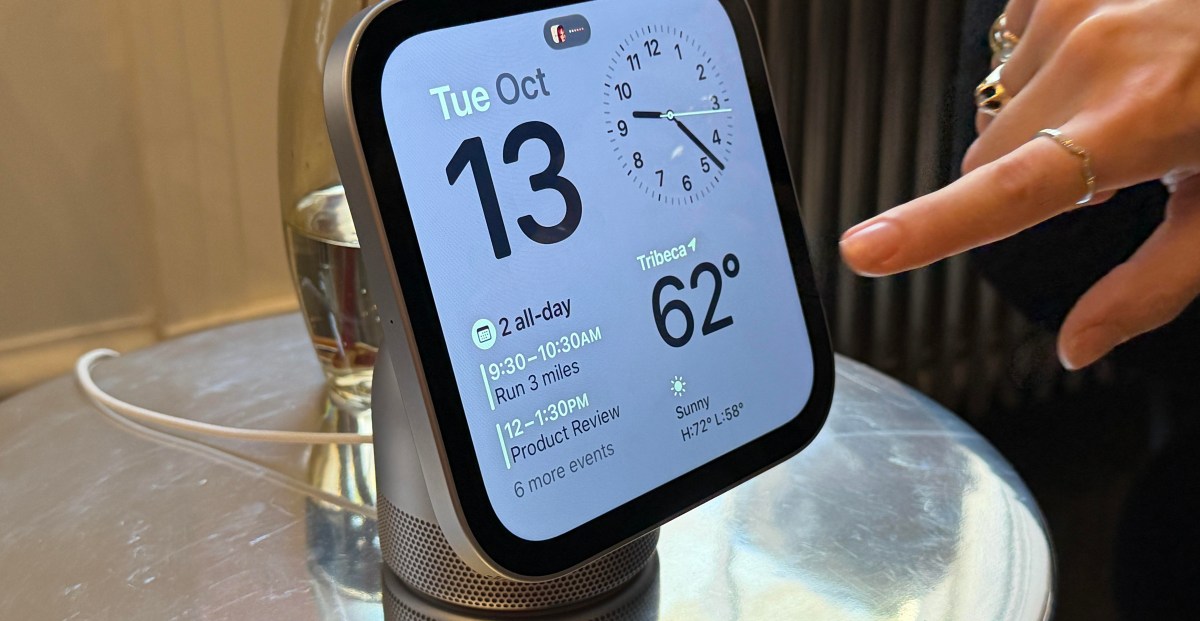
Apple has recently unveiled the HomeView, its inaugural smart home display – and I recently had the opportunity to experience the device firsthand. Featuring a stunning 7-inch square touchscreen and integrated Siri AI, the HomeView is designed to serve as a smart home controller, personal assistant, and home hub for your household, offering a plethora of features to explore.
The size of the HomeView immediately caught my attention. It is much smaller than I anticipated, with the screen almost completely concealing the compact aluminum base that functions as a speaker. The Liquid Retina display is vibrant and responsive to touch, showcasing photos and HomeView “faces” with brilliance.
Users can effortlessly swipe to switch between different faces and select from a variety of options, most of which resemble Apple Watch faces. The display gives off the impression of a large Apple Watch combined with the functionality of an iPhone and the spaciousness of an iPad.
Apple provides both a wall-mounted and tabletop version of the HomeView, with the wall-mounted model appearing to be an excellent smart home controller.
The dedicated Home Widget face integrates devices from the Apple Home app, allowing users to control a thermostat, door lock, activate a scene, and view live footage from HomeKit Secure Video cameras. It also enables users to access nearby accessories, such as opening the garage door. When attempting to unlock a door, the device prompted me to authenticate using my face or iPhone.
The Home Widget essentially mirrors the Home app, offering all the controls available on the iPhone app but on a larger screen designed for easy interaction.
There is a significant amount of swiping involved with the HomeView. Swiping left reveals new home faces, tapping widgets provides access to deeper app controls, and swiping right reveals additional features. Swiping up returns to the main screen, and another upward swipe grants access to the onboard apps, which are automatically populated from your phone. Swiping down from the top of the screen reveals a control center similar to that on an iPhone. The 12MP camera can even be activated from this control center, effectively turning the device into a mirror.
The HomeView is centered around Siri AI, capable of incorporating personal context such as text messages and calendar appointments based on voice commands. Although I did not have the chance to test this feature personally, a demonstration showcased how asking Siri about a friend’s arrival time from the airport could prompt the device to gather relevant information and take appropriate actions.
The device also offers a guided cooking experience, where users can bring up a recipe on their iPhone using Siri, transfer the data to the HomeView using Handoff, and view a formatted recipe with step-by-step instructions and timers for each step. Apple claims that most recipes formatted for Google will work seamlessly with this feature.
Another Siri AI demonstration involved requesting the device to play a song mentioned in a text message, which resulted in the device playing the requested song after a brief processing time. Additionally, a FaceTime demonstration showcased the device’s Center Stage feature, ensuring that users remain centered on the screen during video calls, making it an ideal countertop communication device.
While I only had the chance to explore a few features of the HomeView, I am eager to delve deeper into its capabilities. Priced at $299, the device is available for pre-order and will begin shipping on November 13th.
In conclusion, the integration of personal context with smart home functionality orchestrated by the HomeView represents a significant advancement for Apple Home. I am excited to conduct further testing and exploration of this innovative device.
Photography by Jennifer Pattison Tuohy / The Verge
Follow topics and authors from this story to receive more content like this in your











A Surprise Smartphone from EE!

Unveiling the Ford F-150 Lariat Black Edition: Limited Availability Sparks Frenzy

Revving Up: The Journey of Joining a Formula 1 Team

Apple Steps Up Smart Home Game to Challenge Amazon’s Echo and Ring

Deep Dish Dungeon Delights: Cooking Up a Storm in Echoes of Delicious

Unusual Choices: Apple’s Peculiar Decisions with Their Smart Screen

London-based Obsero Secures €1 Million Funding to Enhance Brand Presence in AI-Driven Search Results

Exploring Apple’s HomeView: A Smart Display Review

Revamped Play Store Integration: Google’s In-Car Experience

EU Takes Action Against Instagram and Facebook for Violating Illegal Content Rules

Warning: Facebook Creators Face Monetization Loss for Stealing and Reposting Videos

Facebook’s New Look: A Blend of Instagram’s Style

Facebook Compliance: ICE-tracking Page Removed After US Government Intervention

Facebook and Instagram to Reduce Personalized Ads for European Users

InstaDub: Meta’s AI Translation Tool for Instagram Videos

Reclaim Your Account: Facebook and Instagram Launch New Hub for Account Recovery

Meta discontinues Messenger apps for Windows and macOS

Breaking Updates: Meta Connect 2025 Unveils Latest Developments
A Surprise Smartphone from EE!

DOOGEE MIX 2 VS DOOGEE MIX 1!

INCREDIBLE Smartphone Gadgets on Amazon!

10 Android Apps you NEED to try in 2017 / 2018

The Most Bizarre Smartphone we’ve seen all year.

Best Tech under $2000 – December 2017 / January 2018!

This could be your next Smartphone.

Top 10 most INSANE Limited Edition Smartphones!

How Smart is the AI-Powered Huawei Mate 10 – with EMUI 8.0?
-
 Facebook12 months ago
EU Takes Action Against Instagram and Facebook for Violating Illegal Content Rules
-
 Facebook12 months ago
Warning: Facebook Creators Face Monetization Loss for Stealing and Reposting Videos
-
 Facebook10 months ago
Facebook’s New Look: A Blend of Instagram’s Style
-
 Facebook12 months ago
Facebook Compliance: ICE-tracking Page Removed After US Government Intervention
-
 Facebook10 months ago
Facebook and Instagram to Reduce Personalized Ads for European Users
-
 Facebook12 months ago
InstaDub: Meta’s AI Translation Tool for Instagram Videos
-
 Facebook10 months ago
Reclaim Your Account: Facebook and Instagram Launch New Hub for Account Recovery
-
 Apple12 months ago
Meta discontinues Messenger apps for Windows and macOS
