
Mobile Tech
The True Cost of Apple HomeView Wall Mount: Uncovering Hidden Expenses and Sacrifices

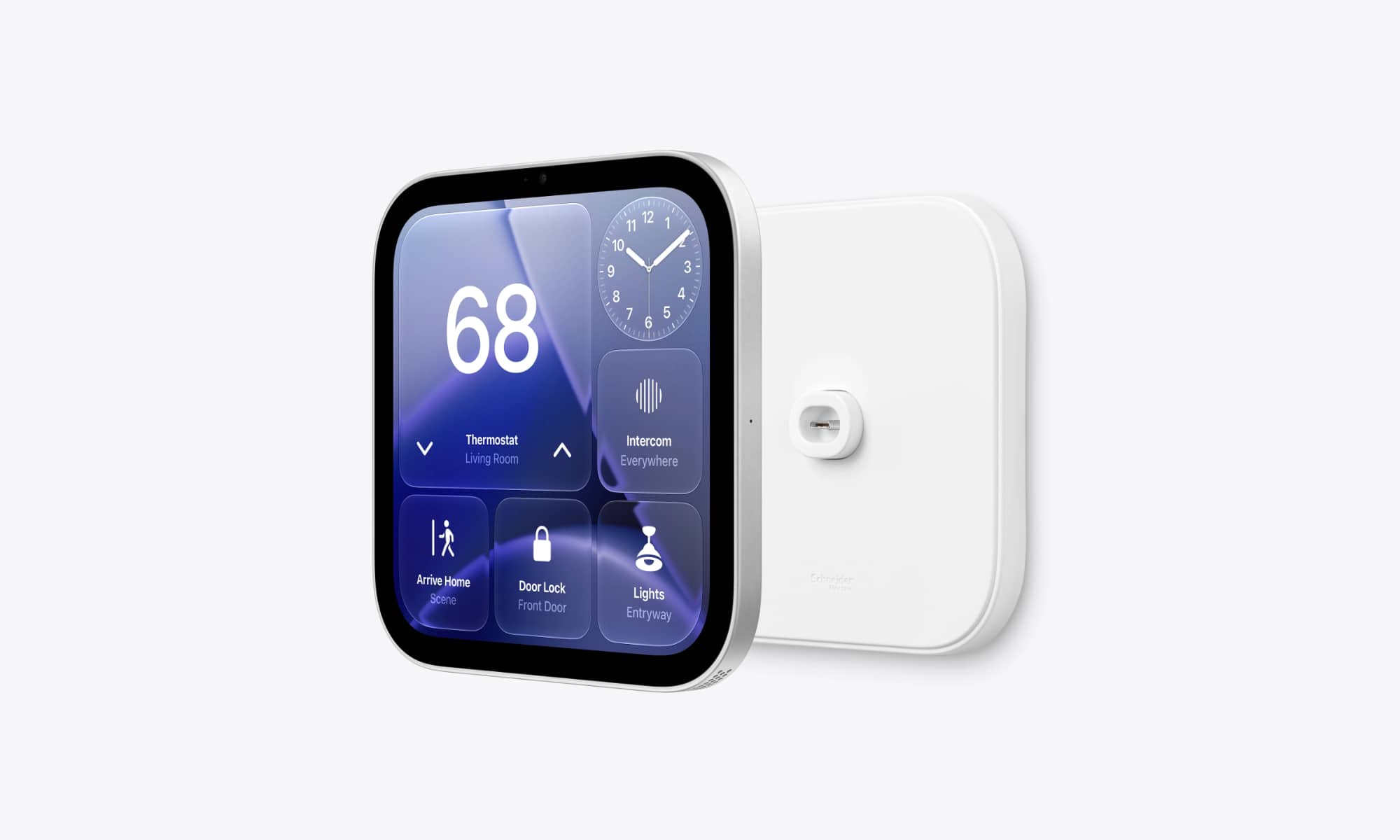
Apple’s new HomeView smart home hub is easily the most interesting new product the company has released for the home in quite some time (not that it’s been much of a race). But what’s even more fascinating is that Apple’s decision to release two distinct versions shows it’s getting even more serious about its smart home ambitions.
The standard HomeView — the one that we think most buyers should opt for — is the sort of smart home display that we’ve been expecting Apple to launch for years. It’s a tabletop device that features a seven-inch Liquid Retina display mounted atop a speaker base with an articulating hinge so you can adjust the angle. It comes in four colors, has a standard USB-C port on the back, and can be placed pretty much anywhere.
That version is Apple’s answer to Amazon’s Echo Show and Google’s Nest Hub, and it’s somewhat unironically what Google’s Pixel Tablet seemed to point to in 2023. However, Apple has taken the HomeView a big step further for those who want to really double down on the Apple Home ecosystem.
The wall-mounted HomeView is a version we weren’t really expecting — at least not in its current form. That’s because it’s much more than a glorified iPad you slap on your wall; it’s a pro-grade controller that’s designed to be professionally integrated into your home.
The fact that Apple is partnering with ADT to offer installation services pretty much says it all:
For customers who prefer to have their smart home accessories professionally installed, Apple Retail now offers third-party installation from ADT for an additional charge, available in the U.S. starting this fall.
Apple
That applies to everything in the new Apple Home Collection, but one look at ADT’s installation services page makes it clear the HomeView is going to be the core part of these services.
Of course, that doesn’t mean you can’t install your own HomeView, but before you pull the trigger on purchasing that version, it’s important to understand that there are some significant trade-offs. In fact, I’d argue that the wall-mounted HomeView is only for those who are really sure that’s what they’re looking for. If you’re on the fence, you’re probably better off opting for the standard tabletop model. It’s far more versatile, and you’ll save some money in the end.
The Wall-Mounted HomeView’s Hidden Costs
Perhaps the most significant catch is that the price tags can be deceptive. While both HomeView models are $299, the standard tabletop version gives you everything you need for that price, while for the wall-mounted version, that’s just the start.
First off, the standard HomeView includes a 30W USB-C power adapter and cable in the box. The HomeView (Wall Mounted) requires you to purchase those separately — or at least provide your own. But be aware that you also need to ensure you buy the right adapter; the HomeView requires a 20W USB-C adapter that puts out 9V at 2.22A or higher.
The second gotcha is that the HomeView offers no universal mounting options such as VESA screw holes. The back is flush, so you could probably jury-rig something together, but it would be less than ideal, especially since the USB-C connection is dead center on the back. That means you’ll need a hole behind it.
Apple clearly wants you to use one of the mounts it’s selling in partnership with Schneider Electric:
- Power Mount USB-C Wall Connector ($59.95) — This is the basic mount that provides a USB-C connector at the bottom, letting you run an included cable directly down to a power adapter plugged into a wall outlet. It’s also the simplest for a self-install; screw it into the wall, run the cable, and call it a day. Also, it still doesn’t include the power adapter, so you’ll have to provide your own.
- Power Mount AC Wired ($79.95) — This is a hardwired mount that you’ll have to connect directly into your home wiring. Apple recommends installation by a licensed electrician, and it’s definitely not for anyone who doesn’t know exactly what they’re doing.
- Power Mount PoE Wired ($129.95) — This last option isn’t even coming until sometime next year, but it’s definitely for the smart home power user, as it requires that you already have PoE (Power over Ethernet) wiring in your home. However, it also has the bonus of offering a direct internet connection (i.e., wired rather than Wi-Fi), which is likely one of the reasons for the higher price tag (and delayed availability).
This puts the realistic price of a wall-mounted HomeView anywhere from around $360 (plus your own power adapter) to $429 if you’re going for the “Cadillac” PoE solution. That will likely be well worth it for anyone who wants a modern, high-tech smart home design. Anyone in that market knows what to expect and probably won’t even blink at these requirements, but for anyone else, you’ll want to be sure you know what you’re getting yourself into.
We’ll undoubtedly see other mounting options appear in the coming weeks and months, as there doesn’t appear to be anything inherently proprietary in the Schneider Home mounts. Apple could have gone with a specialized connector; the fact that it opted for a USB-C port suggests that it’s happy to let users and third-party companies come up with their own solutions.
There’s also nothing to say you have to actually wall-mount the HomeView (Wall Mounted). It can be propped up in various ways with a USB-C cable running into its back, but there’s still another important limitation to keep in mind about going that way.
It’s All About That Bass (Or Not)
The other significant trade-off between the two HomeView models comes down to the speakers.
When comparing the two versions, it is important to note that both feature two custom full-range drivers. However, the wall-mounted version requires some compromises in terms of sound quality due to the absence of the base where the custom down-firing woofer and dual force-canceling passive radiators are located. This is also why the wall-mounted version only needs a 20W power adapter.
While sound quality may not be a priority for those installing the display in their kitchen or foyer, it is worth considering that the standard HomeView offers superior sound performance compared to the HomeView (Wall Mounted), despite both being priced the same.
Additionally, the HomeView (Wall Mounted) is only available in silver and space gray color options. This may not be a significant issue for wall-mounted displays, but it is worth noting that the absence of a more neutral color like starlight could have complemented a wider range of home aesthetics.
In conclusion, the decision between the two versions should be based on individual preferences and priorities, whether it be sound quality or color options. Ultimately, both versions offer unique features that cater to different needs and preferences.

![Apple releases fourth iOS 27.2 developer beta for iPhone [U: Public]](https://bennetttechinnovation.com/wp-content/uploads/2026/10/Apple-unveils-latest-iOS-272-developer-beta-for-iPhone-Now-400x240.jpg)
![Apple releases fourth iOS 27.2 developer beta for iPhone [U: Public]](https://bennetttechinnovation.com/wp-content/uploads/2026/10/Apple-unveils-latest-iOS-272-developer-beta-for-iPhone-Now-80x80.jpg)









The True Cost of Apple HomeView Wall Mount: Uncovering Hidden Expenses and Sacrifices

MYSTERY UNBOXING FROM GOOGLE!

2027 BMW i5: Enhanced Range at Same Price

Stock Milestone: Record High Achieved After Rollercoaster Year

.

Enhanced Sleep Tracking Features for Samsung Health on Galaxy Watch, Fit, and Ring

Master Your Samsung Galaxy: 10 Essential Tips & Tricks for UI 9

Unicorn Power: Skeleton Technologies Secures Multi-Million Funding for US AI Expansion

Revitalize Your Classic iPod with Sprout Pi’s Upgraded Features: Bluetooth, Streaming, and USB-C Connectivity

EU Takes Action Against Instagram and Facebook for Violating Illegal Content Rules

Warning: Facebook Creators Face Monetization Loss for Stealing and Reposting Videos

Facebook’s New Look: A Blend of Instagram’s Style

Facebook Compliance: ICE-tracking Page Removed After US Government Intervention

Facebook and Instagram to Reduce Personalized Ads for European Users

InstaDub: Meta’s AI Translation Tool for Instagram Videos

Reclaim Your Account: Facebook and Instagram Launch New Hub for Account Recovery

Meta discontinues Messenger apps for Windows and macOS

Breaking Updates: Meta Connect 2025 Unveils Latest Developments
MYSTERY UNBOXING FROM GOOGLE!

TOP 6 Smartphones from Companies you NEVER Expected!

A Surprise Smartphone from EE!

DOOGEE MIX 2 VS DOOGEE MIX 1!

INCREDIBLE Smartphone Gadgets on Amazon!

10 Android Apps you NEED to try in 2017 / 2018

The Most Bizarre Smartphone we’ve seen all year.

Best Tech under $2000 – December 2017 / January 2018!

This could be your next Smartphone.
-
 Facebook12 months ago
EU Takes Action Against Instagram and Facebook for Violating Illegal Content Rules
-
 Facebook12 months ago
Warning: Facebook Creators Face Monetization Loss for Stealing and Reposting Videos
-
 Facebook10 months ago
Facebook’s New Look: A Blend of Instagram’s Style
-
 Facebook12 months ago
Facebook Compliance: ICE-tracking Page Removed After US Government Intervention
-
 Facebook10 months ago
Facebook and Instagram to Reduce Personalized Ads for European Users
-
 Facebook1 year ago
InstaDub: Meta’s AI Translation Tool for Instagram Videos
-
 Facebook10 months ago
Reclaim Your Account: Facebook and Instagram Launch New Hub for Account Recovery
-
 Apple12 months ago
Meta discontinues Messenger apps for Windows and macOS
