
Mobile Tech
Unveiling the Exciting Updates: A Comprehensive Guide to iOS 26.4 for Your iPhone

iOS 26.4 is currently in beta testing with developers and public beta users. The update introduces a variety of new features to the iPhone, including enhancements to Apple Music, Apple Podcasts, Messages, and more.
Here are all the new iPhone features in iOS 26.4, along with everything else you need to know.
iOS 26.4 details
iOS 26.4 is currently in beta for developers and public beta users. The most recent release is iOS 26.4 beta 3, with a new build expected soon.
iOS 26.4 is anticipated to be released to the public by the end of March or early April, as noted by my colleague Ryan. For example, iOS 18.4 was released on March 31.
iOS 26.4: New features
Apple Music
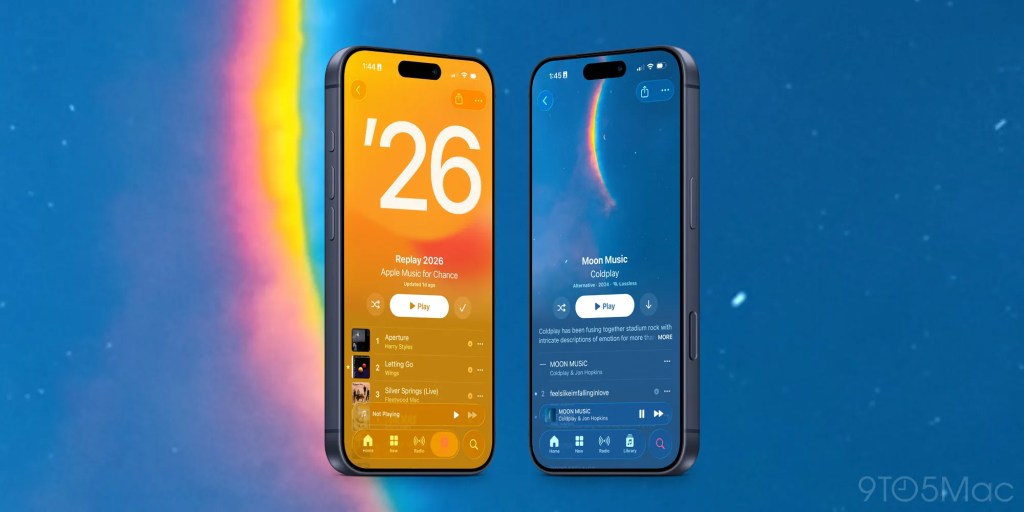
Apple Music receives significant attention in iOS 26.4, with several new features and design improvements:
- Concerts: Discover concerts near you and tour dates for artists in your Apple Music Library.
- New full-screen artwork that enhances the visual experience for albums and playlists.
- A revamped “Profile” section for easier account management, subscriptions, and more.
- Ability to add a song to multiple playlists simultaneously.
Playlist Playground
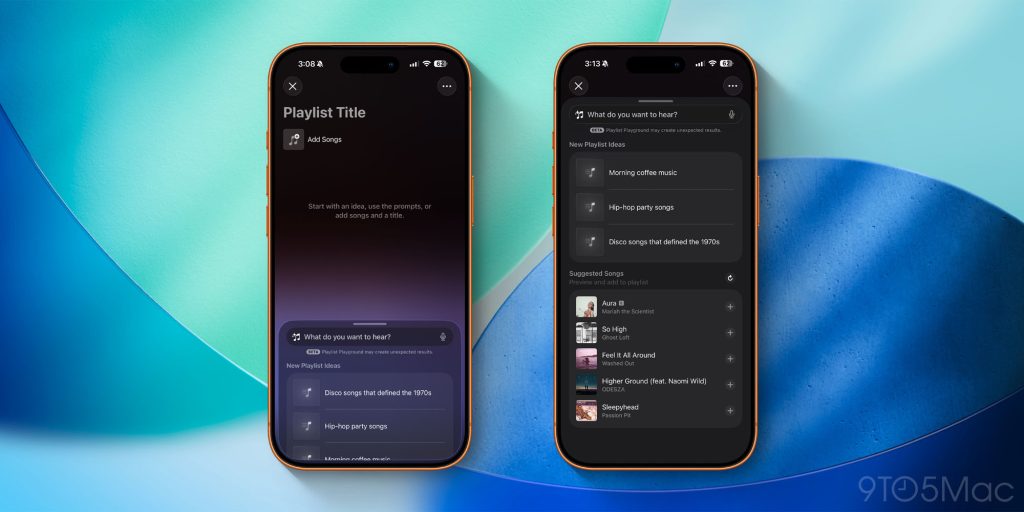
Additionally, iOS 26.4 introduces a new Playlist Playground feature in Apple Music. This feature allows you to create playlists using Apple Intelligence by providing text descriptions. For example, typing “sad songs from the 1990s for a rainy day” will prompt Apple Music to automatically generate a playlist based on that description.
Once Playlist Playground generates a playlist, you can further customize it without restarting the process. Although this feature is in beta, it showcases Apple’s integration of Apple Intelligence into the iPhone experience.
Learn more: iOS 26.4 beta includes new ‘Playlist Playground’ AI feature for Apple Music
New widgets
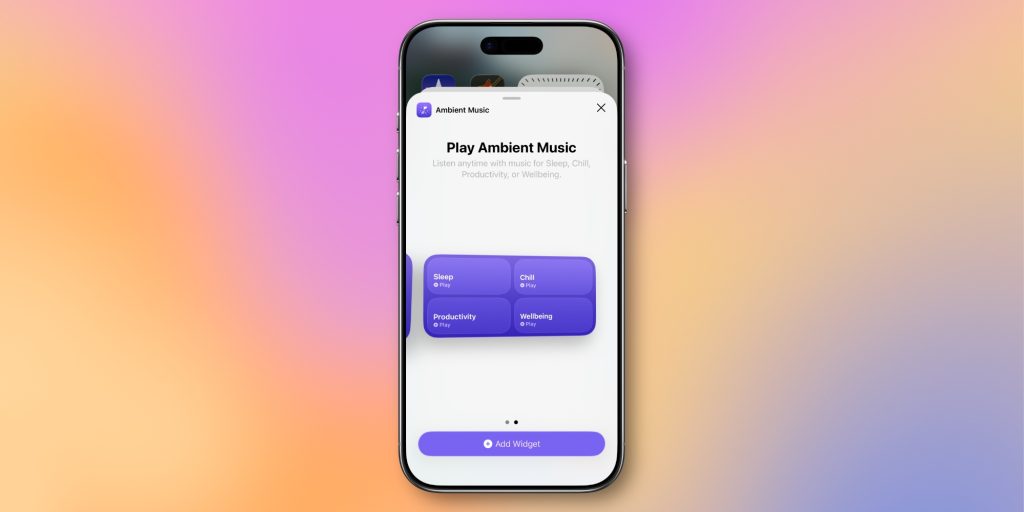
iOS 26.4 introduces a new set of Ambient Music widgets that can be added to your iPhone’s Home Screen. These widgets allow you to easily start playing music for different moods like Chill, Productivity, Sleep, and Wellbeing.
The widget comes in small and medium sizes for customization.
Reminders app
In iOS 26.2, Apple added an “Urgent” designation for tasks in the Reminders app. When a task is marked as urgent, the app sets an alarm to remind you of it.
iOS 26.4 expands on this by including a new Smart List that outlines all tasks designated as urgent.
RCS encryption in Messages
Last March, Apple announced plans to support end-to-end encryption for RCS messages.
iOS 26.4 introduces support for testing this feature. After updating to iOS 26.4 beta 2, users can enable RCS Messaging encryption in Settings > Messages, with a new “End-to-End Encryption (Beta)” toggle enabled by default.
When messaging with RCS encryption, a lock icon will appear in the chat thread. This icon will also be visible in iMessage threads, as iMessage has supported encryption since 2011.
Although RCS end-to-end encryption will not be included in iOS 26.4, it is available for testing purposes and will be part of a future iOS 26 update, according to Apple.
Apple Podcasts
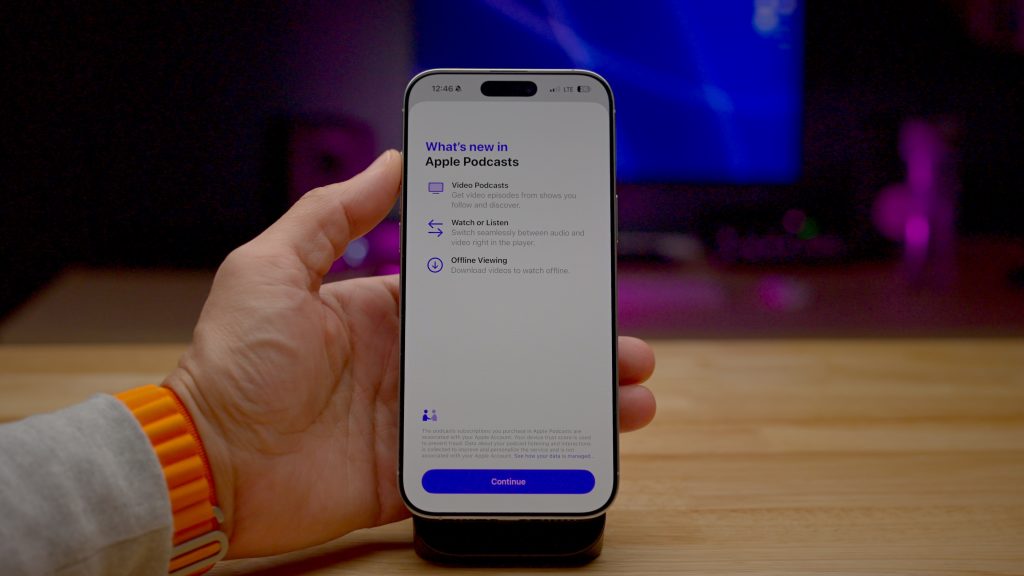
iOS 26.4 brings a significant update to Apple Podcasts with new “advanced video podcast capabilities.”
This update simplifies transitioning between viewing a video podcast and listening to the audio podcast. The features leverage Apple’s HLS technology for automatic quality adjustment based on network conditions.
Apple also introduces support for dynamic video ads in Apple Podcasts with iOS 26.4.
Learn more: Apple Podcasts app gains ‘enhanced video podcast experience’ in iOS 26.4
Apple Health
iOS 26.4 adds more Sleep and Vitals data to the Apple Health app. A new average bedtime metric allows you to track your average bedtime alongside last night’s bedtime for comparison.
Blood Oxygen readings are also reintroduced to the Vitals graph. This follows Apple’s launch of a “redesigned” version of the feature last August amid an ongoing patent dispute.
Learn more: iOS 26.4 adds more Sleep and Vitals data to Apple Health
Stolen Device Protection
Stolen Device Protection is now enabled by default in iOS 26.4. When active, Face ID authentication is required for certain tasks when not in trusted locations like home or work. It includes a time delay for a second biometric authentication for sensitive actions.
Prior to iOS 26.4, users had to manually enable Stolen Device Protection on their iPhones.
More iOS 26.4 features and changes
- In the App Store and Games apps, Apple has relocated the Search bar to the top of the Search tab. The tab is now integrated into the navigation bar at the bottom instead of being in a separate floating circle.
- The Wallpaper Gallery in iOS 26.4 has been redesigned with improved categorization of available options.
- The Apple Watch face gallery receives a redesign with enhanced differentiation between options.
- iOS 26.4







Samsung Galaxy Note 9 – These features will make it INSANE!

Oneplus 5T vs Pixel 2 XL vs S8 vs iPhone 8 Battery life Drain Test!

Oneplus 5T vs Pixel 2 XL vs S8 vs iPhone 8 Battery Charging Speed Test!

The Affordable Next-Gen Xbox: Debunking the $1,800 Price Tag

Revelation: A New Dawn in the Helldivers Universe

Battery Life Halved by Garmin’s New Voice Controls

Revolutionizing Energy: The Future of Next-Gen Battery Life

Warhound Secures $200M Investment to Develop Advanced Military Canines Equipped with Anduril Technology

No, the iPhone Duo isn’t a miniature device

EU Takes Action Against Instagram and Facebook for Violating Illegal Content Rules

Warning: Facebook Creators Face Monetization Loss for Stealing and Reposting Videos

Facebook’s New Look: A Blend of Instagram’s Style

Facebook Compliance: ICE-tracking Page Removed After US Government Intervention

Facebook and Instagram to Reduce Personalized Ads for European Users

InstaDub: Meta’s AI Translation Tool for Instagram Videos

Reclaim Your Account: Facebook and Instagram Launch New Hub for Account Recovery

Meta discontinues Messenger apps for Windows and macOS

Breaking Updates: Meta Connect 2025 Unveils Latest Developments
Samsung Galaxy Note 9 – These features will make it INSANE!
Oneplus 5T vs Pixel 2 XL vs S8 vs iPhone 8 Battery life Drain Test!
Oneplus 5T vs Pixel 2 XL vs S8 vs iPhone 8 Battery Charging Speed Test!

MY NEW CAR?! (Q&A)

Should you buy your Smartphones Refurbished!?

6 Amazing SECRET Android Launchers (2017 / 2018)

6 Value for Money Tech Products you NEED to try!

iPhone X Helicopter 1200ft Drop Test!! + Mous Case Review

7 UNBELIEVABLE Smartphone Magic Tricks!
-
 Facebook1 year ago
EU Takes Action Against Instagram and Facebook for Violating Illegal Content Rules
-
 Facebook1 year ago
Warning: Facebook Creators Face Monetization Loss for Stealing and Reposting Videos
-
 Facebook11 months ago
Facebook’s New Look: A Blend of Instagram’s Style
-
 Facebook1 year ago
Facebook Compliance: ICE-tracking Page Removed After US Government Intervention
-
 Facebook11 months ago
Facebook and Instagram to Reduce Personalized Ads for European Users
-
 Facebook1 year ago
InstaDub: Meta’s AI Translation Tool for Instagram Videos
-
 Facebook11 months ago
Reclaim Your Account: Facebook and Instagram Launch New Hub for Account Recovery
-
 Apple1 year ago
Meta discontinues Messenger apps for Windows and macOS
